1. Ürün Bittiview
The MT-VIKI 6U Wall Mount Server Cabinet is a robust and versatile solution designed for organizing and securing 19-inch IT equipment in various environments, from home offices to commercial spaces. Constructed from durable SPCC cold-rolled steel with a 0.8mm thickness, it offers a maximum loading capacity of 110 lbs (50 kgs).
Temel özellikler şunlardır:
- Kompakt Boyut: 23.6"W x 13.7"H x 17.7"D (600*350*450mm), suitable for 8''/10''/12'' (203/260/304mm) depth rack shelves.
- Ağır Hizmet Tipi İnşaat: Made from 0.8mm thick SPCC cold-rolled steel for enhanced durability and equipment protection.
- Security and Protection: Features a locking front door and side panels to prevent unauthorized access.
- Kolay Erişim: Quick-open side panels facilitate convenient maintenance and equipment installation.
- Dahil Aksesuarlar: Comes with 1pcs 10'' depth rack shelf.
2. Ürün Özellikleri
The MT-VIKI 6U Wall Mount Server Cabinet is engineered with user convenience and equipment safety in mind. Its design incorporates several features to ensure optimal performance and ease of use.

Figure 1: Compact design housing networking gear, demonstrating efficient space utilization.

Şekil 2: Üzeriview of the server cabinet highlighting lockable door, side panels, and removable cover panels for cooling and cable management.

Figure 3: Detailed dimensions of the 6U Wall Mount Server Cabinet, showing height, depth, and length.

Figure 4: Illustration showing the 6U cabinet alongside a larger 12U wheeled cabinet, highlighting different U-height options.
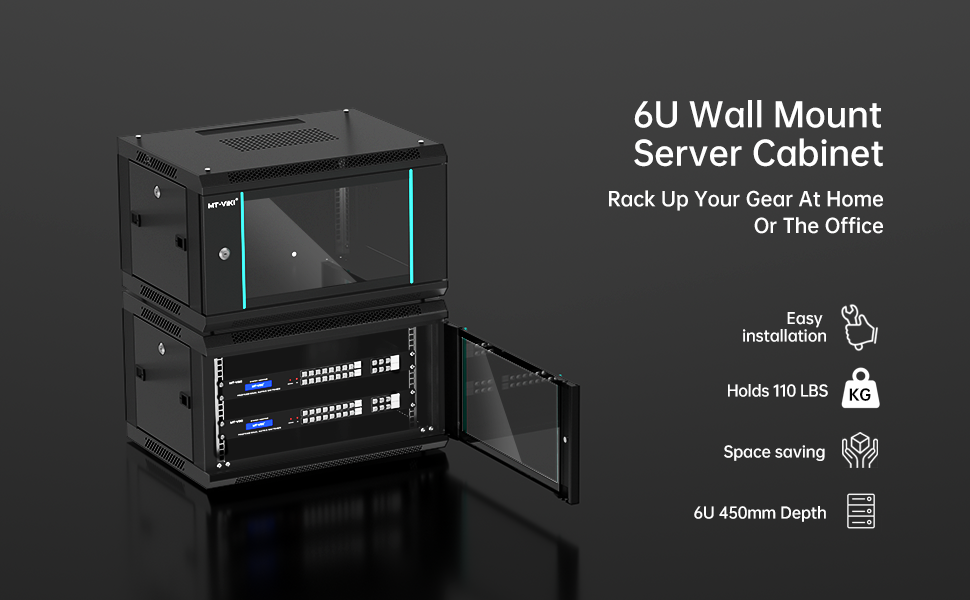
Figure 5: The 6U cabinet with equipment, showcasing its suitability for home or office use, easy installation, and space-saving design.

Figure 6: Detail of the enhanced security locking mechanism on the cabinet door.

Figure 7: The tempered glass door provides visibility and protection for internal components.

Figure 8: Arrows illustrating the effective heat dissipation design of the cabinet.

Figure 9: The cabinet with its removable side panels detached, showing ease of access.

Figure 10: The included 10-inch depth server rack shelf, ready for installation.
3. Kurulum ve Kurulum
The MT-VIKI 6U Wall Mount Server Cabinet is designed for straightforward assembly and installation. Follow these steps for a secure setup.
3.1 Montaj
The cabinet arrives unassembled. The following video provides a detailed guide for assembling the 6U server cabinet.
Video 1: Step-by-step assembly guide for the MT-VIKI 6U/12U rack cabinet. This video demonstrates attaching the bottom panel, front frames, back cover, top cover, rack rails, side panels, and the front glass door.
Başlıca montaj adımları şunlardır:
- Attach Front Frames: Secure the two front frames to the vents side of the bottom panel using the provided screws.
- Fix Back Cover: Attach the back cover to the assembled frame.
- Place Top Cover: Position the top cover and confirm correct splicing of accessories, then screw them in.
- Raf Raylarını Takın: Secure the four rack rails inside the cabinet.
- Yan Panelleri Birleştirin: Attach the side panels to the cabinet frame.
- Install Front Glass Door: Move the latch and install the front glass door, ensuring it is key-lockable.
3.2 Duvara Montaj
The cabinet is designed for wall mounting. Use appropriate hardware for your wall type to ensure secure installation. The rear panel features keyhole slots for easy hanging.
Video 2: Installation guide for the 6U Wall Mount Server Cabinet. This video provides visual instructions for mounting the cabinet to a wall.
Montaj Önerileri:
- Use a mounting template (if provided) to mark drilling points accurately.
- Drill pilot holes and insert appropriate wall anchors suitable for the cabinet's weight and your wall material.
- Secure the wall hanging panel (if separate) first, then carefully lift and hang the assembled cabinet onto it.
4. Kullanım Talimatları
Once installed, the MT-VIKI 6U Server Cabinet provides a secure and organized environment for your equipment.
- Ekipmana Erişim: Use the provided keys to unlock the front glass door and side panels. The quick-open side panels allow for easy access to internal components.
- Kablo yönetimi: Utilize the removable top and bottom cover panels for routing cables efficiently. Ensure cables are neatly organized to maintain airflow and prevent damage.
- Havalandırma: The cabinet features side ventilation holes and a built-in top fan to increase airflow and maintain temperature balance. Ensure these vents are not obstructed.
5. Bakım
Regular maintenance ensures the longevity and optimal performance of your server cabinet and the equipment within.
- Temizlik: Periodically clean the exterior and interior of the cabinet using a soft, dry cloth. For the glass door, use a glass cleaner.
- Toz Giderimi: The removable side panels and cover panels make it easy to access the interior for dust removal. Regularly clean any fans or ventilation grilles to ensure proper airflow.
- Güvenlik kontrolü: Periodically check the locking mechanisms on the door and side panels to ensure they are functioning correctly.
- Donanım Denetimi: Inspect all screws and mounting hardware for tightness. Re-tighten if necessary to maintain stability.
6. Sorun Giderme
If you encounter any issues with your MT-VIKI 6U Wall Mount Server Cabinet, consider the following common solutions:
- Kabine İstikrarsızlığı: Ensure all assembly screws are tightened. Verify that the wall mounting hardware is securely fastened to a suitable wall structure.
- Aşırı Isınan Ekipmanlar: Check that all ventilation holes and the top fan are clear of obstructions. Ensure proper cable management to allow for adequate airflow. Consider adding additional fans if necessary (if the cabinet supports it).
- Kapıları Açma/Kapatmada Zorluk: Inspect hinges and latches for any obstructions or damage. Apply a small amount of lubricant if movement is stiff.
- Kayıp Anahtarlar: Contact MT-VIKI customer support for assistance with replacement keys or alternative access methods.
7. Özellikler
| Özellik | Detay |
|---|---|
| Ürün Boyutları | 17.7"D x 23.6"W x 13.7"H (600*350*450mm) |
| Ürün Ağırlığı | 30.6 pound |
| Malzeme | Alloy Steel (SPCC cold-rolled steel, 0.8mm thick) |
| Boyut | 6U |
| Maksimum Yükleme Kapasitesi | 110 lbs (50 kg) |
| Uyumlu Cihazlar | 19'' IT Equipment, 8''/10''/12'' depth rack shelves |
| Dahil Aksesuarlar | 1pcs 10'' depth rack shelf |
| Güvenlik | Locking front door and side panels |
| Havalandırma | Vented enclosure, built-in top fan |
| Ürün Model Numarası | MT-JG6U01 |
8. Garanti ve Destek
For warranty information, technical support, or any inquiries regarding your MT-VIKI 6U Wall Mount Server Cabinet, please refer to the official MT-VIKI webSite üzerinden satın alabilir veya doğrudan müşteri hizmetleriyle iletişime geçebilirsiniz. Garanti talepleriniz için satın alma fişinizi saklayın.


