1. Giriş
Thank you for choosing the Klarstein Aqualine 6L Reverse Osmosis Water Filtration System. This advanced system is designed to provide clean, purified, and hydrogen-enriched drinking water for your home. It features a 5-stage filtration process, 3 integrated filters, and a hydrogen ionizer for enhanced hydration. The intuitive HD touchscreen allows for easy control over 6 temperature settings and provides essential information such as filter change alerts and TDS levels.
This manual contains important information regarding the installation, operation, maintenance, and troubleshooting of your new water filtration system. Please read it thoroughly before use and keep it for future reference.

Figure 1: Klarstein Aqualine 6L Water Filtration System Overview
2. Güvenlik Bilgileri
- Cihazı çalıştırmadan önce tüm talimatları okuyun.
- Ensure the power supply matches the specifications indicated on the appliance.
- Cihazı, elektrik kablosunu veya fişini suya veya başka sıvılara batırmayın.
- Cihazı çocukların erişemeyeceği yerlerde saklayınız.
- Güç kablosu veya fişi hasarlıysa cihazı çalıştırmayın. Yardım için müşteri desteğiyle iletişime geçin.
- Cihazı sağlam, düz ve kuru bir yüzeye yerleştirin.
- Havalandırma açıklıklarını kapatmayın.
- Only use original Klarstein replacement filters.
- Cihazınızı temizlemeden veya herhangi bir bakım yapmadan önce fişini çekin.
3. Ürün Bileşenleri
The Klarstein Aqualine 6L system includes the following main components:
- Main Filtration Unit
- PAC (Pre-Activated Carbon) Filter
- RO (Ters Ozmoz) Membran Filtre
- CF (Carbon Block) Post-Filter
- 6-Liter Pure Water Tank (removable)
- 2-Liter Wastewater Tank (removable)
- Güç kablosu
- Kullanım Kılavuzu (bu belge)

Şekil 2: Üst view showing the three filter cartridges

Şekil 3: 5-Stage Filtrasyon İşlemi
The filtration system consists of three main filters:
- PAC (Pre-Activated Carbon) Filter: A 2-in-1 pre-filter that removes larger particles like sand and rust, as well as chlorine and odors.
- RO (Reverse Osmosis) Membrane Filter: Contains ultra-fine pores to retain the smallest contaminants in the water.
- CF (Carbon Block) Post-Filter: A 2-in-1 post-filter that refines the water with valuable minerals (calcium, magnesium, sodium, potassium) and balances the pH value for a fresh taste.
4. Kurulum ve İlk Kullanım
4.1 Paketin açılması
- Tüm bileşenleri dikkatlice ambalajından çıkarın.
- Taşıma sırasında herhangi bir hasar olup olmadığını kontrol edin. Hasar varsa, ürünü kullanmayın ve müşteri desteğiyle iletişime geçin.
- Tüm koruyucu filmleri ve ambalaj malzemelerini çıkarın.
4.2 Filtre Kurulumu
The filters are typically pre-installed but may require activation or removal of protective caps. Refer to the labels on the filter slots for correct placement (CF, RO, PAC).
- Cihazın fişinin çekildiğinden emin olun.
- Align each filter with its corresponding slot.
- Insert the filter and rotate it clockwise until it clicks into place and is securely fastened.
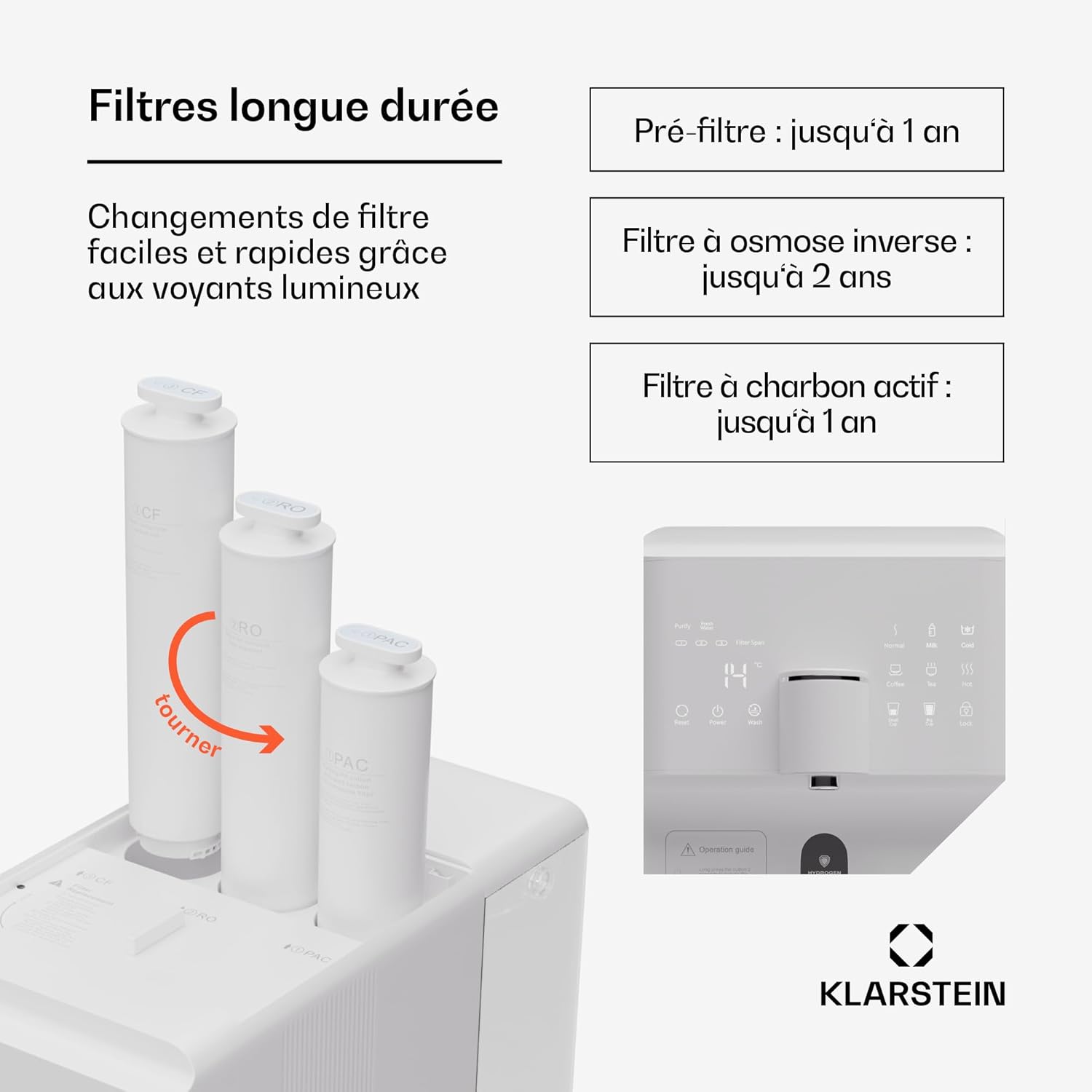
Figure 4: Filter Installation/Replacement
4.3 Su Depolarının Doldurulması
The system features a 6-liter pure water tank and a separate 2-liter wastewater tank.

Figure 5: Water Tank Capacity
- Remove the 6-liter pure water tank from the appliance.
- Fill the tank with tap water. Do not exceed the maximum fill line.
- Place the filled tank back into the appliance, ensuring it is properly seated.
4.4 İlk Temizleme
Before first use, the system must be flushed to remove any manufacturing residues and prepare the filters.
- Cihazın fişini prize takın.
- Turn on the appliance using the power button on the touchscreen.
- Follow the on-screen instructions for initial flushing. This process typically involves dispensing several full tanks of water to waste.
- Empty the wastewater tank as needed during the flushing process.
- Once flushing is complete, the system is ready for use.
5. Kullanım Talimatları
5.1 Touchscreen Functions
The HD touchscreen provides access to all system functions and information.

Figure 6: HD Touchscreen Interface
- Güç Açma/Kapatma: Touch the power icon to turn the appliance on or off.
- Filter Change Alerts: Indicators will light up when a filter needs replacement.
- TDS Kontrolü: Displays the Total Dissolved Solids level of the water.
- Sıcaklık Seçimi: Choose from 6 preset temperatures.
- Su Dağıtımı: Dispense predefined quantities (e.g., 150ml/300ml) or continuous flow.
5.2 Sıcaklık Ayarı
The system offers the following temperature options:
- Chilled Water: For refreshing cold drinks.
- Oda Sıcaklığında Su: For general drinking.
- 45°C (Warm): Ideal for baby formula.
- 80°C: Yeşil çay için uygundur.
- 90°C: Suitable for coffee.
- 100°C (Boiling): For black tea or instant noodles.
Select your desired temperature by touching the corresponding icon on the display.
5.3 Su Dağıtımı
- Place a cup or container under the dispenser spout.
- İstenen sıcaklığı seçin.
- Choose a predefined volume (e.g., 150ml, 300ml) or press the dispense button for continuous flow. Press again to stop.
5.4 Hydrogen Ionizer Function
The integrated hydrogen ionizer enriches the water with hydrogen gas. This hydrogen-rich water is believed to improve hydration and provide antioxidant benefits. Activate this function via the touchscreen if available, or it may be an automatic part of the filtration process.
6. Bakım
6.1 Filtre Değişimi
Regular filter replacement is crucial for maintaining water quality and system performance. The touchscreen will indicate when a filter needs changing.

Figure 7: Recommended Filter Lifespan
| Filtre Türü | Recommended Lifespan |
|---|---|
| PAC (Pre-Activated Carbon) Filter | 1 yıla kadar |
| RO (Ters Ozmoz) Membran Filtre | 2 yıla kadar |
| CF (Carbon Block) Post-Filter | 1 yıla kadar |
Bir filtreyi değiştirmek için:
- Cihazın fişini çekin.
- Rotate the old filter counter-clockwise to unlock and remove it.
- Insert the new filter into the correct slot and rotate clockwise until it locks into place.
- After replacing filters, perform a short flush cycle as indicated in the operating instructions or on the touchscreen.
6.2 Su Depolarının Temizlenmesi
The pure water and wastewater tanks are removable for easy cleaning.
- Cihazın fişini çekin.
- Remove both the pure water tank and the wastewater tank.
- Wash the tanks with mild soap and warm water. Rinse thoroughly to remove all soap residue.
- Dry the tanks completely before reinserting them into the appliance.
6.3 Dış Temizlik
Cihazın dışını yumuşak, damp bezle silin. Aşındırıcı temizleyiciler veya çözücüler kullanmayın.
7. Sorun Giderme
| Sorun | Olası Neden | Çözüm |
|---|---|---|
| Su dağıtılmadı | Pure water tank empty; wastewater tank full; power off; filters clogged. | Refill pure water tank; empty wastewater tank; check power connection; replace filters. |
| Poor water taste/odor | Filters need replacement; initial flushing not completed. | Replace PAC or CF filter; perform initial flushing cycle. |
| Düşük su akış hızı | Filters clogged; air in system. | Replace filters; run a flush cycle to remove air. |
| Ekranda hata mesajı | Sistem arızası; sensör hatası. | Refer to the specific error code in the full manual (if available) or contact customer support. Try restarting the appliance. |
| Su sızıntısı | Filters not properly installed; tank not seated correctly. | Ensure filters are securely locked; re-seat water tanks. |
Bu çözümleri denedikten sonra sorun devam ederse, lütfen Klarstein müşteri desteğiyle iletişime geçin.
8. Özellikler
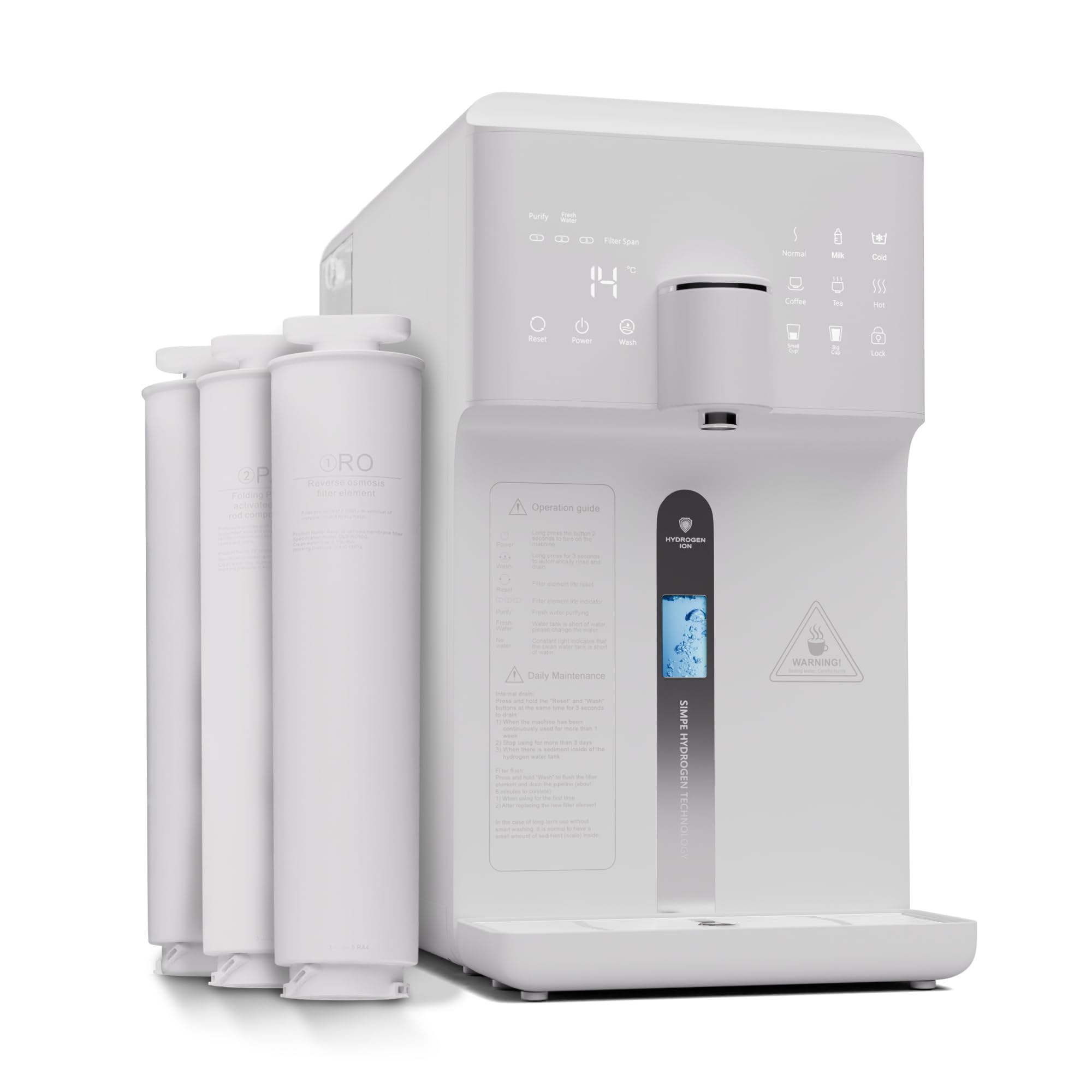
Şekil 8: Ürün Boyutları
| Özellik | Detay |
|---|---|
| Model Numarası | WFT2-AquaFina6LWhite |
| Marka | Klarstein |
| Boyutlar (U x G x Y) | 43x24x47 cm |
| Ağırlık | 14.3 kilo |
| Saf Su Tankı Kapasitesi | 6 Litre |
| Wastewater Tank Capacity | 2 Litre |
| Filtreleme Stages | 5 Stages (3 Filters: PAC, RO, CF) |
| Arıtma Yöntemi | Ters Ozmoz |
| Özel Özellik | Hydrogen Ionizer |
| Malzeme | Plastic, RO membrane, PAC and CF filters |
| Güç Kaynağı | Elektrik kablosu |
| Kurulum Türü | Under Sink (Note: Product description states 'Sous évier' but images and other descriptions suggest countertop. User should verify.) |
| Su Akış Hızı | 30 litre/saat |
| Drain Ratio (Wastewater:Pure Water) | 1.2:1 |
9. Garanti ve Destek
Klarstein products are manufactured with care and undergo strict quality control. In the unlikely event of a defect, please refer to your purchase documentation for warranty terms and conditions. For technical support, replacement parts, or any questions regarding your Klarstein Aqualine 6L system, please contact Klarstein customer service through their official webÜrünü satın aldığınız site veya perakendeci.
Please have your model number (WFT2-AquaFina6LWhite) and purchase date ready when contacting support.


