giriiş
Thank you for choosing the RAINPOINT Digital Sprinkler Timer, Model ITV105. This programmable 1-outlet automatic hose water timer is designed to provide convenient and precise control over your watering schedule, ensuring optimal moisture levels for your lawn and garden. This manual provides detailed instructions for setup, operation, maintenance, and troubleshooting to help you get the most out of your new device.
Ürün Bittiview ve Temel Özellikler
The RAINPOINT ITV105 Sprinkler Timer is engineered for durability and ease of use, offering a reliable solution for automated garden irrigation.
- Standart Uyumluluk: Features a 3/4" inlet and outlet thread, compatible with most standard garden hoses.
- Hava Koşullarına Dayanıklılık: IP54 waterproof rating and heavy-duty weather-resistant ABS housing ensure durability for outdoor use.
- Özelleştirilebilir Programlama: Easy-to-use interface allows customization of start time, watering frequency, and duration for automated irrigation.
- Dahili Filtre: Includes a built-in metal filter to improve water quality and protect plants from debris.
- Sızıntı Önleme: Upgraded strong and durable ABS material and water inlet thread, paired with Teflon tape and rubber washer to prevent water leakage.
- Büyük LCD Ekran: Displays detailed information such as watering time, frequency, power, and battery life for easy readability.
- Düşük Pil Bildirimi: Powered by 2 AAA batteries (not included), with a low battery notification and automatic valve shut-off to prevent water waste.
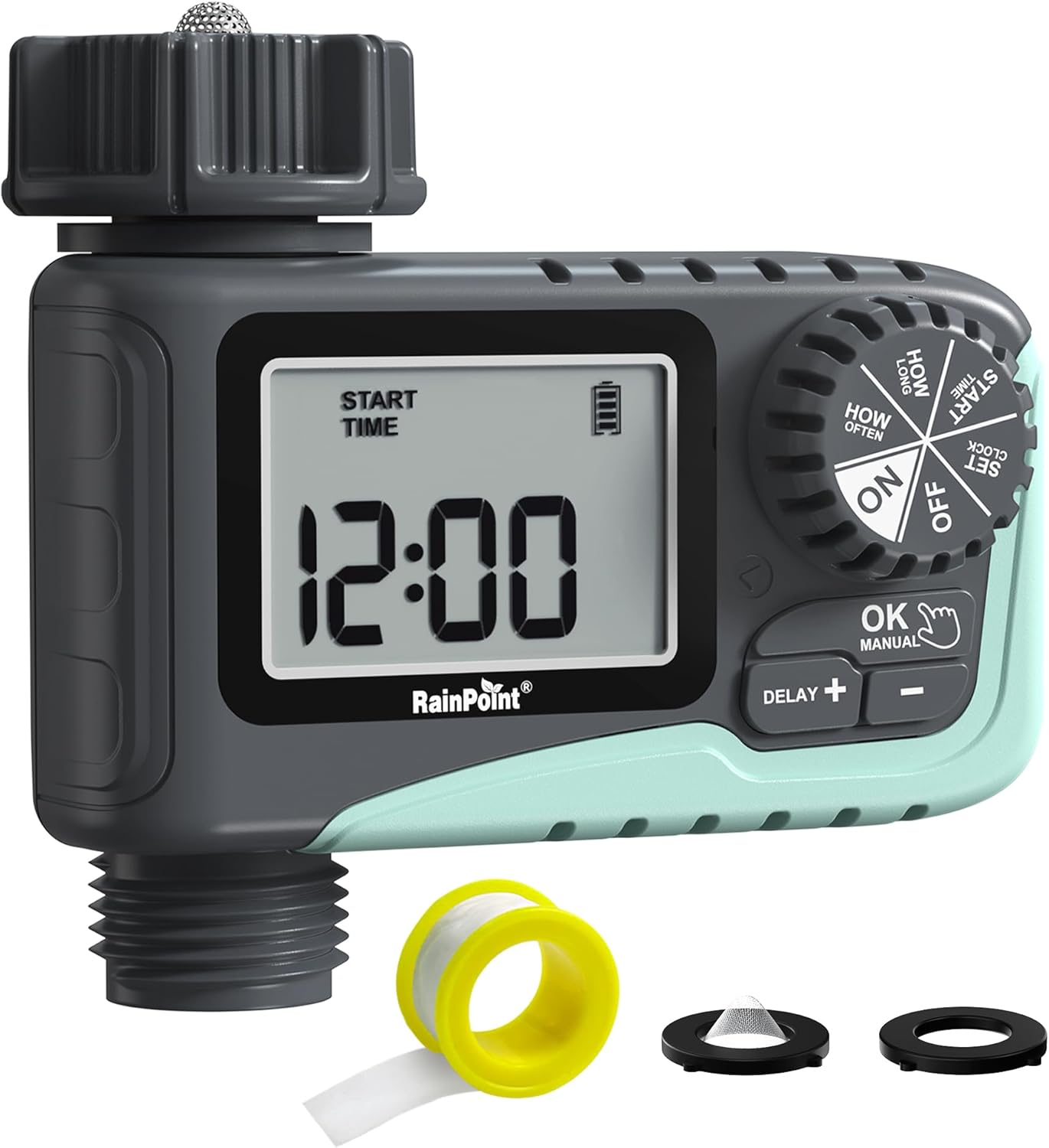
Şekil 1: Ön view of the RAINPOINT Digital Sprinkler Timer (ITV105) showing the large LCD screen, control dial, and buttons.
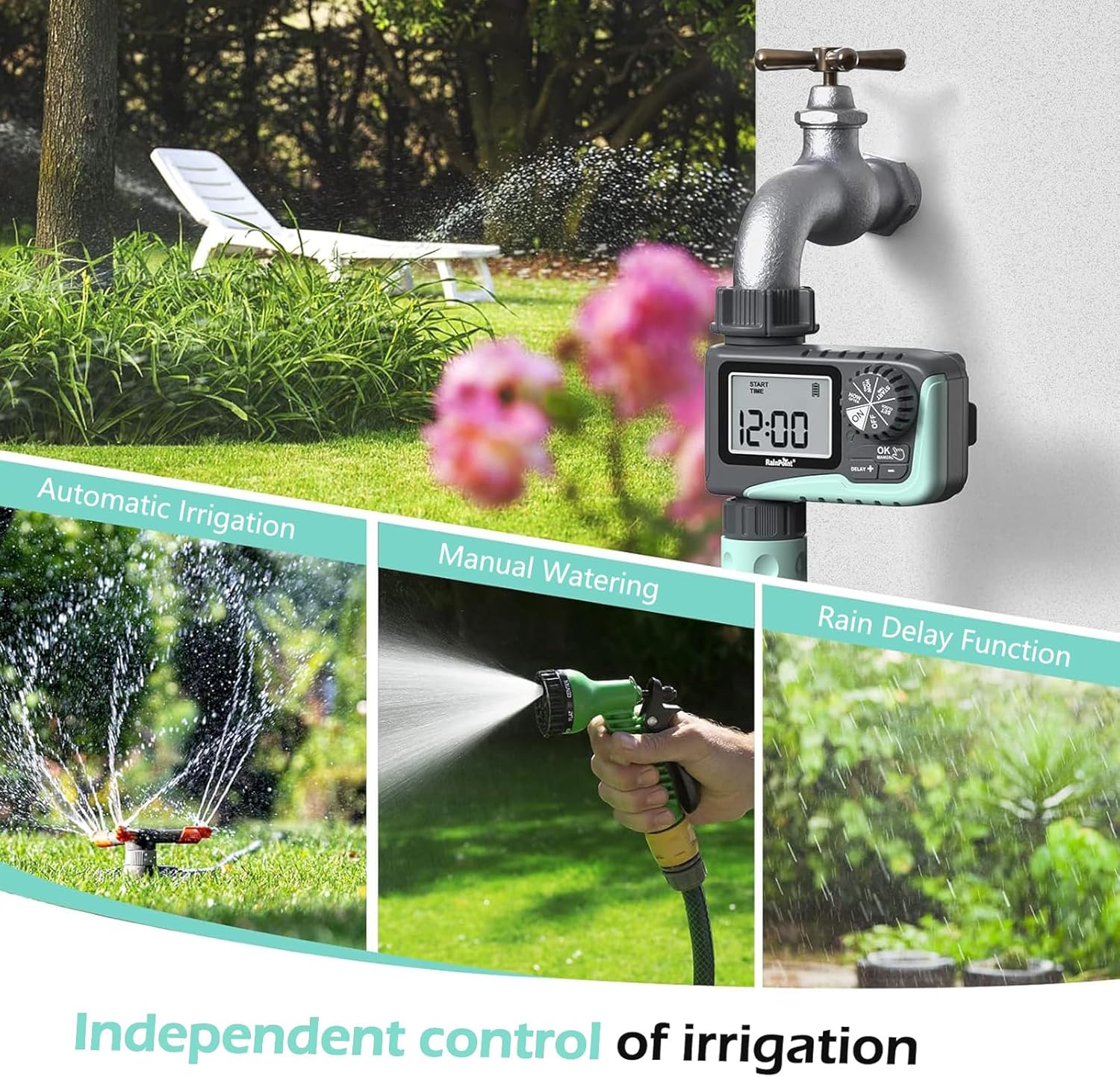
Figure 2: Illustration of the timer's three main functions: automatic irrigation, manual watering, and rain delay.
Paket İçeriği
Lütfen paketi açtıktan sonra içindekileri kontrol ederek tüm ürünlerin eksiksiz olduğundan emin olun:
- 1 x RAINPOINT Digital Sprinkler Timer (ITV105)
- 1 x Kullanım Kılavuzu (bu belge)
- 1 x Teflon bant
- 1 x Rubber washer
- 1 x Spare filter
Kurulum ve Yükleme
Follow these steps to properly set up your sprinkler timer:
- Pilleri Takın:
Locate the battery compartment on the back of the timer. Insert 2 new AAA (1.5V) alkaline batteries, ensuring correct polarity. Close the battery compartment securely. The LCD screen will power on.
- Musluğu hazırlayın:
Ensure your outdoor hose faucet is clean and free of debris. If necessary, apply the included Teflon tape to the faucet threads for a watertight seal.
- Attach Timer to Faucet:
Screw the timer's inlet (top connector) onto your 3/4" outdoor hose faucet. Hand-tighten firmly. Ensure the rubber washer is properly seated inside the timer's inlet to prevent leaks. The timer features a 360° rotating connector for easy positioning.
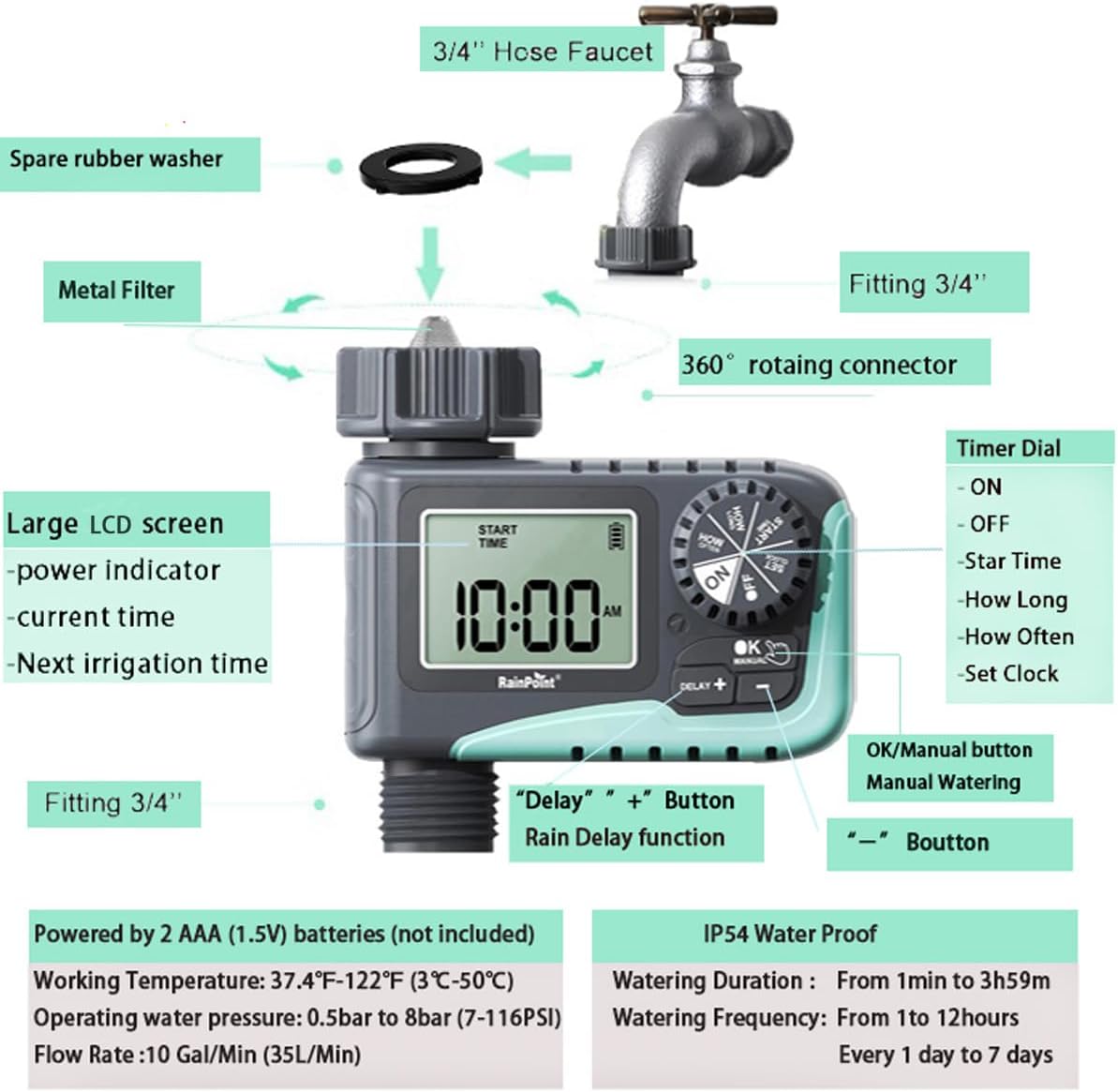
Figure 3: Diagram illustrating the components of the sprinkler timer, including the 3/4" hose faucet connection, metal filter, and LCD screen.
- Hortumu bağlayın:
Attach your garden hose to the timer's outlet (bottom connector). Hand-tighten securely. Ensure a proper washer is in place at the hose connection point.
- Musluğu Açın:
Fully open your outdoor hose faucet. The timer is designed to withstand water pressure from 0.5 bar to 8 bar (7-116 PSI). The timer will control the water flow, not the faucet.
Kullanım Talimatları
The RAINPOINT ITV105 timer features a large dial and intuitive buttons for easy programming.
Kontrol Kadranı Konumları:
- AÇIK: Activates the timer for automatic watering.
- KAPALI: Deactivates the timer, stopping all watering.
- SAATİ AYARLA: Güncel saati ayarlayın.
- BAŞLANGIÇ SAATİ: Set the desired start time for watering cycles.
- NE KADARDIR: Set the duration of each watering cycle.
- NE SIKLIKTA: Set the frequency of watering cycles.
Düğmeler:
- OK/MANUAL: Confirms settings or initiates manual watering.
- DELAY +: Increases values during setting or activates/adjusts rain delay.
- -: Ayarlar sırasında değerler azalır.
Setting the Current Time (SET CLOCK):
- Kadranı şuraya çevirin: SAAT AYARLA.
- Kullanın + Ve - Saati ayarlamak için düğmelere basın. OK onaylamak için.
- Kullanın + Ve - Dakikayı ayarlamak için düğmelere basın. OK onaylamak için.
- Kadranı şuraya çevirin: ON to save the time and return to normal operation.
Setting Automatic Watering Program:
This timer allows you to set a start time, duration, and frequency for automated watering.
- Set Start Time (START TIME):
Kadranı şuraya çevirin: BAŞLANGIÇ ZAMANI. Kullanmak + Ve - to set the desired watering start hour and minute. Press OK Her bir ayarı onaylamak için
- Set Watering Duration (HOW LONG):
Kadranı şuraya çevirin: NE KADARDIR. Kullanmak + Ve - to set the watering duration from 1 minute to 3 hours and 59 minutes. Press OK onaylamak için.

Figure 4: Screen showing settings for "HOW OFTEN" (frequency) and "HOW LONG" (duration) for automatic watering.
- Set Watering Frequency (HOW OFTEN):
Kadranı şuraya çevirin: NE SIKLIKTA. Kullanmak + Ve - to set the frequency:
- Every 1 hour to 12 hours.
- Every 1 day to 7 days.
Basmak OK onaylamak için.
- Programı Etkinleştir:
Kadranı şuraya çevirin: ONZamanlayıcı artık programladığınız takvime göre çalışacaktır.
Manuel Sulama:
Programlı sulama düzeninizi etkilemeden hemen sulama yapmak için:
- Ensure the dial is in the ON konum.
- Basın Tamam/MANUEL button. The display will show the default manual watering duration (e.g., 10 minutes).
- Kullanın + Ve - Sulama süresini 1 dakikadan 8 saate kadar ayarlamak için düğmeler.
- Basmak OK again to start manual watering. The timer will count down the set duration.
- Manuel sulamayı erken durdurmak için basın. Tamam/MANUEL Tekrar.

Figure 5: Display showing the manual watering duration setting, adjustable from 1 minute to 8 hours.
Yağmur Geciktirme Fonksiyonu:
The rain delay function allows you to pause your watering schedule for a set period due to rain or other reasons, preventing overwatering.
- Ensure the dial is in the ON konum.
- Basın DELAY + button. The display will show a default delay time (e.g., 24H).
- Basmak DELAY + repeatedly to cycle through delay options (e.g., 24H, 48H, 72H).
- Once you select the desired delay, the timer will enter rain delay mode. The display will show the remaining delay time.
- After the delay period ends, the timer will automatically resume its programmed watering schedule.
- To cancel the rain delay, press the DELAY + button until the delay time disappears, or rotate the dial to OFF and then back to ON.

Figure 6: The timer displaying the rain delay countdown, highlighting its IP54 waterproof rating.
Bakım
Proper maintenance ensures the longevity and optimal performance of your RAINPOINT Sprinkler Timer.
- Filtreyi Temizle: Periodically check and clean the metal filter located at the timer's inlet. Remove the timer from the faucet, unscrew the filter, rinse it under running water to remove any debris, and reinsert it.
- Pil Değişimi: When the low battery indicator appears on the LCD screen, replace the 2 AAA batteries promptly. Always use new alkaline batteries.
- Kışlama: Before the first frost, remove the timer from the faucet and store it indoors in a dry, frost-free location. Remove the batteries before storage.
- Sızıntıları Kontrol Edin: Regularly inspect all connections (faucet to timer, timer to hose) for any signs of leakage. Ensure all connections are hand-tightened and that rubber washers are properly seated.

Figure 7: Visual representation of the built-in metal filter and durable plastic material designed for anti-leakage and longer service life.
Sorun giderme
If you encounter issues with your RAINPOINT Sprinkler Timer, refer to the following common problems and solutions:
| Sorun | Olası Neden | Çözüm |
|---|---|---|
| Timer not turning on / LCD blank. | Piller bitmiş veya yanlış takılmış. | Replace with 2 new AAA alkaline batteries, ensuring correct polarity. |
| Su akışı yok. |
|
|
| Bağlantılardan su sızıntısı. |
|
|
| Timer not following schedule. |
|
|
Özellikler
| Özellik | Şartname |
|---|---|
| Örnek | ITV105 |
| Ürün Boyutları | 10.5 x 10.3 x 5 cm (4 x 4 x 2 inç) |
| Malzeme | Akrilonitril Bütadien Stiren (ABS) |
| Watering Duration (Automatic) | 1 dakika ila 3 saat 59 dakika |
| Watering Frequency (Automatic) | Every 1 hour to 12 hours, or every 1 day to 7 days |
| Watering Duration (Manual) | 1 minute to 8 hours (Default: 10 minutes) |
| Maksimum Akış Hızı | 10 Gal/Min (35 L/Min) |
| Su Basınç Aralığı | 0.5 bar ila 8 bar (7-116 PSI) |
| Çalışma Sıcaklığı | 3 ℃ -50 ℃ (37.4 ℉ -122 ℉) |
| Güç Kaynağı | 2 x AAA (1.5V) batteries (not included) |
| Su Geçirmezlik Derecesi | IP54 |
Garanti ve Destek
RAINPOINT products are manufactured to high-quality standards. For specific warranty details, please refer to the warranty card included with your product or visit the official RAINPOINT website. If you encounter any issues or have questions not covered in this manual, please contact RAINPOINT customer support through their official webÜrünü satın aldığınız site veya perakendeci.
Daha fazla bilgi ve destek için lütfen şu adresi ziyaret edin: RAINPOINT Store on Amazon.


