giriiş
This manual provides detailed instructions for the setup, operation, and maintenance of your Rapoo M300G Silent Wireless Mouse. Please read this guide thoroughly to ensure proper use and to maximize the performance of your device. The Rapoo M300G offers versatile connectivity options, silent clicking, and adjustable DPI settings for an optimized user experience.
Paket İçeriği
Paketin içinde tüm öğelerin mevcut olduğundan emin olun:
- Rapoo M300G Wireless Mouse x 1
- AA Pil x 1
- USB Receiver x 1 (typically stored inside the mouse)
- Ürün Kılavuzu x 1
Ürün Bittiview
Familiarize yourself with the components of your Rapoo M300G mouse:

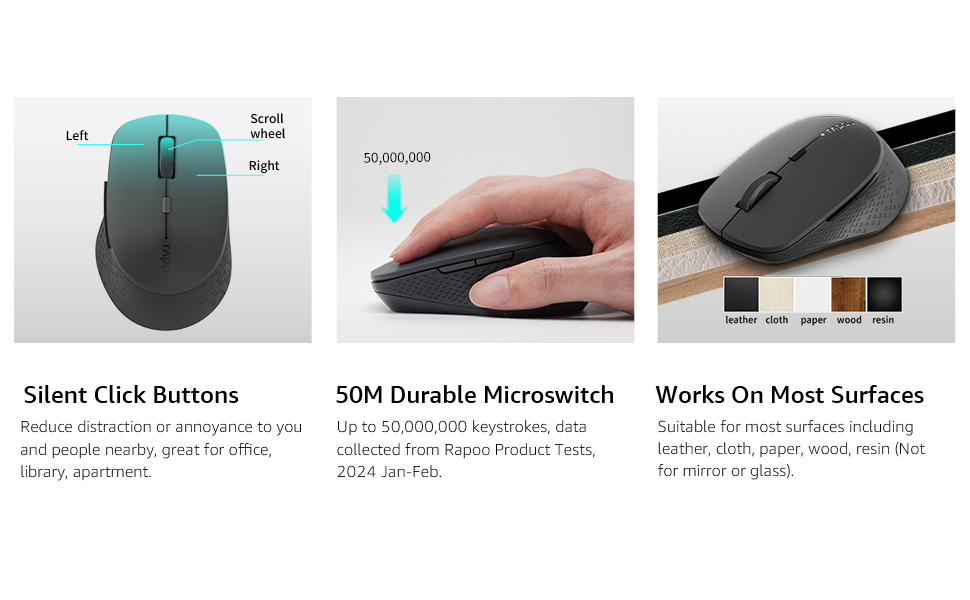
- Sol Tuş: Standart tıklama işlevi.
- Sağ Buton: Standart sağ tıklama fonksiyonu.
- Kaydırma tekerleği: Belgeler arasında gezinmek için ve web Sayfalar. Orta tıklama işlevi için de basılabilir.
- DPI Değiştirme Düğmesi: Fare hassasiyetini (DPI) ayarlar.
- İleri Düğmesi: İleriye doğru gezinir web tarayıcılar veya file kaşifler.
- Geri Düğmesi: Geriye doğru gezinir web tarayıcılar veya file kaşifler.
- Multi-function Button Switch (Underside): Used to switch between 2.4GHz and Bluetooth modes, and for Bluetooth pairing.
Kurmak
1. Pil Kurulumu
The Rapoo M300G mouse requires one AA battery (included).
- Farenin alt tarafındaki pil bölmesi kapağını bulun.
- Kapağı kaydırarak açın.
- Insert the AA battery, ensuring the positive (+) and negative (-) terminals align correctly with the markings inside the compartment.
- Pil bölmesi kapağını sıkıca kapatın.

2. 2.4 GHz Kablosuz Bağlantı
To connect via the 2.4GHz USB receiver:
- USB alıcısını farenin pil bölmesindeki saklama yuvasından çıkarın.
- USB alıcısını bilgisayarınızdaki uygun bir USB bağlantı noktasına takın.
- Alt kısımda bulunan güç düğmesini kullanarak fareyi açın.
- Set the multi-function button switch on the underside of the mouse to the 2.4G mode (indicated by a small icon).
- Bilgisayarınız gerekli sürücüleri otomatik olarak algılayıp yükleyecektir. Fare kullanıma hazırdır.
3. Bluetooth Bağlantısı
The Rapoo M300G supports Bluetooth 5.0 and 4.0. To connect via Bluetooth:
- Alt kısımda bulunan güç düğmesini kullanarak fareyi açın.
- Set the multi-function button switch on the underside of the mouse to the Bluetooth mode (indicated by a Bluetooth icon).
- Press and hold the multi-function button switch for 3-5 seconds until the indicator light on the mouse starts blinking, indicating it is in pairing mode.
- Bilgisayarınızda veya cihazınızda Bluetooth ayarlarını açın ve yeni cihazları arayın.
- Select "Rapoo M300G" from the list of available devices to pair.
- Once paired, the indicator light on the mouse will stop blinking and remain solid for a few seconds, then turn off. The mouse is now connected.

Operasyon
1. DPI Ayarlaması
The Rapoo M300G features 5 adjustable DPI levels: 800, 1000, 1200, 1600, and 2400. To change the DPI:
- Basın DPI Anahtarı Düğmesi located behind the scroll wheel.
- Each press cycles through the available DPI settings. The mouse cursor speed will change accordingly.

2. Çoklu Cihaz Değiştirme
The M300G supports connection to two devices simultaneously (one via 2.4GHz, one via Bluetooth). To switch between connected devices:
- Kısaca basın Multi-function Button Switch on the underside of the mouse.
- The mouse will switch between the 2.4GHz connection and the Bluetooth connection.
3. Yüzey Uyumluluğu
The advanced optical tracking technology allows the Rapoo M300G to operate effectively on various surfaces without a mouse pad, including leather, cloth, paper, wood, and resin. Performance may vary on glass or mirrored surfaces.

Bakım
- Temizlik: Fareyi temizlemek için yumuşak, kuru bir bez kullanın. Sert kimyasallar veya aşındırıcı malzemeler kullanmaktan kaçının.
- Pil Değişimi: Replace the AA battery when the mouse performance degrades or the indicator light signals low power.
- Depolamak: When not in use for extended periods, turn off the mouse to conserve battery life. Store the USB receiver in its dedicated slot to prevent loss.

Sorun giderme
| Sorun | Olası Neden | Çözüm |
|---|---|---|
| Fare yanıt vermiyor | Low battery; Mouse turned off; Incorrect connection mode; USB receiver not connected (2.4GHz); Bluetooth not paired (Bluetooth). | Replace battery; Turn on mouse; Switch to correct mode (2.4G or BT); Plug in USB receiver; Re-pair Bluetooth. |
| İmleç hareketi düzensiz | Kirli optik sensör; Uygun olmayan yüzey; Düşük pil seviyesi. | Clean optical sensor; Use on a suitable surface or mouse pad; Replace battery. |
| Cihazlar arasında geçiş yapılamıyor. | Incorrect button press; Device not properly paired. | Ensure a brief press of the multi-function button; Verify both devices are correctly paired/connected. |
| Side buttons not working (Mac OS) | Limited Mac OS compatibility for side buttons. | This is a known limitation. Side buttons may not function on Mac OS. |
Özellikler
- Modeli: M300G
- Bağlantı: Bluetooth 5.0, Bluetooth 4.0, 2.4GHz Kablosuz
- DPI Ayarları: 800, 1000, 1200, 1600, 2400 (Ayarlanabilir)
- Düğmeler: 6 (Sol, Sağ, Kaydırma Tekerleği, DPI Anahtarı, İleri, Geri)
- Güç: 1 x AA Pil
- Pil Ömrü: 12 aya kadar (normal şartlar altında)
- Boyutlar: 4.09 x 2.57 x 0.04 inç (103.91 x 65.43 x 37.29 mm)
- Ağırlık: 2.46 ons (yaklaşık 70 g)
- Uyumluluk: Windows, Mac OS, Linux, iOS, Android, Chrome OS
Garanti ve Destek
Rapoo M300G Sessiz Kablosuz Fareniz şunlarla birlikte gelir: Bir Yıl Garanti satın alma tarihinden itibaren. Ayrıca, bir 30 günlük iade ve para iadesi veya değişim politikası is offered. For technical support or warranty claims, please refer to the contact information provided on the Rapoo official webweb sitesi veya satıcınızın destek kanalları.


