1. Giriş
Thank you for choosing the WORKPRO 7.2V Cordless Rotary Tool. This manual provides essential information for the safe and effective operation, maintenance, and troubleshooting of your tool. Please read it thoroughly before use and retain it for future reference.
The WORKPRO 7.2V Cordless Rotary Tool is a versatile and compact device designed for various DIY and craft projects. Its lightweight design and variable speed settings make it suitable for tasks such as sanding, engraving, cutting, drilling, grinding, and polishing.

Figure 1: WORKPRO 7.2V Cordless Rotary Tool with included accessories and storage bag.
2. Güvenlik Bilgileri
Elektrikli aletleri çalıştırırken yangın, elektrik çarpması ve kişisel yaralanma riskini azaltmak için her zaman temel güvenlik önlemlerine uyun.
- Tüm talimatları okuyunuz: Aletin kullanımı ve güvenlik talimatlarını öğrenin.
- Göz Koruması Kullanın: Her zaman güvenlik gözlüğü veya yan siperleri olan güvenlik gözlükleri takın.
- İş Parçasını Güvenli Hale Getirin: Her zaman clamp veya iş parçasını çalışma sırasında hareket etmesini önleyecek şekilde başka bir yöntemle sabitleyin.
- Çalışma Alanınızı Temiz Tutun: Dağınık alanlar kazalara davetiye çıkarır.
- Tehlikeli Ortamlardan Kaçının: Elektrikli aletleri d'de kullanmayın.amp veya ıslak yerlerde veya yağmura maruz bırakmayın. Çalışma alanını iyi aydınlatın.
- Çocukları Uzak Tutun: Tüm ziyaretçiler çalışma alanından güvenli bir mesafede tutulmalıdır.
- Uygun şekilde giyinin: Do not wear loose clothing or jewelry. They can be caught in moving parts. Non-skid footwear is recommended. Wear protective hair covering to contain long hair.
- Doğru Aracı Kullanın: Aleti veya ataşmanı tasarlanmadığı bir işi yapmaya zorlamayın.
- Gücü Kesin: Disconnect the tool from its power source before making adjustments, changing accessories, or storing it.
- Aşırı Uzatmayın: Her zaman doğru duruşunuzu ve dengenizi koruyun.
- Aletlerinizi Dikkatli Bir Şekilde Bakımını Yapın: Daha iyi ve daha güvenli performans için aletleri keskin ve temiz tutun. Aksesuarları yağlamak ve değiştirmek için talimatları izleyin.
- Hasarlı Parçaları Kontrol Edin: Aletin daha fazla kullanılmasından önce, hasar görmüş bir koruma veya başka bir parçanın düzgün çalışıp çalışmadığını ve amaçlanan işlevini yerine getirip getirmediğini belirlemek için dikkatlice kontrol edilmelidir.
- Şarj sırasında çalıştırmayın: For safety reasons, do not use the tool while it is being charged.
3. Ürün Bittiview
The WORKPRO 7.2V Cordless Rotary Tool is designed for precision work. Understanding its components is key to effective operation.
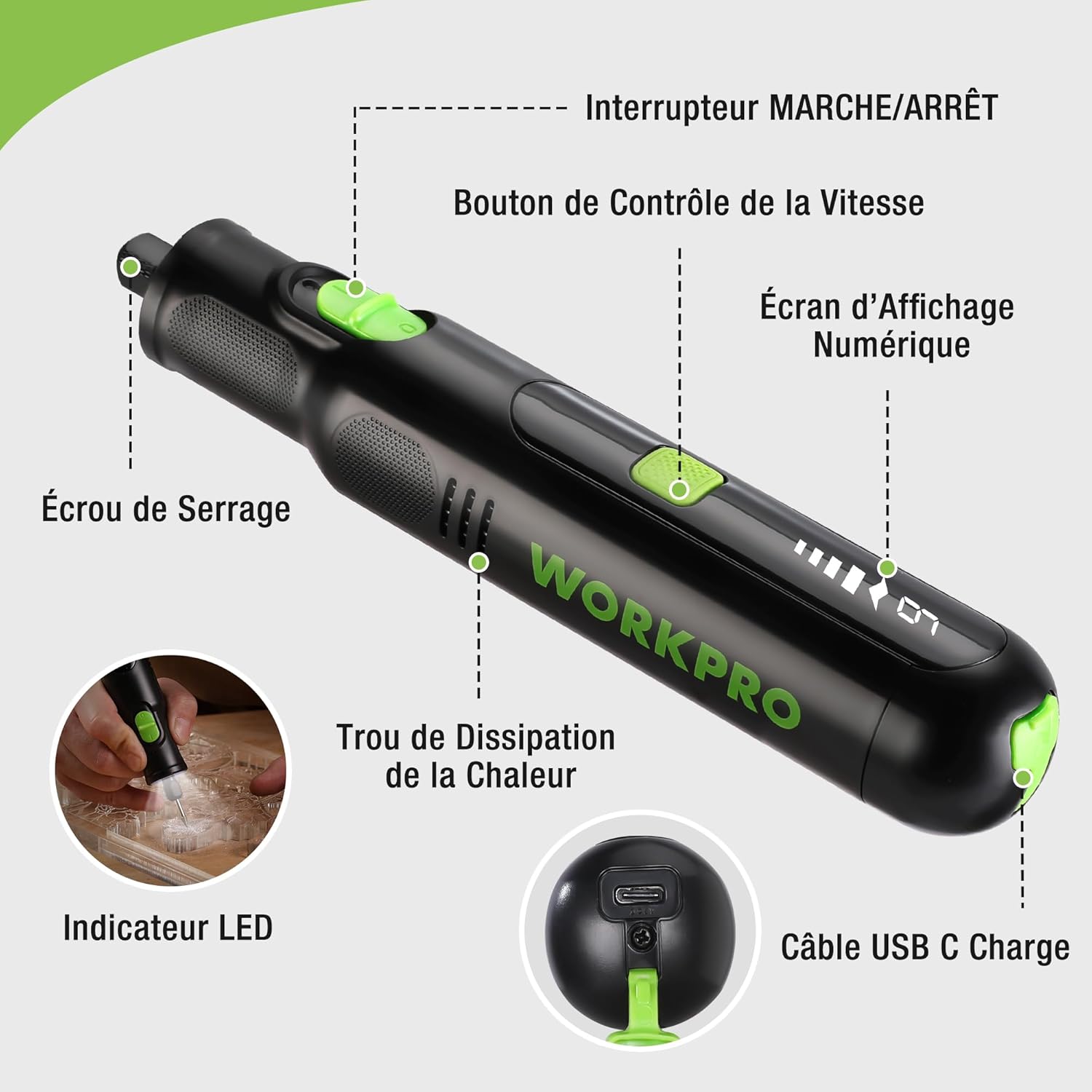
Figure 2: Key components of the rotary tool.
Bileşenler:
- Açma / kapama düğmesi: Aracı etkinleştirir ve devre dışı bırakır.
- Hız Kontrol Düğmesi: Adjusts the rotational speed of the tool.
- Dijital Görüntü Ekranı: Shows the current speed setting.
- Somun: Secures the accessory bits in place.
- Isı Dağıtım Deliği: Ensures proper cooling of the motor during operation.
- LED Göstergesi: Çalışma alanına aydınlatma sağlar.
- USB-C Şarj Portu: Dahili bataryayı şarj etmek için.
Dahil Aksesuarlar:
Your WORKPRO rotary tool comes with 117 diverse accessories, enabling a wide range of applications. These include:

Şekil 3: Üzeriview 117 adet aksesuar dahildir.
- Bileme/Keskiz: Grinding stones and wheels for material shaping and sharpening.
- Oyma: Diamond bits for detailed carving and engraving.
- Parlatma: Wool felt wheels, felt wheels, screw mandrels, and metal brushes for achieving smooth, shiny finishes.
- Frezeleme: Milling bits for precise material removal.
- Kesme: Cutting discs and saw blades for various cutting tasks, along with a cutting disc holder.
- Zımparalama: Sandpaper, rubber sanding drums, and sanding bands for surface preparation and finishing.
- Pensler: 2.35mm and 3.2mm collets to accommodate different shank sizes.
- Delme: 2.35mm and 3.2mm drill bits for small-scale drilling.
- Anahtar: For securing and loosening collet nuts.
4. Kurulum
4.1 Aletin Şarj Edilmesi
The tool is equipped with a 7.2V 1100mAh Lithium-ion rechargeable battery. Before first use, fully charge the tool.
- Connect the provided USB-C charging cable to the tool's USB-C charging port.
- Connect the other end of the USB cable to a compatible USB power source (e.g., computer, USB wall adapter).
- The digital display will indicate charging status. A full charge typically takes approximately 2 hours.
- Tamamen şarj olduktan sonra şarj kablosunu çıkarın.
Note: For optimal battery life, it is recommended to store the tool with the battery charged between 50% and 75%. Recharge the tool at least once every 3 to 6 months if not used regularly.

Figure 4: Charging the rotary tool via USB-C.
4.2 Aksesuarların Kurulumu
The WORKPRO rotary tool features an automatic spindle lock design for easy and secure accessory changes.
- Ensure the tool is turned OFF.
- Unscrew the collet nut at the front of the tool.
- Select the appropriate collet size for your desired accessory (2.35mm or 3.2mm). Insert the collet into the tool if not already present.
- Insert the shank of the accessory bit into the center of the collet nut. Ensure the bit is fully seated.
- Hand-tighten the collet nut. For a secure fit, use the included wrench to tighten the collet nut firmly. Do not overtighten.

Figure 5: Two-step accessory replacement process.

Figure 6: Detailed installation steps for various accessories.
Note: The automatic spindle lock engages when the tool is off, allowing for accessory changes without needing to press a separate button. A slight clicking sound when the tool stops is normal due to this mechanism.
5. Kullanım Talimatları
5.1 Açma/Kapatma
Aleti açmak için açma/kapama düğmesini 'AÇIK' konumuna getirin. Kapatmak için düğmeyi 'KAPALI' konumuna getirin.
5.2 Hızın Ayarlanması
The tool features 6 variable speed settings, ranging from 5000 RPM to 30000 RPM. Press the Speed Control Button to cycle through the speeds. The current speed setting will be displayed on the digital screen.
- Speed I: 5000 RPM
- Speed II: 10000 RPM
- Speed III: 15000 RPM
- Speed IV: 20000 RPM
- Speed V: 25000 RPM
- Speed VI: 30000 RPM
Choose the appropriate speed for your task and material. Lower speeds are generally suitable for polishing, delicate work, and softer materials, while higher speeds are for cutting, grinding, and harder materials.

Figure 7: Variable speed settings and powerful motor.
5.3 Entegre LED Işık
The tool includes an integrated LED light that illuminates the work area, improving visibility in dimly lit spaces and for detailed tasks.

Figure 8: Using the LED light for precision engraving.
5.4 Uygulamalar
The WORKPRO rotary tool is highly versatile and can be used for:
- Kesme: Use appropriate cutting discs for various materials.
- Oyma/Gravür: Utilize diamond bits for intricate designs on wood, plastic, or soft metals.
- Parlatma: Apply felt wheels and polishing compounds to restore shine to surfaces.
- Zımparalama: Use sanding bands and drums for smoothing rough edges or preparing surfaces.
- Delme: Employ small drill bits for precision holes.

Şekil 9: Ör.amples of versatile applications.
6. Bakım
6.1 Temizlik
- Temizleme işlemine başlamadan önce aleti daima güç kaynağından ayırın.
- Yumuşak bir d kullanınamp Aletin dışını silmek için bez kullanın. Sert kimyasallar veya aşındırıcı temizleyiciler kullanmayın.
- Use a small brush or compressed air to clear dust and debris from the heat dissipation holes and around the collet area.
6.2 Pil Bakımı ve Saklama
- To prolong battery life, avoid completely discharging the battery regularly.
- For long-term storage, ensure the battery is charged to approximately 50-75%. Recharge the tool every 3 to 6 months to prevent deep discharge and maintain battery health.
- Store the tool in a cool, dry place, away from direct sunlight and extreme temperatures.
6.3 Aksesuar Depolama
Keep all accessories organized in the provided storage bag or a suitable container to prevent loss and damage.
7. Sorun Giderme
This section addresses common issues you might encounter with your WORKPRO rotary tool.
| Sorun | Olası Neden | Çözüm |
|---|---|---|
| Alet açılmıyor. | Pil boşalmış. | Cihazı USB-C kablosu kullanarak tamamen şarj edin. |
| Tool stops unexpectedly during use. | Pil zayıf veya alet aşırı yüklenmiş. | Recharge the battery. Reduce pressure on the tool or use a lower speed setting for the task. |
| Clicking sound when turning off. | Normal operation of the automatic spindle lock. | This is a normal function and does not indicate a fault. |
| Accessory bit is loose or wobbles. | Somun yeterince sıkılmamış veya kullanılan somun boyutu yanlış. | Ensure the correct collet size is used for the accessory. Tighten the collet nut firmly with the included wrench. |
| Performans düşüşü veya kısa çalışma süresi. | Battery degradation or improper charging/storage. | Ensure proper charging and storage practices are followed (refer to Section 6.2). If the issue persists, the battery may need replacement. |
8. Özellikler
Below are the technical specifications for the WORKPRO 7.2V Cordless Rotary Tool (Model W123024A).
| Özellik | Şartname |
|---|---|
| Marka | İŞPRO |
| Model Numarası | W123024A |
| Cilttage | 7.2 Volt |
| Pil Türü | Lityum-iyon (1 adet dahil) |
| Pil Kapasitesi | 1100 mAh |
| Maksimum Dönme Hızı | 30000 RPM |
| Değişken Hızlar | 6 (5000-30000 RPM) |
| Şarj Süresi | Yaklaşık 2 saat |
| Runtime (Max Speed) | Yaklaşık 45 dakika |
| Ağırlık | 227 Gram |
| Boyutlar (U x G x Y) | 25.2x16.8x5.5 cm |
| Özel Özellik | Cordless, Integrated LED Light, Automatic Spindle Lock |
| Dahil Bileşenler | 117 Aksesuarlar |
| Üretici | Hang Zhou Great Star Industrial Co.,LTD |
9. Garanti ve Destek
For warranty information, please refer to the documentation provided at the time of purchase or contact your retailer. WORKPRO is committed to providing quality products and customer satisfaction.
If you encounter any issues or have questions regarding your WORKPRO 7.2V Cordless Rotary Tool, please contact the seller or WORKPRO customer support through their official website or contact channels. Please have your model number (W123024A) and purchase details ready when seeking support.


