Ürün Bittiview
The DYNAVIN D9-DMI Ultra Flex is an advanced Android car radio navigator designed to upgrade your in-car entertainment and navigation experience. It features a 6.5-inch high-resolution anti-glare touchscreen, integrated GPS navigation, wireless CarPlay, and Android Auto compatibility. This unit seamlessly integrates with your vehicle's existing systems, including steering wheel controls, climate control, and parking sensors, for a cohesive user experience.
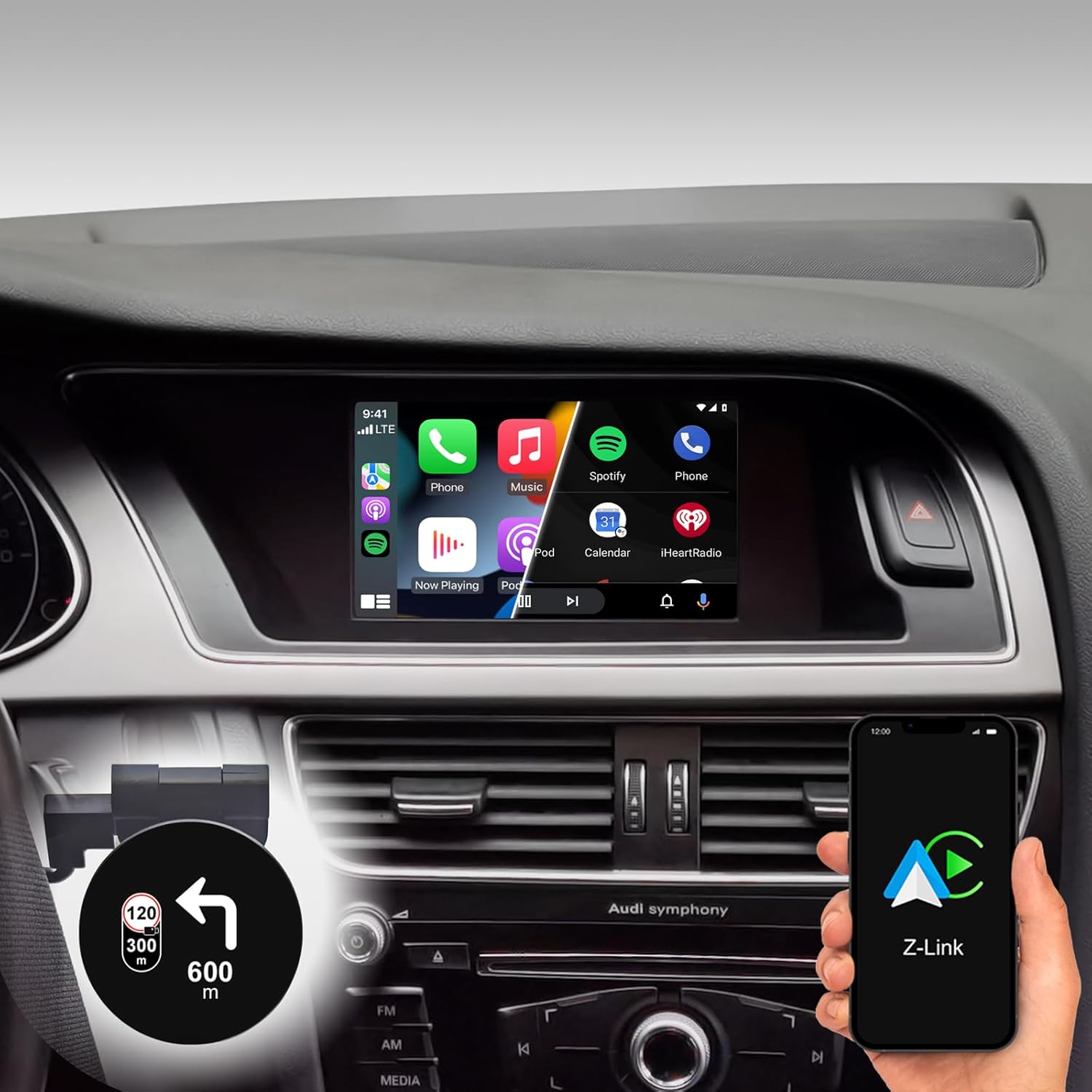
Figure 1: DYNAVIN D9-DMI Ultra Flex Car Radio Navigator installed in an Audi dashboard, showcasing its CarPlay interface and integration with navigation features.
Uyumluluk
This Android Navi Radio is specifically designed for Audi vehicles equipped with a Concert or Symphony radio. Please verify your vehicle's radio type before installation to ensure compatibility.
- Audi A4: 2007 – 2015
- Audi A5: 2007 – 2016
- Audi Q5: 2008 – 2017
- Audi S4: 2009 – 2016
- Audi S5: 2009 – 2016
The unit is compatible with the original AUDI sound system and can receive the AUDI vehicle menu.

Figure 2: Compatible Audi Concert and Symphony radio units.

Figure 3: How to check your car's system version for compatibility.
Temel Özellikler
- Görüntülemek: 6.5-inch high-resolution (1024 x 600 pixels) anti-glare touchscreen.
- İşletim Sistemi: Android 11 OS with quad-core CPU and 4 GB RAM.
- Bağlantı: Wireless CarPlay, Android Auto, and Smartphone Mirroring.
- Navigasyon: Integrated GPS navigation with Dynaway app (31-day trial, activation code required), including speed camera information.
- Ses: Highly sensitive FM-RDS tuner with 15 presets for clear, noise-free playback. Supports audio streaming via smartphone/USB.
- Mikrofon: Compact digital dual microphone with noise reduction for excellent call quality.
- Entegrasyon: Integrated CANBUS solution for seamless control via steering wheel, air conditioning display, and parking sensor information.
- Head-up Display (HUD): Included HUD shows navigation directions, vehicle speed, and speed camera alerts.
- Dynapp Pack: Access to Google Playstore, third-party app installation, and display of speed limits (31-day trial, activation code required).

Figure 4: DYNAVIN's commitment to quality and experience.

Figure 5: The innovative Dynavin Digital Dual-Microphone.

Figure 6: Upgrade your Audi system with the DYNAVIN DMI Ultra Flex.
Kurulum ve Yükleme
Installation of the DYNAVIN D9-DMI Ultra Flex requires careful attention to detail. It is recommended to have the installation performed by a qualified professional. The unit integrates with your vehicle's existing wiring and CAN-BUS system.
Dahil Bileşenler:
Kurulum işlemine başlamadan önce, aşağıda listelenen tüm bileşenlerin paketinizde bulunduğundan emin olun.

Figure 7: Complete list of accessories included in the package.
- Dynavin Radio Unit
- Bağlantı Kablosu
- DAB Anteni
- DAB / CAN Interface
- Arka Kamera Kablosu
- GPS Anteni
- USB Uzatma Kablosu
- Anten Adaptörü
- Mikrofon
- Climate Control Cable
- HUD 150 (Head-up Display)
- BT/Wi-Fi Anteni
- Sökme Araçları
- Hızlı rehber
Kurulum Adımları (Genel):
Refer to the included Quick Guide for detailed, step-by-step installation instructions specific to your Audi model. Professional installation is highly recommended.
- Hazırlık: Disconnect the vehicle's battery. Use the provided disassembly tools to carefully remove the original radio unit and trim.
- Kablolama: Connect the Dynavin radio unit using the supplied connection cables, ensuring all connections are secure. Integrate the DAB/CAN interface and connect the GPS antenna, DAB antenna, and BT/Wi-Fi antenna.
- Mikrofon Kurulumu: Install the compact digital dual microphone in a suitable location, typically near the rearview mirror or steering column, for optimal call quality.
- Head-up Display Installation: Mount the HUD 150 unit on your dashboard or windshield as per the instructions, ensuring it does not obstruct your view.
- CAN-BUS Integration: Ensure the CAN-BUS connections are correctly made to enable steering wheel control, climate display, and parking sensor integration.
- Test: Reconnect the vehicle's battery. Power on the unit and perform initial function tests for radio, navigation, CarPlay/Android Auto, and vehicle system integration.
- Yeniden montaj: Gösterge panelinin parçalarını dikkatlice yeniden birleştirin.
Kullanım Talimatları
Temel İşlem:
- Güç Açma/Kapatma: The unit typically powers on and off with the vehicle's ignition.
- Dokunmatik Ekran Kontrolü: Navigate menus and select functions using the responsive 6.5-inch touchscreen.
- Direksiyon Kontrolleri: Utilize your vehicle's existing steering wheel controls for volume, track skipping, and call management, thanks to CAN-BUS integration.
Navigasyon sistemi:
The integrated GPS navigation system uses the Dynaway app. A 31-day trial is included, after which an activation code must be purchased.
- Hedef Girişi: Enter destinations via the touchscreen.
- Sesli Rehberlik: Follow clear voice instructions for turn-by-turn navigation.
- Rota Rehberi: Select preferred route options (e.g., fastest, shortest).
- Speed Camera Alerts: The navigation software includes alerts for speed cameras.
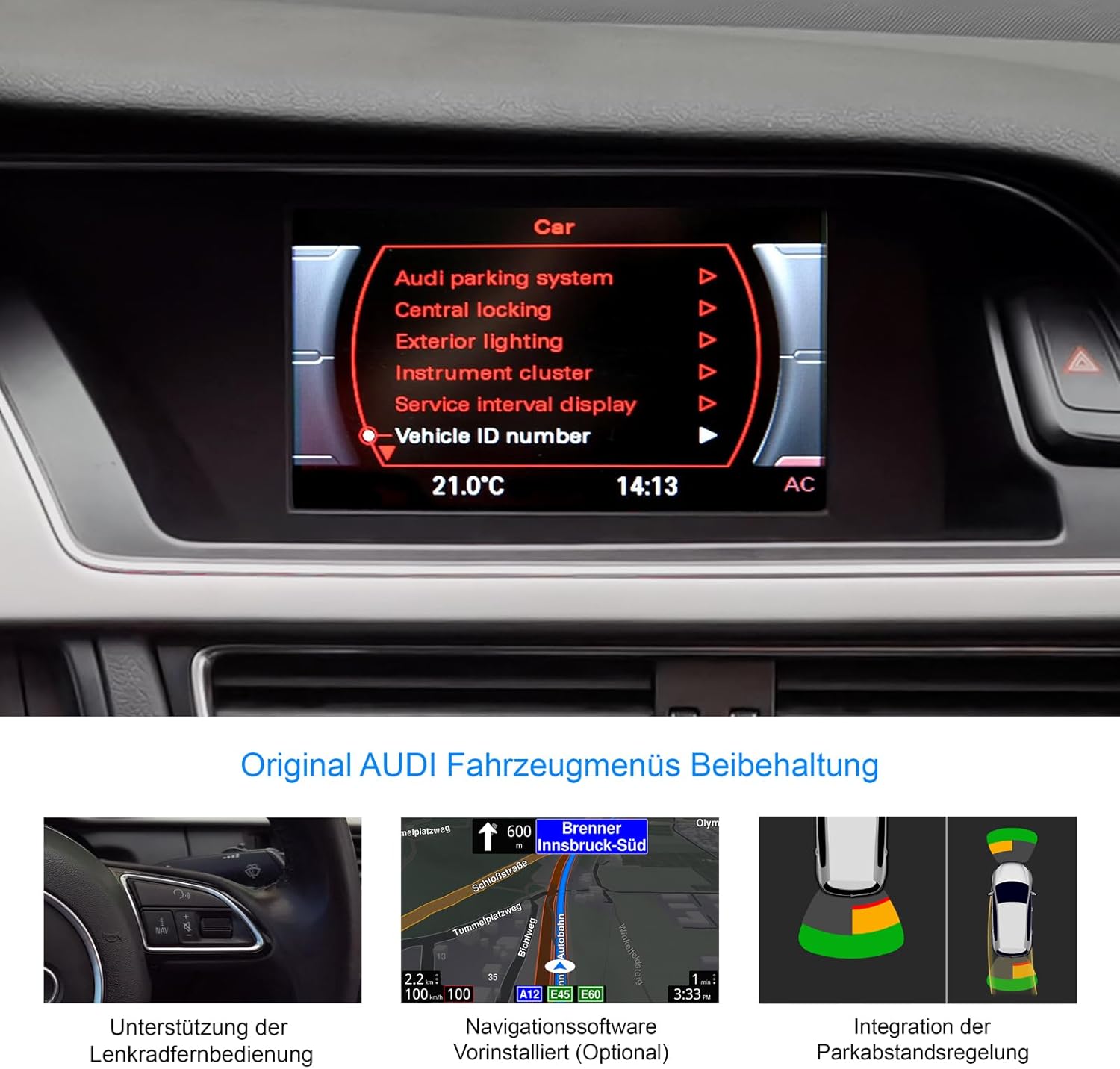
Figure 8: Retention of original Audi vehicle menus and integrated features.
CarPlay ve Android Auto:
Connect your smartphone wirelessly to access CarPlay (for iOS devices) or Android Auto (for Android devices). A 31-day trial is included, after which an activation code must be purchased.
- Kablosuz Bağlantı: Pair your phone via Bluetooth and follow the on-screen prompts to establish a wireless CarPlay or Android Auto connection.
- Uygulama Erişimi: Use compatible apps for navigation (Apple Maps, Google Maps), music streaming (Spotify, Apple Music), messaging, and calls directly from the unit's display.
Head-up Display (HUD):
The included HUD 150 projects key information onto your windshield, allowing you to keep your eyes on the road.
- Görüntülenen Bilgiler: Navigation directions (from Dynaway, Apple Maps, Google Maps), vehicle speed, and Blitzer.de speed camera information.
- Atama: Position the HUD unit to ensure clear visibility without obstructing your driving view.

Figure 9: Head-up Display in action, showing navigation and time.
Bakım
To ensure the longevity and optimal performance of your DYNAVIN D9-DMI Ultra Flex, follow these maintenance guidelines:
- Ekran Temizleme: Elektronik ekranlar için özel olarak tasarlanmış, yumuşak ve tüy bırakmayan bir bez kullanın. Aşındırıcı temizleyiciler veya çözücüler kullanmayın. Tozu ve parmak izlerini gidermek için ekranı nazikçe silin.
- Yazılım Güncellemeleri: Periodically check for software updates from DYNAVIN to ensure the system runs efficiently and has the latest features and bug fixes. Updates can typically be performed via Wi-Fi or USB.
- Genel Bakım: Üniteyi aşırı sıcaklıklara, uzun süre doğrudan güneş ışığına veya aşırı neme maruz bırakmaktan kaçının.
- Kablo Bağlantıları: Ensure all cables remain securely connected. Avoid pulling on cables forcefully.
Sorun giderme
This section addresses common issues you might encounter with your DYNAVIN D9-DMI Ultra Flex. For more complex problems, contact customer support.
| Sorun | Olası Neden | Çözüm |
|---|---|---|
| Ünite açılmıyor. | Gevşek güç bağlantısı, atmış sigorta, araç aküsü sorunu. | Tüm güç kablolarını ve bağlantılarını kontrol edin. Araç sigortalarını inceleyin. Araç aküsünün şarjlı olduğundan emin olun. |
| Ses çıkışı yok. | Volume too low, mute activated, incorrect audio source selected, wiring issue. | Increase volume. Check if mute is active. Select correct audio source. Verify speaker wiring connections. |
| CarPlay/Android Auto bağlantısı kurulmuyor. | Bluetooth not paired, Wi-Fi disabled, trial period expired, activation code not entered. | Ensure Bluetooth and Wi-Fi are enabled on both devices. Re-pair the phone. Check trial status and enter activation code if necessary. |
| GPS sinyali kayıp veya hatalı. | GPS anteni engellenmiş veya bağlantısı kesilmiş, uydu sinyali zayıf. | GPS anteninin doğru şekilde takıldığından ve temiz bir bağlantıya sahip olduğundan emin olun. view Gökyüzü. Anten bağlantısını kontrol edin. Açık bir alana geçin. |
| Direksiyon kumandaları çalışmıyor. | CAN-BUS connection issue, incorrect vehicle configuration. | Verify CAN-BUS wiring. Check unit settings for correct vehicle model configuration. |
Özellikler
| Özellik | Detay |
|---|---|
| Marka | DİNAVİN |
| Örnek | D9-DMI Ultra Flex |
| Uyumlu Araçlar | Audi A4 (2007-2015), A5 (2007-2016), Q5 (2008-2017), S4 (2009-2016), S5 (2009-2016) with Concert/Symphony radio |
| Ekran Boyutu | 6.5 inç |
| Görüntü Türü | LCD, Anti-glare |
| Çözünürlük | 1024 x 600 piksel |
| İşletim Sistemi | Android 11 |
| İşlemci | Dört çekirdekli |
| Veri deposu | 4 GB |
| Bağlantı | Wireless CarPlay, Android Auto, Bluetooth, USB |
| Ses Çıkışı Modu | Stereo (2.0 kanal) |
| Radyo Tuner | FM-RDS with 15 presets |
| Özel Özellikler | Integrated GPS Navigation, Head-up Display (HUD), CAN-BUS Integration (steering wheel, climate, parking sensors), Digital Dual Microphone |
| Paket Boyutları | 28x23x10 cm |
| Ürün Ağırlığı | 2 kilo |
| ASIN | B0CS67GQKN |
Garanti ve Destek
For warranty information, please refer to the documentation provided with your purchase or contact DYNAVIN customer service directly. DYNAVIN offers customer support for product inquiries, technical assistance, and troubleshooting.
For the Dynapp package, CarPlay, and Android Auto features, a 31-day trial phase is included. An activation code must be purchased online to continue using these features after the trial period.
Please visit the official DYNAVIN website or contact your retailer for the most up-to-date support information and contact details.


