1. Ürün Bittiview
This manual provides essential information for the operation and maintenance of your GHUST MR23GA Replacement Magic Voice Remote Control. This remote is designed as a replacement for various LG Smart TV models, offering convenient control without complex setup.

Image 1.1: The GHUST MR23GA Replacement Magic Voice Remote Control.
Temel Özellikler:
- Doğrudan Değişim: Functions as a direct replacement for original LG Magic Remote models.
- Programlamaya Gerek Yok: Pil takıldıktan sonra kutusundan çıkar çıkmaz kullanıma hazırdır.
- Dayanıklı Yapı: Made of high-quality ABS material for enhanced durability.
- Kompakt Tasarım: Small and ergonomic for comfortable grip.
- Voice Search Capability: Supports voice commands for easier navigation (functionality may vary based on TV model and original remote features).
- Özel Kısayol Düğmeleri: Quick access to popular streaming services like Netflix and Prime Video.
2. Kurulum ve Kurulum
The MR23GA remote control is designed for immediate use with compatible LG Smart TVs. No complex programming or pairing procedures are required.
2.1. Pil Kurulumu
- Uzaktan kumandanın arkasındaki pil bölmesi kapağını bulun.
- Bölmeyi açmak için kapağı aşağı doğru kaydırın veya mandalı bastırın.
- İki (2) adet AAA pili (dahil değildir) bölmeye yerleştirin ve pozitif (+) ve negatif (-) terminallerin içerideki göstergelerle doğru şekilde hizalandığından emin olun.
- Pil bölmesi kapağını yerine oturtup tık sesi duyana kadar kaydırarak kapatın.

Image 2.1: The remote control is designed for ease of use with no setup or programming required after battery installation.
Once batteries are installed, the remote is ready to operate your compatible LG Smart TV.
3. Kullanım Talimatları
This section details the basic functions and operation of your MR23GA remote control.
3.1. Temel İşlevler
- Güç düğmesi (●): TV'yi açmak veya kapatmak için basın.
- Sayı Düğmeleri (0-9): Use to directly input channel numbers.
- Sesi Artır/Azalt (+/-): Televizyonun ses seviyesini ayarlayın.
- Kanal Yukarı/Aşağı (▲/▼): Televizyon kanallarını değiştirin.
- Sessize Alma Düğmesi (🔇): Televizyonun sesini kapatın veya açın.
- Gezinme Paneli (Yukarı, Aşağı, Sol, Sağ, Tamam): Menülerde gezinin ve seçenekleri seçin.
- Back Button (↶): Önceki ekrana veya menüye geri dönün.
- Home Button (🏠): Access the TV's Smart Home dashboard.

Image 3.1: The compact size and ergonomic design make the remote easy to hold and operate.
3.2. Ses Kontrolü
Basılı tutun Mikrofon Düğmesi to activate voice control. Speak clearly into the remote to issue commands or search for content. Release the button when finished speaking. Note that voice control functionality may depend on your specific LG TV model and its original features.
3.3. Dedicated Shortcut Buttons
The remote features dedicated buttons for quick access to popular streaming applications:
- Netflix Düğmesi: Netflix uygulamasını doğrudan başlatın.
- Prime Video Düğmesi: Amazon Prime Video uygulamasını doğrudan başlatın.
- Disney+ Düğmesi: Disney+ uygulamasını doğrudan başlatın.
- LG Kanalları Düğmesi: Directly launch the LG Channels application.
- Sling Button: Directly launch the Sling TV application.
- Alexa Düğmesi: Activate Alexa voice assistant (functionality depends on TV model).

Image 3.2: Dedicated shortcut buttons provide quick access to your favorite applications.
3.4. Uyumluluk
This replacement remote control is compatible with a wide range of LG Smart TV models, including but not limited to:
- LG OLED Series: OLED42C3AUA, OLED42C3PUA, OLED48C3PUA, OLED55C3PUA, OLED65C3AUA, OLED77C3PUA, OLED83C3PUA, OLED55G3PUA, OLED65G3PUA, OLED77G3PUA, OLED83G3PUA, OLED55B3PUA, OLED65B3PUA, OLED77B3PUA
- LG QNED Series: 43QNED75URA, 50QNED75URA, 55QNED75URA, 65QNED75URA, 75QNED75URA, 50QNED80URA, 55QNED80URA, 65QNED80URA, 75QNED80URA, 86QNED80URA
- LG UR9000 Series: 43UR9000PUA, 50UR9000PUA, 55UR9000PUA, 65UR9000PUA, 75UR9000PUA
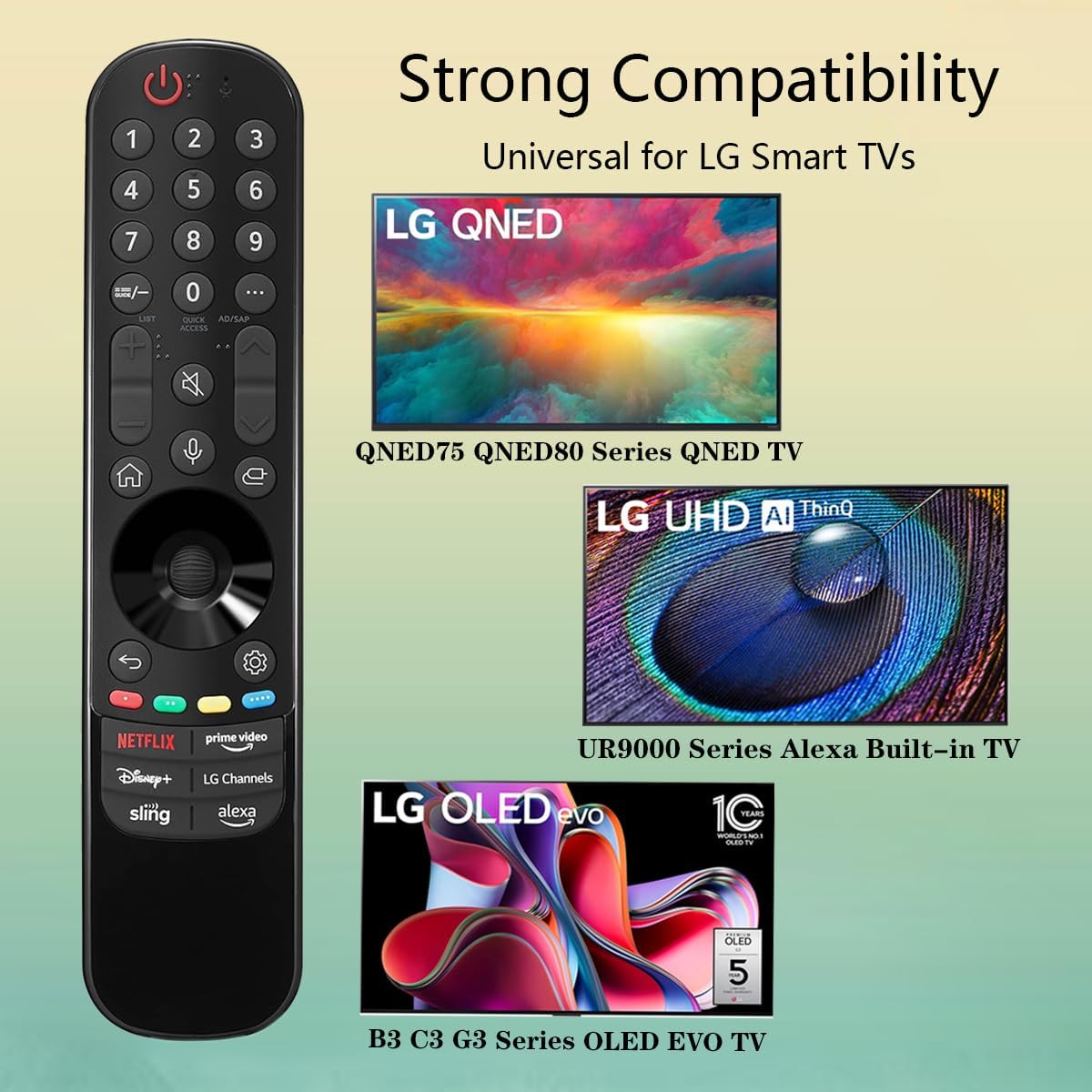
Image 3.3: The remote offers strong compatibility with various LG Smart TV series.
4. Bakım
Doğru bakım ve onarım, uzaktan kumandanızın kullanım ömrünü uzatacaktır.
4.1. Temizlik
- Uzaktan kumandanın yüzeyini silmek için yumuşak ve kuru bir bez kullanın.
- İnatçı kirler için hafifçeampBezi su veya hafif, aşındırıcı olmayan bir temizleyiciyle ıslatın. Temizleyiciyi doğrudan kumandaya püskürtmeyin.
- Kumandanın yüzeyine veya iç bileşenlerine zarar verebileceğinden, sert kimyasallar, çözücüler veya aşındırıcı temizlik malzemeleri kullanmaktan kaçının.
4.2. Pil Bakımı
- Replace batteries when the remote's responsiveness decreases or it stops functioning.
- Her zaman her iki pili de aynı anda, aynı tipte (AAA) yeni pillerle değiştirin.
- Uzaktan kumanda uzun süre (örneğin bir ay veya daha fazla) kullanılmayacaksa, pil sızıntısını ve kumandaya zarar gelmesini önlemek için pilleri çıkarın.
- Kullanılmış pilleri yerel düzenlemelere göre atın.
5. Sorun Giderme
Uzaktan kumandanızla ilgili sorunlarla karşılaşırsanız, aşağıdaki yaygın sorunlar ve çözümlerine bakın:
| Sorun | Olası Neden | Çözüm |
|---|---|---|
| Uzaktan kumanda yanıt vermiyor. | Piller bitmiş veya yanlış takılmış. | Pilleri yeni AAA pillerle değiştirin ve doğru kutuplara (+/-) dikkat edin. |
| Uzaktan çalışma aralıklı olarak gerçekleşiyor. | Low battery power; obstruction between remote and TV; infrared sensor blocked on TV. | Pilleri değiştirin. Televizyonun kızılötesi sensörüne net bir görüş hattı olduğundan emin olun. Herhangi bir engeli kaldırın. |
| Voice control or pointer not working. | This replacement remote may not support all advanced features of the original LG Magic Remote, or your TV model does not fully support these features with a replacement remote. | Verify your TV model's compatibility with replacement remotes for advanced features. Basic functions should still operate. |
| Dedicated app buttons (e.g., Alexa, LG Channels) not working. | Functionality depends on TV model and specific app integration. | Some app buttons may not be universally compatible or require specific TV software versions. Verify if other buttons work. |
Bu çözümleri denedikten sonra sorun devam ederse lütfen müşteri desteğiyle iletişime geçin.
6. Özellikler
- Model Numarası: MR23GA
- Marka: HAYALET
- Ürün Ölçüleri: 7.3 x 1.6 x 1.2 inç
- Ürün Ağırlığı: 2.29 ons
- Güç Kaynağı: 2 x AAA pil (dahil değildir)
- Renk: Siyah
- Malzeme: Yüksek kaliteli ABS
- Uyumlu Cihazlar: LG Smart Televisions (specific models listed in Section 3.4)
- Özellik: Voice Search (functionality may vary)
7. Garanti ve Destek
GHUST is committed to providing high-quality products and excellent customer service.
7.1. Satış Sonrası Hizmet
If you have any questions regarding the quality or functionality of your GHUST MR23GA remote control, please do not hesitate to contact our customer support team. We are dedicated to resolving any issues promptly and ensuring your satisfaction.
For support, please refer to the contact information provided with your purchase or on the official GHUST product page.


