1. Giriş
This manual provides detailed instructions for the installation, configuration, and operation of your SODOLA 24 Port 2.5G Smart Web Managed Switch. This device is designed to enhance network performance with its multi-gigabit capabilities, offering 24x 2.5G Base-T ports and 2x 10G SFP+ ports for high-speed data transfer and flexible network expansion. Please read this manual thoroughly before using the product to ensure proper setup and functionality.
2. Güvenlik Bilgileri
- Aşırı ısınmayı önlemek için cihazın iyi havalandırılan bir alana kurulduğundan emin olun.
- Yalnızca verilen güç adaptörünü kullanın.
- Do not expose the switch to water or excessive humidity.
- Anahtarın üzerine ağır cisimler koymaktan kaçının.
- Sadece iç mekanda kullanıma uygundur.
3. Paket İçeriği
Paketinizde tüm öğelerin mevcut olduğundan emin olun:
- 1 x SODOLA 24 Port 2.5G Smart Web Yönetilen Anahtar
- 1 x Kullanım Kılavuzu
- 1 x Güç Kablosu
4. Ürün Bittiview
The SODOLA 24 Port 2.5G Smart Web Managed Switch is designed for robust network environments, offering a combination of high-speed Ethernet and SFP+ ports.

Şekil 4.1: Genel view of the SODOLA 24 Port 2.5G Smart Web Yönetilen Anahtar.
4.1 Ön Panel
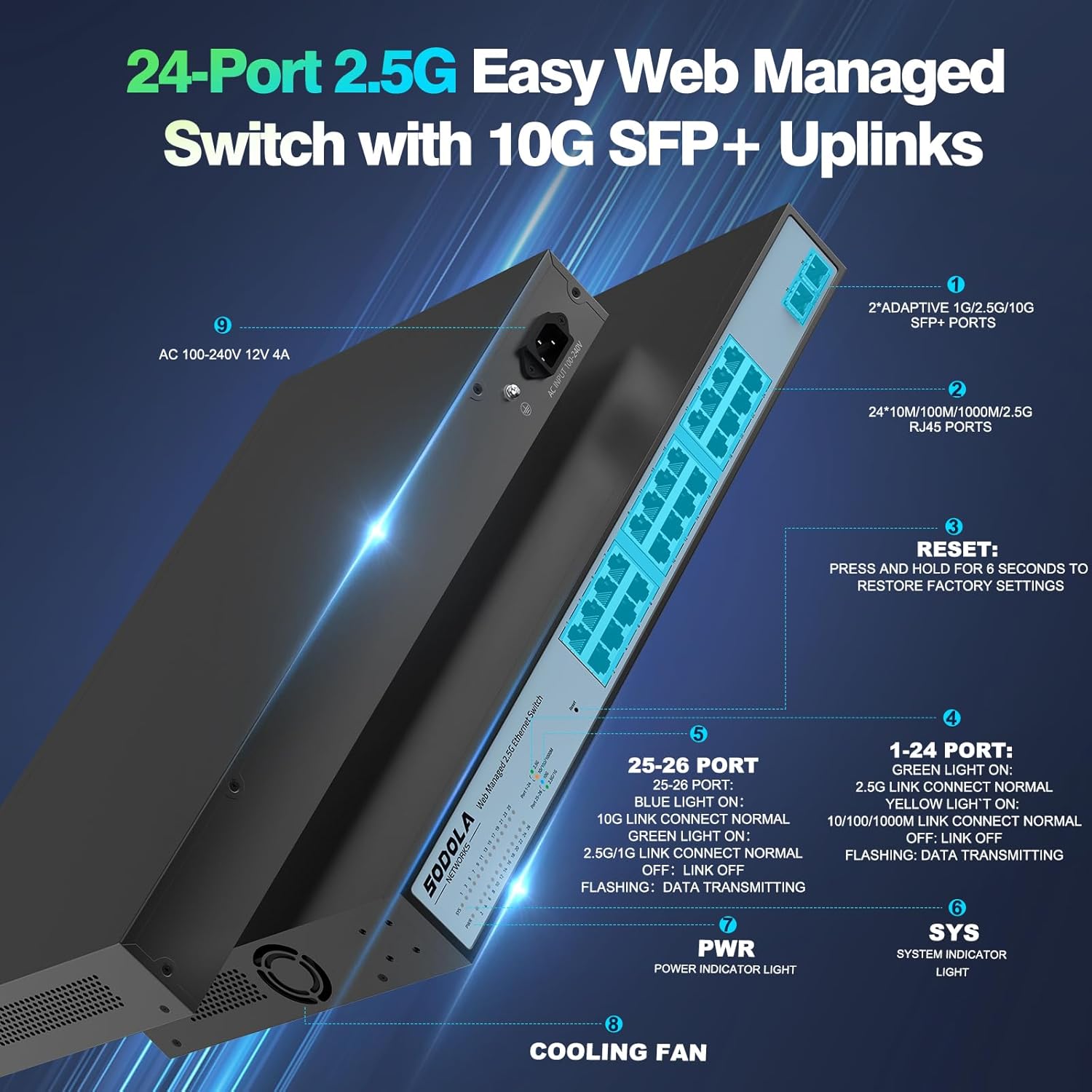
Şekil 4.2: Ayrıntılı view of the switch's front and rear panels, highlighting ports and indicators.
- 24 x 100/1000/2500M RJ45 Ports: These ports support 2.5 Gigabit Ethernet connectivity. Each port has Link/Act LEDs: Green for 2.5G Link/Act, Yellow for 10/100/1000M Link/Act, and flashing for data transmission.
- 2 x 10G SFP+ Bağlantı Noktası: These ports provide high-speed 10 Gigabit fiber connectivity for uplinks or connecting to high-bandwidth devices.
- Sıfırlama Düğmesi: Fabrika ayarlarına dönmek için 6 saniye basılı tutun.
- Güç LED'i: Güç gösterge ışığı.
- SİSTEM LED'i: System indicator light.
4.2 Arka Panel
- AC 100-240V Power Input: Verilen güç kablosunu buraya bağlayın.
- Soğutma Fanı: The switch features a bilateral cooling design without a built-in fan for silent operation.
5. Kurulum Talimatları
5.1 Fiziksel Kurulum
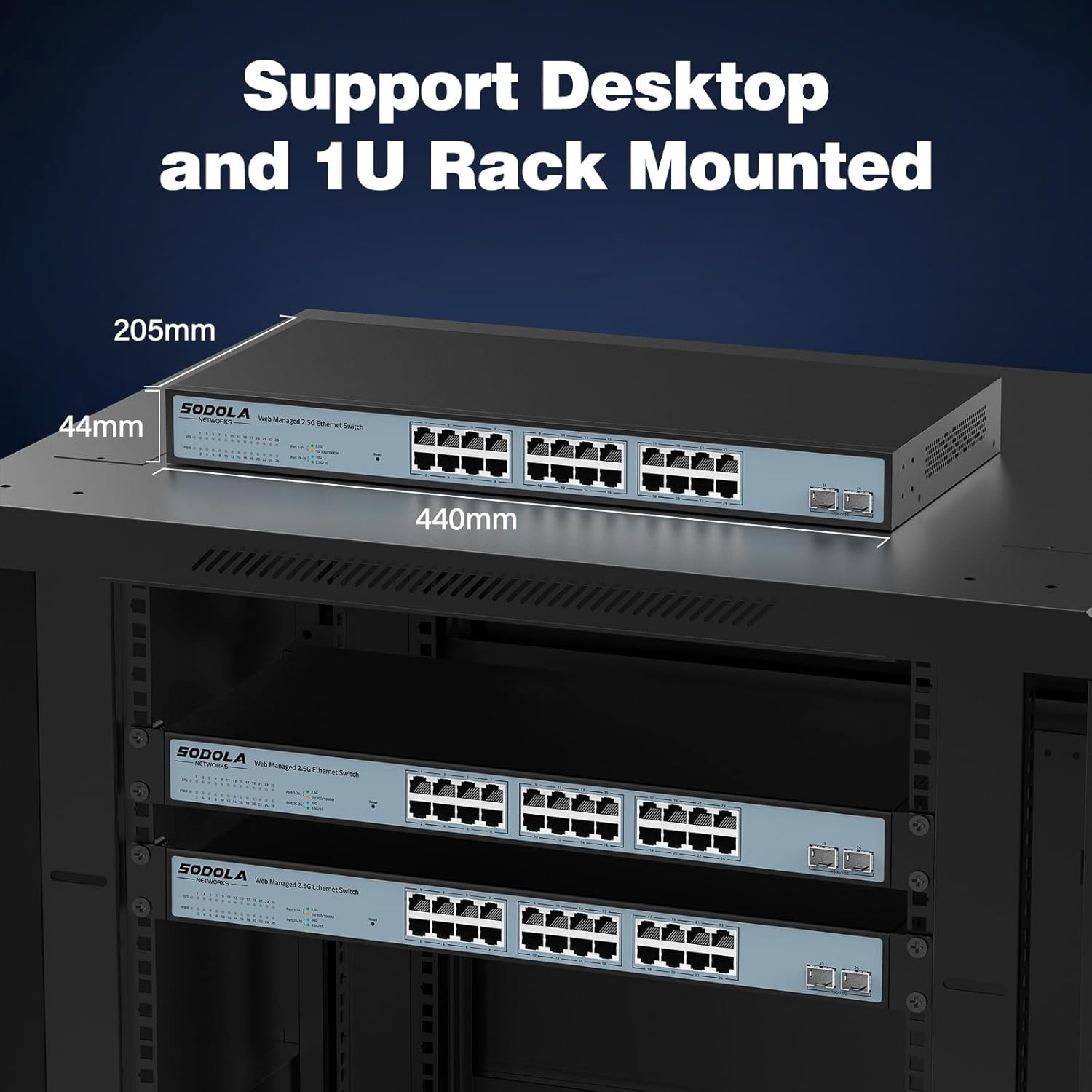
- Montaj: The switch supports 1U rack mounting. Ensure adequate space for ventilation. It can also be placed on a desktop.
- Cihazları Bağlayın: Connect your network devices (computers, servers, NAS, WiFi 6 APs) to the RJ45 ports using Cat5e, Cat6, or Cat6a Ethernet cables.
- Connect Uplink: Use the 10G SFP+ ports for high-speed connections to your router or other core network devices.
- Güç Açık: Connect the power cord to the switch and then to a power outlet. The PWR LED should illuminate.
5.2 Başlangıç Web Yönetim Erişimi
Erişim için web yönetim arayüzü:
- IP Adresi Yapılandırması: Before logging in, ensure your computer's IP address is set within the same IPv4 subnet as the switch's default IP address (e.g., if the switch is 192.168.2.1, set your computer to 192.168.2.X, where X is not 1).
- Açık Web Tarayıcı: Uyumlu bir tane kullanın web browser (e.g., IE 9.0+, Chrome 23.0+, Firefox 20.0+).
- IP adresini girin: Type the default IP address of the switch (192.168.2.1) into the browser's address bar and press Enter.
- Giriş yapmak: Varsayılan kimlik bilgilerini girin:
Kullanıcı adı: yönetici
Şifre: yönetici
Şekil 5.1: Ekran görüntüsü web management interface login page.
6. Operating Instructions (Web Yönetmek)
The web management interface allows for configuration, monitoring, and troubleshooting without requiring command-line interface (CLI) expertise. Key features include:

Figure 6.1: Visual representation of the switch's basic management features.
- Link Aggregation (LACP): Bant genişliğini ve yedekliliği artırmak için birden fazla fiziksel bağlantıyı tek bir mantıksal bağlantıda birleştirin.
- VLAN (Sanal Yerel Alan Ağı): Segment your network into smaller, isolated broadcast domains for improved security and performance.
- QoS (Hizmet Kalitesi): Kritik uygulamaların yeterli bant genişliğine sahip olmasını sağlamak için ağ trafiğini önceliklendirin.
- çok noktaya yayın: Efficiently deliver data to multiple recipients simultaneously.
- MAC Adresi Yönetimi: Control access to the network based on MAC addresses.
- RSTP (Hızlı Yayılma Ağacı Protokolü): Ağ döngülerini önleyin ve ağ istikrarını sağlayın.
- Jumbo Çerçeveler: Support larger Ethernet frames for increased data throughput.
- Döngü Algılama: Identify and mitigate network loops.
- ERPS (Ethernet Ring Protection Switching): Provide fast protection and recovery switching in Ethernet ring topologies.
6.1 Yapılandırmayı Kaydetme
After making any changes in the web arayüz, şuraya gidin Tools > Save to ensure your settings are permanently stored and not lost upon power cycling the device.
7. Bakım
- Temizlik: Use a dry, soft cloth to clean the exterior of the switch. Do not use liquid or aerosol cleaners.
- Havalandırma: Ensure the ventilation openings on the sides of the switch are not obstructed. The fanless design relies on natural convection for cooling.
- Donanım Yazılımı Güncellemeleri: Üreticinin periyodik olarak kontrol edin webEn iyi performans ve güvenliği sağlamak için mevcut tüm yazılım güncellemelerini bulabileceğiniz bir site.
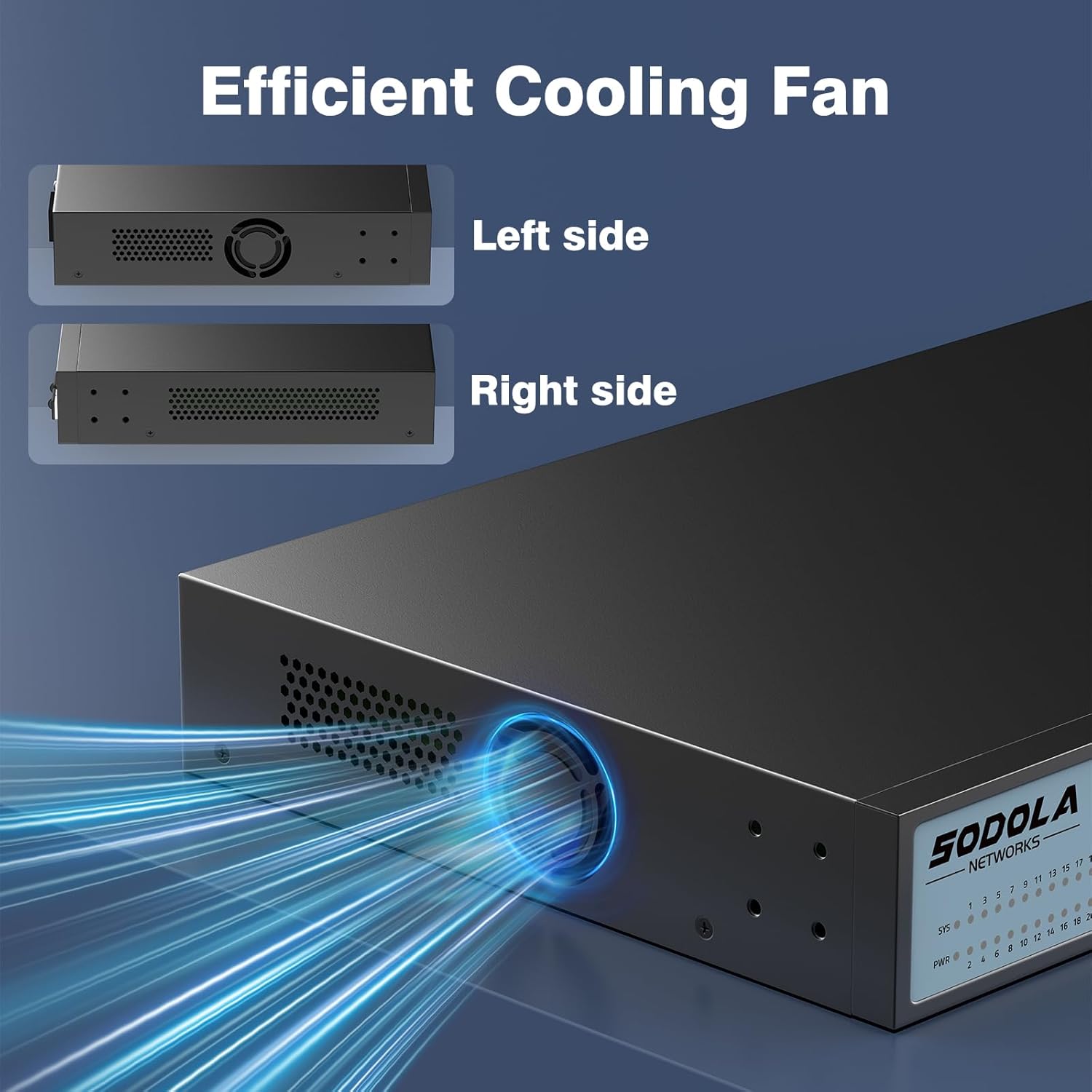
Figure 7.1: Illustration of the switch's efficient fanless cooling design.
8. Sorun Giderme
8.1 Yaygın Sorunlar ve Çözümler
- Güç Yok: Check if the power cord is securely connected to both the switch and the power outlet. Verify the power outlet is functional.
- Liman üzerinde bağlantı/etkinlik yok: Ensure the Ethernet cable is properly connected to both the switch port and the connected device. Verify the connected device is powered on and functioning correctly. Try a different cable or port.
- Yavaş Ağ Hızı: Ensure all connected devices and cables support 2.5G or 10G speeds for optimal performance. Check for network congestion or duplex mismatches in the web arayüz.
- Erişilemiyor Web Arayüz:
- Verify your computer's IP address is in the same subnet as the switch's IP.
- Confirm the switch's IP address (default is 192.168.2.1).
- Sağlamak web browser is compatible.
- If the management interface becomes unresponsive, a power cycle may resolve the issue.
- Ağ Kararsızlığı: Ensure Spanning Tree Protocol (STP) or Rapid Spanning Tree Protocol (RSTP) is enabled to prevent network loops, especially in complex network topologies.
- Configuration Loss: Always remember to save your configuration changes via Tools > Save içinde web arayüz.
8.2 Fabrika Ayarlarına Sıfırlama
If you encounter persistent issues or forget your login credentials, you can restore the switch to its factory default settings by pressing and holding the Sıfırla 6 saniye boyunca düğmeye basın.
9. Özellikler
| Marka | Sodola |
| Model Numarası | 24X2.5G+2X10G SFP+(Managed) |
| Port Sayısı | 26 (24x 2.5G RJ45, 2x 10G SFP+) |
| Arayüz Türü | RJ45, SFP+ |
| Veri Aktarım Hızı | 2500 Megabytes Per Second (2.5Gbps per RJ45 port) |
| Anahtarlama Kapasitesi | 160Gbps |
| Paket Yönlendirme Oranı | 119.04Mp/sn |
| MAC Adres Tablosu Boyutu | 16K |
| Package Cache | 12Mbit |
| Kasa Malzemesi | Metal |
| Renk | Siyah |
| Ürün Boyutları | 17.32 x 8.07 x 1.73 inç |
| Ürün Ağırlığı | 5.89 pound |
| Uyumlu Cihazlar | Laptop, Server |
10. Garanti ve Destek
SODOLA provides a replacement for any quality issue within one year of purchase. For technical support or warranty claims, please refer to your purchase documentation or the retailer where the product was acquired. Please note that official SODOLA website, phone number, or email for direct support may not be readily available.


