1. Giriş
Thank you for choosing the VTech ES2051 DECT Cordless Phone. This manual provides detailed instructions to help you set up, operate, and maintain your new phone system. The ES2051 is designed for reliable communication, featuring a digital answering machine, call blocking capabilities, and enhanced audio features for clear conversations.
2. Kutuda Neler Var?
Lütfen paketinizin içeriğini kontrol ederek tüm öğelerin mevcut olduğundan emin olun:
- 2 Base Units
- 2 Kablosuz Ahize
- 2 Şarj Cihazları
- 2 Battery Packs (4 AAA batteries included)
- Telefon Hattı Kablosu
- Hızlı Başlangıç Kılavuzu

Image 1: VTech ES2051 DECT Cordless Phone system components. This image displays the two cordless handsets, the main base unit with an integrated answering machine, and a secondary charging cradle.
3. Kurulum Kılavuzu
3.1. Pil Kurulumu
- Her bir telefonun arkasında bulunan pil bölmesi kapağını bulun.
- Kapağı çıkarmak için aşağı doğru kaydırın.
- Connect the battery pack connector to the socket inside the compartment, ensuring correct polarity.
- Pil takımını bölmeye yerleştirin.
- Pil bölmesi kapağını yerine takın, yerine oturana kadar yukarı doğru kaydırın.

Image 2: A hand demonstrating the installation of the battery pack into the handset. Ensure the connector is properly aligned before closing the battery cover.
3.2. Connecting the Base Unit and Charger
- Plug the small end of the power adapter into the power jack on the back of the main base unit.
- Güç adaptörünün diğer ucunu duvar prizine takın.
- Connect the telephone line cord to the telephone line jack on the back of the main base unit.
- Telefon hattı kablosunun diğer ucunu duvardaki telefon prizine takın.
- For the secondary charger, plug its power adapter into a wall outlet.
Önemli: Use only the power adapters and batteries provided with this product. Place the base unit and charger in a central location away from other electrical appliances to avoid interference.
3.3. İlk Şarj
Place each handset onto its respective base unit or charger. The handsets will begin charging. Allow the handsets to charge for at least 16 hours before initial use to ensure optimal battery performance.
4. Kullanım Talimatları
4.1. Arama Yapma ve Alma
- Telefon çağrısı yapmak: Pick up a handset, press the Arama button, and dial the number.
- Bir Çağrı Almak İçin: Telefon çaldığında, tuşuna basın Arama herhangi bir telefondaki düğme.
- Aramayı Bitirmek İçin: Basın Son button or place the handset back on the base/charger.
4.2. Dijital Cevaplama Makinesi
The integrated digital answering machine can record up to 30 minutes of messages. The message counter on the main base unit displays the number of new messages.
- Mesajları Oynat: Basın OYNAT/DURDUR Ana ünitedeki düğme.
- Giden Mesaj Kaydı (OGM): Refer to the detailed manual for steps to personalize your outgoing message.

Image 3: A user interacting with the VTech ES2051, highlighting the digital message counter on the base unit, which indicates 12 new messages.
4.3. Rahatsız Edici Çağrı Engelleyici
Block unwanted calls by adding numbers to the call block list. The phone can store up to 100 blacklisted numbers.
- Arama Sırasında Bir Numarayı Engellemek İçin: Basın Çağrı Bloğu button (often marked with a shield icon) during an active call.
- Bir numaranın arayan kimliği geçmişinden gizlenmesi için: Navigate to the Caller ID list, select the number, and follow the on-screen prompts to block it.

Image 4: Visual representation of the call blocker feature, showing the phone and an icon indicating the blocking of nuisance and unwanted calls.
4.4. Volume Booster
The volume booster amplifies incoming sounds, enhancing clarity and loudness for users who prefer a higher volume level or have hearing impairments.
- Etkinleştirmek/Devre Dışı Bırakmak İçin: Basın Hacim Arttırıcı button (often marked with a speaker icon and a plus sign) during a call.

Image 5: A hand pressing the volume booster button on the handset, with graphic representation of amplified sound waves.
4.5. Handsfree Speakerphone
Engage in conversations without holding the handset using the high-quality handsfree speakerphone function.
- Etkinleştirmek/Devre Dışı Bırakmak İçin: Basın Hoparlör Arama sırasında düğmesine basın.
4.6. Backlit Display and Keypad
The handset features a backlit display and keypad, ensuring easy viewing and operation even in dim lighting conditions.

Image 6: The VTech cordless phone handset with its display and keypad illuminated, demonstrating its readability in low-light environments.
4.7. Intercom Between Handsets
Use the intercom function to communicate between handsets within your home, eliminating the need to shout.
- İnterkomu Başlatmak İçin: Basın İÇ button (or similar, refer to handset buttons) and select the desired handset.
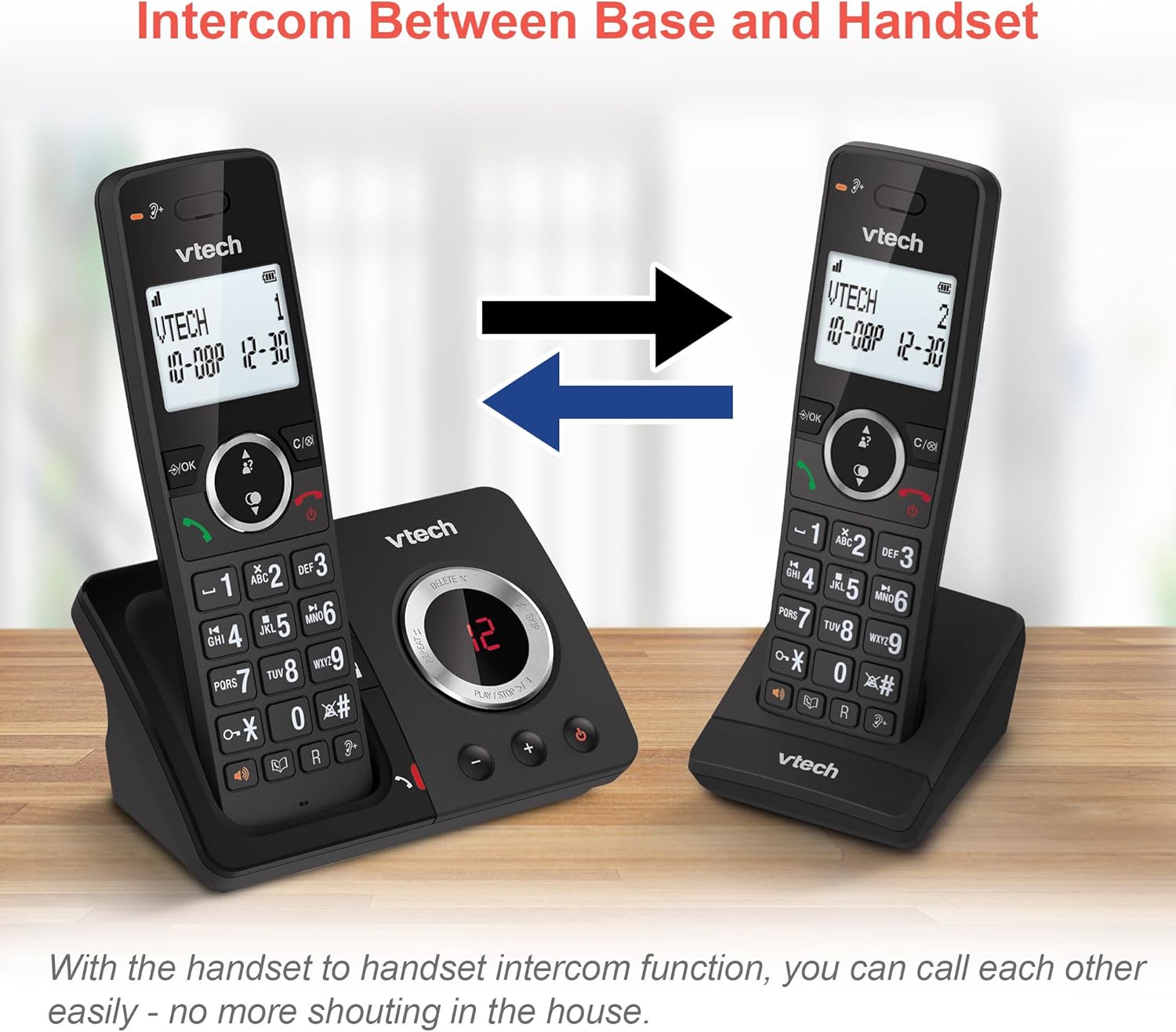
Image 7: Two VTech handsets illustrating the intercom feature, allowing direct communication between them.
4.8. 3-Way Conference Calling
Conduct a conference call with two internal callers (handsets) and one external caller.
- To Start a 3-Way Conference: While on an external call, initiate an intercom call to another handset. Once connected, press the Konferans button (or similar) to join all three parties.

Image 8: Depiction of a 3-way conference call in progress, showing three individuals communicating simultaneously.
4.9. Telefon Rehberi ve Tekrar Arama
- Telefon Defteri: Hızlı arama için telefon rehberine 100 adede kadar isim ve numara kaydedebilirsiniz.
- Son Numarayı Tekrar Ara: Access the last 10 dialed numbers for convenient redialing.
- Arayan Kimliği: View caller information for the last 20 incoming calls (requires subscription to caller ID service).

Resim 9: Bir kolaj gösterisiasing various features: the 100-name phonebook, caller ID with 20 call lists, 10 last number redial, and the impressive 18 hours talk time.
4.10. Ek Özellikler
- Alarm Fonksiyonu: Set an alarm to remind you of important events.
- Sessiz İşlevi: Görüşme sırasında gizliliğinizi korumak için mikrofonunuzu kapatın.
- Tuş takımı kilidi: Yanlışlıkla tuşlama yapılmasını önlemek için tuş takımını kilitleyin.
- EKO Modu: Reduces power consumption and transmission power when the handset is close to the base unit.
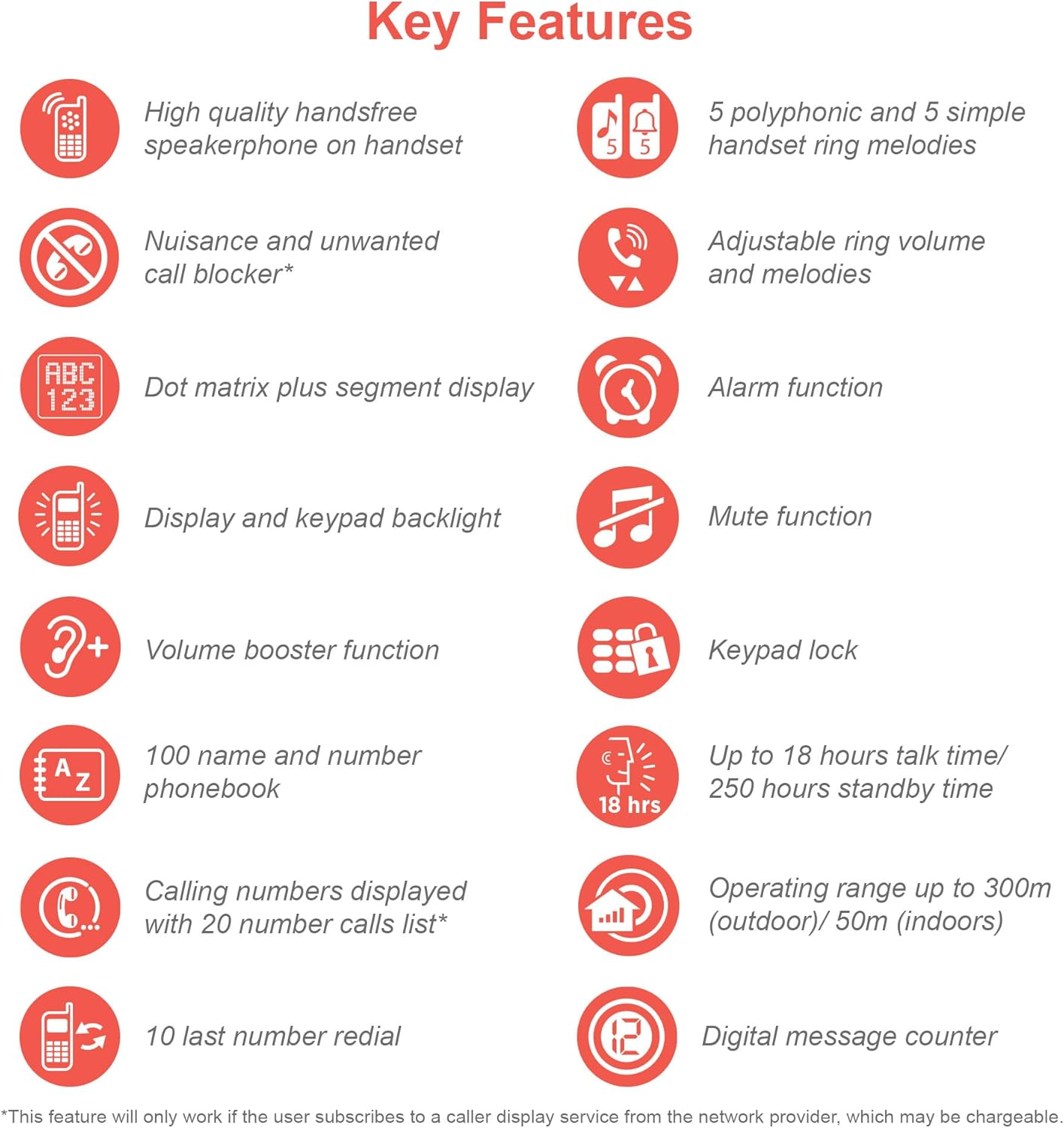
Image 10: An infographic summarizing the key features of the VTech ES2051, including handsfree speakerphone, nuisance call blocker, dot matrix display, volume booster, 100-name phonebook, 10 last number redial, 5 polyphonic ring melodies, alarm, mute, keypad lock, 18 hours talk time, 300m outdoor/50m indoor operating range, and digital message counter.
5. Bakım
- Temizlik: Clean the phone and base units with a soft, damp cloth. Do not use cleaning sprays or abrasive cleaners.
- Pil Bakım: If the phone will not be used for an extended period, remove the batteries from the handsets.
- Çevresel Koşullar: Avoid placing the phone in direct sunlight, near heat sources, or in areas with high humidity.
6. Sorun Giderme
| Sorun | Olası Neden | Çözüm |
|---|---|---|
| Çevir sesi yok | Telephone line cord is not connected or faulty. | Ensure the telephone line cord is securely plugged into the base unit and the wall jack. Test with another phone if possible. |
| Handset displays "Out of Range" | Handset is too far from the base unit or interference. | Ana üniteye daha yaklaşın. Ana üniteyi diğer elektronik cihazlardan uzaklaştırın. |
| Arayan kişiyi duyamıyorum / Arayan kişi beni duyamıyor | Ses seviyesi çok düşük veya mikrofonun sesi kapatılmış. | Adjust the earpiece/speaker volume. Check if the mute function is active. |
| Sesli yanıt makinesi mesajları kaydetmiyor. | Memory full or answering machine is off. | Delete old messages to free up memory. Ensure the answering machine is turned on. |
For more detailed troubleshooting, please refer to the full user manual available on the VTech support webalan.
7. Özellikler
- Modeli: ES2051
- Teknoloji: DECT6.0
- Pil Tipi: 4 x AAA Ni-MH şarj edilebilir pil (dahil)
- Konuşma Süresi: 18 saate kadar
- Bekleme Süresi: 250 saate kadar
- Answering Machine Recording Time: 30 dakikaya kadar
- Telefon Rehberi Kapasitesi: 100 isim ve numara
- Çağrı Engelleme Kapasitesi: Up to 100 blacklisted numbers
- Çalışma Aralığı: Up to 300m (outdoor) / 50m (indoor)
- Görüntülemek: Arka aydınlatmalı LCD
8. Ürün Bittiview Video
Video 1: Resmi bir ürünview video for the VTech ES2051 DECT Cordless Phone. This video highlights key features such as the twin handset design, digital answering machine, call blocker, volume booster, and handsfree speakerphone.
9. Garanti ve Destek
VTech products are manufactured to high quality standards. For warranty information, technical support, or to register your product, please visit the official VTech webSite üzerinden satın alabilir veya müşteri hizmetleriyle iletişime geçebilirsiniz. Satın alma belgenizi saklayın.
Çevrimiçi destek: www.vtech.co.uk/support


