1. Giriş
Welcome to the NARWAL S10 Pro user manual. This document provides essential information for the safe and efficient operation, maintenance, and troubleshooting of your new cordless wet dry vacuum mop. Please read this manual thoroughly before first use and keep it for future reference.

Image: The NARWAL S10 Pro Cordless Wet Dry Vacuum Mop with its charging base and accessories.
2. Kutuda Neler Var?
Your NARWAL S10 Pro package includes the following components:
- Vacuum Mop Unit (including Roller Brush and HEPA Filter)
- Halletmek
- Kendi kendini temizleyen Taban
- Temizleme Fırçası
- Yedek Rulo Fırça
- Yedek HEPA Filtresi
- Kullanıcı Kılavuzu

Image: A close-up of the NARWAL S10 Pro's cleaning head and various accessories, including a spare roller brush and filter.
3. Kurulum
- Paketin açılması: Tüm bileşenleri ambalajından dikkatlice çıkarın. Ambalajı, ilerideki taşıma veya depolama için saklayın.
- Kol Montajı: Sapı, yerine güvenli bir şekilde oturana kadar elektrikli süpürgenin ana gövdesine takın.
- Şarj İstasyonunun Yerleştirilmesi: Place the self-cleaning base on a flat, stable surface near a power outlet. Ensure there is enough space around the base for easy access.
- Başlangıç ücreti: Place the assembled vacuum mop onto the charging base. The display will indicate charging status. Fully charge the device before its first use.
Video: A user unboxes the NARWAL S10 Pro, assembles the handle, and places it on the charging base for initial setup.
4. Kullanım Talimatları
4.1 Su Deposunun Doldurulması
- Locate the clean water tank on the back of the main unit.
- Press the release button and pull the tank out.
- Open the tank cap and fill with clean water. For optimal cleaning, use NARWAL-approved cleaning solution as directed. Do not use foaming detergents.
- Securely close the cap and reinsert the tank into the unit until it clicks.
4.2 Açma ve Mod Seçimi
- Cihazı açmak için kulptaki güç düğmesine basın.
- Tilt the handle backward to unlock the vacuum mop from its upright position.
- Use the mode selection button to cycle through available cleaning modes:
- Otomatik mod: Automatically adjusts suction and water flow based on dirt detection for general cleaning.
- Turbo mod: Provides maximum suction and water for stubborn stains and heavy messes.
- Sessiz Mod: Operates with reduced noise for lighter cleaning tasks.
- Emme Modu: Su püskürtmeden sıvıları vakumlamak için.

Image: The NARWAL S10 Pro's display illustrating the five available cleaning modes for diverse needs.
4.3 Zeminlerinizi Temizlemek
Guide the vacuum mop across your hard floors. The self-propelling feature assists in movement, requiring minimal effort. For optimal results, move the device in a steady, overlapping pattern. The 180° fold-flat flexibility allows for easy cleaning under furniture and in tight spaces.

Image: The NARWAL S10 Pro head folded flat, showcasing its 180-degree flexibility for reaching under low furniture.

Image: The NARWAL S10 Pro cleaning under a low cabinet, highlighting its ability to reach tight spaces.

Image: A person effortlessly maneuvering the lightweight NARWAL S10 Pro across a floor.

Image: The NARWAL S10 Pro cleaning close to a baseboard, illustrating its precise edge cleaning capability.
5. Bakım
5.1 Kendi Kendini Temizleme ve Kurutma
After each use, return the vacuum mop to its self-cleaning base. Press the dedicated self-clean button (often indicated by a water droplet icon) to initiate the self-cleaning cycle. The device will clean its roller brush and then activate hot air drying to prevent odors and maintain hygiene.

Image: Visual representation of the NARWAL S10 Pro's self-cleaning and hot air drying functions.
Video: A demonstration of the NARWAL S10 Pro's self-cleaning cycle, showing the brush roll being cleaned and dried.
5.2 Emptying the Dirty Water Tank and Cleaning Filters
- Regularly empty the dirty water tank after each cleaning session. Press the release button and pull out the dirty water tank.
- Separate solid debris from liquid waste using the integrated filter system. Dispose of solids and pour out dirty water.
- Rinse the dirty water tank and the filter thoroughly with clean water. Allow all parts to air dry completely before reassembling.
- The HEPA filter should be cleaned periodically and replaced every 3-6 months, or as needed, depending on usage.

Image: A close-up of the dirty water tank, illustrating the wet-dry waste separation feature.
Video: Kısa bir ön izlemeview showing the removal and cleaning of the dirty water tank and filter.
5.3 Rulo Fırçanın Temizlenmesi
While the self-cleaning function handles most of the brush maintenance, occasional manual cleaning may be necessary. Remove the brush roll cover and then the brush roll itself. Use the provided cleaning brush to remove any tangled hair or debris. Rinse the brush roll under running water and allow it to dry completely before reinstallation.
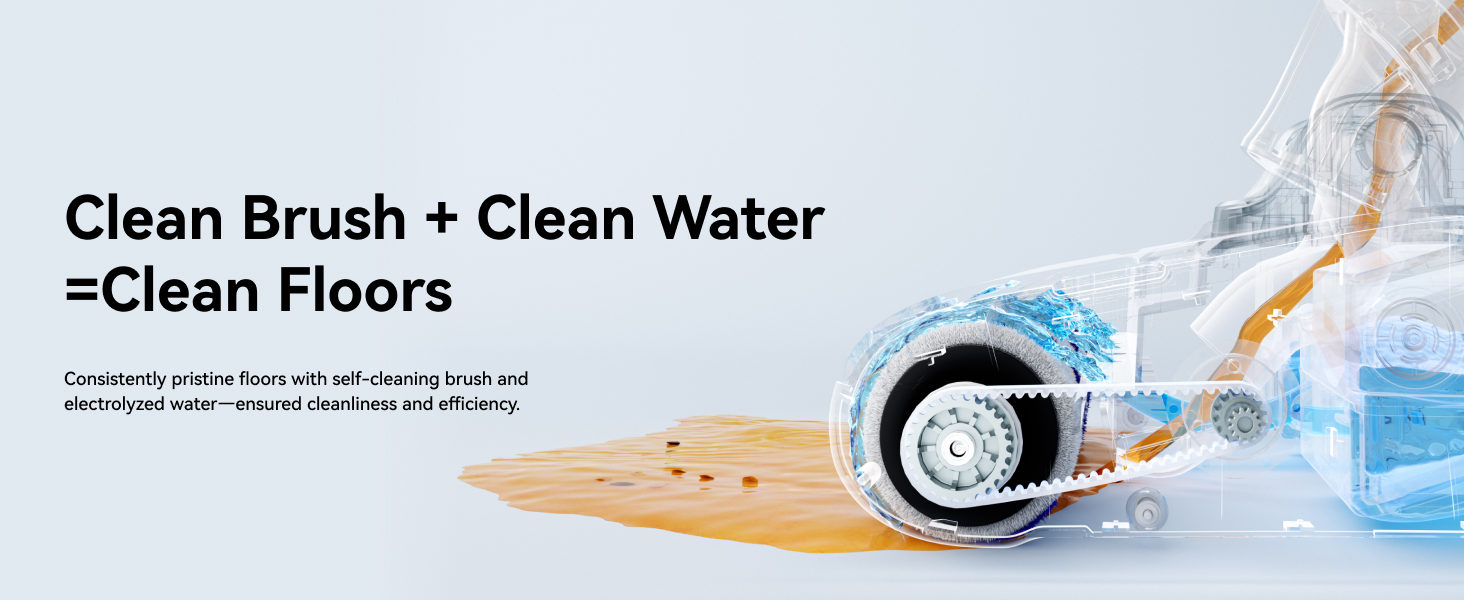
Resim: Dahili view of the NARWAL S10 Pro's cleaning head, showing the brush roll and water flow for effective cleaning.
6. Sorun Giderme
- Güç Yok: Ensure the device is fully charged and correctly seated on the charging base. Check the power adapter connection.
- Zayıf Emiş: Check if the dirty water tank is full or if the filter is clogged. Clean or replace the filter as needed. Ensure the brush roll is free of obstructions.
- Su Kaçağı: Verify that both clean and dirty water tanks are correctly installed and their caps are securely closed.
- Alışılmadık Gürültü: Inspect the brush roll for any foreign objects or tangled hair. Remove any obstructions.
- Hata Mesajları: Refer to the LCD display for specific error codes and consult the full user manual for detailed solutions.
7. Özellikler
| Özellik | Detay |
|---|---|
| Marka | NARWAL |
| Model Adı | S10 Pro (YJSC001) |
| Özel Özellikler | 14,000Pa Suction, Cordless, Lightweight, Self-Cleaning & Drying, Wet/Dry, 180° Flexibility |
| Filtre Türü | HEPA Filtre |
| Kablosuz mu? | Evet |
| Temiz Su Tankı Kapasitesi | 790 Mililitre |
| Netage | 750 watt |
| Şarj Süresi | 3.5 Saat |
| Önerilen Kullanımlar | Hard Floor, Tile Floor, Hardwood, Bare Floor |
| Ürün Boyutları | 28.7"U x 10.7"G x 13.8"Y |
| Pil Türü | Lityum-İyon |
| Gürültü Seviyesi | 72 Desibel |
| Pil Ömrü | 50 dakikaya kadar |
8. Garanti ve Destek
For warranty information, product registration, or technical support, please visit the official NARWAL website or contact customer service. Keep your purchase receipt as proof of purchase.
Çevrimiçi destek: Visit the NARWAL Store on Amazon


