1. Giriş
Welcome to the user manual for your MAXCOM FW67 Titan Pro Smartwatch. This device is designed to enhance your daily life by providing convenient access to notifications, health monitoring, and fitness tracking features directly from your wrist. Please read this manual carefully to ensure proper use and to fully understand the capabilities of your new smartwatch.
2. Güvenlik Bilgileri
- Cihazı sökmeye, onarmaya veya değiştirmeye çalışmayın. Bu, garantiyi geçersiz kılabilir ve hasara neden olabilir.
- Cihazı aşırı sıcaklıklardan, doğrudan güneş ışığından ve açık alevlerden uzak tutun.
- Cihazı şiddetli darbelere veya titreşimlere maruz bırakmaktan kaçının.
- This device is water-resistant (IP69K rating), suitable for splashes and swimming. However, avoid hot water, steam, or prolonged submersion in deep water.
- Consult a medical professional before starting any new exercise regimen or if you have any health concerns. The health data provided by the smartwatch is for reference only and should not be used for medical diagnosis or treatment.
- Yalnızca ürünle birlikte verilen şarj kablosunu ve uyumlu bir güç adaptörünü kullanın.
3. Paket İçeriği
Lütfen paketi aşağıdaki öğeler açısından kontrol edin:
- MAXCOM FW67 Titan Pro Smartwatch (Orange)
- Şarj kablosu
- Kullanıcı Kılavuzu
4. Cihaz Bittiview
Familiarize yourself with the main components of your smartwatch.

Şekil 4.1: Ön view of the MAXCOM FW67 Titan Pro Smartwatch, displaying the main watch face with time, date, weather, battery level, and activity metrics like calories burned and step count.

Şekil 4.2: Taraf view of the smartwatch, highlighting the 'POWER' button at the top and the 'BACK' button below it, both located on the right side of the watch casing.
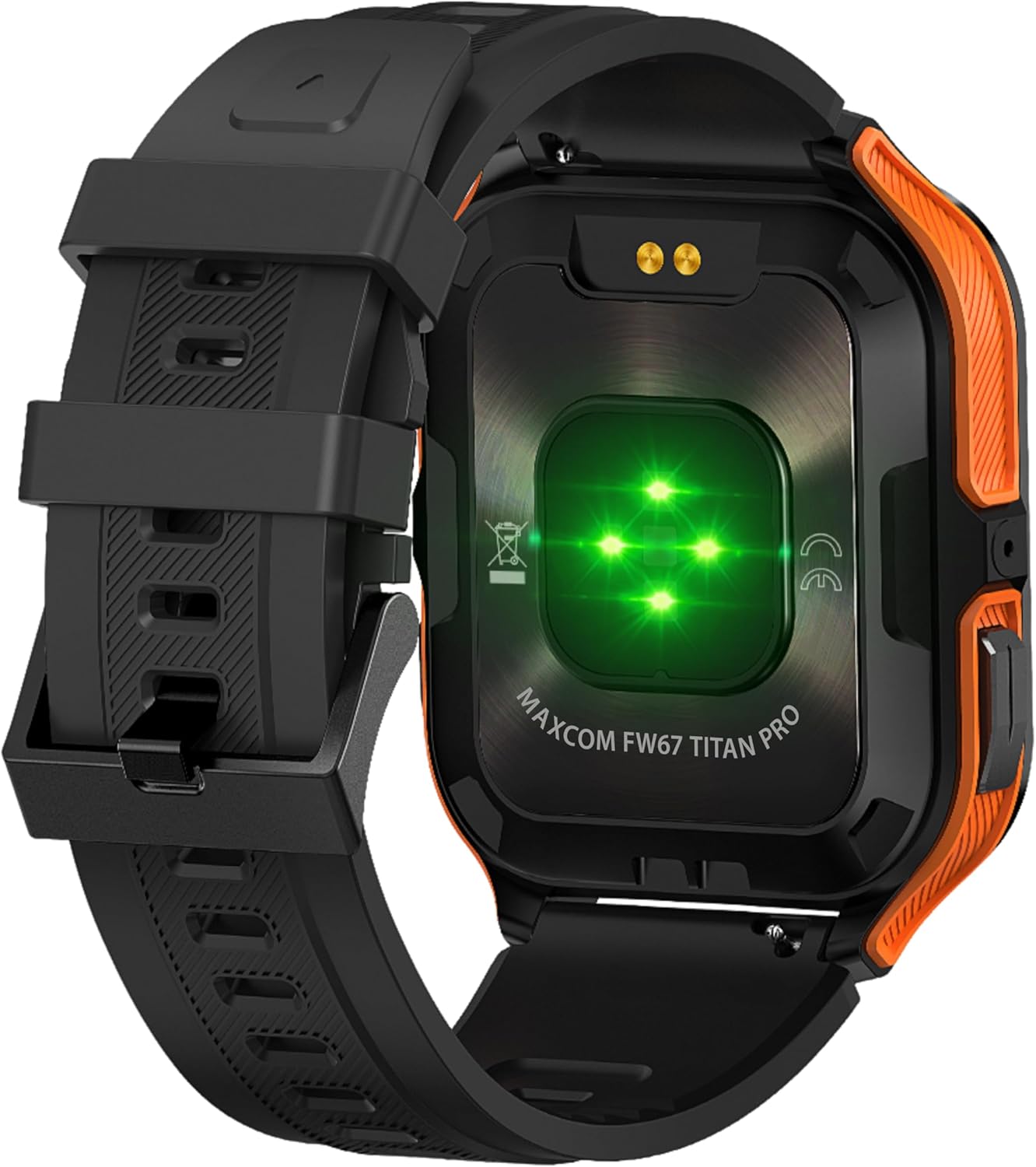
Şekil 4.3: Arka view of the smartwatch, showing the optical heart rate sensors (glowing green) and the magnetic charging pins. The model name 'MAXCOM FW67 TITAN PRO' is also visible.
5. Kurulum
5.1. İlk Şarj
İlk kullanımdan önce akıllı saatinizi tamamen şarj edin.
- Connect the charging cable to the magnetic charging pins on the back of the smartwatch. Ensure the pins align correctly.
- Plug the USB end of the charging cable into a compatible USB power adapter (e.g., 5V/1A) or a computer's USB port.
- Saat ekranı şarj durumunu gösterecektir. Tam şarj genellikle yaklaşık 2-3 saat sürer.
5.2. Uygulama Kurulumu ve Eşleştirme
To unlock the full potential of your smartwatch, you need to pair it with your smartphone via the dedicated companion application.
- Uygulamayı indirin: Arama the official MAXCOM smartwatch application (e.g., 'GloryFit' or similar, refer to packaging for exact app name) on the Google Play Store (for Android) or Apple App Store (for iOS). Install the app on your smartphone.
- Bluetooth'u etkinleştir: Akıllı telefonunuzda Bluetooth'un etkinleştirildiğinden emin olun.
- Uygulamayı açın: Launch the installed app and follow the on-screen instructions to create an account or log in.
- Cihaz Ekle: Within the app, navigate to the 'Device' or 'Add Device' section. The app will search for available smartwatches.
- Select Your Smartwatch: Select 'FW67 Titan Pro' from the list of discovered devices.
- Eşleştirmeyi Onayla: Hem telefonunuzda hem de akıllı saatinizde eşleştirme isteği görünebilir. Her iki cihazda da eşleştirmeyi onaylayın.
- Kurulumu Tamamla: Follow any remaining prompts in the app to set up your profile, permissions, and preferences.
6. Akıllı Saatinizi Çalıştırma
6.1. Temel Gezinme
- Güç Düğmesi: Press and hold to power on/off. Short press to wake the screen or return to the main watch face.
- Geri Düğmesi: Short press to go back to the previous screen or exit a function.
- Dokunmatik Ekran Hareketleri:
- Yukarı kaydırın: Hızlı ayarlar/kontrol merkezine erişin.
- Aşagı kaydır: View bildirimler.
- Sola/Sağa Kaydır: Navigate through widgets (e.g., activity, heart rate, weather).
- Musluk: Bir öğe seçin veya menüye girin.
6.2. Temel Özellikler

Şekil 6.1: The smartwatch display showcasing various health metrics including steps taken, calories burned, heart rate, blood oxygen saturation (SpO2), and blood pressure, along with battery status.
- Nabız İzleme: The watch continuously monitors your heart rate. Access this feature from the main menu or by swiping to the heart rate widget.
- Etkinlik Takibi: Tracks steps, distance, and calories burned throughout the day. Set daily goals in the companion app.
- Uyku İzleme: Derin uyku, hafif uyku ve uyanma süreleriniz de dahil olmak üzere uyku düzeninizi otomatik olarak takip eder. View Uygulamada detaylı analiz.
- Spor Modları: Select from various sports modes (e.g., running, walking, cycling) to track specific workout data. Start a workout from the 'Sport' menu.
- Bildirimler: Receive call, message, and app notifications directly on your wrist. Ensure notification permissions are granted in the companion app.
- Blood Oxygen (SpO2) & Blood Pressure: The watch can measure SpO2 and blood pressure. These measurements are for reference only and not for medical use.
- Hava durumu: View current weather conditions after syncing with the app and granting location permissions.
- Müzik Kontrolü: Akıllı telefonunuzdaki müzik çalmayı doğrudan saatinizden kontrol edin.
7. Bakım
- Temizlik: Regularly clean your smartwatch and strap with a soft, dry, lint-free cloth. If necessary, use a slightly damp Bezi hafif bir sabunla silin, ardından durulayın ve iyice kurulayın.
- Kimyasallardan Kaçının: Saatinizin yüzeyine ve contalarına zarar verebileceğinden, sert kimyasallar, temizleme çözücüleri veya güçlü deterjanlar kullanmayın.
- Şarj Portu: Keep the charging pins clean and dry to ensure proper charging.
- Depolamak: Uzun süre kullanılmadığı zamanlarda akıllı saati serin ve kuru bir yerde saklayın.
- Suya Dayanıklılık: While the watch is IP69K water-resistant, it is not recommended for diving or high-pressure water activities. Always dry the watch thoroughly after exposure to water.
8. Sorun Giderme
Akıllı saatinizle ilgili sorunlarla karşılaşırsanız, aşağıdaki yaygın sorunlar ve çözümlerine göz atın:
| Sorun | Çözüm |
|---|---|
| Akıllı saat açılmıyor. | Saatinizin tam şarjlı olduğundan emin olun. Saatinizi en az 30 dakika şarj cihazına takın. |
| Akıllı telefonla eşleştirilemiyor | 1. Ensure Bluetooth is enabled on your phone. 2. Make sure the smartwatch is within range. 3. Restart both the smartwatch and your phone. 4. Clear Bluetooth cache on your phone. 5. Try pairing through the app, not directly via phone's Bluetooth settings. |
| Bildirimler alınmadı. | 1. Check if the smartwatch is connected to the app. 2. Ensure notification permissions are granted for the app on your phone. 3. Verify that app notifications are enabled within the smartwatch app settings. 4. Disable 'Do Not Disturb' mode on both the watch and phone. |
| Yanlış sağlık verileri | 1. Ensure the watch is worn snugly on your wrist, not too loose or too tight. 2. Clean the sensors on the back of the watch. 3. Avoid excessive movement during measurements. 4. Remember that data is for reference and not medical diagnosis. |
| Kısa pil ömrü | 1. Reduce screen brightness. 2. Limit continuous heart rate monitoring if not needed. 3. Turn off unnecessary notifications. 4. Ensure the watch is fully charged each time. |
9. Özellikler
Key technical specifications for the MAXCOM FW67 Titan Pro Smartwatch:
| Özellik | Şartname |
|---|---|
| Marka | MAXCOM |
| Örnek | FW67 Titan Pro |
| Renk | Turuncu |
| İşletim Sistemi | Proprietary OS (compatible with Android/iOS) |
| Ekran Boyutu | 1.85 inç |
| Bağlantı | Bluetooth |
| Özel Özellikler | Heart Rate Monitor, Notifications, SpO2, Blood Pressure, Activity Tracking |
| Uyumlu Cihazlar | Akıllı telefon |
| Pil Bileşimi | Lityum iyon |
| Pil Kapasitesi | 380 mAh |
| Küresel Konumlama Sistemi | Akıllı telefon üzerinden GPS |
| Şekil | Dikdörtgen |
10. Garanti ve Destek
Your MAXCOM FW67 Titan Pro Smartwatch comes with a standard manufacturer's warranty. Please refer to the warranty card included in your package for specific terms and conditions, including warranty duration and coverage details. For technical support, troubleshooting assistance beyond this manual, or warranty claims, please contact MAXCOM customer service through their official webSite veya ürün belgelerinizle birlikte verilen iletişim bilgileri.


