giriiş
Thank you for choosing the TECNO TRUE 1 TWS Earbuds. This manual provides essential information on setting up, operating, maintaining, and troubleshooting your new earbuds. Please read it carefully before use to ensure optimal performance and longevity of your device.
The TECNO TRUE 1 TWS Earbuds are designed to deliver a superior audio experience with advanced features such as 42 dB Active Noise Cancellation, deep bass from 10mm drivers, and a long-lasting battery life of up to 45 hours with the charging case. They are also IPX5 rated for sweat, water, and dust resistance, making them suitable for various activities.
Kutuda Neler Var?
- TECNO TRUE 1 TWS Earbuds (Left and Right)
- Şarj Kutusu
- Kullanıcı Kılavuzu
- Ear Tip Pairs (various sizes)
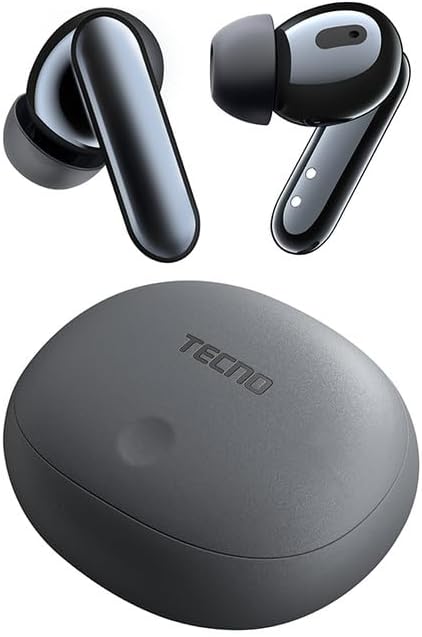
Image: The TECNO TRUE 1 TWS Earbuds and their charging case, showcasinşık tasarımı.
Kurmak
1. Kulaklıkları ve Kutuyu Şarj Etme
Before first use, fully charge the earbuds and the charging case. Connect the charging case to a power source using a compatible USB cable. The indicator lights on the case will show the charging status.

Image: The TECNO TRUE 1 TWS charging case connected to a charging cable, illustrating the charging process.
Place the earbuds into the charging case. They will begin charging automatically. A full charge provides up to 6 hours of playback for the earbuds, and the case extends total playtime to 45 hours.
2. Cihazınızla Eşleştirme
- Kulaklıkların şarj kutusunda olduğundan ve kutu kapağının açık olduğundan emin olun.
- Cihazınızda (akıllı telefon, tablet vb.) Bluetooth’u etkinleştirin.
- Arama new Bluetooth devices. The earbuds should appear as "TECNO TRUE 1" or similar.
- Eşleştirilecek kulaklıkları seçin. Bağlantının başarılı olduğu sesli bir uyarıyla onaylanacaktır.
The earbuds support pop-up connection for compatible devices, simplifying the pairing process.
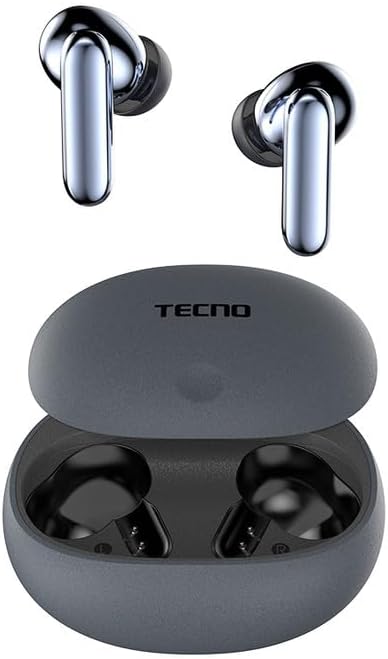
Image: The TECNO TRUE 1 TWS Earbuds resting inside their open charging case, ready for pairing.
3. Kulaklıkların Takılması
Gently insert the earbuds into your ear canals. Rotate them slightly to find a comfortable and secure fit. Choose the appropriate ear tip size from the included pairs for optimal sound quality and noise cancellation.
Kullanım Talimatları
Dokunmatik Kontroller
The TECNO TRUE 1 TWS Earbuds feature intuitive touch controls on each earbud. The specific functions may vary slightly based on your device and app, but common controls include:
- Tek Dokunuş: Müzik çalma/duraklatma, Çağrı cevaplama/sonlandırma.
- Çift Dokunuş (Sol/Sağ): Next/Previous track (may vary).
- Üçlü Dokunma: Voice Assistant'ı etkinleştirin.
- Uzun basma: Switch between Active Noise Cancellation (ANC) and Transparency Mode.
Aktif Gürültü Önleme (ANC) ve Şeffaflık Modu
The earbuds offer 42 dB Active Noise Cancellation to minimize ambient sounds, providing a more immersive listening experience. Transparency Mode allows you to hear your surroundings without removing the earbuds, which is useful for awareness in busy environments.
To switch between ANC and Transparency Mode, perform a long press on either earbud's touch sensor.
Bakım
Temizlik
Düzenli temizlik ses kalitesinin ve hijyenin korunmasına yardımcı olur:
- Kulaklıklarınızı ve şarj kutusunu silmek için yumuşak, kuru ve tiftiksiz bir bez kullanın.
- Kulaklık uçlarını kulaklıklardan çıkarın ve bir bezle temizleyin.amp cloth and mild soap if necessary. Rinse thoroughly and dry completely before reattaching.
- Kulaklık telinin içindeki kulak kiri veya kalıntıları küçük, yumuşak bir fırça veya pamuklu çubuk kullanarak nazikçe temizleyin.
Depolamak
Kullanılmadığı zamanlarda, kulaklıkları tozdan, hasardan korumak ve şarjlarının dolu kalmasını sağlamak için daima şarj kutusunda saklayın.
Suya Dayanıklılık (IPX5)
The earbuds are IPX5 rated, meaning they are resistant to sweat and splashes of water. They are not designed for submersion in water. Avoid exposing them to heavy rain or showering with them. Ensure the earbuds and charging port are dry before charging to prevent damage.
Sorun giderme
| Sorun | Olası Neden | Çözüm |
|---|---|---|
| Kulaklıklar eşleşmiyor | Low battery, out of range, not in pairing mode, previously paired to another device. | Charge earbuds and case. Ensure Bluetooth is on and within range. Place earbuds in case, close and reopen lid to re-enter pairing mode. Disconnect from other devices. |
| Ses yok veya düşük ses seviyesi | Volume too low, earbuds not properly seated, debris in earbud mesh, connection issue. | Increase volume on device and earbuds. Adjust earbud fit. Clean earbud mesh. Re-pair earbuds. |
| Şarj sorunları | Cable or adapter fault, dirty charging contacts, case battery empty. | Try a different cable/adapter. Clean charging contacts on earbuds and case. Charge the charging case. |
| ANC etkili bir şekilde çalışmıyor | Improper fit, ear tips not sealed, very high-frequency noise. | Adjust earbud fit and try different ear tip sizes for a better seal. ANC is most effective on low-frequency sounds. |
Özellikler
| Özellik | Detay |
|---|---|
| Marka | Teknoloji |
| Model Adı | 10309821 |
| Renk | Gri |
| Malzeme | Plastik |
| Kulak Yerleşimi | Kulak içi |
| Form Faktörü | Kulak içi |
| Gürültü İzolasyonu | Aktif Gürültü Engelleme (42 dB) |
| Bağlantı Teknolojisi | Kablosuz |
| Kablosuz İletişim Teknolojisi | Bluetooth |
| Uyumlu Cihazlar | Akıllı Telefonlar, Tabletler, Dizüstü Bilgisayarlar, Masaüstü Bilgisayarlar, Akıllı Hoparlörler |
| Belirli Ürün Kullanımları | Travel, Sport |
| Su Direnç Seviyesi | IPX5 (Suya Dayanıklı) |
| Frekans Aralığı | 20 ila 20,000 Hz |
| Oynatma Süresi | 6 saate kadar (kulaklık), 45 saate kadar (şarj kutusuyla birlikte) |
| Dahil Bileşenler | Charging Case, User Manual, Ear Tip Pairs |
Garanti ve Destek
For warranty information and customer support, please refer to the official TECNO webWeb sitesini ziyaret edin veya yerel satıcınızla iletişime geçin. Garanti talepleri için satın alma belgenizi saklayın.
Daha fazla yardım için şu adresi ziyaret edebilirsiniz: product page on Amazon.com.be or contact TECNO customer service directly.