1. Giriş
The syitren R300 is a portable desktop retro CD player designed for home use. It features Bluetooth connectivity and fiber optic output, allowing users to connect to various external audio systems. This manual provides detailed instructions for setting up, operating, maintaining, and troubleshooting your R300 CD player.

Figure 1: syitren R300 CD Player - Front View
2. Kutuda Neler Var?
Lütfen paket içeriğini kontrol ederek tüm öğelerin mevcut olduğundan emin olun:
- syitren R300 CD Player
- Tip-C Güç Kablosu
- 1 adet AAA pil (dahil)
3. Kurulum
3.1 Açma ve Şarj Etme
The R300 CD player is powered via a Type-C cable. It includes a built-in 2000mAh battery, providing over 6 hours of playback on a full charge. Connect the provided Type-C power cable to the DC IN 5V port on the back of the unit and plug the other end into a compatible USB power adapter (not included).

Figure 2: Rear Ports (DC IN 5V and SPDIF)
3.2 Ses Aygıtlarına Bağlanma
The R300 CD player does not have a built-in speaker. It requires connection to external audio devices for sound output. This design helps reduce the impact of audio vibration on the CD player, allowing users to choose their preferred speakers and power amplifer ekipmanı.
3.2.1 Bluetooth Bağlantısı
The R300 CD player can connect wirelessly to Bluetooth headphones or speakers.
- Ensure your external Bluetooth audio device is in discovery mode.
- On the R300, activate Bluetooth pairing mode by holding the designated Bluetooth button (refer to controls section for button identification).
- Once connected, a solid Bluetooth icon will appear on the R300's display.
Video 1: Demonstrates how to connect the R300 CD Player to an external stereo system using Bluetooth. The video shows activating Bluetooth on the R300 and pairing it with a separate speaker, confirming connection via the display icon.
3.2.2 Fiber Optic (SPDIF) Output
For high-quality digital audio output, connect the R300 to an audio receiver or amplifier using a fiber optic cable (not included) via the SPDIF port on the back of the unit.
3.2.3 AUX Çıkışı
The R300 also features an AUX output for analog audio connection to compatible devices using a 3.5mm audio cable (not included).
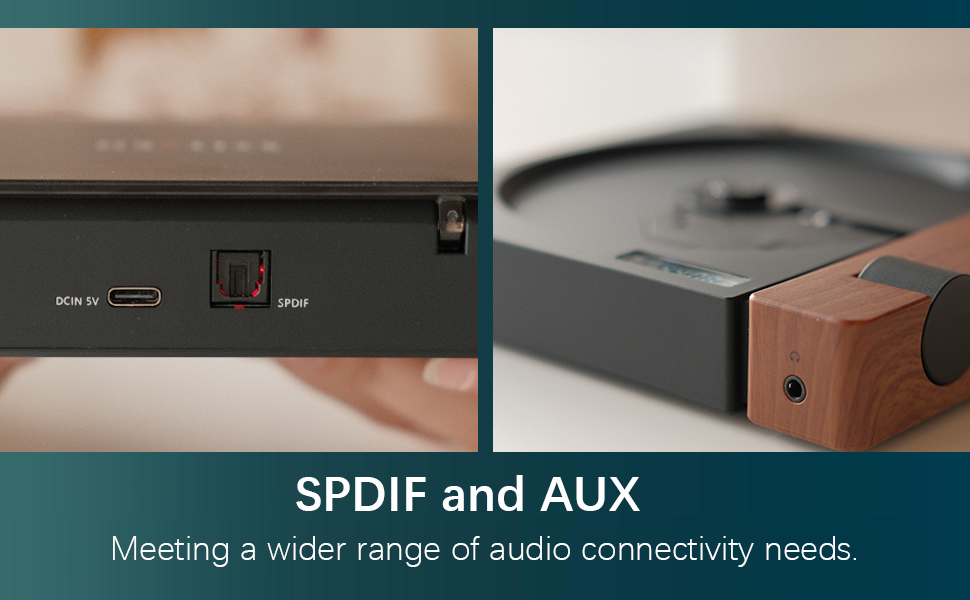
Figure 3: SPDIF and AUX Connectivity Options
4. Kullanım Talimatları
4.1 CD çalma
- Disk kapağını yavaşça açın.
- Place a CD onto the spindle, ensuring it is seated correctly.
- Disk kapağını kapatın.
- Press the Play/Pause button (orange button) to begin playback.
- Use the Skip Forward and Skip Backward buttons to navigate between tracks.
- Ses düğmesini kullanarak sesi ayarlayın.

Figure 4: Opening the Disc Cover

Şekil 5: Kontrol Paneli ve Ekran
4.2 Kontrollerview
The R300 features a minimalist control panel on the right side of the unit:
- Güç düğmesi: Located on the back/side of the unit (refer to Figure 2).
- Ses Düğmesi: Rotates to adjust audio output level.
- Oynat/Duraklat Düğmesi: Orange button to start or pause CD playback.
- Atla Düğmeleri: Black buttons for skipping tracks forward or backward.
- Bluetooth Activation Button: (Likely one of the black buttons, or the top one, as shown in video) Used to initiate Bluetooth pairing.
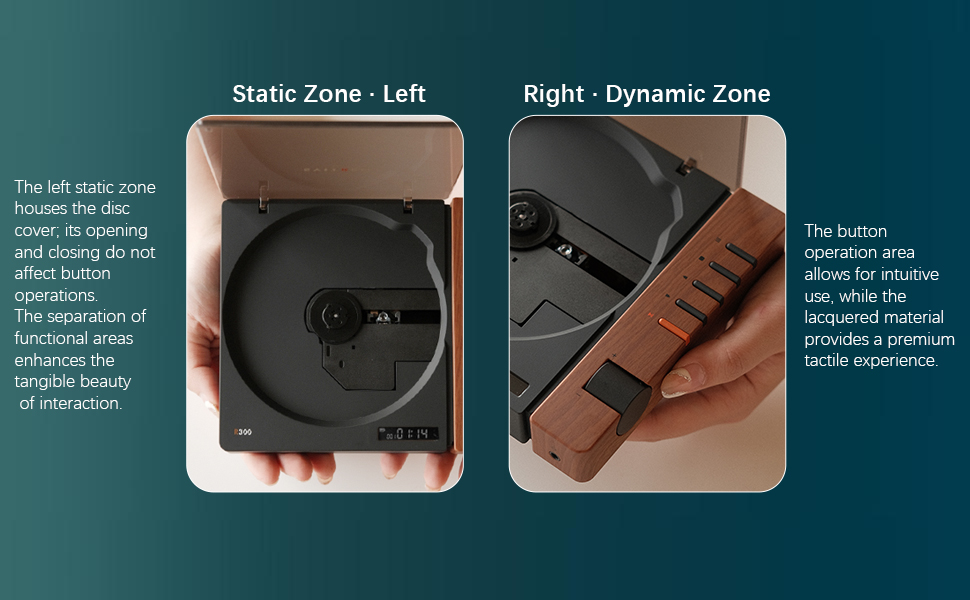
Figure 6: Functional Zones of the R300
5. Bakım
- Cihazı yumuşak, kuru bir bezle silerek temiz tutun. Aşındırıcı temizleyicilerden veya çözücülerden kaçının.
- Ensure the disc tray is free of dust and debris to prevent playback issues.
- When not in use, store the CD player in a cool, dry place away from direct sunlight and extreme temperatures.
- Parmak izi ve çizik oluşmasını önlemek için CD'leri kenarlarından tutun.
6. Sorun Giderme
| Sorun | Olası Neden | Çözüm |
|---|---|---|
| Oynatıcı açılmıyor. | Pil bitmiş veya güç kablosu bağlı değil. | Charge the unit using the Type-C power cable. Ensure the power cable is securely connected. |
| "NO CD" message displayed. | No CD inserted, CD is dirty/scratched, or CD is not properly seated. | Insert a CD. Clean the CD with a soft cloth. Ensure the CD is placed correctly on the spindle. |
| Ses çıkışı yok. | No external speaker connected, volume too low, or incorrect output mode selected. | Connect an external speaker via Bluetooth, SPDIF, or AUX. Increase the volume. Ensure the external device is properly configured for input. |
| Bluetooth bağlantı sorunları. | Device not in pairing mode, out of range, or interference. | Her iki cihazın da eşleştirme modunda olduğundan emin olun. Cihazları birbirine yaklaştırın. Diğer kablosuz cihazlardan kaynaklanan paraziti azaltın. |
| Player randomly shuts off. | Pil zayıf veya dahili arıza. | Pilin tamamen şarj olduğundan emin olun. Sorun devam ederse müşteri desteğiyle iletişime geçin. |
7. Özellikler
- Model Adı: R300
- Marka: sytren
- Ürün Ölçüleri: 6.38 x 5.79 x 1.28 inç
- Ürün Ağırlığı: 14.1 ons
- Piller: 1 adet AAA pil gereklidir (dahil)
- Bağlantı Teknolojisi: Bluetooth, SPDIF, AUX
- Özellik: Taşınabilir
- Üretici: syitren/Guangdong Kaiping Electronics Co., Ltd
- Pil Kapasitesi: Built-in 2000mAh (more than 6 hours playback)
8. Garanti ve Destek
For warranty information and customer support, please refer to the product's official Amazon listing page or visit the syitren official webSite. Satın alma fişinizi, garanti talepleriniz için saklayın.
Üretici: syitren/Guangdong Kaiping Electronics Co., Ltd
Marka Mağazası: Visit the syitren Store on Amazon


