1. Önemli Güvenlik Talimatları
Lütfen bu ürünü çalıştırmadan önce tüm güvenlik talimatlarını okuyun ve anlayın. Bu kılavuzu ileride başvurmak üzere saklayın.
- Üniteyi yağmura, neme veya aşırı sıcaklıklara maruz bırakmayın.
- Üniteyi radyatör, kalorifer ızgarası, soba veya ısı üreten diğer cihazlar gibi ısı kaynaklarının yakınına yerleştirmekten kaçının.
- Sadece üretici tarafından belirtilen aparatları/aksesuarları kullanın.
- Yıldırımlı havalarda veya uzun süre kullanılmayacaksa bu cihazın fişini çekin.
- Tüm servis işlemleri için kalifiye servis personeline başvurun. Cihaz herhangi bir şekilde hasar gördüğünde servis gereklidir.
- Ünitenin çevresinde yeterli havalandırma olduğundan emin olun. Havalandırma açıklıklarını hiçbir şekilde kapatmayın.
- Güç kablosunun üzerine basılmasını veya sıkışmasını önleyin.
2. Paket İçeriği
Aşağıda listelenen tüm öğelerin paketinizde bulunduğunu doğrulayın:
- 1x syitren PARON II Record Player
- 1x Kullanım Kılavuzu
- 1x Toz Kapağı
- 1x 12V AC Power Adapter

3. Ürün Bittiview
Familiarize yourself with the main components of your syitren PARON II Record Player.


4. Kurulum
- Üniteyi Paketinden Çıkarın: Pikapı ve tüm aksesuarlarını ambalajından dikkatlice çıkarın.
- Place the Dust Cover: Position the dust cover onto the hinges at the back of the unit.
- Gücü bağlayın: Plug the 12V AC power adapter into the DC IN port on the back of the record player, then plug the adapter into a wall outlet.
- Karşı ağırlığı ayarlayın: The tonearm features an adjustable counterweight. Carefully balance the tonearm so it floats horizontally. Then, rotate the counterweight to the recommended tracking force (refer to cartridge specifications, typically around 2.5g for the AT3600L). This ensures optimal sound quality and prevents record damage.
- Patinaj Önleyici Ayar: The anti-skating system helps prevent the stylus from skipping. Adjust this setting according to the instructions provided with the cartridge or by testing with a blank record.

5. Kullanım Talimatları
5.1 Vinil Plak Çalmak
- Güç Açık: Turn the power knob to switch on the unit.
- Hızı Seçin: Choose the appropriate speed (33 or 45 RPM) for your vinyl record using the speed selector switch.
- Yer Kaydı: Carefully place your vinyl record on the platter. If playing a 45 RPM single, use the included adapter.
- Kolu Kaldır: Tonearm kaldırmak için tonearm kaldırma kolunu kullanın.
- Position Stylus: Pikap kolunu, plağın istenen başlangıç oluğunun üzerine yavaşça hareket ettirin.
- Alt Kol: Kaldırma kolunu kullanarak pikap kolunu yavaşça indirin. İğne plağa temas edecek ve çalma başlayacaktır.
- Sesi Ayarla: Use the volume knob to set the desired listening level.
The record player features an auto-stop function that will stop the platter approximately three minutes after the record ends. The tonearm will not auto-return.

5.2 Bluetooth Bağlantısı
The syitren PARON II Record Player can receive audio wirelessly from Bluetooth-enabled devices.
- Bluetooth'u etkinleştir: Switch the function selector to Bluetooth mode. The indicator light will flash, indicating it's in pairing mode.
- Eşleştirme Cihazı: On your smartphone, tablet, or other Bluetooth device, enable Bluetooth and search for available devices. Select "syitren PARON II" (or similar name) from the list.
- Onay: Once paired, the indicator light on the record player will stop flashing and remain solid. You can now stream audio from your device to the record player's built-in speakers.
5.3 Harici Ses Bağlantıları
The unit supports both Aux-in and RCA output for versatile audio connections.
- Yardımcı giriş: Connect an external audio source (e.g., MP3 player, CD player) to the AUX IN port using a 3.5mm audio cable. Select AUX mode on the record player to play audio from the connected device.
- RCA Çıkışı: Connect the RCA output jacks on the back of the record player to an external amplifier or powered speakers using RCA cables. This allows you to use the record player as a source for a larger audio system.
6. Bakım
6.1 Kalemin Temizlenmesi
A clean stylus ensures optimal sound quality and extends the life of your records. Use a soft brush designed for stylus cleaning, brushing gently from back to front.
6.2 Ünitenin Temizlenmesi
Wipe the unit with a soft, dry cloth. For stubborn marks, a slightly damp Önce bir bez kullanılabilir, ardından kuru bir bezle silin. Aşındırıcı temizleyicilerden veya çözücülerden kaçının.
6.3 Dust Cover Care
The dust cover protects your turntable. Clean it with a soft, lint-free cloth. Avoid harsh chemicals that may scratch or cloud the plastic.
7. Sorun Giderme
Sorunlarla karşılaşırsanız aşağıdaki yaygın sorunlara ve çözümlere bakın:
| Sorun | Olası Çözüm |
|---|---|
| Güç yok | Güç adaptörünün cihaza ve çalışan bir elektrik prizine güvenli bir şekilde bağlı olduğundan emin olun. |
| Hoparlörlerden ses gelmiyor | Check volume level. Ensure correct input mode (Phono, Aux, Bluetooth) is selected. |
| Atlamalı veya bozuk ses | Clean the record and stylus. Re-adjust the tonearm counterweight and anti-skating. Ensure the record player is on a stable, level surface. |
| Bluetooth eşleştirmiyor | Ensure the record player is in Bluetooth pairing mode. Disable and re-enable Bluetooth on your device. Move closer to the record player. |
Sorunlar devam ederse, lütfen yardım için müşteri destek ekibiyle iletişime geçin.
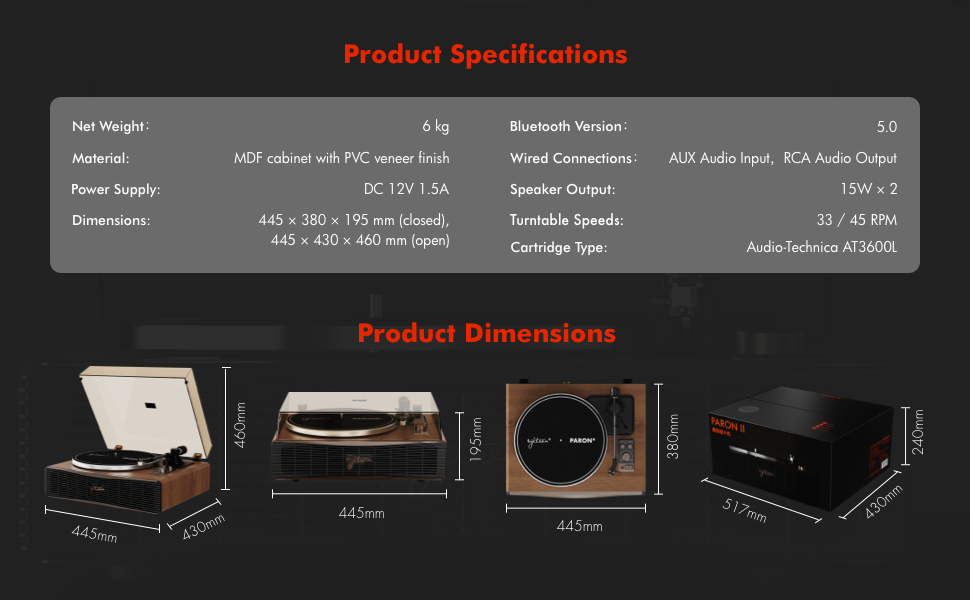
8. Özellikler
| Özellik | Detay |
|---|---|
| Model Adı | PARON II |
| Ürün Model Numarası | SN13 |
| Ürün Boyutları | 17.4 x 14.96 x 7.48 inches (445 x 380 x 195 mm closed) |
| Ürün Ağırlığı | 16 pound (6 kg) |
| Malzeme | MDF cabinet with PVC veneer finish (Wood, Metal, Plastic) |
| Döner Tabla Hızları | 33 1/3, 45 dev/dak |
| Kartuş Tipi | Audio-Technica AT3600L (Magnet-type) |
| Bluetooth Sürümü | 5.0 |
| Kablolu Bağlantılar | AUX Audio Input, RCA Audio Output |
| Hoparlör Çıkışı | 15W x 2 (Built-in 2.5" woofer and 2" tweeter) |
| Güç Kaynağı | DC 12V 1.5A |
| Özel Özellikler | Adjustable Counterweight, Built-In Speaker, Built-In Bluetooth Receiver, RCA Output, Suspension Shock Absorption System, S5 Motor System |
9. Garanti ve Destek
The syitren PARON II Record Player is designed for reliable performance. For warranty information or technical support, please refer to the contact details provided with your purchase documentation or visit the official syitren webalan.
Herhangi bir garanti talebiniz için lütfen satın alma belgenizi saklayın.


