1. Giriş
This manual provides detailed instructions for the installation, operation, maintenance, and troubleshooting of your maXpeedingrods 7" Portable Car Stereo. Please read this manual thoroughly before using the device to ensure proper functionality and safety.
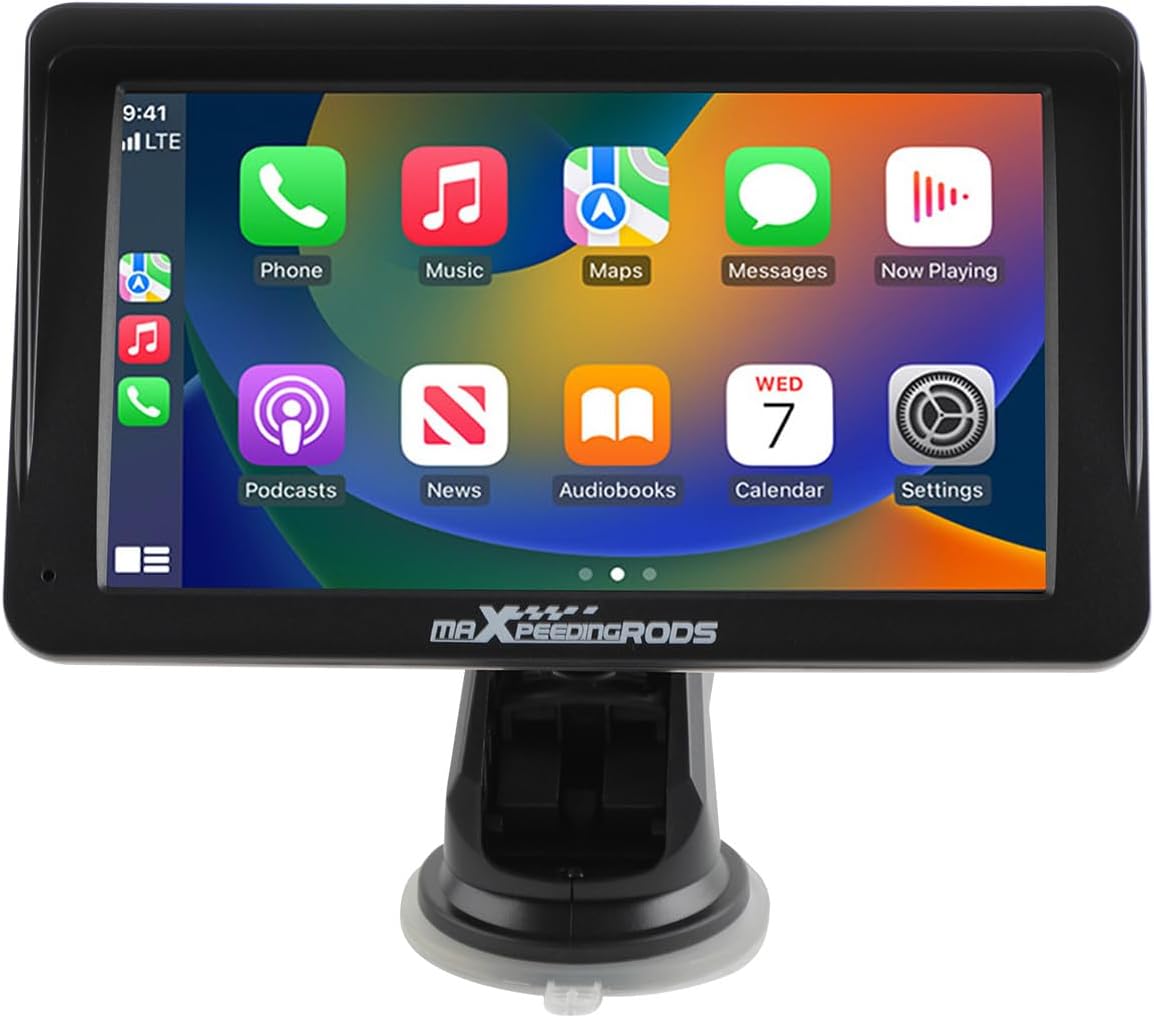
Figure 1.1: maXpeedingrods 7" Portable Car Stereo
Temel Özellikler:
- 7" HD IPS Display (1024*600 resolution)
- Kablosuz Apple CarPlay ve Android Auto
- AHD Backup Camera support
- GPS Navigation & Voice Control (Siri/Google Assistant)
- Bluetooth connectivity and Mirror Link functionality
- Easy, non-invasive installation
2. Paket İçeriği
Aşağıda listelenen tüm ürünlerin paketinizde mevcut olduğundan emin olun. Eksik veya hasarlı bir ürün varsa, lütfen müşteri hizmetleriyle iletişime geçin.

Şekil 2.1: Kutuda Neler Var?
- Portable Car Stereo Device
- Backup Camera + Camera Cable
- GPS Kablosu
- Mounting Bracket (with suction cup)
- Power Cable (cigarette lighter adapter)
- AUX Kablosu
3. Kurulum ve Kurulum
3.1 Cihaz Montajı
The portable car stereo is designed for easy, non-permanent installation on your dashboard or windshield.
- Temiz Yüzey: Ensure the dashboard or windshield surface is clean and dry where you intend to mount the device.
- Braketi Takın: Secure the mounting bracket to the device.
- Pozisyon Cihazı: Peel off the protective film from the suction cup and firmly press the bracket onto the chosen surface. Engage the locking mechanism on the suction cup for a secure hold.

Şekil 3.1: Kolay Kurulum Adımları
3.2 Güç Bağlantısı
Connect the provided power cable to the device and then plug the cigarette lighter adapter into your vehicle's 12V-24V power socket.
3.3 Dış Bağlantılar
The device features various ports for connectivity:

Figure 3.2: Device Ports
- Güç kablosu: For connecting to the vehicle's power supply.
- TF Kart Yuvası: For inserting a TF (MicroSD) card for media playback.
- USB BAĞLANTI: USB cihazlarını bağlamak veya şarj etmek için.
- AVİN: For connecting the AHD backup camera.
- SES: For AUX audio output.
3.4 Geri Görüş Kamerası Montajı (İsteğe Bağlı)
If you choose to install the AHD backup camera, connect its cable to the AVIN port on the main unit. Route the camera cable carefully to the rear of your vehicle and mount the camera in a suitable position, typically near the license plate. Ensure the camera is connected to your vehicle's reverse light power for automatic activation when reversing.

Figure 3.3: AHD Backup Camera Features
3.5 Araç Uyumluluğu
The device is compatible with a wide range of vehicles supporting 12V-24V power systems.

Figure 3.4: Wide Vehicle Compatibility
4. Kullanım Talimatları
4.1 Açma/Kapatma
The device will power on automatically when your vehicle's ignition is turned on and power is supplied to the cigarette lighter socket. To power off, simply turn off your vehicle's ignition or unplug the power cable.
4.2 Dokunmatik Ekran Kullanımı
The device features a responsive 7-inch HD IPS touchscreen with 1024x600 resolution and adjustable brightness for clear visibility.

Figure 4.1: Touchscreen Features
4.3 Kablosuz Apple CarPlay ve Android Auto
Connect your smartphone wirelessly via Bluetooth to access Apple CarPlay or Android Auto. This allows you to use your phone's navigation, music, messaging, and other compatible apps directly on the car stereo display.
- Bluetooth'u etkinleştir: Akıllı telefonunuzda Bluetooth'u etkinleştirin.
- Eşleştirme Cihazı: On the car stereo, navigate to the Bluetooth settings and pair with your smartphone.
- CarPlay/Android Auto'yu etkinleştirin: Once paired, the device should prompt you to activate Apple CarPlay or Android Auto. Follow the on-screen instructions.

Şekil 4.2: Kablosuz CarPlay ve Android Auto Bağlantısı
4.4 GPS Navigasyon ve Ses Kontrolü
Utilize your preferred navigation apps (e.g., Google Maps, Apple Maps) through Apple CarPlay or Android Auto. Voice control features (Siri or Google Assistant) are supported for hands-free operation, allowing you to manage calls, music, and navigation commands safely while driving.

Figure 4.3: GPS Navigation and Voice Control
4.5 Ayna Bağlantısı
The Mirror Link function allows you to mirror your smartphone's screen directly onto the car stereo display. This is useful for apps not natively supported by CarPlay or Android Auto.
4.6 Ses Çıkış Modları
The car stereo offers multiple ways to output audio to your vehicle's sound system:

Figure 4.4: Audio Output Options
- Bluetooth: Stream audio wirelessly to your vehicle's Bluetooth-enabled stereo (if available).
- AUX Kablo Girişi: Connect the provided AUX cable from the stereo's AUDIO port to your vehicle's AUX input for a wired audio connection.
- FM Verici: Broadcast audio from the portable stereo to your vehicle's FM radio by tuning both to the same unused FM frequency.
- Dahili Hoparlör: The device has a built-in speaker for direct audio output.
5. Bakım
5.1 Temizlik
To clean the device, use a soft, dry, lint-free cloth. For stubborn smudges on the screen, lightly dampen the cloth with water or a screen-safe cleaning solution. Avoid using harsh chemicals, abrasive cleaners, or solvents, as these can damage the screen and casing.
5.2 Depolama
Cihazınızı uzun süre saklayacaksanız, güç bağlantısını kesin ve doğrudan güneş ışığından ve aşırı sıcaklıklardan uzakta, serin ve kuru bir yerde saklayın.
6. Sorun Giderme
If you encounter issues with your maXpeedingrods car stereo, please refer to the following common problems and solutions:
| Sorun | Olası Neden | Çözüm |
|---|---|---|
| Cihaz açılmıyor. | No power supply; faulty cable; vehicle socket issue. | Check power cable connection. Ensure vehicle's cigarette lighter socket is functional. Try a different power source if available. |
| Kablosuz CarPlay/Android Auto bağlantısı kurulamıyor. | Bluetooth not enabled; incorrect pairing; software glitch. | Ensure Bluetooth is active on your phone and the stereo. Delete previous pairings and re-pair. Restart both the stereo and your phone. |
| Ses yok veya ses kalitesi düşük. | Incorrect audio output mode; volume too low; loose cable. | Verify the selected audio output mode (Bluetooth, AUX, FM). Adjust volume on both the stereo and your vehicle's system. Check AUX cable connections. Ensure FM frequency is clear if using FM transmitter. |
| Dokunmatik ekran yanıt vermiyor. | Geçici yazılım sorunu; ekran koruyucu müdahalesi. | Restart the device. Ensure no debris or liquid is on the screen. If a screen protector is installed, ensure it is properly applied and not interfering with touch sensitivity. |
| Geri görüş kamerası görüntü vermiyor. | Camera cable loose; incorrect wiring; camera malfunction. | Check the AVIN cable connection. Ensure the camera is receiving power and correctly wired to the reverse light circuit. |
If the problem persists after trying these solutions, please contact maXpeedingrods customer support for further assistance.
7. Özellikler
Detailed technical specifications for the maXpeedingrods 7" Portable Car Stereo:
| Özellik | Detay |
|---|---|
| Ürün Boyutları | 9.06 x 5.51 x 4.72 inç |
| Ürün Ağırlığı | 1.87 pound |
| Model Numarası | 7001 |
| Marka | maXpeedingrods |
| Araç Servis Tipi | Araba |
| Ekran Boyutu | 7 inç |
| Özel Özellik | Dokunmatik ekran |
| Bağlantı Teknolojisi | Bluetooth |
| Harita türü | Road (via connected smartphone) |
| Ses Çıkışı Modu | Stereo |
| Montaj Tipi | Kontrol Paneli Montajı |
| Çözünürlük | 1024x600 |
| İşletim Sistemi | Android (underlying system for CarPlay/Android Auto functionality) |
8. Garanti ve Destek
8.1 Ürün Garantisi
maXpeedingrods warrants its products against manufacturing defects in materials and workmanship for 1 yıl from the date of purchase. This warranty covers defects that arise under normal use of the product.
8.2 Technical Support & Customer Service
maXpeedingrods provides unlimited technical support and customer service. If you have any questions, require assistance with installation, operation, or troubleshooting, or need to make a warranty claim, please contact our customer support team. Refer to your purchase documentation or the official maXpeedingrods webiletişim bilgileri için site.


