1. Giriş
Thank you for choosing the RORRY D2 Portable Charger. This compact and versatile power bank is designed to keep your Apple Watch, iPhone, AirPods, and other compatible devices charged while you are on the go. Please read this manual carefully to ensure safe and optimal use of your device.
Kutuda Neler Var:
- RORRY Portable Charger (1 unit)
- 1M USB-C to USB-C Charging Cable (1 unit)
- Kullanım Kılavuzu (1 adet)
2. Temel Özellikler
- Evrensel Uyumluluk: Designed for Apple Watch Ultra/11/10/9/8/7/6/SE, iPhone 17/16/15/14/13/12/11/Pro/Pro Max, AirPods, and Android devices.
- 5000mAh Büyük Kapasite: Provides approximately 7-10 charges for Apple Watch, 1 full charge for iPhone 15, and 6-8 charges for AirPods.
- Eşzamanlı Şarj: Capable of charging multiple devices concurrently, including Apple Watch, iPhone, AirPods, and other Android devices.
- Taşınabilir Tasarım: Features a compact and lightweight keychain design for easy portability in pockets or attached to backpacks.
- Üstün Güvenlik: Equipped with built-in protection against over-temperature, over-current, over-voltage ve kısa devre.
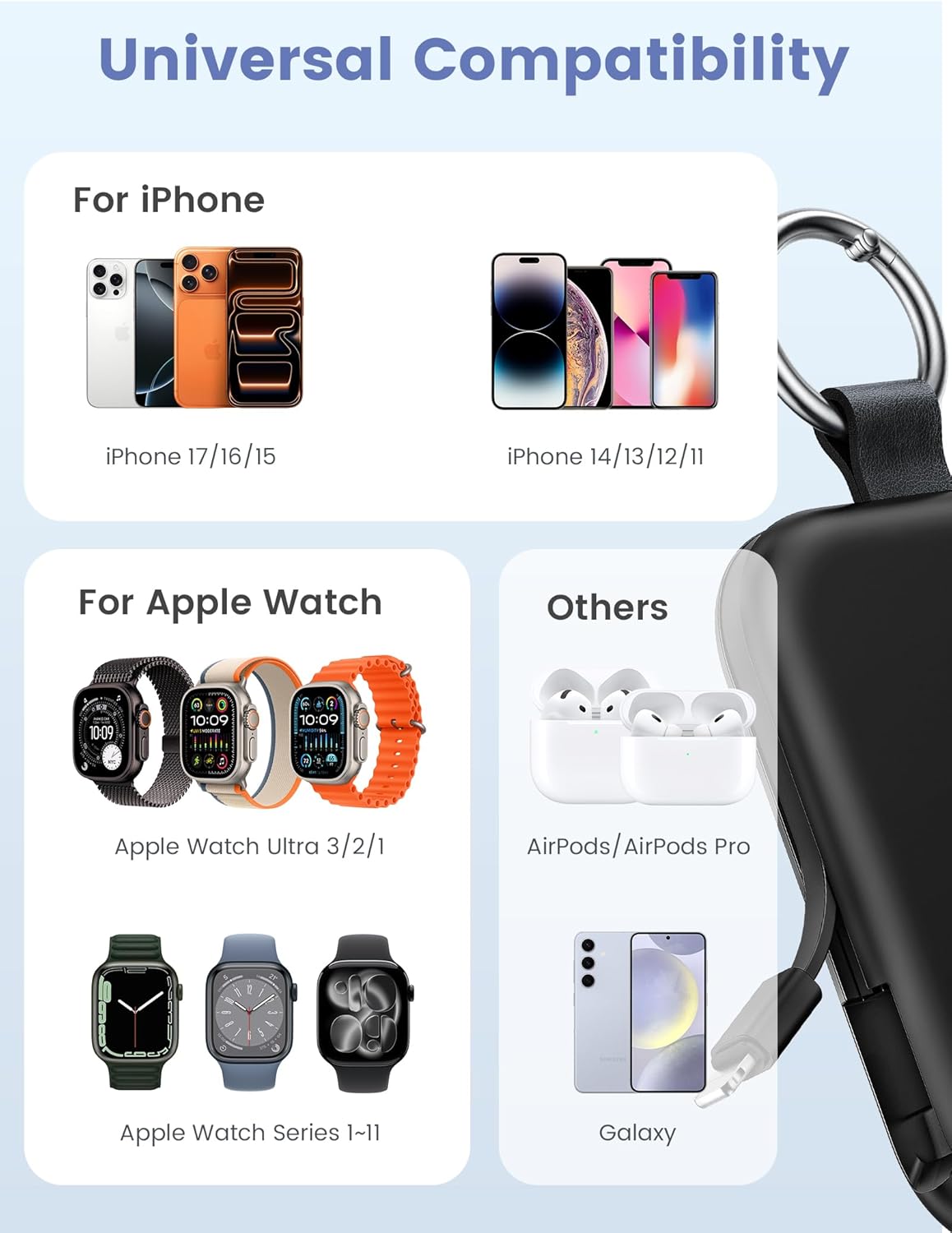
Image: Universal compatibility of the RORRY portable charger with various devices.
3. Kurulum ve İlk Şarj
3.1 Power Bank'ı Şarj Etme
- Connect the provided USB-C to USB-C charging cable to the USB-C input port on the RORRY D2 Portable Charger.
- Kablo ucunu uyumlu bir USB-C duvar adaptörüne bağlayın (adaptör pakete dahil değildir).
- The LED indicator lights on the power bank will illuminate to show the charging status. A full charge typically takes approximately 2.5 hours.
- Once fully charged, all LED indicators will be solid. Disconnect the power bank from the charger.

Image: Charging the RORRY D2 Portable Charger using the included USB-C cable.
4. Kullanım Talimatları
4.1 Charging Apple Watch
- Press the power button on the side of the RORRY D2 Portable Charger to activate the wireless charging pad.
- Place your Apple Watch onto the magnetic charging pad located on the top surface of the power bank.
- Ensure the watch is properly aligned for optimal charging. The watch screen will indicate charging status.
4.2 Charging iPhone and USB-C Devices
- Locate the built-in Lightning cable (for iPhone) or USB-C cable (for Android/other USB-C devices) on the sides of the power bank.
- Gently pull out the appropriate cable.
- Connect the cable to your device's charging port. The device should begin charging automatically.
- To charge multiple devices simultaneously, use the wireless charging pad for Apple Watch and the built-in cables for other devices.

Image: RORRY D2 Portable Charger actively charging an Apple Watch and an iPhone.

Resim: Üzeriview of charging times and capacities for various devices with the RORRY D2.
4.3 Güç Göstergesi
The LED lights on the front of the power bank indicate the remaining battery level. Press the power button once to check the current battery status.
Video: Demonstration of the RORRY Portable Apple Watch Charger's features and usage.
5. Özellikler
| Model Numarası | D2 |
| Pil Kapasitesi | 5000 Miliamp Saat |
| Ürün Boyutları | 3.86 x 2.82 x 0.65 inç |
| Ürün Ağırlığı | 4.4 ons |
| Bağlayıcı Türü | Built-in Cable L+C, USB-C Port |
| Özel Özellikler | Compact, Built-in Cables, All-in-one, Keychain Design |
6. Safety Features and Precautions
The RORRY D2 Portable Charger is equipped with multiple safety features to protect your devices and the power bank itself:
- Aşırı Sıcaklık Koruması: Prevents overheating during charging and discharging.
- Aşırı Akım Koruması: Aşırı akım akışına karşı koruma önlemleri.
- Aşırı Hacimtage Koruma: Volkanlara karşı koruma sağlar.tage dalgalanmalar.
- Kısa devre koruması: Kısa devre durumunda otomatik olarak kapanır.
Genel Güvenlik Önlemleri:
- Do not disassemble, squeeze, or hit the device.
- Keep away from fire, water, and heat sources.
- Çocukların erişemeyeceği yerde saklayınız.
- Do not use the power bank in extremely high or low temperatures.
- Cihazı düşürmekten veya güçlü darbelere maruz bırakmaktan kaçının.
7. Bakım ve Onarım
- Powerbank'i yumuşak ve kuru bir bezle temizleyin. Sert kimyasallar veya aşındırıcı malzemeler kullanmayın.
- Cihazı kullanılmadığında serin ve kuru bir yerde saklayın.
- If the power bank will not be used for an extended period, charge it fully at least once every three months to maintain battery health.
8. Sorun Giderme
Cihaz şarj olmuyor:
- Power bank'in yeterince şarj olduğundan emin olun. LED göstergelerini kontrol edin.
- Verify that the charging cables are securely connected to both the power bank and your device.
- For Apple Watch, ensure it is correctly placed on the magnetic charging pad and the power button has been pressed.
- Try using a different charging cable or wall adapter to charge the power bank itself.
Yavaş şarj oluyor:
- Ensure you are using a compatible wall adapter for optimal charging speed.
- Birden fazla cihazı aynı anda şarj etmek, tek tek cihazların şarj hızını düşürebilir.
Taşınabilir şarj cihazı açılmıyor:
- Charge the power bank fully. If the battery is completely depleted, it may take a few minutes for the LED indicators to light up.
9. Garanti ve Destek
RORRY products are designed and manufactured to the highest quality standards. For warranty information, after-sales service, or technical support, please refer to the contact details provided in the packaging or visit the official RORRY webalan.
İletişim Bilgileri:
- Üretici: Shenzhen Xianyang Yenilik Teknolojisi A.Ş.
- Webalan: www.rorry.com (Lütfen dikkat: Bu bir yer tutucudur URL, refer to actual product for correct webSite)


