giriiş
Thank you for choosing the R-MUSIC KARADUO Complete Karaoke Pack. This manual provides detailed instructions for the safe and efficient use of your new karaoke system, which includes a portable RGB speaker and two wireless microphones. Please read this manual thoroughly before operation and retain it for future reference.
Paket İçeriği
Paketleri açtığınızda tüm eşyaların mevcut ve iyi durumda olduğundan emin olun:
- 1 x R-MUSIC KARADUO Portable RGB Speaker
- 2 x Kablosuz Mikrofon
- 1 x USB-C Şarj Kablosu
- 1 x Kullanım Kılavuzu (bu belge)

Image: The R-MUSIC KARADUO portable RGB speaker and two wireless microphones, as included in the package.
Ürün Bittiview
Hoparlör Bileşenleri ve Kontrolleri

Resim: Üst view of the R-MUSIC KARADUO speaker, showing the control buttons.
- LED Animation Button: Press to cycle through 5 different LED light animations.
- Ses + / Sonraki Şarkı Düğmesi: Short press to increase volume. Long press to skip to the next song.
- ON / OFF / Pause / Play Button: Long press to power the speaker on or off. Short press to play or pause music.
- Ses - / Önceki Şarkı Düğmesi: Short press to decrease volume. Long press to go to the previous song.
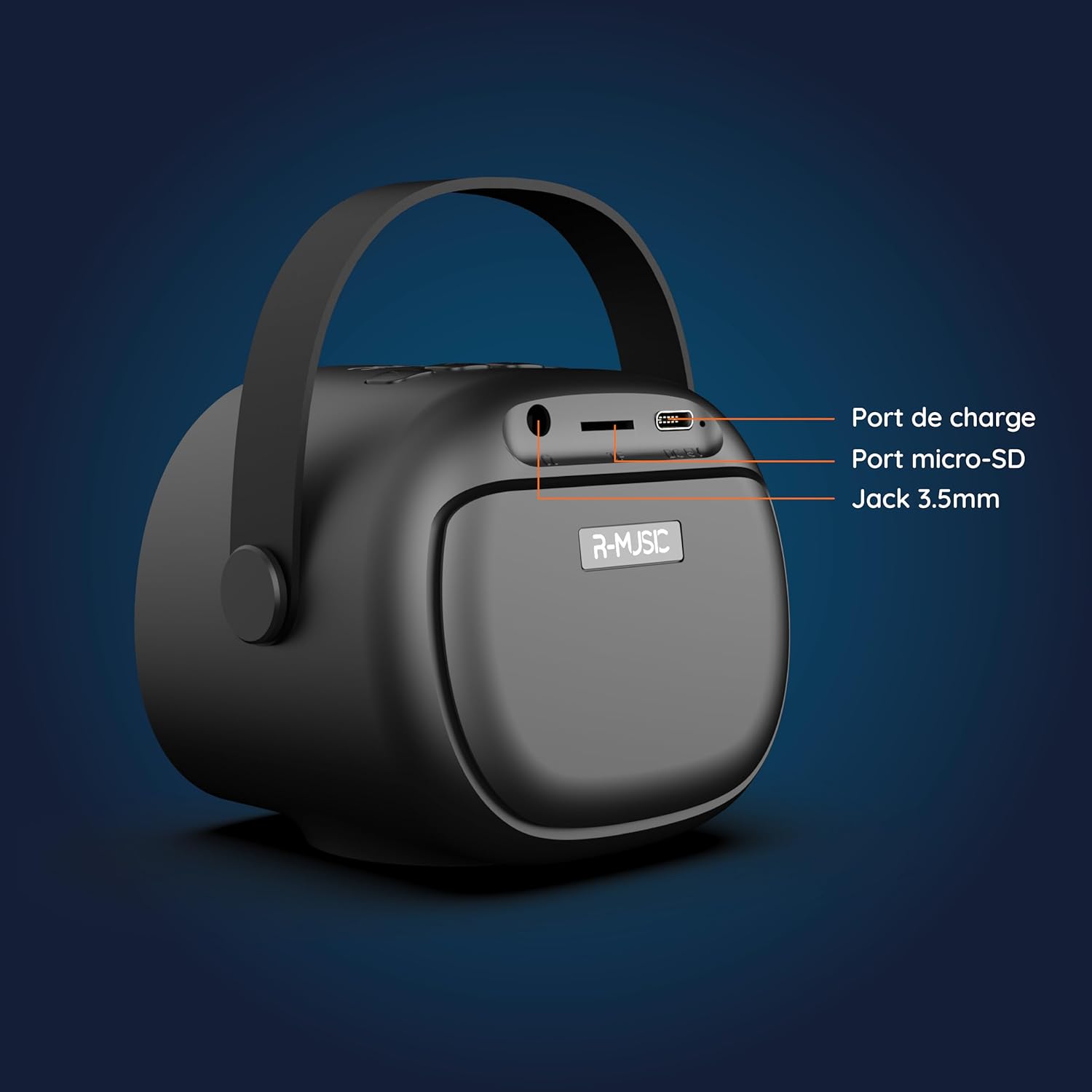
Resim: Arka view of the R-MUSIC KARADUO speaker, highlighting the charging port, Micro-SD card slot, and 3.5mm Jack port.
- Şarj Portu (USB-C): Şarj etmek için kutu içeriğinde bulunan USB-C kablosunu bağlayın.
- Micro-SD Kart Yuvası: Müziği doğrudan çalmak için bir Micro-SD kart takın.
- 3.5 mm AUX Bağlantı Noktası: Harici ses cihazlarını 3.5 mm ses kablosu kullanarak bağlayın (kablo dahil değildir).
Mikrofon Kontrolleri

Image: Close-up of the R-MUSIC wireless microphones, illustrating the power, volume, and mode buttons.
- Güç Düğmesi: Long press to power the microphone on or off.
- Ses Seviyesi + Düğmesi: Mikrofon sesini artırın.
- Ses Seviyesi Düğmesi: Mikrofon sesini azaltın.
- Mod Düğmesi (M): Short press to cycle through 5 voice deformation effects and 3 karaoke modes.
Kurmak
1. Charging the Speaker and Microphones
İlk kullanımdan önce hoparlörü ve her iki mikrofonu da tamamen şarj edin.
- Konuşmacı: Connect the provided USB-C charging cable to the speaker's charging port and a compatible USB power adapter (not included). The charging indicator will show the charging status.
- Mikrofonlar: Each microphone has its own charging port (usually Micro-USB, check the microphone itself). Connect them to a USB power source using appropriate cables (not included, or check if included with microphones).
A full charge provides approximately 14 hours of speaker playback without LED lights, or 7 hours with LED lights activated.
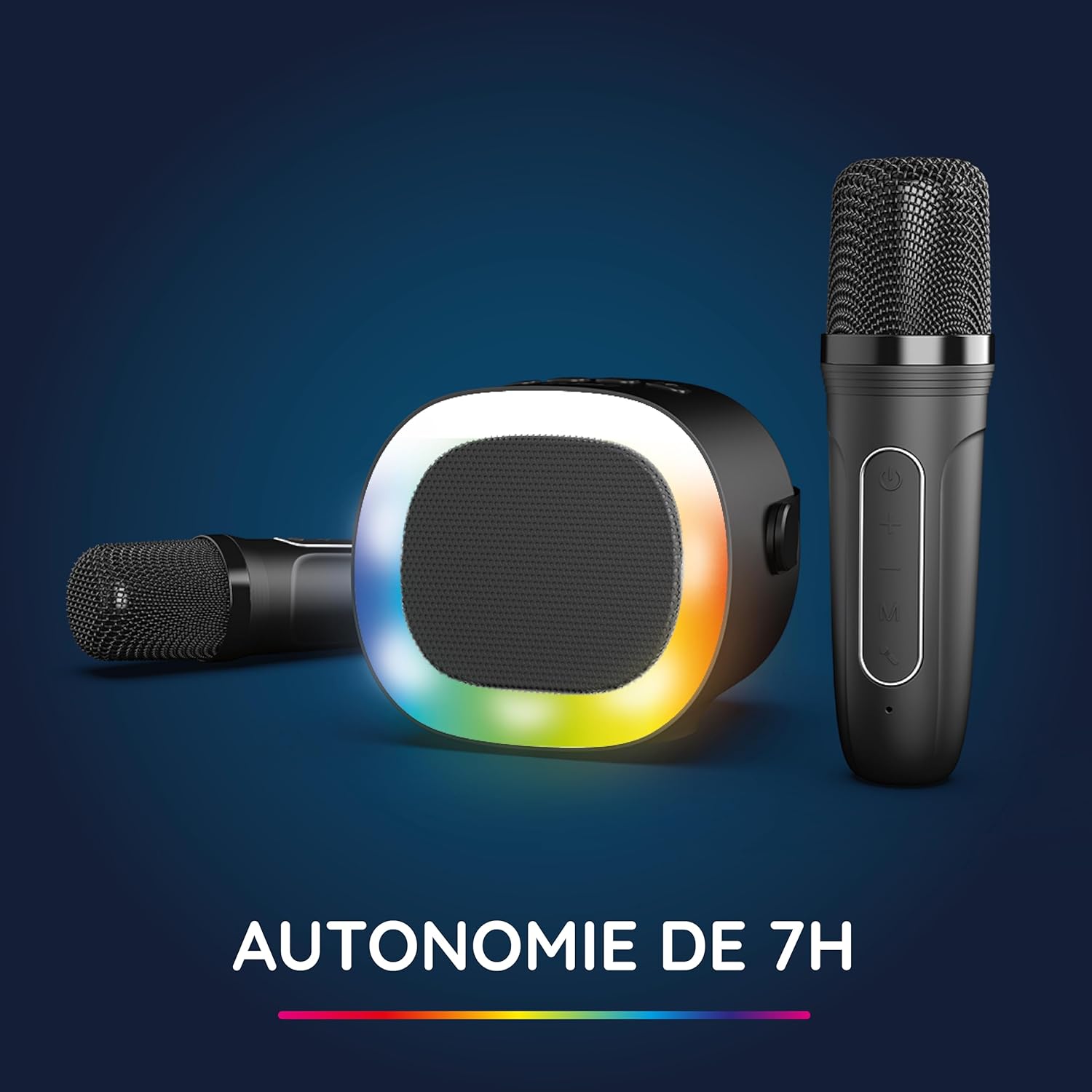
Image: The R-MUSIC speaker and microphones, illustrating the battery life with LED lights active.
2. Powering On and Pairing Microphones
- Hoparlörü Aç: Long press the ON/OFF button on the speaker until it powers on.
- Mikrofonları Açın: Long press the Power button on each microphone until they power on.
- The microphones should automatically pair with the speaker. If not, ensure they are within close proximity and try powering them off and on again.
Kullanım Talimatları
1. Ses Kaynaklarına Bağlanma
The KARADUO speaker offers multiple connectivity options:
- Bluetooth 5.0:
- Hoparlörün açık olduğundan emin olun.
- Activate Bluetooth on your smartphone, tablet, PC, or other compatible device.
- Arama "KARADUO" in your device's Bluetooth settings and select it to pair. A confirmation sound will indicate a successful connection.
- The Bluetooth 5.0 technology ensures optimal sound quality and a stable connection up to 10 meters.
- AUX Girişi:
- Connect a 3.5mm audio cable (not included) from your audio device's headphone jack to the speaker's 3.5mm AUX port.
- Hoparlör otomatik olarak AUX moduna geçecektir.
- Micro-SD Card Playback:
- Insert a Micro-SD card containing MP3 audio files into the Micro-SD card slot on the back of the speaker.
- Hoparlör, kartı otomatik olarak algılayacak ve müzik çalmaya başlayacaktır.
2. Speaker Operation
- Oynat/Duraklat: Short press the ON/OFF/Pause/Play button.
- Ses Ayarı: Short press the Volume + or Volume - buttons.
- Sonraki / Önceki Parça: Long press the Volume + (next) or Volume - (previous) buttons.
- LED Işık Modları: Press the LED Animation button to cycle through 5 different LED light animations.

Image: The R-MUSIC speaker showcasing its dynamic LED light animations.
3. Mikrofon Kullanımı
- Mikrofon Ses Seviyesi: Use the Volume + and Volume - buttons on the microphone to adjust your vocal volume.
- Voice Deformation Effects: Short press the 'M' (Mode) button on the microphone to cycle through 5 different voice deformation effects.
- Karaoke Modları: Continue pressing the 'M' button to cycle through 3 distinct karaoke modes.
Bakım
To ensure the longevity and optimal performance of your R-MUSIC KARADUO system, follow these maintenance guidelines:
- Temizlik: Hoparlör ve mikrofonları temizlemek için yumuşak, kuru bir bez kullanın. Aşındırıcı temizleyiciler, çözücüler veya sert kimyasallar kullanmayın.
- Depolamak: Cihazı kullanmadığınız zamanlarda serin, kuru ve doğrudan güneş ışığından ve aşırı sıcaklıklardan uzak bir yerde saklayın.
- Suya Maruz Kalma: Bu ürün su geçirmez değildir. Suya veya aşırı neme maruz bırakmaktan kaçının.
- Şarj: Only use the provided charging cable and a compatible USB power adapter. Do not overcharge the device.
Sorun giderme
If you encounter issues with your KARADUO system, please refer to the following common problems and solutions:
| Sorun | Olası Neden | Çözüm |
|---|---|---|
| Güç yok | Pil seviyesi düşük veya cihaz kapalı. | Charge the speaker/microphones. Long press the power button to turn on. |
| Hoparlörden ses gelmiyor | Volume too low, incorrect input mode, or device not connected. | Increase speaker volume. Ensure correct input (Bluetooth, AUX, Micro-SD). Reconnect Bluetooth or check AUX cable. |
| Mikrofonlar çalışmıyor. | Mikrofonlar kapalı, pil seviyesi düşük veya eşleştirilmemiş. | Ensure microphones are charged and powered on. They should automatically pair with the speaker. If not, power cycle them. |
| Bluetooth bağlantısının kesilmesi | Device out of range, interference, or low battery. | Move the connected device closer to the speaker (within 10m). Ensure no major obstacles. Recharge the speaker. |
If the problem persists after trying these solutions, please contact R-MUSIC customer support.
Özellikler
| Özellik | Detay |
|---|---|
| Marka | R-MÜZİK |
| Model Numarası | RM484437 |
| Renk | Siyah |
| Bağlantı Teknolojisi | Bluetooth 5.0 |
| Bağlantı Noktaları | 3.5mm Jack, USB Type-C (charging), Micro-SD Card Slot |
| Özel Özellikler | 2 Wireless Microphones, Universal Connectivity, 5 Voice Deformation Effects, LED Lights |
| Uyumlu Cihazlar | PC, Smartphone, Tablet, TV (via AUX) |
| Güç Kaynağı | Pil ile çalışır |
| Hoparlör Pil Ömrü | Up to 14 hours (without LED), 7 hours (with LED) |
| Bluetooth Menzili | 10 metreye kadar |

Image: Technical dimensions of the R-MUSIC KARADUO speaker, showing its height, width, and depth.
Garanti ve Destek
Information regarding specific warranty terms and conditions for the R-MUSIC KARADUO Complete Karaoke Pack is not available in this document. Please refer to the product packaging or the retailer's webgaranti detayları için site.
For technical support or further assistance, please contact R-MUSIC customer service through their official webSiteye veya satın alma işleminizle birlikte verilen iletişim bilgilerine.


