giriiş
This manual provides essential information for the installation and care of your new OEM LCD Screen for ZTE Blade A71 (2021) A7030 with Digitizer Full Assembly. Please read all instructions carefully before proceeding with installation to ensure proper function and to avoid damage.
Ürün Bittiview
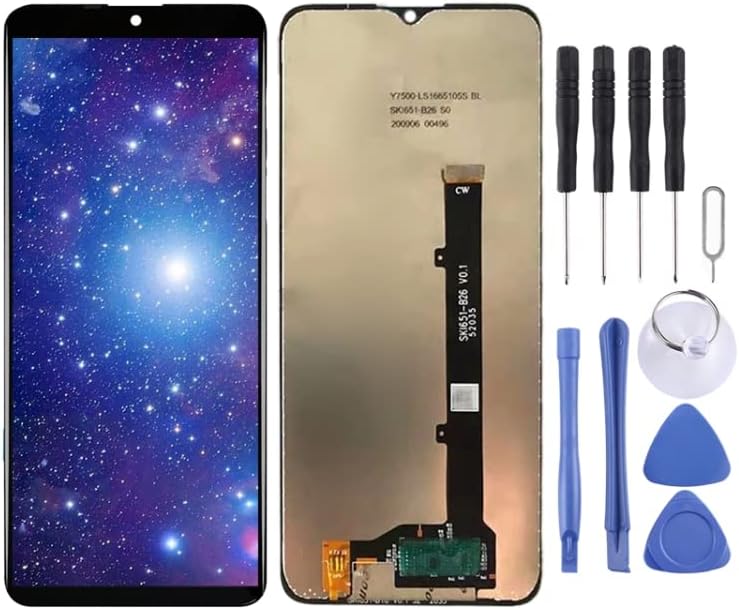
Image: The complete LCD screen and digitizer assembly for the ZTE Blade A71 (2021) A7030, shown with a vibrant display on the left and the rear view with flex cables on the right. This is the main component for display replacement.

Image: The LCD screen assembly alongside a set of repair tools. The tools include screwdrivers, pry tools, a suction cup, and picks, indicating that the product is intended for self-installation or professional repair.
This product is a replacement LCD display touch screen digitizer assembly specifically designed for the ZTE Blade A71 2021 A7030 model. It is intended to replace broken or unusable screens, restoring your device's visual functionality and touch responsiveness.
Each item undergoes thorough inspection and is confirmed to be in good condition prior to shipping, ensuring reliable quality.
Before Installation Notes
Tips 1: Test before installation
When testing, do not remove any protective film or tags. Please pay attention to the problem of static electricity. Before attempting any repair, be sure to ground yourself using an ESD (electrostatic discharge) strap. This will prevent static electricity from damaging the electronic components within the phone. Ensure you wear eye protection and use caution not to cut your finger with glass splinters.
Tips 2: Simulates testing
Screen replacement is a very fragile product. We suggest testing before installation. Please simulate testing, which means connecting the mobile phone's motherboard, LCD, or screen to the audio cable and the new replacement part, powering it on, and testing its functionality. If the test is successful, proceed with installation. If it does not display, please contact us immediately. Do not force it to be installed in the mobile phone if it's not working correctly during testing.
Tips 3: Do not over bend cable
Please make sure the LCD cable is not over-bent. Bending it over 90 degrees will cause a black display or other damage.


Images: Close-up views of the LCD flex cable and its connection point. Handle this component with extreme care to prevent damage.
Kurulum ve Yükleme
Professional installation is highly recommended for this product due to its delicate nature and the complexity of mobile phone repairs. If you are not experienced with phone repairs, please seek assistance from a qualified technician.
Key Installation Steps (General Guidance):
- Hazırlık: Ensure your workspace is clean, well-lit, and free of static electricity. Use an ESD strap.
- Sökme: Carefully disassemble your ZTE Blade A71 (2021) A7030, following a reliable repair guide specific to your phone model.
- Pre-installation Test: Before fully installing the new screen, connect it to the phone's motherboard and power on the device to verify display and touch functionality. Refer to "Tips 2: Simulates testing" above.
- Kurulum: If the test is successful, proceed with carefully installing the new screen assembly, ensuring all flex cables are properly seated and not bent excessively.
- Yeniden montaj: Reassemble your phone, taking care to secure all components and screws.

Image: Illustration of the product preparation process, showing quality control, protective packaging, and bulk packaging. This highlights the care taken before the product reaches the customer.
Operating the New Screen
Once successfully installed, your new OEM LCD Screen will restore the full visual and touch capabilities of your ZTE Blade A71 (2021) A7030. The screen is designed to completely fit and work as the original.
- Ekran İşlevselliği: The screen will display images and videos with clarity and accurate colors.
- Dokunma Duyarlılığı: The digitizer will enable precise and smooth touch interactions, allowing you to navigate your device as usual.
- Brightness and Calibration: You can adjust brightness and other display settings through your phone's operating system settings.
Bakım
To ensure the longevity and optimal performance of your new LCD screen, follow these maintenance guidelines:
- Temizlik: Yumuşak, tiftiksiz bir bez kullanın, hafifçe kurulayın.ampened with water or a screen-specific cleaner, to gently wipe the screen. Avoid harsh chemicals, abrasive materials, or excessive moisture.
- Koruma: Consider applying a screen protector (not included) to guard against scratches and minor impacts.
- Baskıdan Kaçının: Ekrana aşırı baskı uygulamayın, çünkü bu LCD panele veya dokunmatik ekrana zarar verebilir.
- Sıcaklık Uç Noktaları: Cihazınızı aşırı sıcaklıklara maruz bırakmaktan kaçının; bu durum ekran performansını ve kullanım ömrünü etkileyebilir.
Sorun giderme
Kurulumdan sonra sorunlarla karşılaşırsanız, aşağıdaki genel sorun giderme adımlarını göz önünde bulundurun:
- Black Screen / No Display:
- Ensure all flex cables are securely connected and not over-bent (especially the LCD cable).
- Check for any debris or damage to the connectors on both the screen and the motherboard.
- Perform a hard reset of your phone (refer to your phone's original manual for instructions).
- Dokunmatik Ekran Tepki Vermiyor:
- Verify the digitizer flex cable is properly connected.
- Telefonu yeniden başlatın.
- Ensure there are no protective films or foreign objects interfering with touch.
- Ekranda Çizgiler / Bozuk Görüntü:
- This often indicates a damaged LCD flex cable or a faulty connection. Recheck connections carefully.
- If the issue persists, the screen itself might be defective.
Sorun giderme adımları sorunu çözmezse, profesyonel yardım almanız veya daha fazla destek için satıcıyla iletişime geçmeniz önerilir.
Özellikler
| Özellik | Detay |
|---|---|
| Ürün Türü | Replacement LCD Display Touch Screen Digitizer Assembly |
| Uyumluluk | ZTE Blade A71 (2021) A7030 |
| Renk | Siyah |
| Ürün Ağırlığı | 8.8 ons |
| Üretici | Yedek parça |
| İlk Mevcut Tarih | 24 Ekim 2023 |
Destek ve İletişim
For any questions, concerns, or issues not covered in this manual, please contact the seller or manufacturer directly. Provide your product details (ASIN: B0CLNJCT3T) when seeking support.
Profesyonel Kurulum Önerilen: As stated, mobile phone LCD screens are fragile products and professional installation is strongly advised to prevent damage during the repair process.


