1. Giriş
Bu kılavuz, cihazınızın kurulumu, çalıştırılması ve bakımı için gerekli temel bilgileri sağlamaktadır. ViewSonic VG3456A 34-inch Ultrawide QHD 1440p IPS Monitor. Please read it thoroughly before use.
The ViewSonic VG3456A is designed to enhance productivity with its 34-inch ultrawide 21:9 WQHD (3440x1440p) IPS display and integrated docking capabilities. It features 100W USB-C power delivery, Gigabit Ethernet, and ergonomic adjustments for a streamlined workspace.
2. Güvenlik Bilgileri
Observe the following safety guidelines to ensure proper operation and prevent damage:
- Monitörün sabit ve düz bir yüzeye yerleştirildiğinden emin olun.
- Monitördeki havalandırma açıklıklarını kapatmayın.
- Yalnızca üretici tarafından sağlanan güç adaptörünü ve kabloları kullanın.
- Monitörü nemden veya aşırı sıcaklıklardan koruyun.
- Disconnect power before cleaning the monitor.
3. Kutuda Neler Var?
Ürün ambalajında tüm öğelerin mevcut olduğunu doğrulayın:
- ViewSonic VG3456A Monitor
- Güç kablosu
- HDMI Kablosu
- USB C Tipi Kablo
- Hızlı Başlangıç Kılavuzu

Image: The contents of the ViewSonic VG3456A monitor box, showing the monitor, power cable, HDMI cable, USB Type-C cable, and a Quick Start Guide.
4. Kurulum
4.1. Stand Montajı
The monitor features an easy-to-install quick-release stand. Attach the base to the upright section, then secure the stand to the monitor. Refer to the included Quick Start Guide for detailed steps.

Image: A diagram illustrating the simple, tool-free assembly of the monitor stand, highlighting the quick-release mechanism.
4.2. Cihazlarınızı Bağlama
The VG3456A offers versatile connectivity options:
- USB-C Bağlantısı: Connect your laptop or compatible device using the provided USB Type-C cable. This single cable can provide video, audio, data transfer, and up to 100W power delivery to your device.
- HDMI/DisplayPort: Use an HDMI or DisplayPort cable to connect to other video sources.
- Ethernet (RJ45): Connect an Ethernet cable to the RJ45 port for reliable network connectivity.
- USB Tip-A: Utilize the integrated USB hub for connecting peripherals like keyboards, mice, or external storage.

Resim: Ayrıntılı view of the monitor's rear panel, highlighting the HDMI, DisplayPort, 100W USB Type-C, 15W USB Type-C, USB Type-A, and RJ45 Ethernet ports.

Image: A laptop connected to the monitor with a single USB-C cable, illustrating how the monitor acts as a docking station to reduce cable clutter.
4.3. Güç Açık
Connect the power cable to the monitor and a power outlet. Press the power button located on the monitor's front or bottom bezel.
4.4. Video: USB Type-C Connectivity Overview
Video: This video demonstrates the single-cable USB Type-C connectivity of ViewSonic monitors, showing how it simplifies connections for power, video, and data transfer.
5. Monitörünüzü Çalıştırma
5.1. Ekran Üstü Görüntüleme (OSD) Menüsü
Navigate the OSD menu using the buttons on the monitor's bezel to adjust settings such as brightness, contrast, color, input source, and ViewMode presets.
5.2. Ergonomik Ayarlamalar
The VG3456A features an ergonomic stand allowing for tilt, swivel, and height adjustments to optimize your viewkonfor:
- Tilt: Adjust the screen's vertical angle (up to 40 degrees).
- Döner: Ekranı yatay olarak döndürün.
- Yükseklik Ayarı: Ekranı istediğiniz yüksekliğe yükseltin veya alçaltın.

Image: An illustration of the monitor's ergonomic capabilities, including tilt, swivel, and height adjustment, designed for user comfort.
5.3. vDisplayManager Software
The integrated vDisplayManager software provides quick and easy OSD control and customized screen templates for efficient multi-tasking. This software is available for download from the manufacturer's webalan.

Image: A visual representation of the vDisplayManager software interface, demonstrating its features for managing display settings and screen layouts.
5.4. Göz Bakımı Teknolojisi
The monitor incorporates eye care technologies such as a Blue Light Filter and Flicker-Free display to reduce eye strain during extended use.

Image: A graphic explaining the monitor's eye care features, including Blue Light Filter and Flicker-Free technology, designed to enhance viewkonfor.
6. Bakım
6.1. Ekranın Temizlenmesi
Ekranı yumuşak, tiftiksiz bir bezle nazikçe silin. İnatçı lekeler için hafifçe silin.ampBezi su veya hafif, aşındırıcı olmayan bir ekran temizleyici ile silin. Sıvıyı doğrudan ekrana püskürtmekten kaçının.
6.2. C'nin Temizlenmesiasing
Monitörü temizlemek için yumuşak ve kuru bir bez kullanın.asing. Güçlü deterjanlar veya aşındırıcı temizleyiciler kullanmayın.
7. Sorun Giderme
7.1. Ekranda Görüntü Yok
- Güç kablosunun monitöre ve elektrik prizine güvenli bir şekilde bağlı olduğundan emin olun.
- Verify that the video cable (USB-C, HDMI, or DisplayPort) is properly connected to both the monitor and your device.
- OSD menüsünde doğru giriş kaynağının seçili olup olmadığını kontrol edin.
- Confirm your device is powered on and outputting a video signal.
7.2. Power Delivery Issues (USB-C)
- Ensure your device supports USB-C Power Delivery and is compatible with the monitor's 100W output.
- Try reconnecting the USB-C cable.
- If issues persist, try a different USB-C cable or power cycle the monitor and your device.
7.3. Network Connectivity Issues (RJ45)
- Verify the Ethernet cable is securely connected to the monitor and your network router/switch.
- Check your device's network settings.
8. Özellikler
| Özellik | Detay |
|---|---|
| Ekran Boyutu | 34 inç |
| Çözünürlük | 3440x1440 (WQHD) |
| En Boy Oranı | 21:9 |
| Panel Tipi | IPS |
| Yenileme Hızı | 100Hz |
| USB-C Güç Dağıtımı | 100W'a kadar |
| Bağlantı | 2x HDMI 2.0, 1x DisplayPort (in), 1x 100W USB Type-C, 1x 15W USB Type-C, 4x USB Type-A, 1x Ethernet (RJ45) |
| Konuşmacılar | 2x 5 watt entegre hoparlörler |
| Ergonomi | Eğme, Döndürme, Yükseklik Ayarı |
| VESA Montaj Uyumlu | Evet (100 x 100 mm) |
| Boyutlar (UxGxY) | 9.3 x 32.2 x 21.02 inç |
| Ürün Ağırlığı | 19.4 pound |
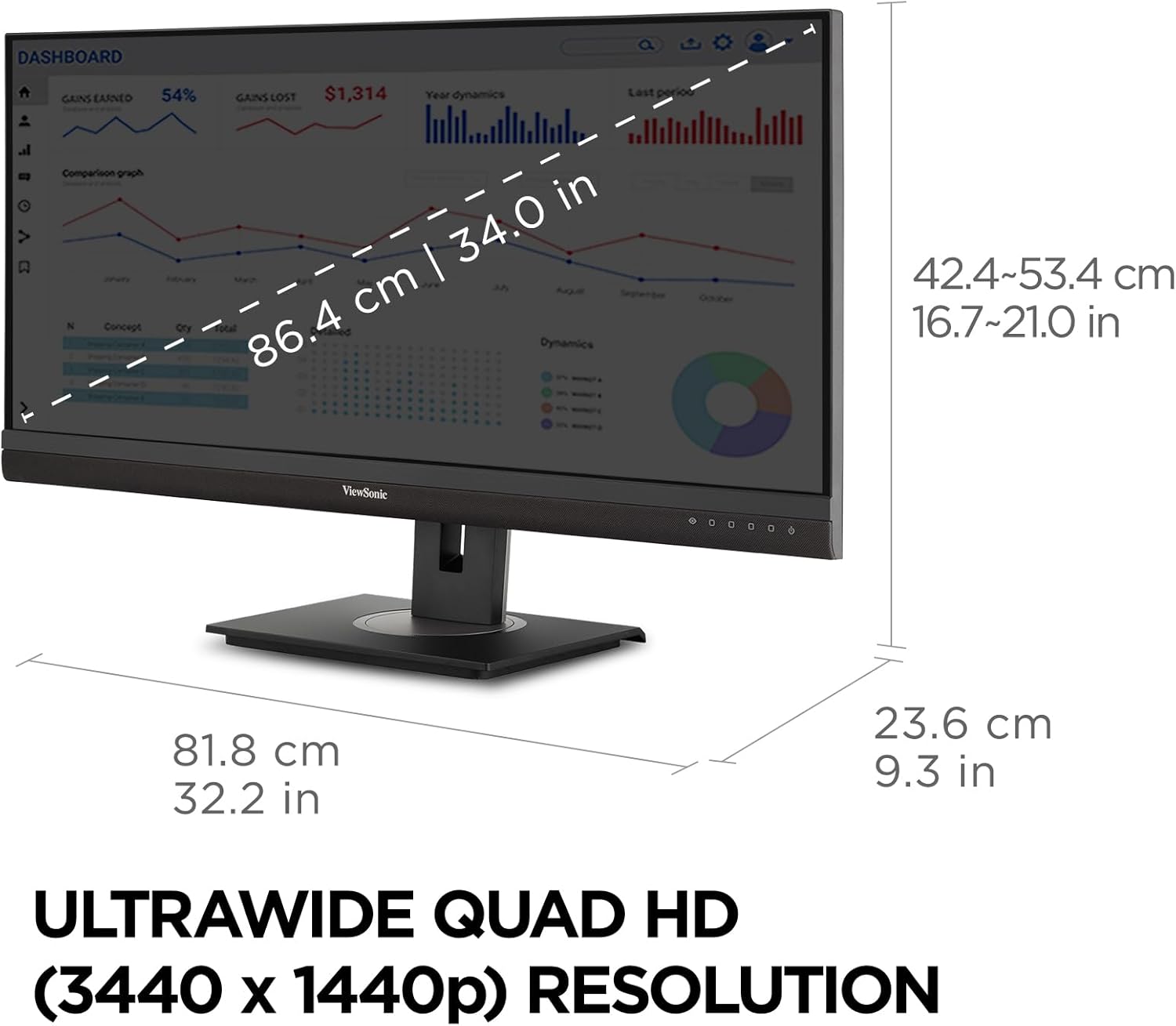
Image: A diagram illustrating the physical dimensions of the monitor, including screen size and overall measurements.
9. Garanti
The ViewSonic VG3456A monitor comes with a 3-Year Limited Warranty. For detailed warranty terms and conditions, please refer to the official ViewSonik webSiteyi veya ürününüzle birlikte gelen garanti belgesini inceleyin.

Resim: Ürünle birlikte verilen 3 yıllık garantiyi temsil eden bir simge.
10. Destek
For technical assistance, product registration, or further information, please visit the official ViewSes desteği webalan: www.viewsonic.com/us/support.
Ayrıca bizimle iletişime geçebilirsiniz ViewSonic customer support directly for assistance.


