1. Güvenlik Bilgileri
Please read all instructions carefully before using the iZEEKER Projector. Keep this manual for future reference.
- Güç Kaynağı: Yalnızca belirtilen güç adaptörünü kullanın. Voltajın düşük olduğundan emin olun.tage bölgenizle uyumludur.
- Havalandırma: Havalandırma açıklıklarını kapatmayın. Aşırı ısınmayı önlemek için projektörün etrafında yeterli hava akışı sağlayacak boşluk bırakın.
- Çevre: Avoid exposing the projector to rain, moisture, direct sunlight, or extreme temperatures. Do not place it near heat sources.
- Temizlik: Temizlemeden önce projektörün fişini çekin. Yumuşak, kuru bir bez kullanın. Sıvı veya aerosol temizleyiciler kullanmayın.
- Göz Koruması: Projektör lensine doğrudan bakmayın.amp is on. The iZEEKER projector utilizes diffuse reflection technology to reduce blue light exposure and eye fatigue.
- Çocuklar: Keep the projector out of reach of small children. Supervise children when the projector is in use.
- Sökme: Projektörü kendiniz sökmeye veya onarmaya çalışmayın. Tüm servis işlemlerini yetkili personele yaptırın.

2. Paket İçeriği
Aşağıda listelenen tüm öğelerin paketinizde bulunduğunu doğrulayın:
- iZEEKER Projector (Model: iPL320)
- Güç Adaptörü
- Uzaktan kumanda
- HDMI Kablosu
- AV Kablosu
- Kullanıcı Kılavuzu
- Customized Tripod

3. Ürün Bittiview
3.1 Temel Özellikler
- Bluetooth 5.2: For enhanced audio experience with external Bluetooth speakers or headphones. Note: Bluetooth is for audio output only, not for screen mirroring.
- Yüksek Parlaklık ve Çözünürlük: 12000 Lux brightness and native 1080P resolution with 100% NTSC color reproduction and 10000:1 contrast ratio for clear, realistic images.
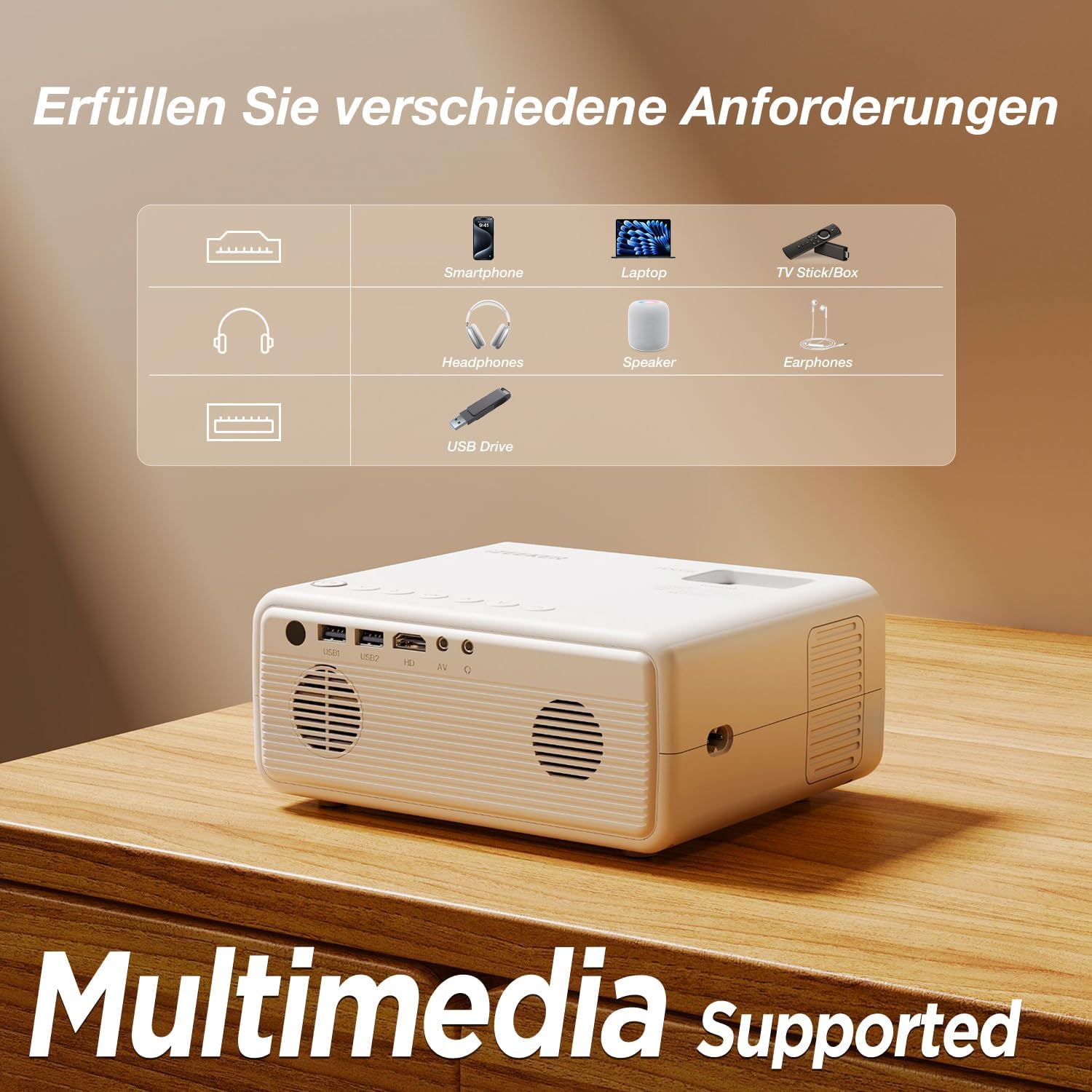
- Çoklu Cihaz Bağlantısı: Equipped with HDMI, AV, USB, and Aux ports for stable connections to smartphones, laptops, PS5, TV boxes, and DVD players.
- Büyük Ekran Projeksiyon: Supports up to a 250-inch screen size with 75% zoom function for flexible screen adjustment without moving the projector.
- Göz Koruması: High-refraction lenses and diffuse reflection technology reduce blue light and eye fatigue.


4. Kurulum
4.1 Yerleştirme
Choose a flat, stable surface for the projector. The projection distance affects the screen size. For optimal viewing, ensure the projector is perpendicular to the projection surface.
- The projector can be placed on a table, mounted on the included tripod, or ceiling-mounted.
- Adjust the distance to achieve your desired screen size, up to 250 inches.

4.2 Güç Bağlantısı
Güç adaptörünü projektörün güç giriş portuna bağlayın, ardından adaptörü bir elektrik prizine takın.
4.3 Odak ve Trapez Düzeltme
After powering on, adjust the focus ring on the projector lens until the image is clear. Use the keystone correction dial to adjust the image shape if it appears trapezoidal.

4.4 Cihazları Bağlama
The projector supports various wired connections for stable performance:
- HDMI: Connect laptops, gaming consoles (PS5), TV boxes, or DVD players using an HDMI cable.
- USB BAĞLANTI: Medya dosyalarını oynatmak için bir USB sürücü takın. filedoğrudan s.
- AV: Eski cihazlar için AV bağlantı noktasını kullanın.
- Smartphones (Wired):
- iOS Cihazlar: Requires an Apple Lightning to HDMI adapter cable (not included).
- Android Cihazlar: Requires a Micro USB/Type-C to HDMI cable (not included).


4.5 Bluetooth Ses Bağlantısı
To connect external Bluetooth speakers or headphones:
- Bluetooth ses cihazınızın eşleştirme modunda olduğundan emin olun.
- Projeksiyon cihazında Bluetooth ayarları menüsüne gidin.
- Eşleştirilecek kullanılabilir cihazlar listesinden cihazınızı seçin.
NOT: The Bluetooth function is for audio output only and does not support screen mirroring from mobile devices.

5. Kullanım Talimatları
5.1 Güç Açma/Kapatma
- Güç Açık: Projektör veya uzaktan kumanda üzerindeki güç düğmesine basın.
- Kapat: Güç düğmesine tekrar basın. İstenirse kapatmayı onaylayın.
5.2 Menü Navigasyonu
Use the navigation buttons on the projector or remote control to browse the on-screen menu. The "OK" button confirms selections, and the "Back" button returns to the previous screen.
5.3 Giriş Kaynağı Seçimi
Press the "Source" button on the remote control or projector to select the desired input (e.g., HDMI1, USB, AV).
5.4 Yakınlaştırma İşlevi
The projector features a 75% zoom function. Access this setting in the projector's menu to adjust the screen size without physically moving the projector.


6. Bakım
6.1 Lensin Temizlenmesi
Use a professional lens cleaning cloth or air blower to clean the projector lens. Do not touch the lens directly with your hands or use abrasive cleaners.
6.2 Projektör Gövdesinin Temizlenmesi
Wipe the projector's exterior with a soft, dry cloth. Do not use liquid, abrasive, or corrosive cleaners.
6.3 Depolama
Projeksiyon cihazını uzun süre kullanılmadığı zamanlarda serin, kuru ve tozsuz bir ortamda saklayın. Hasarı önlemek için orijinal ambalajını veya koruyucu bir kılıfı kullanın.
7. Sorun Giderme
| Sorun | Olası Neden | Çözüm |
|---|---|---|
| No image/No signal | Yanlış giriş kaynağı seçildi; Kablo düzgün bağlanmamış; Cihaz açık değil. | Select the correct input source (HDMI, USB, AV). Check all cable connections. Ensure the connected device is powered on. |
| Bulanık görüntü | Odak ayarı yapılmamış; Projektör çok uzak/yakın; Lens kirli. | Adjust the focus ring. Adjust projection distance. Clean the projector lens. |
| Trapezoidal image | Projeksiyon cihazı ekrana dik açıda değil. | Adjust the keystone correction dial. Reposition the projector. |
| Ses yok | Ses seviyesi çok düşük; Ses kapalı; Harici ses aygıtı bağlı/eşleştirilmiş değil. | Increase volume. Unmute. Check Bluetooth connection for external speakers/headphones. |
| Cannot play Netflix/Prime Video | Telif hakkı kısıtlamaları. | These services can only be played via a TV Stick (e.g., Amazon Fire Stick) connected to the projector's HDMI port. |
8. Özellikler
| Marka | iZEEKER |
| Model Numarası | iPL320 |
| Ürün Türü | Taşınabilir Projektör |
| Parlaklık | 12000 Lüks |
| Ekran Çözünürlüğü | 1920 x 1080 (1080P Native) |
| Maksimum Ekran Çözünürlüğü | 1920x1080 |
| Kontrast Oranı | 10000:1'e kadar |
| Bağlantı Teknolojisi | Bluetooth 5.2, HDMI, USB, AV, Aux |
| Screen Size (Max) | 250 inç |
| Yakınlaştırma İşlevi | %75 |
| Ürün Boyutları | 19U x 15.8G x 8.6Y santimetre |
| Montaj Tipi | Tripod Montajı |
| Önerilen Kullanımlar | Ev Sineması |
9. Garanti ve Destek
iZEEKER is committed to providing excellent customer service.
- Üretici Garantisi: The iZEEKER Projector comes with a free 2-year after-sales warranty.
- Teknik Destek: Professional lifetime technical support is available.
- Bize Ulaşın: If you have any questions, issues, or require assistance, please do not hesitate to contact iZEEKER customer support. Refer to the contact information provided in your product packaging or on the official iZEEKER webalan.


