1. Giriş
Thank you for choosing the techno line WT2600 Digital Calendar. This device provides accurate time, date, indoor temperature, and humidity readings, along with alarm functions. This manual will guide you through the setup, operation, and maintenance of your new digital calendar.
2. Güvenlik Bilgileri
- Cihazı aşırı sıcaklıklara, doğrudan güneş ışığına veya yüksek neme maruz bırakmayın.
- Cihazı düşürmekten veya güçlü darbelere maruz bırakmaktan kaçının.
- Cihazı kendiniz sökmeye veya onarmaya çalışmayın. Yetkili servis personeline başvurun.
- Kullanılmış pilleri yerel düzenlemelere uygun şekilde sorumlu bir şekilde atın.
- Cihazı çocukların erişemeyeceği yerde saklayınız.
3. Paket İçeriği
Lütfen paketinizde tüm öğelerin mevcut olduğundan emin olun:
- techno line WT2600 Digital Calendar Unit
- Kullanım Kılavuzu (bu belge)
- Batteries (may be included depending on region)
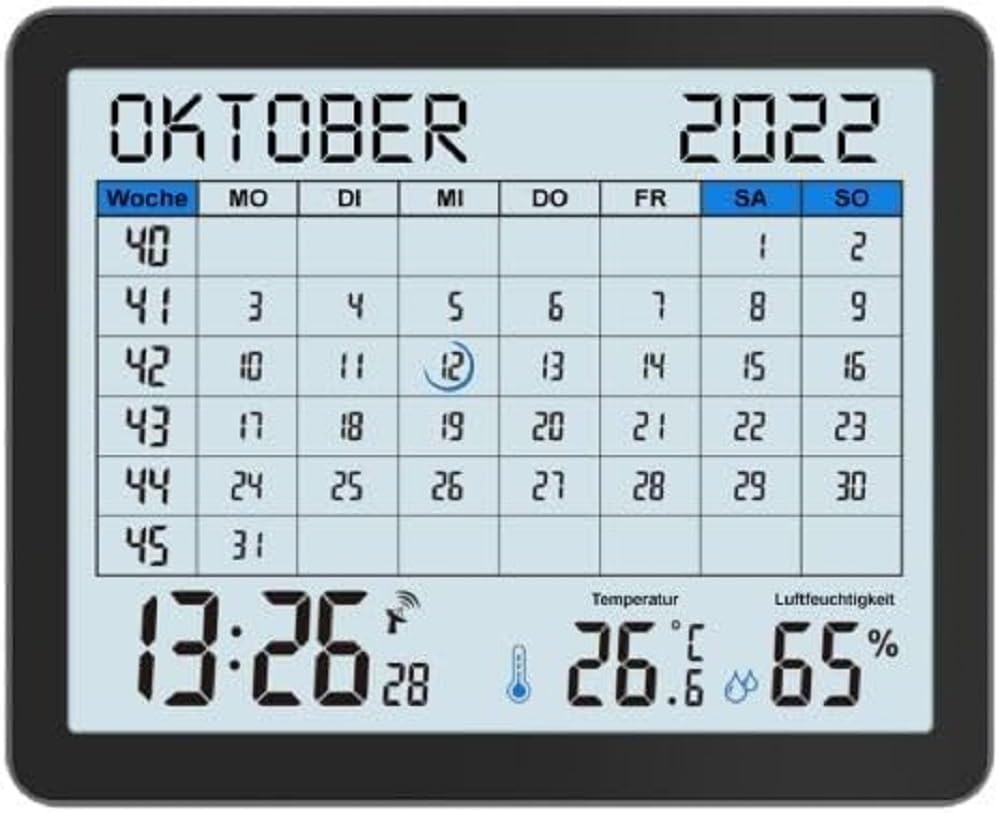
Image of the techno line WT2600 Digital Calendar packaging, showing the device and its key features.
4. Ürün Özellikleri
The techno line WT2600 Digital Calendar offers the following key features:
- DCF-77 Radio-Controlled Clock: Automatic time synchronization for precise timekeeping, with an option for manual setting.
- 12/24 Saatlik Zaman Göstergesi: Select your preferred time format.
- Takvim Ekranı: Shows the current date, day of the week, and month.
- 7-Language Month Display: Choose from seven languages for the month display.
- İç Ortam Sıcaklık Göstergesi: Shows indoor temperature in Celsius (°C) or Fahrenheit (°F).
- Indoor Humidity Display: Displays the current indoor humidity level.
- MIN/MAX Display: Records and displays the minimum and maximum temperature and humidity values.
- Erteleme Özellikli Çift Alarm: Set two independent alarms with a convenient snooze function.
- Düşük Pil Göstergesi: Pillerin değiştirilmesi gerektiğinde sizi uyarır.
- Çok Yönlü Yerleştirme: Designed for both wall mounting and table standing.

Ön view of the techno line WT2600 Digital Calendar display, showing the calendar grid, current time, temperature, and humidity.
5. Kurulum
5.1 Pil Kurulumu
- Ünitenin arkasındaki pil bölmesini bulun.
- Pil bölmesinin kapağını açın.
- Insert the required batteries (e.g., 2 x AAA, not specified in data, common for such devices) according to the polarity markings (+ and -).
- Pil bölmesi kapağını sıkıca kapatın.
5.2 Initial Power On and DCF-77 Signal Reception
Upon battery insertion, the device will power on and automatically begin searching for the DCF-77 radio signal. This process may take several minutes. For optimal reception, place the unit near a window and away from electronic interference.
- A signal icon (e.g., an antenna symbol) will flash during signal search.
- Once the signal is received, the time and date will be set automatically, and the signal icon will become solid.
- If no signal is received after 10-15 minutes, try repositioning the unit.
5.3 Manuel Saat ve Tarih Ayarı
If automatic synchronization is not desired or unsuccessful, you can set the time and date manually.
- Press and hold the 'SET' button (or similar, refer to device buttons) for a few seconds to enter manual setting mode.
- Use the '+' or '-' buttons to adjust the flashing value (e.g., hour, minute, year, month, day).
- Press 'SET' again to confirm the current setting and move to the next adjustable parameter.
- Repeat until all settings are complete.
5.4 Dil Ayarı
To change the display language for the month:
- Enter the setting mode (e.g., by pressing 'SET').
- Navigate through the settings until the language option appears.
- Use the '+' or '-' buttons to cycle through the available 7 languages.
- Seçiminizi onaylayın.
6. Çalıştırma
6.1 Viewing Time, Date, Temperature, and Humidity
The main display continuously shows the current time, date, indoor temperature, and indoor humidity. You can switch between 12-hour and 24-hour time formats by pressing a dedicated button (e.g., '12/24H' or 'MODE').
6.2 Alarmları Ayarlama
Cihazda iki adet bağımsız alarm bulunmaktadır.
- Press the 'ALARM' button (or similar) to view 1 kez alarm.
- Press and hold 'ALARM' to enter Alarm 1 setting mode.
- Use '+' or '-' to adjust the hour and minute, pressing 'ALARM' to confirm each.
- Repeat for Alarm 2.
- To activate/deactivate an alarm, press 'ALARM' repeatedly until the alarm icon appears/disappears.
6.3 Using Snooze
When an alarm sounds, press the 'SNOOZE' button (or similar, often a large button on top) to temporarily silence the alarm. The alarm will sound again after a few minutes (typically 5-10 minutes). To stop the alarm completely, press any other button.
6.4 MIN/MAX Display Function
The device records the minimum and maximum temperature and humidity values since the last reset.
- Press the 'MIN/MAX' button (or similar) once to view the maximum recorded values.
- Tekrar basın view the minimum recorded values.
- To reset the MIN/MAX records, press and hold the 'MIN/MAX' button while viewkayıtları inceliyoruz.

Close-up of the techno line WT2600 Digital Calendar display, highlighting the time, temperature, and humidity readings.
7. Bakım
7.1 Temizlik
Cihazı yumuşak bir bezle silin.amp Bez kullanın. Aşındırıcı temizleyiciler veya çözücüler kullanmayın, çünkü bunlar ekranı veya cihazı hasar verebilir.asing.
7.2 Pil Değişimi
When the low battery indicator appears on the display, replace all batteries with new ones of the same type. Follow the battery installation steps in Section 5.1.
8. Sorun Giderme
- Görüntü yok: Pillerin kutuplarını kontrol edin ve pillerin yeni olduğundan emin olun.
- Yanlış Saat/Tarih: Ensure the DCF-77 signal icon is solid. If not, reposition the unit or set the time manually (Section 5.3). Check your time zone setting if applicable (not explicitly mentioned in data, but common).
- Temperature/Humidity Readings Seem Inaccurate: Ensure the unit is placed in a location with good air circulation, away from direct heat sources or drafts. Allow some time for readings to stabilize after initial setup or relocation.
- Alarm Çalmıyor: Verify that the alarm is activated (alarm icon displayed) and the alarm time is set correctly.
9. Özellikler
| Özellik | Şartname |
|---|---|
| Model Numarası | WT2600 |
| Boyutlar (U x G x Y) | 17.3x3.81x14 cm |
| Ağırlık | 380 gr |
| Renk | Siyah |
| Malzeme | Plastik |
| Güç Kaynağı | Pil ile çalışır |
| Görüntü Türü | Dijital |
| İç/Dış Mekan Kullanımı | Kapalı |
10. Garanti ve Destek
Information regarding product warranty and customer support was not available in the provided product data. Please refer to the retailer or manufacturer's official webGaranti kapsamı ve destek seçenekleri hakkında ayrıntılı bilgi için siteyi ziyaret edin.


