Powerwave Wireless Controller Purple Rush
Kullanıcı Kılavuzu
1. Giriş
Satın aldığınız için teşekkür ederizasing the Powerwave Wireless Controller. This controller is designed to enhance your gaming experience on PlayStation 4 consoles, offering advanced features such as motion sensing, dual motor vibration, and a built-in speaker. Please read this manual carefully to ensure proper use and maintenance of your device.
This controller is compatible with PS4, PS4 Slim, and PS4 Pro models. Please note that PlayStation Lightbar, PSVR, turbo functionality, and PS5 compatibility are not supported.
2. Paket İçeriği
- 1 x Powerwave Wireless Controller (Purple Rush)
- 1 x USB Şarj Kablosu
- 1 x Kullanım Kılavuzu (bu belge)

Image: The Powerwave Wireless Controller shown within its retail packaging, highlighting the product and its box.
3. Kontrol Cihazının Özellikleri
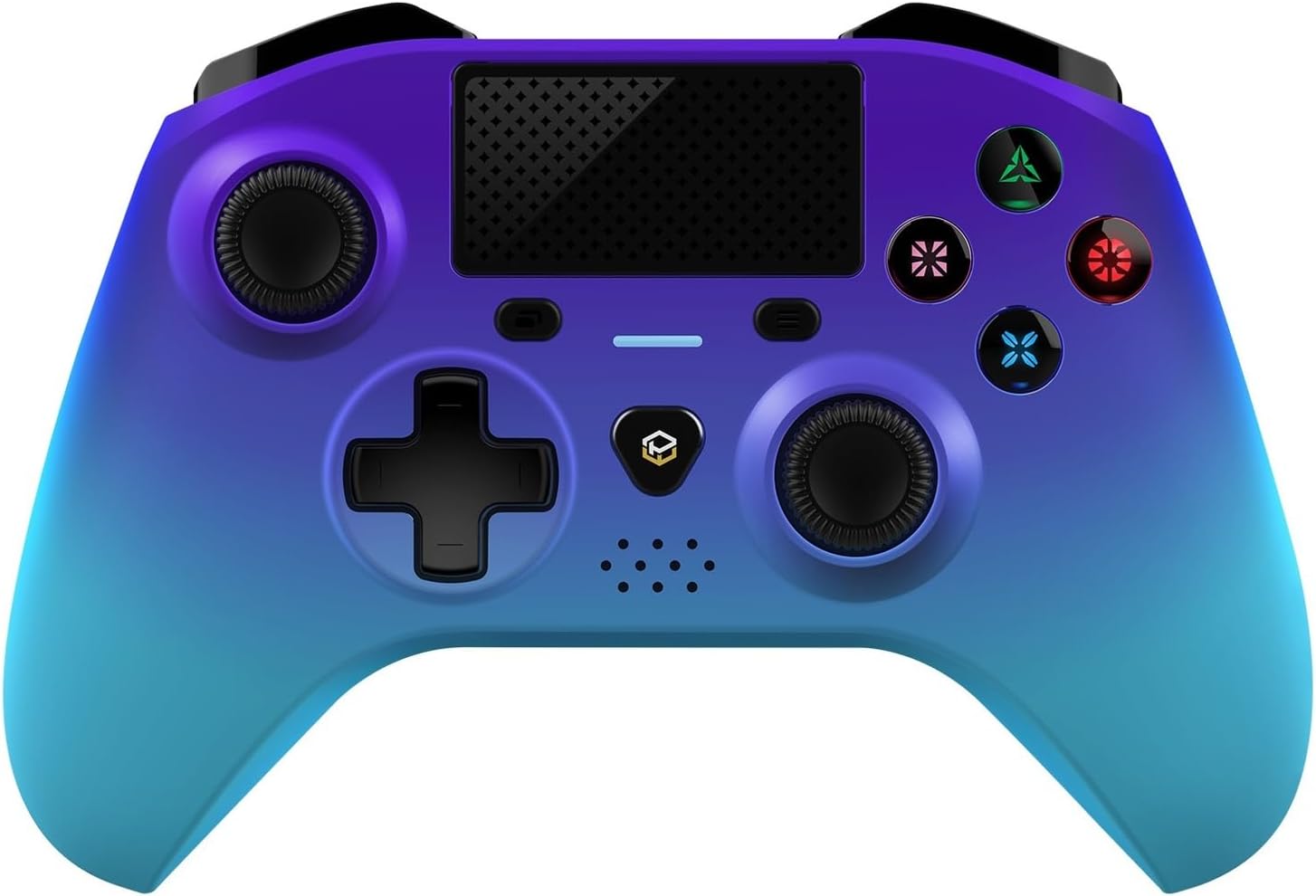
Resim: Ayrıntılı bir ön yüz view of the Powerwave Wireless Controller in Purple Rush color, showcasing its buttons, joysticks, touchpad, and LED display.
- Kablosuz Bluetooth Bağlantısı: For seamless gaming without cables.
- LED Display Buttons: Illuminated buttons for enhanced visibility.
- Şarj Edilebilir Pil: Built-in lithium polymer battery for extended playtime.
- Hareket Algılama Teknolojisi: Integrated sensors for intuitive control in compatible games.
- Çift Motorlu Titreşim: Oyun sırasında sürükleyici dokunsal geri bildirim sağlar.
- Dokunmatik yüzey: Interactive surface for unique gameplay mechanics.
- Dahili Hoparlör: Enhances audio experience directly from the controller.
- 3.5mm Stereo Audio Jack: Kulaklık veya mikrofonlu kulaklık bağlamak için.
4. Kurulum Kılavuzu
4.1 Kontrol Ünitesinin Şarj Edilmesi
- Connect the small end of the supplied USB charging cable to the micro-USB port on the front of the controller.
- Connect the larger end of the USB cable to an available USB port on your PlayStation 4 console or a compatible USB wall adapter (5V/1A recommended).
- The controller's LED indicator will show charging status. It will typically turn off or change color once fully charged.
4.2 Pairing with PlayStation 4
- PlayStation 4 konsolunuzun açık olduğundan emin olun.
- Connect the controller to the PS4 console using the supplied USB charging cable.
- Basın PS düğmesi (the button with the PlayStation logo) in the center of the controller.
- The controller will automatically pair with the console. Once paired, you can disconnect the USB cable for wireless play.
- To pair additional controllers, repeat the steps above.
Note: If the controller does not pair, ensure it is fully charged and try connecting it to a different USB port on the console.
5. Kontrol Cihazının Çalıştırılması
5.1 Temel Kontroller
The Powerwave Wireless Controller features standard PlayStation layout buttons, including:
- Yön Tuş Takımı (D-Pad): Yönlü giriş için.
- Eylem Düğmeleri (Üçgen, Daire, Çarpı, Kare): Oyun içi eylemler için.
- Sol ve Sağ Analog Çubuklar: Hassas hareket ve kamera kontrolü için.
- L1/R1 and L2/R2 Buttons: Omuz ve tetik düğmeleri.
- PAYLAŞ düğmesi: Oyun anlarını paylaşmak için.
- SEÇENEKLER düğmesi: For accessing in-game menus.
- PS Düğmesi: For accessing the PS4 home screen and power options.
- Dokunmatik yüzey: Functions as a clickable button and multi-touch surface.
5.2 Gelişmiş İşlev
- Hareket Algılama: Tilt and move the controller to interact with games that support motion controls.
- Titreşimli geribildirim: Experience realistic vibrations during gameplay, such as impacts or explosions.
- Ses Çıkışı: Connect a 3.5mm headset to the audio jack for in-game sound and voice chat. Adjust volume through the PS4 system settings.
6. Bakım ve Özen
- Temizlik: Kumanda ünitesini temizlemek için yumuşak, kuru bir bez kullanın. İnatçı kirler için hafifçe kurulayın.ampBezi suyla yıkayın. Sert kimyasallar veya aşındırıcı temizleyiciler kullanmayın.
- Depolamak: Kontrol cihazını serin, kuru ve doğrudan güneş ışığından ve aşırı sıcaklıklardan uzak bir yerde saklayın.
- Pil Bakım: Pil ömrünü uzatmak için, kontrol cihazını sık sık tamamen boşaltmaktan kaçının. Uzun süre kullanılmasa bile düzenli olarak şarj edin.
- Damlalardan Kaçının: Kumanda cihazını, iç bileşenlerine zarar verebilecek fiziksel darbelere ve düşmelere karşı koruyun.
7. Sorun Giderme
| Sorun | Olası Çözüm |
|---|---|
| Kumanda açılmıyor. | Ensure the controller is fully charged. Connect it to the PS4 via USB cable and try pressing the PS button. |
| Controller does not pair with PS4. |
|
| Input lag or disconnection during wireless play. |
|
| Vibration or motion sensing not working. | Check in-game settings and PS4 system settings to ensure these features are enabled. Some games may not support these features. |
8. Özellikler
| Özellik | Detay |
|---|---|
| Bağlantı | Kablosuz Bluetooth |
| Uyumluluk | PlayStation 4, PS4 Slim, PS4 Pro |
| Pil Türü | 1 Lityum Polimer pil (dahil) |
| Boyutlar (yaklaşık) | 17.5x15.6x6.9 cm |
| Ağırlık (yaklaşık) | 987 Gram |
| ses Limanı | 3.5 mm Stereo Ses Jakı |
| Model Tanımlayıcısı (ASIN) | B0CKPF5X2N |
9. Garanti ve Destek
For warranty information and customer support, please refer to the documentation provided with your purchase or visit the official Powerwave webSite. Satın alma belgenizi garanti talepleriniz için saklayın.
Daha fazla yardım için, ürünü satın aldığınız perakendeciyle de iletişime geçebilirsiniz.
Bu ürün için resmi satıcı videosu bulunamadı.


