1. Giriş
Welcome to the instruction manual for your Raymarine Axiom 2 Pro 12 S Chartplotter/Fishfinder. This guide provides essential information for the safe installation, effective operation, and proper maintenance of your marine electronics device. Please read this manual thoroughly before using the product to ensure optimal performance and longevity.
1.1 Güvenlik Bilgileri
- Güç Kaynağı: Ensure the device is connected to a stable 12V DC power source. Incorrect voltagÜniteye zarar verebilir.
- Suya Maruz Kalma: While the unit is designed for marine environments, avoid direct high-pressure water jets. Ensure all connections are sealed to prevent water ingress.
- Montaj: Securely mount the device in a location that does not obstruct navigation or safety equipment. Verify the mounting surface can support the unit's weight.
- Seyir Yardımı: This device is an aid to navigation. Always use official government charts and exercise caution.
2. Paket İçeriği
Carefully unpack your Raymarine Axiom 2 Pro 12 S and verify that all items are present. If any items are missing or damaged, contact your dealer immediately.
- Raymarine Axiom 2 Pro 12 S Display Unit
- Mounting Hardware Kit (gasket, studs, thumb nuts, washers)
- Power/NMEA2000 Cable
- Documentation Pack (including this manual)
3. Kurulum ve Kurulum
Proper installation is crucial for the performance of your Axiom 2 Pro 12 S. Refer to the detailed installation instructions provided in the separate installation guide for specific drilling templates and wiring diagrams.
3.1 Ekran Ünitesinin Montajı
The Axiom 2 Pro 12 S is designed for surface mounting. Choose a location that offers good visibility, is protected from excessive direct sunlight, and allows for adequate ventilation around the unit.
- Konum: Select a flat, rigid surface on your dashboard or console.
- Gümrükleme: Ensure sufficient space behind the unit for cable connections and ventilation.
- Delme: Use the provided template to mark and drill the necessary holes for mounting studs and cables.
- Sızdırmazlık: Apply marine-grade sealant around drilled holes and the mounting gasket to prevent water intrusion.
3.2 Güç ve Ağ Bağlantıları
Connect the power cable to a dedicated 12V DC circuit. The unit is battery-powered and requires a stable power supply.
- Güç kablosu: Connect the red wire to the positive (+) terminal of your 12V DC power source and the black wire to the negative (-) terminal. Ensure an inline fuse (not supplied) is installed on the positive line, as specified in the installation guide.
- NMEA2000: The supplied power cable also includes NMEA 2000 connections for integrating with other compatible marine electronics. Connect to your NMEA 2000 backbone for data sharing.
- Transducer/Chart (Optional): This model does not include a chart or transducer. If you are connecting an external, compatible transducer or chart card reader, refer to their respective manuals for connection details.
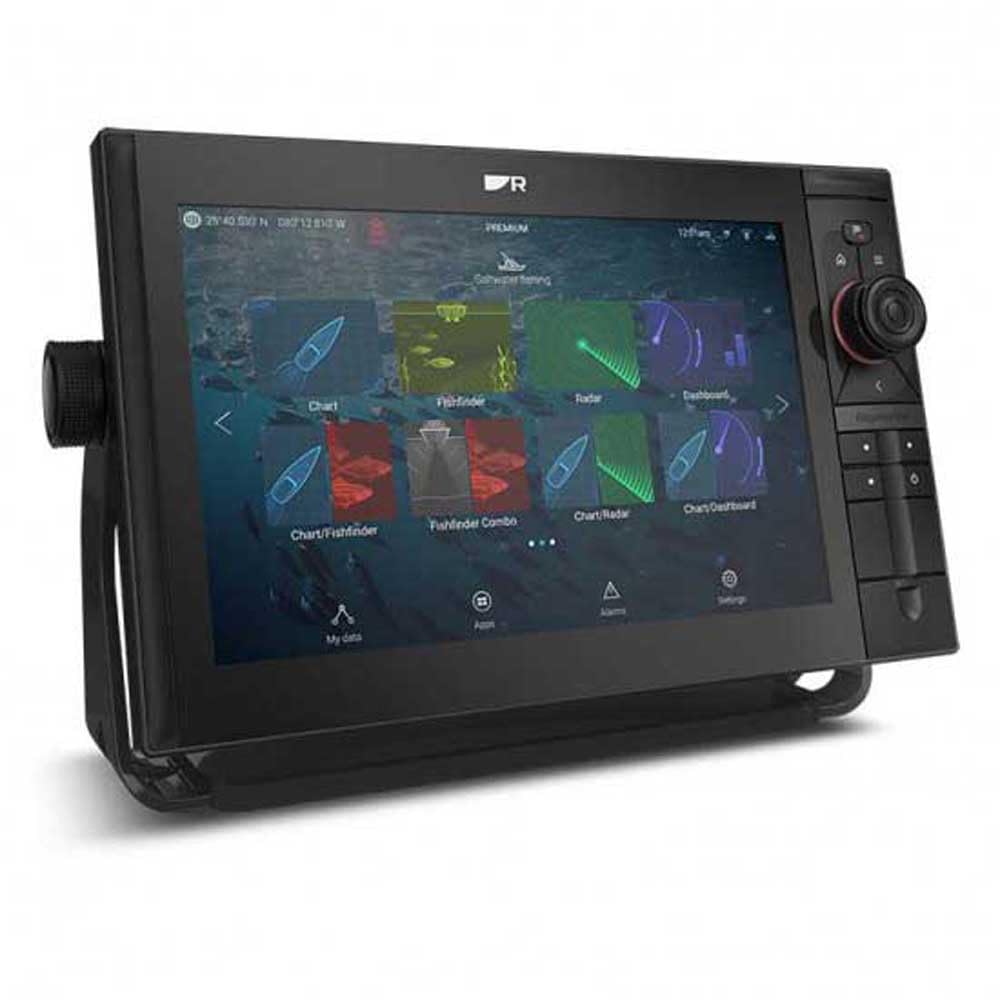
Image of the Raymarine Axiom 2 Pro 12 S display unit, showing its sleek design and large touchscreen.
4. Kullanım Talimatları
The Axiom 2 Pro 12 S features an intuitive touchscreen interface. Familiarize yourself with the basic operations to navigate and utilize its functions effectively.
4.1 Güç Açma/Kapatma
- Güç Açık: Press and hold the power button located on the unit's side or front panel until the Raymarine logo appears.
- Kapat: Press and hold the power button until the power-off menu appears. Select 'Power Off' to shut down the system safely. A quick press will bring up the quick access menu.
4.2 Dokunmatik Ekran Arayüzü
- Musluk: Select items, open menus, or activate functions.
- Tokatlamak: Scroll through lists or pan across charts.
- Yakınlaştırmak için sıkıştırma: Use two fingers to zoom in or out on charts and sonar displays.
- Uzun basma: Access contextual menus or advanced options.
4.3 Grafik Çizici Fonksiyonları
- Navigasyon: Tap on the chart to set a waypoint or create a route. Follow the on-screen guidance.
- Ara noktalar: Save specific locations of interest. Access the Waypoints menu to manage saved points.
- Rotalar: Plan multi-point journeys. Routes can be created, edited, and activated from the Routes menu.
- Parçalar: The unit automatically records your vessel's path. View and manage tracks from the Tracks menu.
4.4 Fishfinder Functions
Note: Fishfinder functionality requires a compatible transducer (not included with this model) to be connected.
- Sonar Display: Interpret the sonar returns to identify fish, bait, and bottom structure.
- Derinlik aralığı: Adjust the depth range to focus on specific water columns.
- Kazanç Ayarlaması: Increase or decrease the sensitivity (gain) to optimize the sonar image for different water conditions.
- Frekanslar: If using a multi-frequency transducer, select the appropriate frequency for your fishing conditions.
4.5 Sistem Ayarları
- Görüntülemek: Adjust brightness, color palette, and backlight settings.
- Birimler: Configure units of measurement for depth, speed, temperature, etc.
- Dil: Kullanıcı arayüzü için tercih ettiğiniz dili seçin.
- Ağ: Manage network connections and device settings for connected equipment.
5. Bakım
Regular maintenance ensures the longevity and reliable operation of your Axiom 2 Pro 12 S.
- Temizlik: Ekranı yumuşak bir bezle temizleyin.amp bez ve yumuşak deterjan kullanın. Aşındırıcı temizleyicilerden veya çözücülerden kaçının.
- Yazılım Güncellemeleri: Periodically check the Raymarine website for software updates. Keeping your unit updated ensures access to the latest features and performance enhancements.
- Kablo Denetimi: Regularly inspect all cables and connections for signs of wear, corrosion, or damage. Ensure all connections remain watertight.
- Depolamak: If storing the vessel for an extended period, ensure the unit is powered off correctly and consider covering it to protect from dust and UV exposure.
6. Sorun Giderme
This section addresses common issues you might encounter. For more complex problems, contact Raymarine customer support.
| Sorun | Olası Neden | Çözüm |
|---|---|---|
| Ünite açılmıyor | Elektrik yok, sigorta atmış, bağlantı gevşek. | Güç kablosu bağlantılarını kontrol edin, sigortayı inceleyin, pilin doluluk oranını doğrulayın.tage. |
| GPS sinyali yok | Engellenmiş view of sky, internal GPS fault | Açık olduğundan emin olun view of the sky. If problem persists, contact support. |
| No sonar data | Transdüser bağlı değil, transdüser arızalı, transdüserin altında hava kabarcıkları var. | Verify transducer connection. Check transducer for damage. Ensure transducer is properly submerged and free of obstructions. |
| Ekran soluk veya okunamıyor | Parlaklık ayarı çok düşük, doğrudan güneş ışığına maruz kalıyor. | Adjust display brightness in settings. Reposition unit or use a sun cover if direct sunlight is an issue. |
7. Özellikler
Key technical specifications for the Raymarine Axiom 2 Pro 12 S (Model E70655).
- Marka: Raymarine
- Model Adı: Axiom 2 Pro 12 S (E70655)
- Ekran Boyutu: 12 inç
- Görüntüleme Türü: Dokunmatik ekran
- Güç Kaynağı: Pil ile çalışır (12V DC)
- Maksimum Ölçüm Derinliği: 274 Meters (with compatible transducer)
- Montaj Tipi: Yüzey Montajı
- Ürün Ölçüleri: Yaklaşık 1 x 1 x 1 inç (Note: This dimension may be generic. Refer to the installation guide for precise measurements.)
- UPC: 723193843536
8. Garanti ve Destek
Your Raymarine Axiom 2 Pro 12 S is covered by a manufacturer's warranty. For specific warranty terms and conditions, please refer to the warranty documentation included with your product or visit the official Raymarine webalan.
For technical support, service, or to find authorized service centers, please visit the official Raymarine support website or contact their customer service department directly. Providing your model number (E70655) and serial number will assist in faster service.
Official Raymarine Webalan: www.raymarine.com