1. Ürün Bittiview
The SJOYBRING JOY-W005 is a 7-inch double din car radio designed to enhance your in-car entertainment and connectivity. It features wireless Apple CarPlay and Android Auto, Bluetooth 5.3, Mirror Link functionality, and supports a backup camera for improved safety.

Resim 1.1: Ön view of the SJOYBRING JOY-W005 car radio displaying the main interface with various application icons, along with illustrations of wireless Android Auto, wireless CarPlay, and the included backup camera.
2. Kurulum ve Kurulum
En iyi performans için doğru kurulum çok önemlidir. Cihazın profesyonel bir oto ses sistemi teknisyeni tarafından monte edilmesi önerilir.
2.1. Kurulum Öncesi Kontroller
- Dashboard Opening Size: Verify that your vehicle's dashboard opening size matches one of the following dimensions for compatibility:
- 170 x 97 mm (6.69 x 3.81 inches) - Common in U.S. and Europe.
- 178 x 100 mm (7 x 3.93 inches) - Common in Asia.
- 189 x 117 mm (7.44 x 4.61 inches) - Other common sizes.
- Ek Aksesuarlar: Some car models may require a wire harness adapter and a radio antenna adapter. These are not included and must be purchased separately if needed.

Image 2.1: Detailed diagram showing the various dimensions of the car radio for fitment verification, along with a comprehensive wiring diagram for power, speakers, and camera connections. It also illustrates the connection points for the main harness (A, B, C) and notes for additional accessories (E, F, G).

Image 2.2: Visual guide demonstrating the installation process, including the use of a vehicle-specific dash kit to integrate the car stereo seamlessly into the dashboard and the connection of an ISO harness to a vehicle-specific harness adapter.
2.2. Kablo Bağlantıları
Refer to the wiring diagram provided in Image 2.1 for detailed connections. Ensure all connections are secure to prevent malfunctions.
- Güç Bağlantıları: Connect the yellow wire to 12V constant power, the black wire to ground, and the red wire to 12V ignition switch.
- Hoparlör Bağlantıları: Connect the speaker wires (FR, FL, RR, RL) to their corresponding vehicle speaker wires.
- Geri Görüş Kamerası: Connect the backup camera's video input to the unit's "F-CAM R-CAM V-OUT" port. The camera's power should be connected to the vehicle's reversing light circuit.

Image 2.3: Diagram illustrating the one-step wiring connection for the rear camera, showing how the camera connects to the reversing light and then to the car stereo.
3. Kullanım Talimatları
3.1. Kablosuz Apple CarPlay ve Android Auto
The unit supports wireless connection to Apple CarPlay and Android Auto. Once paired, your smartphone will automatically connect when you start your vehicle, providing access to navigation, music, messages, and voice assistants.
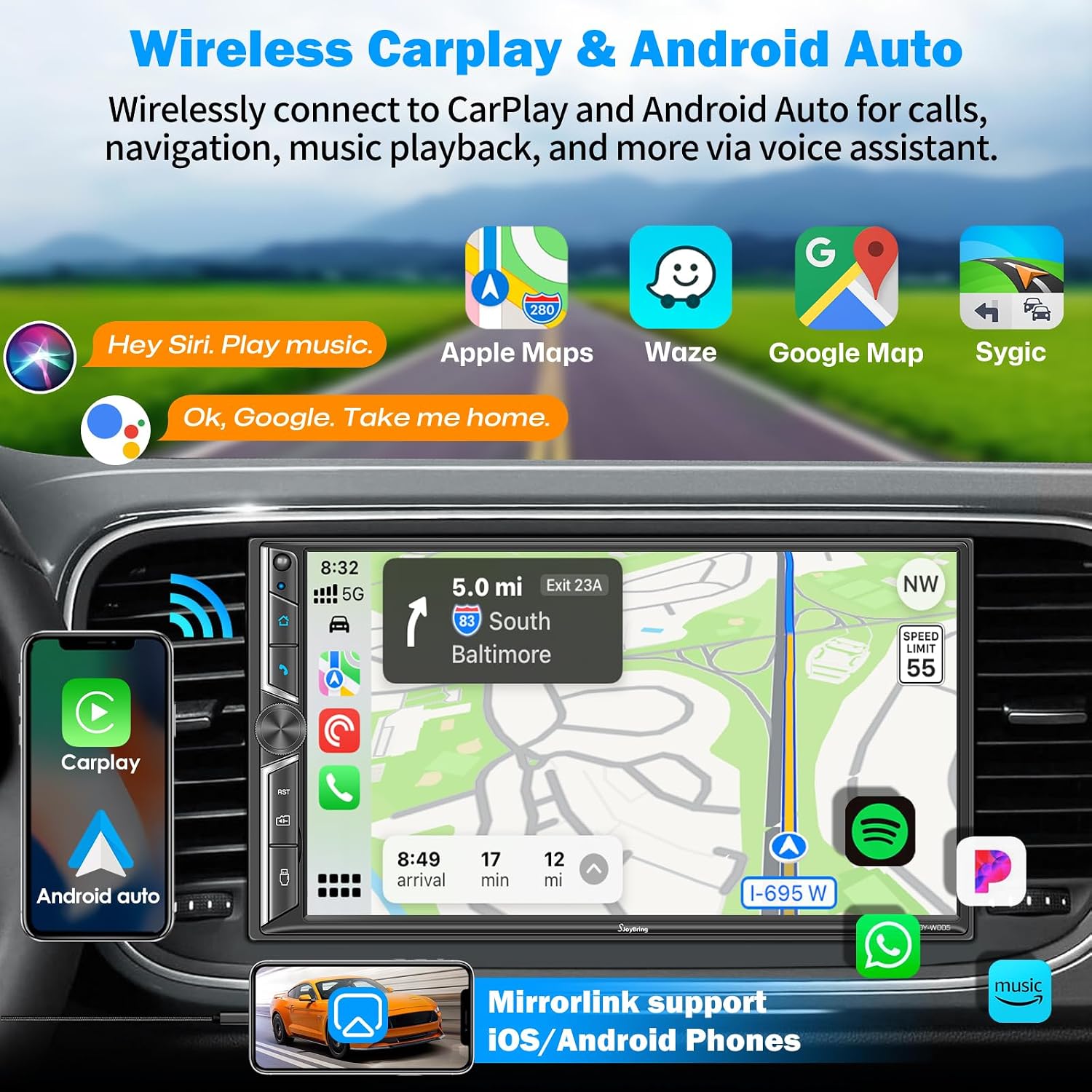
Image 3.1: Display of the car radio screen showing the Apple CarPlay interface with navigation, music, and voice assistant prompts, alongside a phone displaying Android Auto. This image highlights the wireless connectivity feature.

Image 3.2: An in-car perspective of the SJOYBRING car radio displaying the Apple CarPlay interface, with a smartphone on either side illustrating wireless CarPlay and Android Auto connections. Various app icons like Apple Maps, Waze, Google Maps, and Spotify are visible.
3.2. Bluetooth 5.3 Bağlantısı
The upgraded Bluetooth 5.3 module provides stable and efficient wireless audio streaming and hands-free calling. The built-in microphone ensures clear call quality, and an external microphone jack is available for enhanced voice input.

Image 3.3: Illustration of the Bluetooth 5.3 upgrade, showing a noise cancellation process graph, a clear hands-free call interface on the car radio, and the locations of the built-in microphone, Bluetooth antenna, and external MIC jack.

Image 3.4: Screenshot of the car radio's Bluetooth music playback interface, displaying song information, playback controls, and options for dialing, contacts, and pairing devices.
3.3. Ayna Bağlantısı İşlevselliği
Connect your iOS or Android smartphone via USB to mirror its screen onto the car radio display. This allows you to view apps like Google Maps, Spotify, or YouTube directly on the 7-inch HD screen.

Image 3.5: Illustration of the Mirror Link feature, showing a smartphone connected via USB to the car radio, with the phone's screen content (a sports car) mirrored onto the larger car radio display.
3.4. Audio Output and Equalizer
The unit features a 4.2-channel audio output (FR, FL, RR, RL) with a maximum of 240W output, supporting connections to aftermarket amplifiers and two separate subwoofers. Utilize the built-in EQ and DSP for sound customization.

Image 3.6: Diagram illustrating the 4.2-channel surround sound system within a car, highlighting the speaker placement and subwoofer outputs. The image also shows the car radio's built-in EQ setup screen with adjustable frequency bands and a balance/fader control interface.

Image 3.7: A detailed visual representation of the 4.2-channel stereo system, emphasizing the four-channel surround and dual subwoofer outputs with 60W*4 power amplification. It includes a graphical equalizer and sound field adjustment interface.
3.5. AM/FM Radyo
Tune into your favorite AM and FM radio stations. The unit supports FM frequencies from 87.5-107.9 MHz and AM frequencies from 530-1710 KHz.

Image 3.8: Screenshot of the car radio's AM/FM radio interface, displaying frequency display, station presets, and scan options. The image also indicates the supported frequency ranges for FM and AM bands.
3.6. Backup Camera and Front View Destek
The car radio automatically displays the rear view image when the vehicle is shifted into reverse. An HD night vision rear view camera is included, offering a wide viewing angle and waterproof design. The unit also supports a front view kamera (dahil değildir).

Image 3.9: Comparison of front view ve arka view camera displays on the car radio screen, demonstrating how the unit automatically switches to the reversing image. Key features like High Definition, Wide Viewing Angle, Night Vision, and IP68 Waterproof are highlighted, along with an image of the included backup camera.
3.7. Direksiyon Kontrolü
The unit supports steering wheel controls, allowing you to manage functions like volume, track changes, and calls directly from your steering wheel. Access the steering wheel control settings in the system menu to configure.

Image 3.10: Screenshot of the car radio's menu for setting up steering wheel controls, showing options to assign functions like volume up/down, next/previous track, and mute to physical buttons on the steering wheel.
3.8. HD Touch Screen
The 7-inch HD touch screen features a 1024 x 600 resolution and supports 1920 x 1080P video playback. Physical buttons, including a rotating volume control, are provided for ease of use while driving.

Image 3.11: Visual comparison between the 1024x600 HD screen of the SJOYBRING unit and a general screen, highlighting the clarity and detail of the HD display. It also illustrates multi-touch gestures for screen interaction.
4. Bakım
To ensure the longevity and optimal performance of your SJOYBRING car radio, follow these general maintenance guidelines:
- Temizlik: Ekranı ve dış yüzeyi temizlemek için yumuşak ve kuru bir bez kullanın. Yüzeye zarar verebilecek aşındırıcı temizleyiciler veya çözücülerden kaçının.
- Sıcaklık: Cihazı uzun süre aşırı sıcak veya soğuk sıcaklıklara maruz bırakmaktan kaçının.
- Donanım Yazılımı Güncellemeleri: Üreticinin kontrol edin webPerformansı artırmak ve yeni özellikler eklemek için mevcut ürün yazılımı güncellemeleri için siteyi düzenli olarak kontrol edin.
- Kablolama Denetimi: Periodically check all wiring connections for looseness or damage, especially after any vehicle maintenance.
5. Sorun Giderme
This section addresses common issues you might encounter with your SJOYBRING car radio.
5.1. Güç Yok / Cihaz Açılmıyor
- Check the vehicle's fuse box for any blown fuses related to the car stereo.
- Ensure all power wires (yellow, red, black) are correctly and securely connected as per the wiring diagram.
- Verify that the vehicle's ignition is on if the red ACC wire is connected to an ignition-switched power source.
5.2. No Sound / Distorted Audio
- Check all speaker wire connections for proper polarity and secure contact.
- Sesin kapalı olmadığından veya çok düşük bir seviyeye ayarlanmadığından emin olun.
- Verify that the audio source (e.g., radio, Bluetooth, CarPlay) is correctly selected.
- harici kullanılıyorsa ampHayat kurtarıcılar, güç ve sinyal bağlantılarını kontrol edin.
5.3. Wireless CarPlay / Android Auto Connection Issues
- Telefonunuzun Wi-Fi ve Bluetooth özelliğinin etkin olduğundan emin olun.
- Forget the device from both your phone's Bluetooth settings and the car radio's Bluetooth settings, then attempt to re-pair.
- Restart both your smartphone and the car radio.
- Telefonunuzun işletim sisteminin güncel olduğundan emin olun.
5.4. Backup Camera Not Displaying
- Check the video input connection from the camera to the car radio.
- Verify that the camera's power wire is correctly connected to the vehicle's reversing light circuit and receiving power when in reverse.
- Ensure the reverse trigger wire (usually pink or brown) from the car radio is connected to the vehicle's reverse signal wire.
6. Özellikler
| Özellik | Detay |
|---|---|
| Marka | JOYBRING |
| Model Numarası | JOY-W005 |
| Ekran Boyutu | 7 inç |
| Ekran Çözünürlüğü | 1024x600 |
| Video Playback Support | 1920x1080P |
| Bağlantı Teknolojisi | Bluetooth 5.3, USB, Wi-Fi |
| Ses Çıkışı Modu | Stereo |
| Çevresel Ses Kanalı Yapılandırması | 4.1 (4.2-Channel Audio Output) |
| Max Audio Output Power | 240W (60Gx4) |
| Özel Özellikler | Wireless Apple CarPlay, Wireless Android Auto, Mirror Link, Built-In Bluetooth, Backup Camera Support |
| Ürün Ağırlığı | 2.75 pound |
| Ürün Boyutları | 3.25 x 7 x 3.9 inç |
7. Paket İçeriği
Ürün paketinde genellikle aşağıdaki öğeler bulunur:
- SJOYBRING JOY-W005 Car Radio Unit
- Arka View Kamera
- Yedek Kamera Kablosu
- Kablo demeti
- Uzaktan kumanda
- Montaj Braketleri
- Vidalar
- Kullanım Kılavuzu (bu belge)
- Additional Frames (for use when needed)

Image 7.1: Visual representation of the items included in the product package, such as the car stereo unit, rear view camera, cables, harness, remote, brackets, screws, and user manual. It also notes the need for additional dash kits, wire harnesses, and radio antenna adapters for certain installations.
8. Garanti ve Destek
SJOYBRING offers comprehensive support for its products.
- İade: 30 günlük iade/değişim politikası.
- Yenisiyle değiştirme: Available for 12 months.
- Teknik Destek: Lifetime consultation and support.
- Yanıt Süresi: Quick reply within 24 hours for inquiries.
For technical assistance or warranty claims, please contact the seller directly through the platform where the product was purchased. You can typically find a "Ask a question" or "Contact Seller" option on the product page or in your order history.

Image 8.1: Icon indicating 24-hour quick reply support from SJOYBRING.

Image 8.2: Icon indicating a 90-day return policy for SJOYBRING products.

Image 8.3: Icon indicating a 12-month replacement policy for SJOYBRING products.

Image 8.4: Icon indicating lifetime consultation and support from SJOYBRING.


