1. Giriş
This manual provides detailed instructions for the installation, operation, and maintenance of your GoHawk AN4-Halo Chrome Motorcycle Bluetooth Speaker System. This system features 4-inch full-range speakers with a built-in 300W Class-D amplifier, Bluetooth 5.0 connectivity, USB, and AUX inputs, and an integrated LED halo ring. It is designed for use on motorcycles, ATVs, scooters, and 4-wheelers.
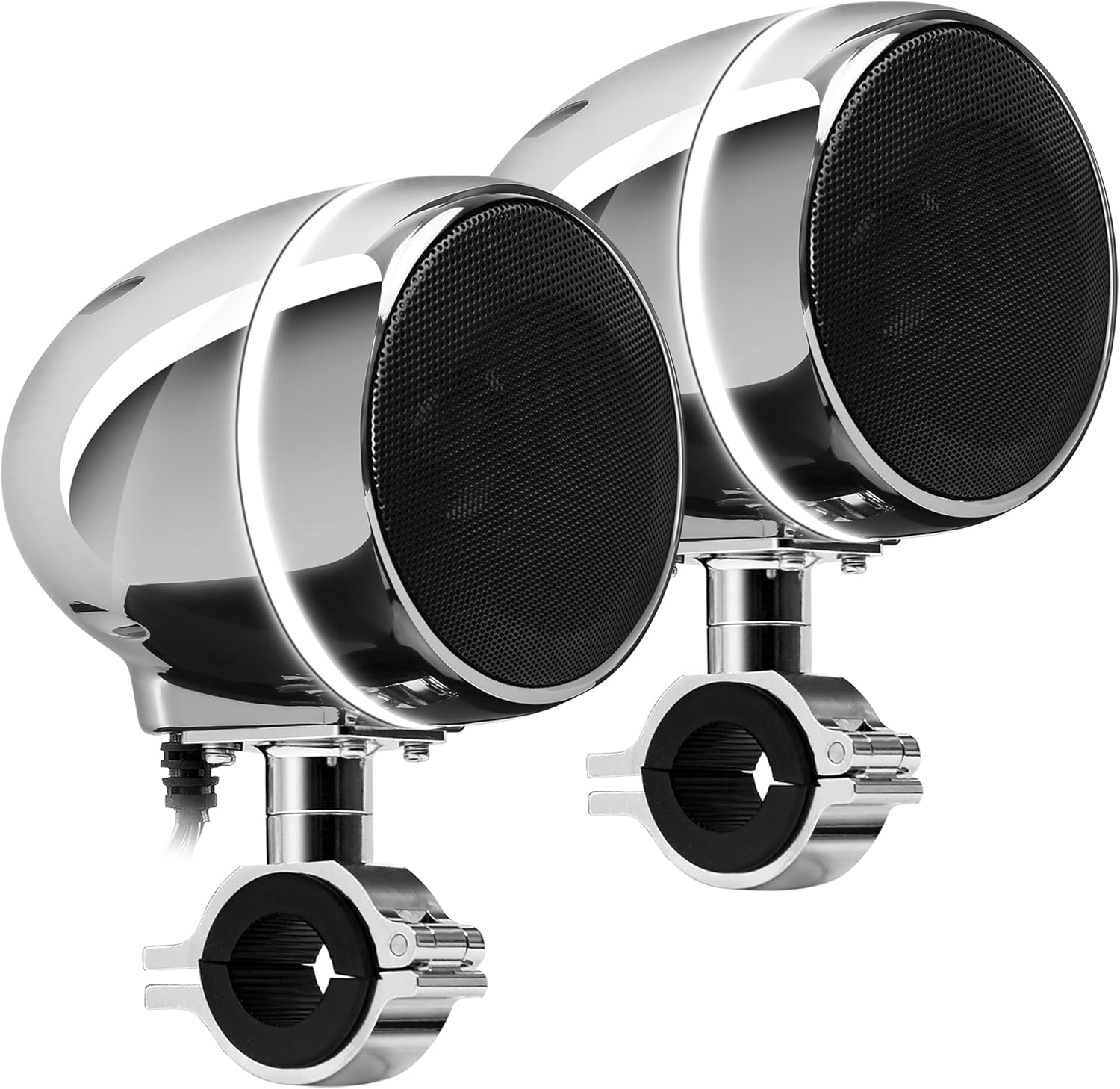
Image 1.1: GoHawk AN4-Halo Chrome Motorcycle Bluetooth Speaker System.
2. Güvenlik Bilgileri
- Always ensure proper wiring and secure mounting to prevent accidents during vehicle operation.
- Do not attempt to disassemble or modify the speaker system. This may void the warranty and cause damage.
- Avoid prolonged exposure to extremely high volume levels, which can cause hearing damage.
- Ensure all connections are waterproofed and protected from the elements, despite the system's IP56 waterproof rating.
- Herhangi bir adımda emin değilseniz, kurulum için bir uzmana danışın.
3. Paket İçeriği
Paketin içinde tüm öğelerin mevcut olduğundan emin olun:
- 1 x Master Speaker with Built-in Ampcankurtaran
- 1 x Köle Hoparlör
- 1 x Kablolu Kontrol
- 1 x 3.5mm Audio AUX Cable
- 1 x SAE to Ring Terminal Power Cord (78 inches long)
- 2 x Montaj Clamps (supports 7/8" to 1-1/4" bar size)
- 1 x Kullanım Kılavuzu
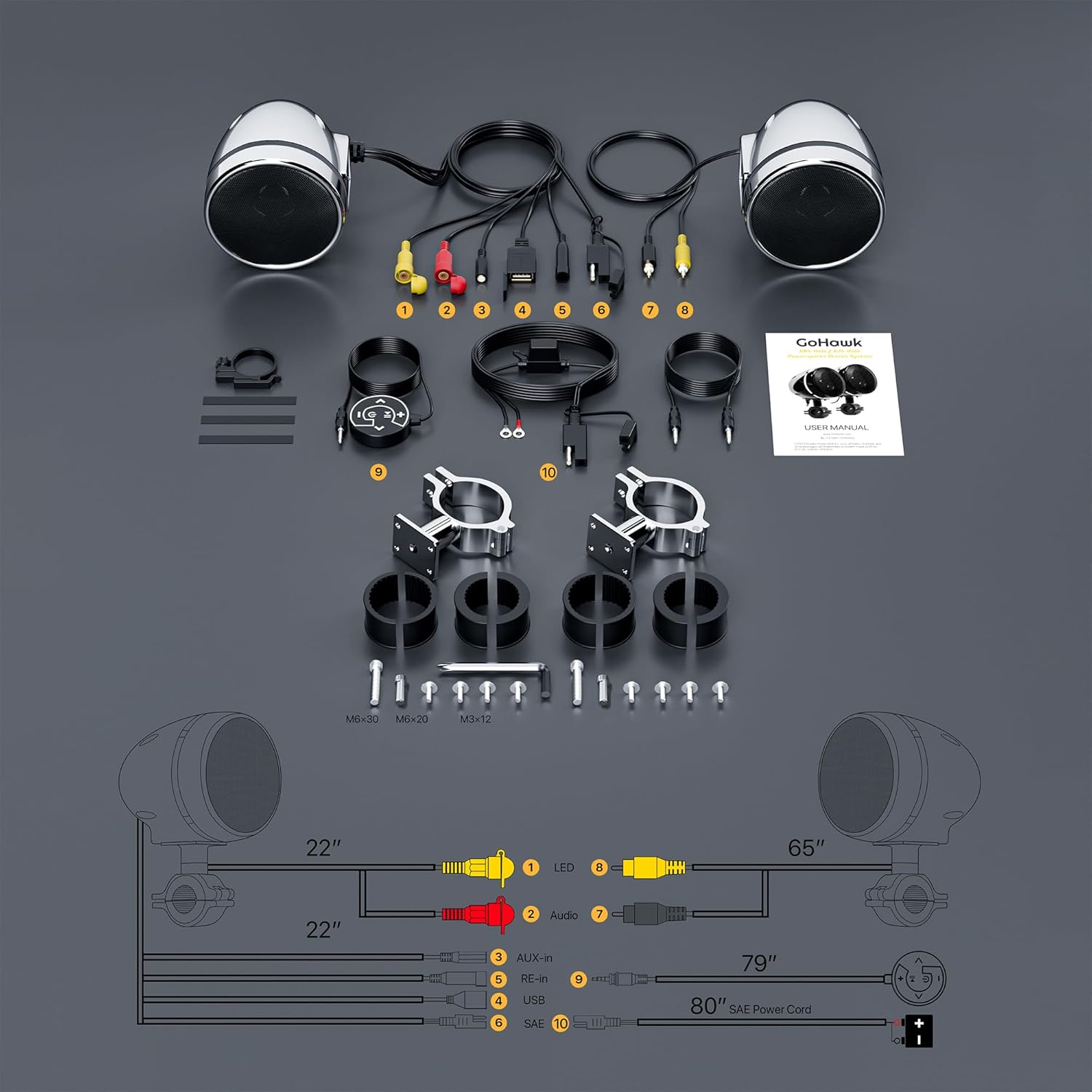
Image 3.1: Included components and wiring diagram.
4. Kurulum ve Kurulum
Doğru kurulum için şu adımları izleyin:
- Hoparlörlerin Montajı: Attach the master and slave speakers to your vehicle's handlebars using the provided mounting clamps. Cl'nin doğru olduğundan emin olun.amps are securely tightened for stability. The clamps support handlebar sizes from 7/8 inch to 1-1/4 inch.
- Hoparlörleri Bağlama: Connect the slave speaker to the master speaker using the provided speaker cable. The slave speaker cable is 70 inches long and uses a standard RCA male connector.
- Connecting the Wired Control: Plug the wired control unit into the designated port on the master speaker. Mount the wired control in an easily accessible location on your handlebars.
- Güç Bağlantısı: Connect the SAE to ring terminal power cord to your vehicle's 12V power source. The red wire connects to the positive (+) terminal, and the black wire connects to the negative (-) terminal. Ensure a secure and stable power supply.
- Kablo yönetimi: Route all cables safely, away from moving parts, heat sources, and potential pinch points. Secure cables with zip ties or similar fasteners.

Resim 4.1: Montaj planlaması için ürün boyutları.
5. Kullanım Talimatları
The system is controlled via the backlit wired control unit.

Image 5.1: Close-up of the full-function backlit wired control.
5.1 Wired Control Functions
- Güç Düğmesi: Press and hold to turn the system on or off. A short press may switch modes.
- Oynat/Duraklat Düğmesi: Press to play or pause audio playback. Long-press to toggle the LED halo ring.
- Sesi Aç (+): Ses seviyesini artırın.
- Sesi kıs (-): Ses seviyesini azaltın.
- Next Track (Right Arrow): Sonraki parçaya veya istasyona atlayın.
- Previous Track (Left Arrow): Go to the previous track or station.
5.2 Bluetooth Eşleştirme
To connect your smartphone or other Bluetooth-enabled device:
- Ensure the speaker system is powered on and in Bluetooth mode (indicated by an audible prompt or LED indicator).
- Mobil cihazınızda Bluetooth'u etkinleştirin ve mevcut cihazları arayın.
- Select "GOHAWK" from the list of discovered devices to pair.
- Once paired, you will hear a confirmation tone, and audio will stream wirelessly from your device.

Resim 5.2: Örn.ample of Bluetooth pairing on a smartphone.
5.3 USB ve AUX Oynatma
The system supports audio playback from USB drives and devices connected via the 3.5mm AUX input.
- USB Girişi: Ses dosyaları içeren bir USB bellek takın. files into the USB port. The system will automatically switch to USB mode and begin playback. Note: USB charging and direct playback from phones via USB are not supported.
- AUX Girişi: Connect an audio device (e.g., MP3 player) to the 3.5mm AUX input using the provided AUX cable. The system will switch to AUX mode for playback.

Image 5.3: USB input for audio files.

Image 5.4: 3.5mm AUX input for external devices.
5.4 LED Ring Control
The integrated white LED halo ring can be controlled directly from the wired control unit.
- Toggle LED: Long-press the Play/Pause button on the wired control to turn the LED halo ring on or off.

Image 5.5: Speakers featuring the LED halo ring.
6. Bakım
To ensure the longevity and optimal performance of your GoHawk speaker system:
- Temizlik: Yumuşak bir d kullanınamp Hoparlör yüzeylerini temizlemek için bir bez kullanın. Yüzeye zarar verebilecek aşındırıcı temizleyicilerden veya çözücülerden kaçının.
- Suya Dayanıklılık: The system has an IP56 waterproof design, meaning it is protected against dust and high-pressure water jets. However, avoid submerging the unit or exposing it to prolonged heavy rain if possible. Ensure all port covers are securely closed.
- Bağlantı Kontrolleri: Periodically inspect all wiring connections for tightness and signs of wear or corrosion.
- Depolamak: If storing the vehicle for an extended period, ensure the speaker system is clean and disconnected from the power source.

Image 6.1: Visual representation of the system's waterproof design and features.
7. Sorun Giderme
Hoparlör sisteminizle ilgili sorunlarla karşılaşırsanız, aşağıdaki yaygın sorunlar ve çözümlere göz atın:
| Sorun | Olası Neden | Çözüm |
|---|---|---|
| Elektrik yok/Ses yok | Loose power connection, blown fuse, system off. | Check power wiring (red to +, black to -). Ensure system is powered on. Check vehicle's fuse. |
| Bluetooth eşleştirmiyor | Speakers not in pairing mode, device Bluetooth off, too far from speakers. | Ensure speakers are in Bluetooth mode. Turn Bluetooth off/on on your device. Move device closer (within 15 meters). |
| Düşük ses seviyesi veya bozuk ses | Volume too low on device/speakers, poor audio source, speaker obstruction. | Increase volume on both the speaker system and your connected device. Ensure audio source quality is good. Check for any obstructions around speakers. Note: Volume may be affected by vehicle speed and wind noise. |
| USB oynatma çalışmıyor | USB drive not formatted correctly, unsupported file types, USB charging attempt. | Ensure USB drive contains compatible audio files. Verify the USB drive is properly inserted. Remember, USB charging is not supported. |
8. Özellikler
Key technical specifications for the GoHawk AN4-Halo Chrome Speaker System:
- Model Adı: AN4-Halo Chrome
- Giriş Voltage: 12 Volt
- Hoparlör Tipi: 4-inch Full Range Speaker Systems
- Hoparlör Maksimum Çıkış Gücü: 300 Watt
- Empedans: 4 Ohm
- Frekans Tepkisi: 20 KHz
- Bağlantı Teknolojisi: Bluetooth 5.0
- Bluetooth Aralığı: 15 Metreye Kadar
- Suya Dayanıklılık Seviyesi: IP56 (Su geçirmez)
- Malzeme: Alüminyum, Metal, Plastik
- Montaj Tipi: Handlebar Mount (7/8" to 1-1/4" bar size)
- Özel Özellikler: LED Light, USB Port, AUX Input
- Ürün Ölçüleri: 5.25"D x 4"G x 8"Y
- Ürün Ağırlığı: 4 Pound

Image 8.1: Speakers feature adjustable swivel for optimal positioning.
9. Garanti ve Destek
The GoHawk AN4-Halo Chrome Motorcycle Bluetooth Speaker System comes with a limited warranty. For specific warranty details, please refer to the documentation included with your purchase or contact GoHawk customer support.
If you require technical assistance, have questions about installation, or need to report a defect, please contact GoHawk directly through their official support channels. Provide your product model number (AN4-Halo) and purchase details for efficient service.


