1. Giriş
This manual provides detailed instructions for the installation, operation, and maintenance of your SIGMA KSF5035 Electronic Safe. Please read this manual thoroughly before using the safe to ensure proper function and security. Keep this manual for future reference.
2. Güvenlik Bilgileri
- Do not store the emergency keys inside the safe. Keep them in a secure location outside the safe.
- Yetkisiz kişilerin kasayı çıkarmasını önlemek için kasanın güvenli bir şekilde monte edildiğinden emin olun.
- Replace batteries promptly when the low battery warning is indicated.
- Kasayı aşırı sıcaklıklara veya neme maruz bırakmaktan kaçının.
- Kasayı zorla açmaya çalışmayın. Bu, kilit mekanizmasına zarar verebilir ve garantiyi geçersiz kılabilir.
3. Paket İçeriği
Lütfen paketin içindeki tüm ürünlerin eksiksiz olduğundan emin olun:
- SIGMA KSF5035 Electronic Safe
- Acil Durum Anahtarları (2 adet)
- Mounting Bolts (for wall mounting)
- Kullanım Kılavuzu (bu belge)
4. Ürün Bittiview
The SIGMA KSF5035 is an electronic safe designed for securing valuable items. It features a robust construction and an electronic locking mechanism with a programmable code.
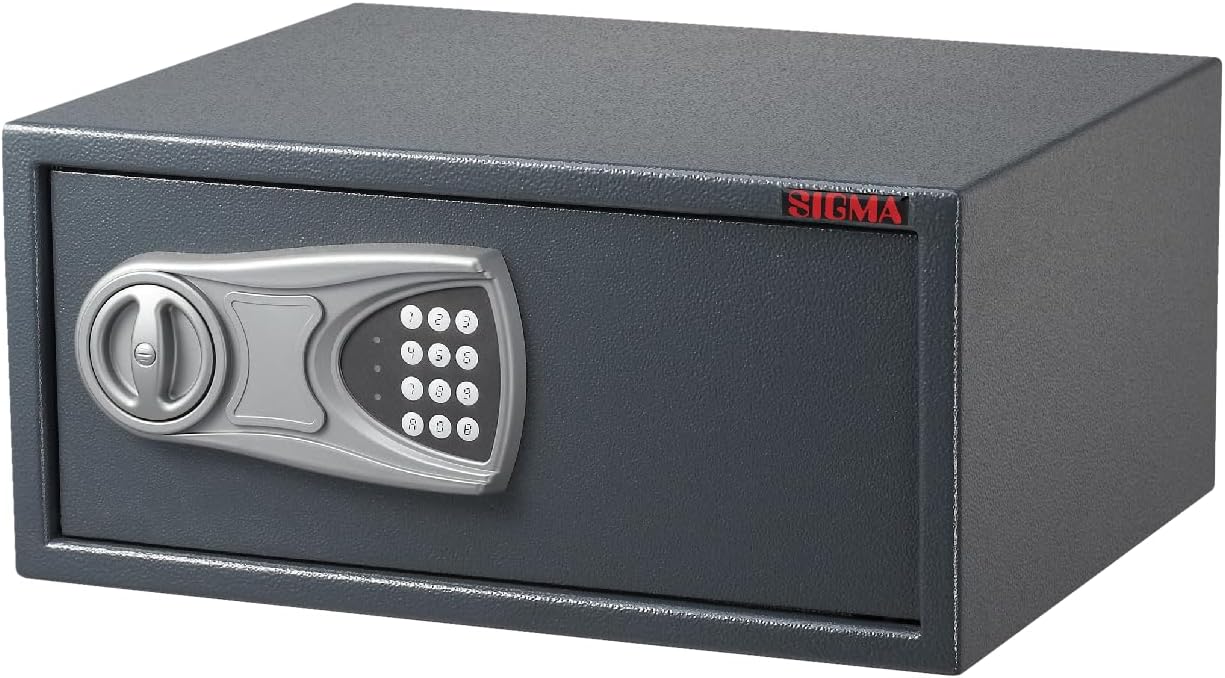
Şekil 1: Ön view of the SIGMA KSF5035 Electronic Safe, showing the electronic keypad, rotary handle, and the SIGMA brand logo.

Şekil 2: İç mekan view of the SIGMA KSF5035 Electronic Safe with the door open, revealing the spacious compartment and the battery compartment on the inside of the door.
Temel Özellikler:
- Elektronik Kilit: Secure electronic locking mechanism with programmable code (3 to 8 digits).
- Acil Erişim: Includes 2 emergency keys for manual override.
- Sağlam Yapı: Door thickness of 4 mm and structural thickness of 2 mm for enhanced security.
- TampKoruma: Caydırıcı özelliklerle tasarlandıamperiyor.
- Düşük Pil Uyarısı: Alerts when battery power is low, indicating it's time for replacement.
- Mounting Capability: Pre-drilled holes and included mounting bolts for secure wall installation.
- Dayanıklı Kaplama: Powder-coated surface, both inside and out, in an elegant grey color.
5. Kurulum
5.1. Pil Kurulumu
- Open the safe door using one of the emergency keys. Insert the key into the keyhole, turn it clockwise, and then turn the handle to open the door.
- Kasanın iç kapağında bulunan pil bölmesini bulun.
- Pil yuvasına 4 adet AA pil (dahil değildir) yerleştirin ve doğru kutuplara (+/-) dikkat edin.
- Pil bölmesinin kapağını kapatın.
- Test the electronic lock by entering a default code (if any, or proceed to set your own code).
5.2. Kasanın Montajı
For optimal security, it is highly recommended to mount the safe to a wall or floor using the provided mounting bolts.
- Choose a suitable location for mounting, suchs as a solid wall or floor.
- Open the safe door and locate the pre-drilled holes on the back or bottom of the safe.
- Mark the drilling points on the wall/floor through the pre-drilled holes.
- Uygun bir matkap ucu kullanarak işaretli noktalara delikler açın.
- Kasayı açılan deliklerle hizalayın ve montaj cıvatalarını takın.
- Kasayı yerine sabitlemek için cıvataları iyice sıkın.
6. Kullanım Talimatları
6.1. Kişisel Kodunuzu Belirleme
You can program a personal code of 3 to 8 digits.
- With the safe door open, press the red reset button located on the inside of the door, near the battery compartment. You will hear a beep, and the yellow indicator light on the keypad will illuminate.
- 5 saniye içinde, tuş takımına istediğiniz 3 ila 8 haneli kodu girin.
- Press the "E" or "#" button to confirm your new code. You will hear a confirmation beep, and the yellow light will turn off.
- Test the new code with the door open before closing it. If successful, the green light will illuminate.
6.2. Opening the Safe with Your Code
- Tuş takımına 3 ila 8 haneli kişisel kodunuzu girin.
- Press the "E" or "#" button. The green indicator light will illuminate, and you will hear a beep.
- 5 saniye içinde kolu saat yönünde çevirerek kasa kapağını açın.
6.3. Opening the Safe with Emergency Key
In case of forgotten code or dead batteries, you can use the emergency key.
- Locate the emergency keyhole, usually hidden behind a small cover on the keypad panel.
- Remove the cover and insert one of the emergency keys.
- Turn the key clockwise and simultaneously turn the handle to open the safe door.
- Once open, you can replace the batteries or reset the code.
6.4. Kasanın Kapatılması ve Kilitlenmesi
Close the safe door and turn the handle counter-clockwise until it is fully locked. The safe will automatically lock.
7. Bakım
7.1. Pil Değişimi
When the low battery warning is activated (usually indicated by a red light or specific beeps), replace all four AA batteries immediately to ensure continuous operation.
- Open the safe using your code or the emergency key.
- Kapının iç tarafında bulunan pil bölmesini bulun.
- Eski pilleri çıkarın ve sorumlu bir şekilde atın.
- Dört adet yeni AA pili, doğru kutuplara dikkat ederek takın.
- Pil bölmesinin kapağını kapatın.
7.2. Temizlik
Kasanın dışını yumuşak bir bezle silin.amp Aşındırıcı temizleyiciler veya çözücüler kullanmayın, çünkü bunlar cilaya zarar verebilir.
8. Sorun Giderme
| Sorun | Olası Neden | Çözüm |
|---|---|---|
| Kasa şifreyle açılmıyor. | Yanlış kod girildi. Piller zayıf veya ölü. Code not set correctly. | Kodu dikkatlice tekrar girin. Pilleri değiştirin. Reset the code following section 6.1. Use emergency key to open if necessary. |
| Tuş takımı yanıt vermiyor. | Piller tamamen bitmiş durumda. | Use the emergency key to open the safe and replace the batteries. |
| Low battery warning light is on. | Piller bitmek üzere. | Replace all batteries immediately (see section 7.1). |
| Safe door cannot be closed. | Kapı çerçevesinde bir engel var. Locking bolts are extended. | Check for any items blocking the door. Ensure the handle is in the open position before closing the door. |
9. Özellikler
| Model Numarası | KSF5035 |
| Marka | SIGMA |
| Boyutlar (Genişlik x Derinlik x Yükseklik) | 50 cm x 35 cm x 20 cm |
| Ağırlık | 12.2 kilo |
| Malzeme | Alaşımlı Çelik |
| Kapı Kalınlığı | 4 mm |
| Structure Thickness | 2 mm |
| Kilit Tipi | Electronic with Keypad |
| Kod Uzunluğu | 3 ila 8 haneli |
| Güç Kaynağı | 4 x AA Pil (dahil değildir) |
| Renk | Gri |
| Montaj Tipi | Duvara Montaj |
| Alarm | Acoustic (Low Battery/Tamp) er |
10. Garanti ve Destek
For warranty information and customer support, please refer to the documentation provided at the time of purchase or contact your retailer. You may also visit the official SIGMA webDaha fazla yardım için siteyi ziyaret edin.


