1. Giriş
The Emerson EMT-1200 Multimedia Recorder is designed to effortlessly digitize and preserve your cherished memories by converting various media formats into modern digital files. This manual provides comprehensive instructions for setting up, operating, and maintaining your device.
2. Kutuda Neler Var?
- Emerson EMT-1200 Multimedia Recorder
- AC Güç Adaptörü
- Hızlı Başlangıç Kılavuzu
- AV Kablosu
- Kullanıcı Kılavuzu
3. Ürün Bittiview
The Emerson EMT-1200 is a versatile multimedia recorder featuring a 4.3-inch LCD screen, multiple input/output options, and app integration for seamless media conversion and playback.

Image: The Emerson EMT-1200 Multimedia Recorder shown with various media sources like phones, DVDs, and USB drives, highlighting its multi-functionality.
Temel Özellikler ve Bileşenler:
- 4.3 inç LCD Ekran: Ön içinviewing recordings and navigating menus.
- Ses Girişi (RCA): Red and white ports for stereo audio input.
- Video In (RCA): Yellow port for composite video input.
- HD Out (HDMI): Harici ekranlara bağlanmak için.
- USB Bağlantı Noktası: USB sürücülerini bağlamak için.
- Kart Yuvası: SD kart takmak için.
- DVD/CD Drive: For disc media.
- Güç Düğmesi: Cihazı açmak/kapatmak için.
- Çıkarma Düğmesi: To open/close the disc tray.
- Kayıt Düğmesi: To start/stop recording.
- Navigation Buttons (ENTER, RETURN, UP/DOWN/LEFT/RIGHT): For menu control.

Resim: Üst view of the Emerson EMT-1200, highlighting the 4.3-inch LCD screen and the central control panel with navigation and function buttons.

Resim: Ön view of the Emerson EMT-1200, showing the Audio In, Video In, HD Out, and USB ports on the left side.

Resim: Yan view of the Emerson EMT-1200 with the DVD/CD tray open, ready for disc insertion.
4. Kurulum
- Place the Recorder: Position the EMT-1200 on a clean, stable surface.
- Gücü bağlayın: Connect the AC power adapter to the DC IN 5V port on the recorder and plug the adapter into a wall outlet or surge protector.
- Güç Açık: Press the Power button on the device. The Emerson logo will appear on the screen.
Video: This video demonstrates the basic setup process for the Emerson EMT-1200 Multimedia Recorder, including connecting power and initial boot-up.
5. Kullanım Talimatları
5.1 Recording from VHS
- Connect VHS Player: Use the AV cable to connect the LINE OUT ports of your VHS player to the AUDIO IN (Red/White) and VIDEO IN (Yellow) ports on the EMT-1200.
- VHS kasetini takın: Place the VHS tape you wish to record into your VHS player.
- Kaynak Seç: On the EMT-1200, navigate to the main menu and select "Video -> USB/Card" or "Video -> DVD" depending on your desired output.
- Kaydı Başlat: Begin playback on your VHS player, then press the REC button on the EMT-1200 to start recording. Press REC again to stop.

Image: The Emerson EMT-1200 connected to a VHS player via AV cables, illustrating the process of converting VHS tapes to digital formats.
Video: This video demonstrates how to record content from a VHS player to the Emerson EMT-1200 Multimedia Recorder.
5.2 Recording from DVD/CD
- Insert Source Disc: Eject the disc tray and insert the DVD or CD you wish to record from. Close the tray.
- Kaynak Seç: From the main menu, select "CD/DVD -> USB/Card" or "CD/DVD -> Memory" based on your desired storage.
- Kaydı Başlat: Play the content on the disc, then press the REC button on the EMT-1200 to start recording. Press REC again to stop.
Video: This video guides you through the process of recording content from a DVD to the Emerson EMT-1200 Multimedia Recorder.
Video: This video demonstrates how to record audio from a CD to the Emerson EMT-1200 Multimedia Recorder.
5.3 Recording from USB/SD Card
- Ekleme Depolama Alanı: Insert a USB drive into the USB port or an SD card into the CARD slot.
- Kaynak Seç: From the main menu, select "USB/Card -> DVD" or "USB/Card -> CD" to transfer files from your USB/SD to a disc.
- Kaydı Başlat: Follow the on-screen prompts to select files and initiate the transfer.
Video: This video explains how to record files from a USB drive to a DVD using the Emerson EMT-1200 Multimedia Recorder.
5.4 Aktarma Files from iOS/Android App
- İndir uygulaması: Download the "Friendly Memories" app from the App Store (iOS) or Google Play Store (Android).
- Wi-Fi'ye bağlanın: Power on the EMT-1200. On your smartphone/tablet, go to Wi-Fi settings and connect to the device's Wi-Fi network (e.g., "DVD_SERVER_XXXX"). Enter the password found in your user manual.
- Grant Access: In your phone's settings, ensure the "Friendly Memories" app has access to the photos and videos you wish to transfer.
- Yüklemek Files: Open the "Friendly Memories" app, select the files you want to transfer, and choose your desired destination (USB, SD Card, or DVD) on the EMT-1200.

Image: An iPhone displaying the "Friendly Memories" app interface, connected wirelessly to the Emerson EMT-1200 for file Aktar.
Video: This video demonstrates how to use the iOS app to transfer files to the Emerson EMT-1200 Multimedia Recorder.
5.5 Media Playback & HD Output
- Ekrana Bağlan: Connect an HDMI cable from the HD OUT port on the EMT-1200 to your TV or monitor's HDMI input.
- Girişi Seçin: On your TV/monitor, select the corresponding HDMI input source.
- Select Media Player: On the EMT-1200, navigate to the main menu and select "Media Player".
- Kaynak Seçin: Select the source (USB, Card, or CD/DVD) where your media files saklanır.
- Medyayı Oynat: Browse and select the desired file oynamak.

Image: The Emerson EMT-1200 connected to a larger TV screen via HDMI, allowing users to view their digitized media on an external display.
Video: This video demonstrates the media player functionality and HD output capabilities of the Emerson EMT-1200 Multimedia Recorder.
6. Ayarlar
Access the "Setup" menu from the main menu to configure various device settings:
- Kayıt Formatı: Choose between MPG (for Blu-ray players) or MP4 (for computers and DVD players).
- DVD Burn Type: Select "Data" for data-only files or "Video" for video format compatible with DVD/Blu-ray players.
- Kayıt Kalitesi: Adjust the recording quality to High, Medium, or Low. Note that higher quality results in larger file sizes and longer recording times.
- Auto Stop Timer: Set a preset time (e.g., 30 minutes, 60 minutes, 2 hours) for the recording to stop automatically.
- Auto Chapter: Enable this feature to automatically break recordings into chapters at specified intervals (e.g., 5, 10, or 15 minutes).
- Renk Sistemi: Set the video color system (e.g., NTSC).
- Ekran Dili: Select the On-Screen Display language (English, Deutsch, Français, Nederlands, Español).
- Tarih Ayarı: Adjust the current date.
- Zaman Ayarı: Mevcut saati ayarlayın.
- Varsayılan ayarları: Tüm ayarları fabrika varsayılanlarına sıfırlayın.
7. Sorun Giderme
If you encounter issues with your Emerson EMT-1200, please refer to the following common troubleshooting tips:
- Güç Yok: Ensure the AC power adapter is securely connected to both the device and a working power outlet.
- Ekranda Sinyal Yok: Verify all AV or HDMI cables are correctly connected to both the recorder and the external display. Ensure the correct input source is selected on your TV/monitor.
- Kayıt Sorunları: Check that the source media (VHS, DVD, etc.) is playing correctly. Ensure the destination media (USB, SD card, blank DVD) has sufficient space and is compatible with the device.
- Uygulama Bağlantı Sorunları: Confirm your smartphone/tablet is connected to the EMT-1200's Wi-Fi network and the correct password has been entered. Check app permissions for media access.
- Disk Çıkarma Sorunları: If a disc does not eject, ensure the device is powered on and press the Eject button firmly. Do not force the disc tray.
For more detailed troubleshooting, please consult the full user manual or visit the Emerson support webalan.
8. Özellikler
| Özellik | Detay |
|---|---|
| Marka | Emerson |
| Model Adı | Acil Durum-1200 |
| Özel Özellik | USB Kayıt (DVR) |
| Çözünürlük | 1280×720 |
| Bağlayıcı Türü | Mikro USB |
| Bağlantı Teknolojisi | USB |
| Ürün Ağırlığı | 1 Pound |
| Ürün Boyutları | 6.1"U x 1.85"G x 6.1"Y |
| Video Çıkış Çözünürlüğü | 1080p |
| Uyumlu Cihazlar | Televizyon, Akıllı Telefon |
| Denetleyici Türü | Düğme Kontrolü |
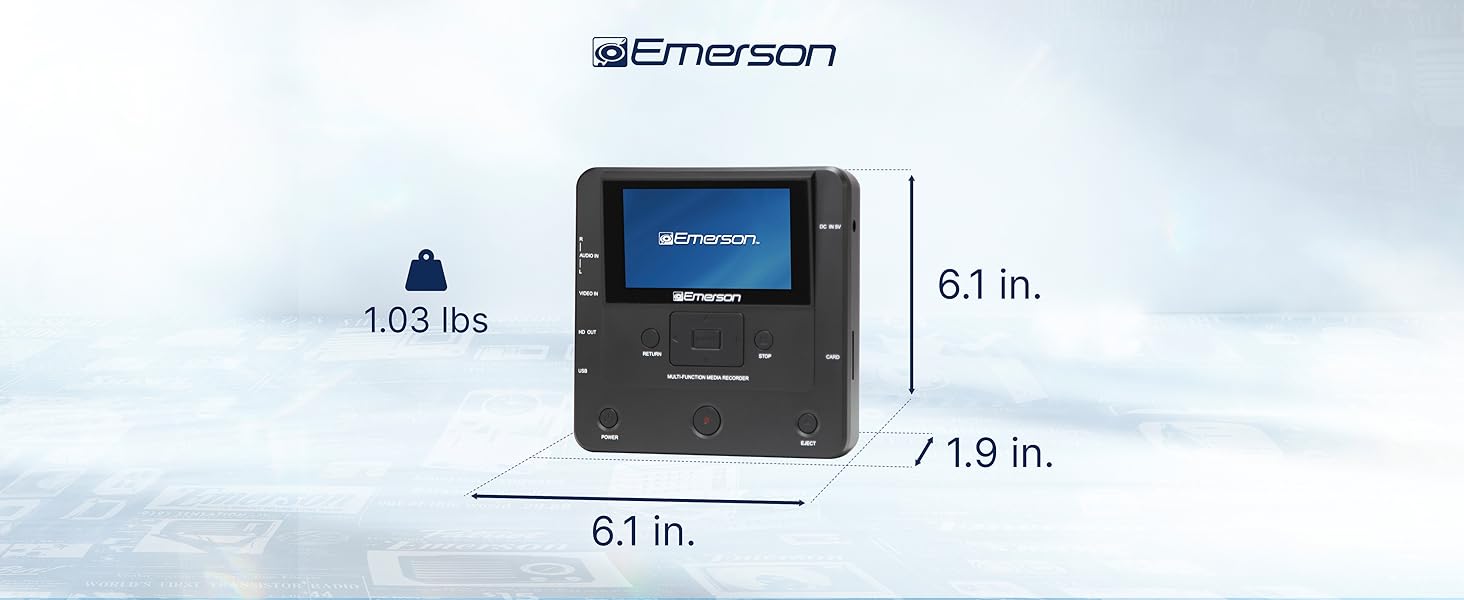
Image: The Emerson EMT-1200 Multimedia Recorder with its dimensions labeled: 6.1 inches Length, 1.9 inches Width, 6.1 inches Height, and a weight of 1.03 pounds.
9. Bakım
To ensure the longevity and optimal performance of your Emerson EMT-1200 Multimedia Recorder, follow these maintenance guidelines:
- Temizlik: Cihazın dış yüzeyini temizlemek için yumuşak, kuru bir bez kullanın. Sıvı temizleyiciler, aerosoller veya çözücüler kullanmaktan kaçının.
- Depolamak: Cihazı serin, kuru ve doğrudan güneş ışığından ve aşırı sıcaklıklardan uzak bir yerde saklayın.
- Disk Bakımı: Handle discs by their edges to avoid fingerprints and scratches. Keep discs in their protective sleeves when not in use.
- Havalandırma: Cihazın aşırı ısınmasını önlemek için havalandırma açıklıklarının tıkanmadığından emin olun.
10. Garanti ve Destek
Your Emerson EMT-1200 Multimedia Recorder comes with a limited warranty to ensure your satisfaction.
- Garanti Süresi: 1 Year Parts, 90 Days Labor.
- Üretici: Naxa Elektronik, A.Ş.
For warranty claims, product updates, extended support documentation, or frequently asked questions, please visit the official Emerson Audio website veya müşteri desteği ile iletişime geçin.


