1. Giriş
The Lutron YK-37UVSD is a professional-grade light meter designed for accurate measurement of both UVA and UVC light. This device features a microprocessor circuit for high reliability and durability, making it suitable for various applications including monitoring blue light radiation hazards, UV sterilization, graphic arts, photochemical matching, UV EPROM erasure, photoresist exposure, and curing of inks, adhesives, and coatings. It includes an SD card real-time data logger and supports Type K temperature measurements.
This manual provides detailed instructions for the setup, operation, maintenance, and troubleshooting of your YK-37UVSD light meter.
2. Güvenlik Bilgileri
- Cihazı çalıştırmadan önce tüm talimatları dikkatlice okuyunuz.
- Cihazı aşırı sıcaklıklara, neme veya uzun süre doğrudan güneş ışığına maruz bırakmayın.
- Cihazı düşürmekten veya güçlü darbelere maruz bırakmaktan kaçının.
- Do not attempt to open or modify the device; this will void the warranty.
- Pillerin doğru kutuplara dikkat edilerek takıldığından emin olun. Cihaz uzun süre kullanılmayacaksa pilleri çıkarın.
- Keep the probes clean and free from dust or debris to ensure accurate readings.
3. Ürün Bittiview
3.1 Ana Ünite
The main unit features an LCD display, control buttons for power, function, data hold, recording, zero adjustment, and data logging. It also includes slots for the SD card and probe connections.
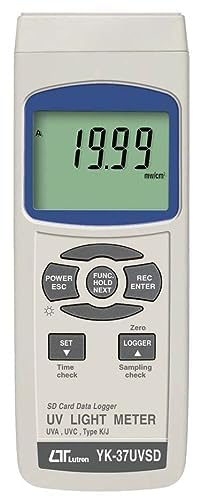
Şekil 1: Ön view of the Lutron YK-37UVSD main unit, showing the LCD display and control buttons.
3.2 UVA and UVC Probes
The meter comes with two specialized probes: one for UVA measurement and another for UVC measurement. Both probes feature a cosine correction filter for accurate light detection.
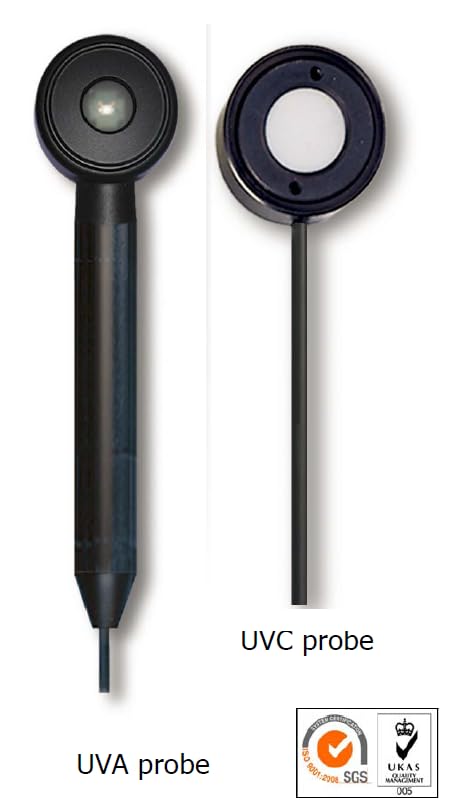
Şekil 2: Separate UVA and UVC probes. The UVA probe has a cylindrical body, while the UVC probe has a flat, circular sensor head.
4. Kurulum
4.1 Pil Kurulumu
- Ana ünitenin arka tarafında bulunan pil bölmesi kapağını bulun.
- Kapağı kaydırarak açın.
- Insert six (6) 1.5V AA (UM-3) batteries, ensuring correct polarity as indicated inside the compartment.
- Pil bölmesi kapağını yerine takın.
4.2 Prob Bağlantısı
- Identify the desired probe (UVA or UVC) for your measurement.
- Connect the probe's cable connector to the corresponding input jack on the top or side of the main unit. Ensure a secure connection.
4.3 SD Kart Takılması
- Locate the SD card slot on the side of the main unit.
- Insert a formatted SD card (up to 16 GB) into the slot until it clicks into place.
- Çıkarmak için, kartı hafifçe içeri doğru itin, kendiliğinden dışarı fırlayacaktır.
5. Kullanım Talimatları
5.1 Açma/Kapatma
Basın POWER/ESC button to turn the meter on. Press and hold the POWER/ESC Kapatmak için birkaç saniye boyunca düğmeye basın.
5.2 Measurement Mode Selection
After powering on, the meter will display the current measurement mode. To switch between UVA and UVC modes, press the dedicated UVA/UVC button (if available) or cycle through modes using the FUNC/HOLD/NEXT button as per the on-screen prompts.
5.3 Aralık Seçimi
The YK-37UVSD offers two measurement ranges: 2 mW/cm² and 20 mW/cm². The meter typically auto-ranges, but you may be able to manually select a range using the AYARLAMAK button or a combination of buttons as described in the on-screen menu.
5.4 Veri Tutma Fonksiyonu
Basın TUTMAK düğme (genellikle ile birlikte) FUNC/NEXT) to freeze the current reading on the display. Press it again to release the hold function.
5.5 Sıfır Ayarı
For accurate measurements, especially in low light conditions, a zero adjustment may be necessary. With the probe covered or in a dark environment, press the SIFIR button to calibrate the meter to zero.
5.6 Data Logging (SD Card)
To initiate real-time data logging to the SD card:
- Ensure an SD card is inserted.
- Basın KAYITÇI button. The display will indicate that logging has started.
- Oturum açmayı durdurmak için tuşuna basın. KAYITÇI Tekrar düğmeye basın.
- Data is saved in a format compatible with spreadsheet software for easy analysis.
5.7 Type K Temperature Measurement
The YK-37UVSD also supports Type K thermocouple temperature measurements. Connect a Type K thermocouple probe (sold separately) to the designated input. Use the FUNC/NEXT button to switch to temperature measurement mode.
6. Bakım
6.1 Temizlik
Wipe the device and probes with a soft, dry cloth. For stubborn dirt, a slightly damp Cihaza sıvı girmemesine dikkat ederek hafif deterjanlı bir bez kullanabilirsiniz. Aşındırıcı temizleyiciler veya çözücüler kullanmayın.
6.2 Pil Değişimi
When the low battery indicator appears on the display, replace all six AA batteries promptly to ensure continued accurate operation. Refer to section 4.1 for battery installation instructions.
6.3 Depolama
Store the meter and probes in a cool, dry place, away from direct sunlight and extreme temperatures. If storing for an extended period, remove the batteries to prevent leakage.
7. Sorun Giderme
- No Display / Device Not Turning On: Check battery installation and ensure batteries are fresh. If using an AC adapter, verify the connection and power source.
- Yanlış Okumalar: Ensure probes are clean and properly connected. Perform a zero adjustment. Verify that the correct measurement mode (UVA/UVC) is selected.
- SD Kart Hatası: Ensure the SD card is properly inserted and formatted. Try a different SD card if the issue persists.
- Data Logging Not Working: Check if the SD card has sufficient free space. Ensure the logging function is activated correctly.
Bu çözümleri denedikten sonra sorun devam ederse lütfen müşteri desteğiyle iletişime geçin.
8. Özellikler
The following table outlines the key specifications of the Lutron YK-37UVSD UVA and UVC Light Meter:
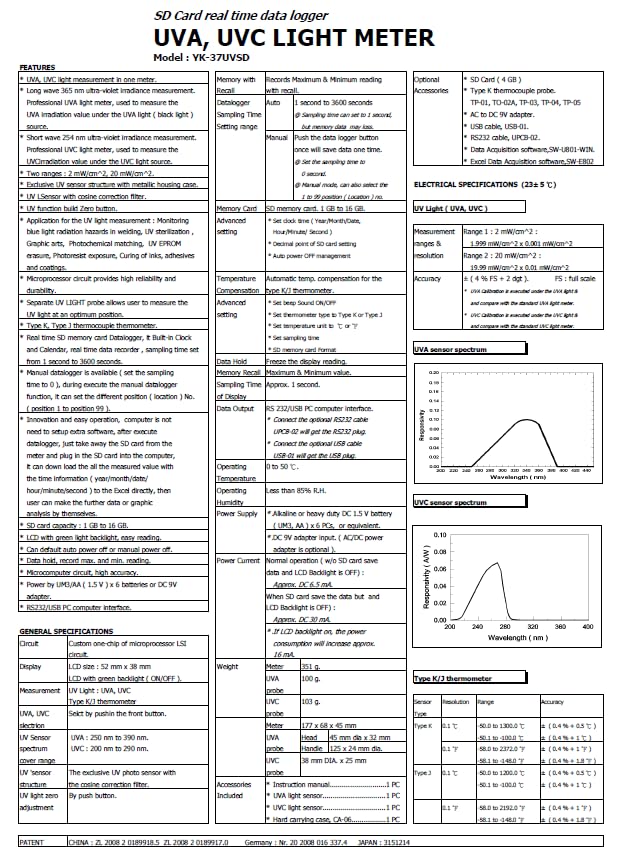
Şekil 3: Detailed specification sheet for the Lutron YK-37UVSD, providing comprehensive technical data.
| Özellik | Şartname |
|---|---|
| Örnek | YK-37UVSD |
| Ölçüm Aralıkları | UVA: 2 mW/cm², 20 mW/cm² UVC: 2 mW/cm², 20 mW/cm² |
| Sensör Tipi | UVA probe, UVC probe with cosine correction filter |
| Görüntülemek | LCD |
| Veri Kaydedici | SD Card (1 GB to 16 GB), Real-time data logging |
| Sıcaklık Ölçümü | Type K Thermocouple (optional probe) |
| Güç Kaynağı | 6 x 1.5V AA (UM-3) batteries or DC 9V adapter |
| Çalışma Nemi | %85'dan az RH |
| Boyutlar (Ana Ünite) | Yaklaşık 203 x 76 x 38 mm (8 x 3 x 1.5 inç) |
| Ağırlık (Ana Ünite) | Yaklaşık. 300 gr (0.66 lbs) |
| Menşei ülke | Tayvan |
| Ürün Ağırlığı | 426 gr |
| Ürün Boyutları | 30.48x15.24x10.16 cm |
9. Garanti ve Destek
9.1 Garanti Bilgileri
This product is manufactured by Lutron. For specific warranty terms and conditions, please refer to the warranty card included with your product or contact the manufacturer directly. Warranty coverage typically includes defects in materials and workmanship under normal use.
9.2 Müşteri Desteği
For technical assistance, troubleshooting not covered in this manual, or service inquiries, please contact the seller or the authorized Lutron service center in your region. Please have your model number (YK-37UVSD) and purchase information ready when contacting support.