
1. Ürün Bittiview
The THOMSON 43-inch QLED Smart Android TV (Model 43QA2S13) offers an immersive viewing experience with its Ultra High Definition (UHD) display and QLED technology. Enjoy vibrant colors and sharp details, four times more precise than Full HD. This smart TV integrates Android TV, providing access to a vast library of applications, intelligent voice control with Google Assistant, and built-in Chromecast for seamless content streaming. Its sleek, frameless design on three sides ensures a captivating visual experience.

Resim 1.1: Ön view of the THOMSON 43-inch QLED Smart Android TV, showcasing its vibrant display and slim bezels.
2. Kurulum Kılavuzu
2.1 Paketin açılması
Televizyonu ve tüm aksesuarlarını ambalajından dikkatlice çıkarın. Ambalaj malzemelerini ilerideki taşıma veya saklama için saklayın.
2.2 Ayaklık Montajı / Duvara Montaj
Your TV comes with two stand feet for tabletop placement.
- Attach the stand feet to the designated slots at the bottom of the TV using the provided screws. Ensure they are securely fastened.
- For wall mounting, use a VESA compatible wall mount (200x200 mm, not included). Refer to the wall mount's instructions for proper installation.

Resim 2.1: Ön view of the TV with its two stand feet attached.

Resim 2.2: Yan profesyonelfile of the TV, showing its slim design.

Resim 2.3: Diagram illustrating the TV's dimensions (102.3 cm width, 59 cm height with stand, 30 cm depth with stand).
2.3 Cihazları Bağlama
Harici cihazlarınızı uygun bağlantı noktalarını kullanarak televizyona bağlayın.
- HDMI (x3): Blu-ray oynatıcılar, oyun konsolları, set üstü kutular vb. cihazları bağlamak için.
- USB (x2): USB depolama aygıtlarını bağlayarak medya oynatmak için kullanılır.
- LAN: Kablolu internet bağlantısı için.
- Ses Çıkışı (Dijital Optik): Soundbarlara veya ev sinema sistemlerine bağlanmak için.
- Uydu (DVB-S2): For satellite antenna connection.
- Antenna (DVB-T2/C):): For terrestrial or cable antenna connection.
- AV Girişi: For connecting older devices with composite video/audio outputs.
- Ortak Arayüz (CI+): For inserting a CAM module and smart card for encrypted channels.

Resim 2.4: Arka view of the TV, illustrating the various input and output ports available for connectivity.
2.4 İlk Kurulum
After connecting the power cable and turning on the TV, follow the on-screen instructions for the initial setup:
- Tercih ettiğiniz dili seçin.
- Wi-Fi ağınıza bağlanın veya kablolu LAN bağlantısı kullanın.
- Android TV özelliklerine ve uygulamalarına erişmek için Google hesabınızla oturum açın.
- Scan for available TV channels using the built-in triple tuner.
- Kurulumu tamamlamak için hüküm ve koşulları kabul edin.
3. TV'nizi Çalıştırma
3.1 Uzaktan Kumanda
The ergonomic, backlit remote control provides easy navigation and access to all TV functions.
- Google Asistan Düğmesi: Press to activate voice control and search for content, control smart home devices, or get information.
- Favoriler düğmesi: Customize this button to quickly launch your most-used application with a single click.
- The backlight ensures visibility even in dim lighting conditions.

Resim 3.1: A user interacting with the TV using the Google Assistant voice command feature on the remote control.
3.2 Android TV Özellikleri
Your THOMSON TV runs on Android TV, offering a rich entertainment experience.
- Uygulama Erişimi: Browse and download over 400,000 movies and TV shows from various applications available on the Google Play Store (e.g., Netflix, Prime Video, Disney+, YouTube, Spotify, Apple TV).
- Chromecast Yerleşik: Wirelessly stream movies, music, and videos from compatible devices (smartphones, tablets, computers) directly to your TV.
- Google Asistan: Sesli komutları kullanarak içerik arayabilir, oynatmayı kontrol edebilir, ayarları değiştirebilir ve akıllı ev cihazlarını yönetebilirsiniz.

Resim 3.2: The Android TV home screen, displaying popular streaming service applications and content recommendations.
3.3 Görüntü ve Ses Kalitesi
Experience superior visual and audio performance with advanced technologies.
- QLED Teknolojisi: Delivers vibrant and realistic colors through Quantum Dots, enhancing brightness and color accuracy.
- 4K UHD Çözünürlük: Provides incredibly sharp and detailed images with 3840 x 2160 pixels.
- HDR (High Dynamic Range) with Dolby Vision: Improves contrast, brightness, and color reproduction for a more realistic and immersive picture, especially in scenes with extreme light and shadow.
- Dolby Ses: Creates a dynamic and immersive sound experience.
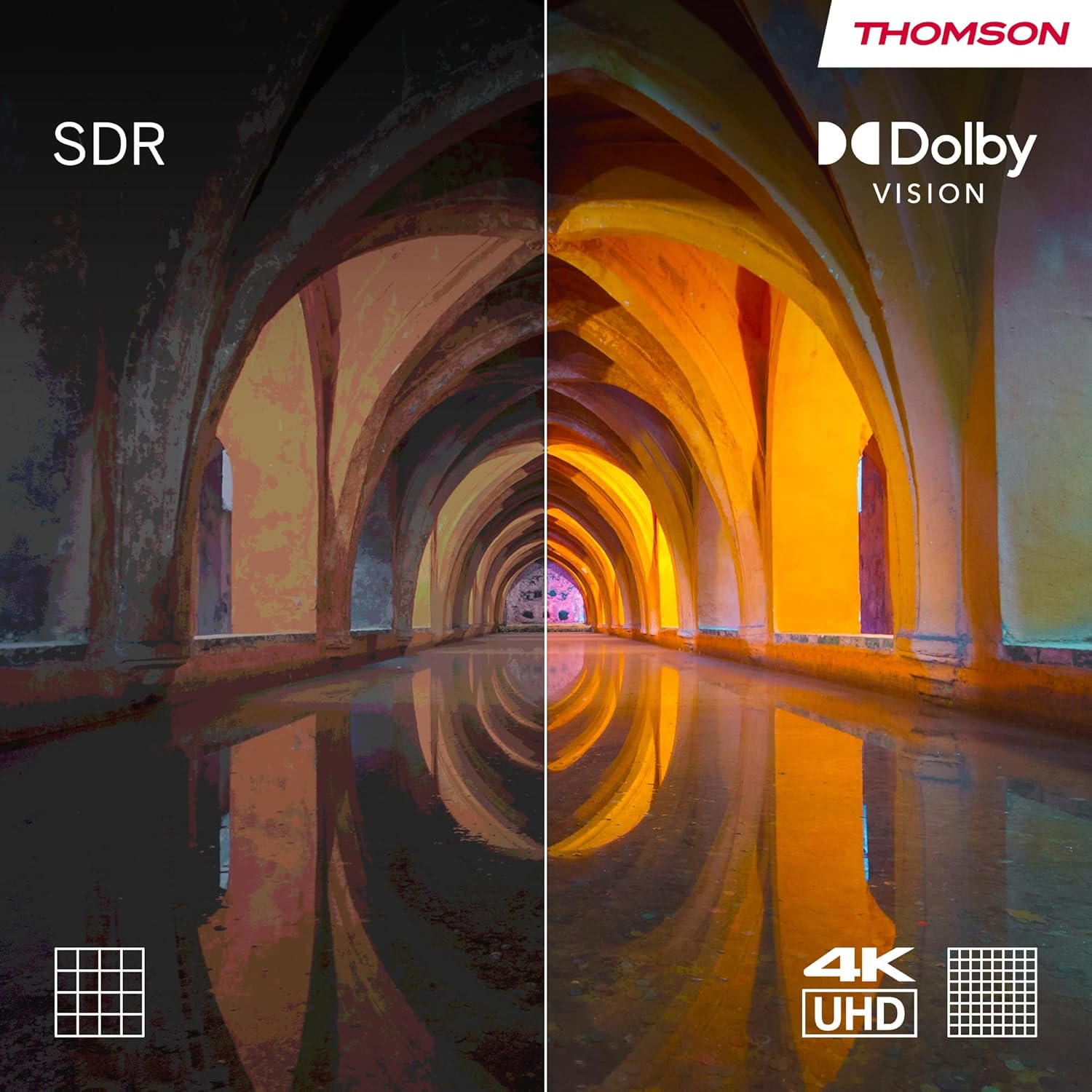
Resim 3.3: Visual comparison demonstrating the enhanced contrast and color depth provided by Dolby Vision compared to standard dynamic range (SDR).

Resim 3.4: An illustration depicting the immersive, multi-dimensional sound experience created by Dolby Atmos technology.
4. Bakım
Doğru bakım, televizyonunuzun uzun ömürlü olmasını ve optimum performans göstermesini sağlar.
- Ekranın Temizlenmesi: Ekranı yumuşak, tüy bırakmayan bir bezle nazikçe silin. İnatçı lekeler için, elektronik cihazlar için özel olarak tasarlanmış bir ekran temizleme solüsyonunu doğrudan ekrana değil, beze uygulayın.
- Kabinin Temizlenmesi: Televizyonun kasasını temizlemek için yumuşak, kuru bir bez kullanın. Aşındırıcı temizleyiciler veya çözücüler kullanmaktan kaçının.
- Yazılım Güncellemeleri: Ensure your TV's software is up-to-date. The TV will typically notify you of available updates. You can also check manually in the settings menu. Regular updates improve performance and security.
- Güç yönetimi: For optimal performance and to clear temporary data, it is recommended to occasionally power off the TV completely (unplug from the wall) for a few minutes, especially if you notice any slowdowns.
5. Sorun Giderme
Televizyonunuzla ilgili sorunlarla karşılaşırsanız, aşağıdaki yaygın sorunlar ve çözümlerine göz atın.
| Sorun | Olası Neden / Çözüm |
|---|---|
| Güç Yok |
|
| Resim Yok / Siyah Ekran |
|
| Ses Yok |
|
| Uzaktan Kumanda Yanıt Vermiyor |
|
| Ağ Bağlantı Sorunları |
|
Daha karmaşık sorunlar için lütfen destek bölümüne bakın veya müşteri hizmetleriyle iletişime geçin.
6. Özellikler
| Özellik | Detay |
|---|---|
| Marka | Thomson |
| Model Numarası | 43QA2S13 |
| Ekran Boyutu | 43 İnç (109 cm) |
| Ekran Teknolojisi | QLED |
| Çözünürlük | 3840 x 2160 Piksel (4K UHD) |
| Yenileme Hızı | 60 Hz |
| İşletim Sistemi | Android televizyon |
| Özel Özellikler | Chromecast built-in, Google Assistant, HDR (Dolby Vision), Dolby Audio |
| Bağlantı | 3x HDMI, 2x USB, Wi-Fi, Bluetooth, LAN, Digital Optical Audio Out, AV In |
| Ayarlayıcı | DVB-C/S2/T2 (Triple Tuner) |
| Ses Yapılandırması | 2.0 |
| Ürün Boyutları (U x G x Y) | 102.3 x 30 x 166.7 cm (standlı) |
| Ağırlık | 6.3 kilogram |
| VESA Duvar Montaj Desteği | 200x200 mm (montaj aparatı dahil değildir) |
6.1 Enerji Verimliliği
This product has an energy efficiency rating of F.

Resim 6.1: EU Energy Label for the THOMSON 43QA2S13 TV, showing its energy efficiency class F.
For more details, visit the EPREL database: https://eprel.ec.europa.eu/qr/1471757
7. Garanti ve Destek
Your THOMSON 43-inch QLED Smart Android TV comes with a comprehensive 3 yıllık üretici garantisi, demonstrating our commitment to quality and reliability.
For technical assistance, troubleshooting beyond this manual, or warranty claims, please contact THOMSON customer support.
- Üretici: AKTARIMVIEW GMBH
- Refer to the official THOMSON website or your purchase documentation for the most up-to-date contact information and support resources in your region.