1. Giriş
Thank you for choosing the arVin Mobile Gaming Controller D6. This manual provides detailed instructions for setting up, operating, and maintaining your controller to ensure an optimal gaming experience across various platforms. Please read this manual thoroughly before first use.

Image 1: arVin Mobile Gaming Controller D6 with a smartphone.
2. Ürün Bittiview
2.1 Temel Özellikler
- Çoklu Cihaz Uyumluluğu: Supports iOS 13.0+, Android 6.0+, Windows 7.0+, Switch, PS3, PS4. (PS5 compatibility limited to PS4/PS3 games).
- Wide Game Support: Compatible with most cloud gaming services (Nvidia GeForce Now, Xbox Cloud, Amazon Luna, Google Stadia, Rainway, Moonlight), Apple Arcade, and MFi games.
- Remote Play Functionality: Supports streaming PC games via Steam Link, and console games via PS Remote Play and Xbox Remote Play.
- Gelişmiş Kontroller: Features Hall Effect joysticks for high precision and durability, and 256-level analog triggers for precise input.
- Enhanced Feedback: Dual vibration motors and 6-axis gyroscope for immersive gameplay (features not supported on iOS/Android).
- Turbo Fonksiyonu: 3-level Turbo mode for customizable rapid-fire actions.
- Ergonomic & Stretchable Design: Accommodates phones from 5-7.1 inches, with a recessed design for phone lenses and bezel-less access to volume.
- Uzun Pil Ömrü: Built-in 600mAh rechargeable battery provides up to 15 hours of gaming.
2.2 Kontrol Cihazı Bileşenleri

Image 2: Key Description of the arVin Mobile Gaming Controller D6.
Aşağıdaki bileşenlerin konumu için Resim 2'ye bakın:
- L3 Left Joystick: Aşağıya doğru basma düğmeli sol analog çubuk.
- Yön Tuşları (D-Pad): Up, Down, Left, Right directional input.
- Switch Mode Button: For changing connection modes.
- V3 Mode Button: Specific mode button.
- Bluetooth Modu Düğmesi: For initiating Bluetooth pairing.
- SEÇ Düğmesi: Fonksiyonu seçin.
- Başlama butonu: Başlatma fonksiyonu.
- TURBO Düğmesi: Activates and sets Turbo function.
- R3 Right Joystick: Aşağıya doğru basma düğmeli sağ analog çubuk.
- A/B/X/Y Tuşları: Standart eylem düğmeleri.
- LB/RB: Sol ve Sağ Tampon düğmeleri.
- LT/RT: Left and Right Trigger buttons.
- Sıfırlama Düğmesi: Small button for resetting the controller (located near the charging port).
- C Tipi Şarj Bağlantı Noktası: Kumandayı şarj etmek için.
- Gösterge Işığı: Displays connection status and charging status.
3. Kurulum
3.1 Kontrol Ünitesinin Şarj Edilmesi
Before first use, fully charge the controller. Connect the provided Type-C charging cable to the controller's charging port and a suitable USB power source. The indicator light will show charging status and turn off when fully charged.

Image 3: Charging port and indicator light location.
3.2 Cihazınızı Takma
The controller features a stretchable design to accommodate mobile devices from 5 to 7.1 inches in length. Gently pull the two sides of the controller apart and carefully place your smartphone or tablet into the central slot. Ensure your device is securely seated.

Image 4: Stretchable design and phone case compatibility.
3.3 Bluetooth Eşleştirme
Kontrol cihazını cihazınıza bağlamak için:
- Kontrol cihazının şarjlı olduğundan emin olun.
- Basılı tutun Bluetooth Modu Düğmesi (refer to Image 2) until the indicator light flashes rapidly, indicating it is in pairing mode.
- On your device (iOS/Android phone/tablet, PC, Switch), go to Bluetooth settings and search for available devices.
- Select "arVin Controller D6" (or similar name) from the list to pair. The indicator light will become solid when successfully connected.
- For Switch, PS3/PS4, or Xbox connections, specific mode buttons (V3 Mode, Switch Mode) may need to be pressed in combination with the Bluetooth button. Refer to the quick start guide included in the product packaging for specific platform pairing instructions.
4. Kullanım Talimatları
4.1 Çoklu Platform Uyumluluğu
The arVin D6 controller is designed for broad compatibility:
- iOS/Android/PC: Bluetooth ile bağlanın.
- Nintendo Anahtarı: Connect via Bluetooth using the Switch Mode.
- PS3/PS4: Connect via Bluetooth. Note: For PS5, only PS4/PS3 games are supported.
- Xbox: Bluetooth ile bağlanın.

Image 5: Multi-platform compatibility overview.
4.2 Game Support and Remote Play
This controller supports a wide range of gaming options:
- Controller Supported App Games: Play popular titles like Call of Duty Mobile (CODM), Genshin Impact, Minecraft, Diablo Immortal, Asphalt 9: Legends, and Asphalt 8: Airborne.
- Bulut Oyun: Enjoy games on services such as Nvidia GeForce Now, Xbox Cloud, Amazon Luna, Google Stadia, Rainway, and Moonlight.
- Apple Arcade & MFi Games: Fully compatible with games designed for Apple Arcade and MFi standards.
- Uzaktan Oynatma: Transform your mobile device into a portable console by using Steam Link for PC games, PS Remote Play for PlayStation games, and Xbox Remote Play for Xbox games. Ensure your phone and game console are connected to the same local area network (LAN) for remote play.

Image 6: Remote Play options.

Image 7: Supported app games and cloud gaming services.
4.3 Hall Effect Joysticks and Analog Triggers
The controller is equipped with advanced input mechanisms:
- Hall Etkili Joystickler: Provide 360° precise control with high accuracy and extended lifespan (up to 5 million uses), minimizing drift issues.
- Analog Tetikleyiciler: Offer 256 levels of pressure sensitivity for fine control in racing and shooting games, ensuring low latency and fast feedback.

Image 8: Hall Effect Joysticks and Analog Triggers.
4.4 Turbo Fonksiyonu
The 3-level Turbo function allows for rapid, repeated input of a button press:
- Turbo ayarını yapmak için: Basılı tutun TURBO button, then press the desired function button (e.g., A button). The setting is complete.
- To Activate Auto Turbo: Basın TURBO button and the function button again. The controller will automatically repeat the button press without continuous holding.
- Turbo sürümünü iptal etmek için: Basın TURBO button and the function button a third time to disable the auto-repeat function.

Image 9: Turbo Combo Function setup.
4.5 Dual Vibration and 6-Axis Gyroscope
For supported platforms (Switch, PS3/PS4, PC), the controller offers enhanced sensory feedback:
- Çift Titreşim Motorları: Provide haptic feedback, immersing you further into the game.
- 6 Eksenli Jiroskop: Enables high-precision directional control, allowing for quick reactions and an improved gaming experience.
Not: These features (Dual Vibration and 6-Axis Gyroscope) are desteklenmiyor on iOS and Android devices.
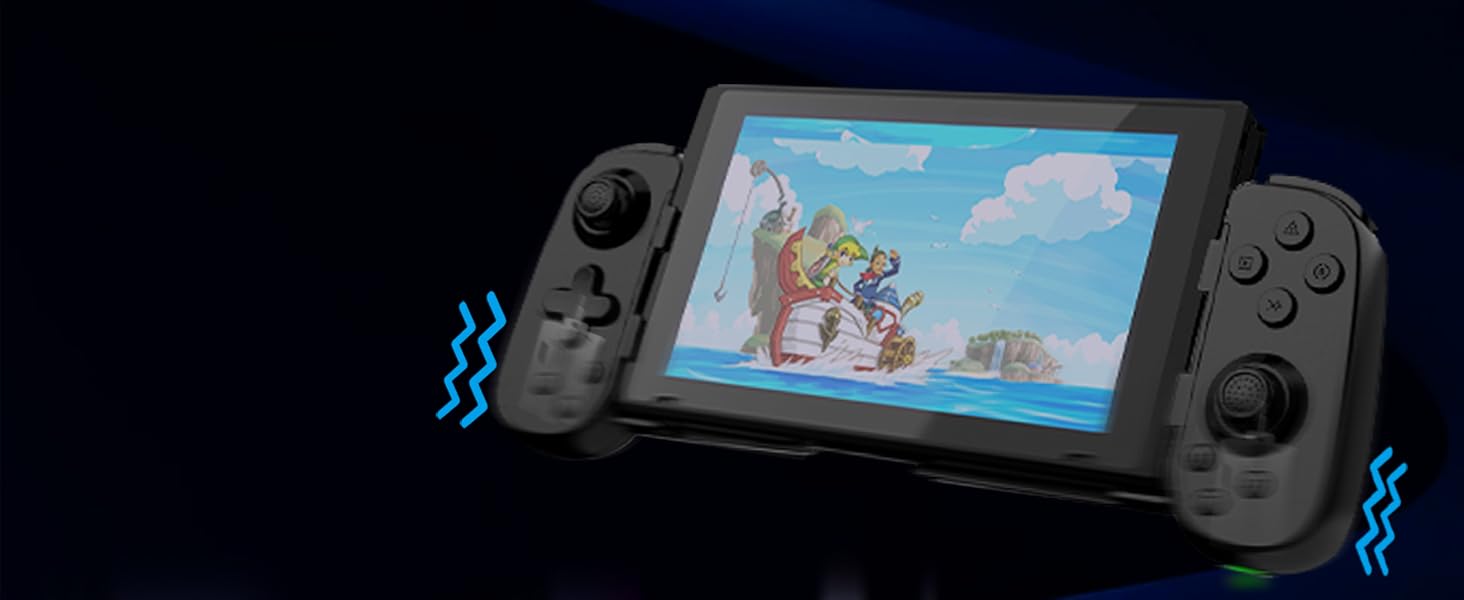
Image 10: Dual Vibration and 6-Axis Gyroscope features.
5. Bakım
Proper care will extend the life of your controller:
- Temizlik: Kumandayı temizlemek için yumuşak ve kuru bir bez kullanın. Sert kimyasallar veya aşındırıcı malzemeler kullanmaktan kaçının.
- Depolamak: Kontrol cihazını serin, kuru ve doğrudan güneş ışığından ve aşırı sıcaklıklardan uzak bir yerde saklayın.
- Pil Bakım: To preserve battery health, avoid fully discharging the controller frequently. Charge it regularly, even if not in use for extended periods.
- Etkiden Kaçının: Kumanda cihazını düşürmeyin veya sert darbelere maruz bırakmayın, çünkü bu iç bileşenlere zarar verebilir.
6. Sorun Giderme
If you encounter issues with your arVin Mobile Gaming Controller D6, please refer to the following common solutions:
- Controller Not Connecting/Pairing:
- Kontrol cihazının tam şarjlı olduğundan emin olun.
- Cihazınızda Bluetooth'un etkin olduğunu doğrulayın.
- Make sure the controller is in pairing mode (indicator light flashing rapidly).
- Cihazınızın Bluetooth ayarlarından kumandanın eşleştirmesini kaldırıp tekrar eşleştirmeyi deneyin.
- Restart both your device and the controller.
- Düğmeler/Joystickler Yanıt Vermiyor:
- Kumandanın cihazınıza doğru şekilde bağlı olup olmadığını kontrol edin.
- Oynadığınız oyunun kontrolcü girişini desteklediğinden emin olun.
- If experiencing 'joystick drift' (unintended movement), try resetting the controller using the small reset button (refer to Image 3). If the issue persists, it may indicate a hardware fault.
- Turbo Function Not Working:
- Review the Turbo function setup steps in Section 4.4.
- Ensure you are pressing the correct combination of buttons.
- Vibration/Gyroscope Not Working on iOS/Android:
- These features are not supported on iOS and Android devices. This is normal operation.
- Remote Play Issues:
- Confirm that your mobile device and the console/PC are connected to the same local area network (LAN).
- Check your network connection stability.
Bu adımlar sorununuzu çözmezse, lütfen müşteri desteğiyle iletişime geçin.
7. Özellikler
| Örnek | D6 (Standard Version) |
| Boyutlar | 8.66 x 3.98 x 1.93 inç (220 x 101 x 49 mm) |
| Ürün Ağırlığı | 8.5 ons (241 gram) |
| Pil Kapasitesi | 600mAh |
| Pil Ömrü | 15 saate kadar (tam şarjla) |
| Bağlantı | Bluetooth 5.0 |
| Desteklenen Cihaz Uzunluğu | 5 - 7.1 inç (127 - 180 mm) |
| Supported Phone Case Thickness | En fazla 1.57 inç (40 mm) |
| Üretici | ShenZhen ShanWan Teknoloji A.Ş. |
8. Garanti ve Destek
For warranty information, please refer to the documentation included with your product packaging or contact your retailer. If you require technical assistance or have questions not covered in this manual, please contact arVin customer support through the retailer's platform or the official arVin webalan.


