1. Giriş
This manual provides detailed instructions for the installation, operation, and maintenance of your COMMAX CDV-77M 7-inch Fine View Monitor. Please read this manual thoroughly before using the product to ensure proper function and safety. Keep this manual for future reference.
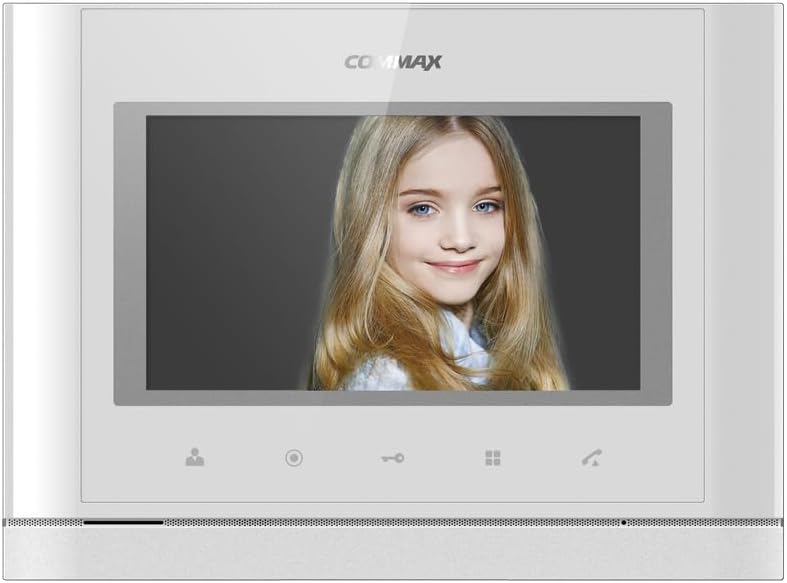
Ön view of the COMMAX CDV-77M monitor, showcasing its 7-inch TFT LCD screen and sleek design. The screen is active, displaying an image.
2. Ürün Özellikleri
- 7-inch TFT LCD screen for clear video display.
- Supports video communication and door lock release functions.
- Expandable system: Connects with up to 2 door cameras, 2 additional monitors, and 2 interphones.
- PAL/NTSC video format conversion capability.
- Hand-free operation for convenience.
- Wall-mounted design for easy installation.
3. Güvenlik Bilgileri
Please observe the following safety precautions to prevent damage to the product and ensure user safety:
- Üniteyi suya veya aşırı neme maruz bırakmayın.
- Üniteyi doğrudan güneş ışığına veya ısı kaynaklarının yakınına yerleştirmekten kaçının.
- Üniteyi kendiniz açmaya veya onarmaya çalışmayın. Tüm servis işlemlerini kalifiye personele yaptırın.
- Güç kaynağının belirtilen voltajla uyumlu olduğundan emin olun.tage (AC 100-240V, 50/60Hz).
- Üniteyi güçlü manyetik alanlardan uzak tutun.
- Operate within the specified temperature range of 0℃ to 40℃.
4. Kurulum
4.1 Paket İçeriği
Tüm bileşenlerin mevcut olduğunu doğrulayın:
- COMMAX CDV-77M Monitor Unit
- Duvara Montaj Braketi
- Montaj Vidaları ve Ankrajları
- Kullanım Kılavuzu (bu belge)
- Güç kablosu
4.2 Monitörün Montajı
The CDV-77M monitor is designed for wall-mounted installation. Choose a suitable location indoors, away from direct sunlight and moisture.
- Secure the wall mounting bracket to the desired location using the provided screws and anchors.
- Ensure the bracket is level and securely fastened.
- Refer to the dimensions diagram for proper spacing and fit:

Technical drawing showing the dimensions of the COMMAX CDV-77M monitor: 244 mm width and 180 mm height.
4.3 Kablo Bağlantıları
Before making any connections, ensure the power supply is disconnected.
- Door Camera Connection: Connect the door camera using a 4-wire cable. The maximum recommended distance is 28 meters (using 0.5Ø wire).
- Interphone Connection: Connect the interphone unit using a 4-wire cable.
- Additional Monitor Connection: If connecting additional monitors, refer to the specific wiring diagram provided with your system.
- Güç Bağlantısı: Connect the AC 100-240V, 50/60Hz power cable to the monitor and a suitable power outlet.
After all connections are made, carefully attach the monitor unit to the wall mounting bracket.
5. Kullanım Talimatları
Familiarize yourself with the monitor's controls:

Detailed diagram illustrating the front panel of the COMMAX CDV-77M monitor, with labels for the TFT LCD, Speaker, Microphone, Power Switch, and control buttons: Monitoring, Interphone, Door Release, Menu, and Talk.
- Güç Açma/Kapatma: Use the Power Switch located on the side/bottom of the unit.
- Bir Çağrı Alma: When a visitor calls from the door camera, the monitor will display their image and ring. Press the Konuşma Düğmesi to communicate.
- İzleme: Basın İzleme Düğmesi ile view the feed from the connected door camera at any time.
- Kapı Açma: During a call or while monitoring, press the Kapı Açma Düğmesi to unlock the connected door.
- Interphone Communication: Basın Interphone Button to initiate communication with another connected interphone or monitor.
- Menü Navigasyonu: Kullanın Menü Düğmesi to access settings and adjustments for the monitor.
6. Bakım
- Temizlik: Monitör ekranını ve ekran koruyucusunu temizlemek için yumuşak ve kuru bir bez kullanın.asing. Aşındırıcı temizleyiciler veya çözücüler kullanmayın.
- Toz Giderimi: Regularly dust the unit to prevent accumulation, especially around ventilation areas.
- Sıvılardan Kaçının: Do not spray liquids directly onto the monitor.
7. Sorun Giderme
| Sorun | Olası Neden | Çözüm |
|---|---|---|
| Monitöre elektrik gelmiyor. | Power cable disconnected; power outlet faulty; power switch off. | Check power cable connection; test outlet with another device; ensure power switch is on. |
| No video from door camera. | Camera cable loose or damaged; camera faulty. | Check camera wiring connections; ensure camera is powered and functioning. |
| İletişim sırasında ses yok. | Microphone/speaker faulty; wiring issue. | Check audio wiring; ensure volume settings are appropriate. |
| Kapı kilidi açılmıyorasing. | Door lock wiring issue; lock mechanism faulty. | Verify door lock wiring; test door lock mechanism independently. |
Bu çözümleri denedikten sonra sorun devam ederse lütfen müşteri desteğiyle iletişime geçin.
8. Özellikler
| Özellik | Detay |
|---|---|
| Örnek | CDV-77M |
| Ekran Boyutu | 7 inç TFT LCD |
| Güç Kaynağı | AC 100-240V, 50/60Hz |
| Montaj Tipi | Duvara monte edilmiş tip |
| Çalışma Sıcaklığı | 0℃ ~ 40℃ |
| Wiring (Door Camera) | 4 wires (Distance: 28m with 0.5Ø wire) |
| Wiring (Interphone) | 4 tel |
| Maks. Bağlantılar | 2 Cameras, 2 Monitors, 2 Interphones |
| Tüketim | Max. 15W / Standby 3W |
| Boyutlar (G×Y×D) | 244mm × 180mm × 18mm |
| Video Format | PAL/NTSC convertible |
9. Garanti ve Destek
For warranty information, please refer to the warranty card included with your product or contact your local COMMAX distributor. For technical support or service inquiries, please visit the official COMMAX websitesine bakın veya müşteri hizmetleri departmanıyla iletişime geçin.
Üretici: COMMAX
İlk Mevcut Tarih: 7 Ağustos 2023


