1. Giriş
This manual provides essential information for the safe and efficient use of your FLEXISPOT 42-inch Sit-to-Stand Desk Riser. This height-adjustable computer workstation is designed to promote a healthy balance between sitting and standing throughout your workday. Please read these instructions thoroughly before assembly and operation.
2. Güvenlik Bilgileri
- Kullanmadan önce tüm bileşenlerin güvenli bir şekilde sabitlendiğinden emin olun.
- Do not exceed the maximum weight capacity of 33 lbs for the desktop and 4.4 lbs for the keyboard tray.
- Keep hands and fingers clear of moving parts during height adjustment to prevent injury.
- Place the desk riser on a stable, level surface.
- Distribute weight evenly on the desktop to maintain stability.
- Çalışma sırasında çocukları ve evcil hayvanları üniteden uzak tutun.
3. Paket İçeriği
Montaja başlamadan önce tüm parçaların mevcut olduğundan emin olun. Herhangi bir parça eksik veya hasarlıysa, müşteri hizmetleriyle iletişime geçin.
- Main Desk Riser Unit
- Removable Keyboard Tray
- Assembly Hardware (screws for keyboard tray)
- Kullanım Kılavuzu
4. Kurulum Talimatları
The FLEXISPOT Sit-to-Stand Desk Riser is designed for quick and straightforward assembly. Two people are recommended for easier setup.
- Üniteyi Paketinden Çıkarın: Tüm bileşenleri dikkatlice ambalajından çıkarın.
- Ana Üniteyi Konumlandırın: Place the main desk riser unit on your existing desk or workstation. Ensure it is centered and stable.
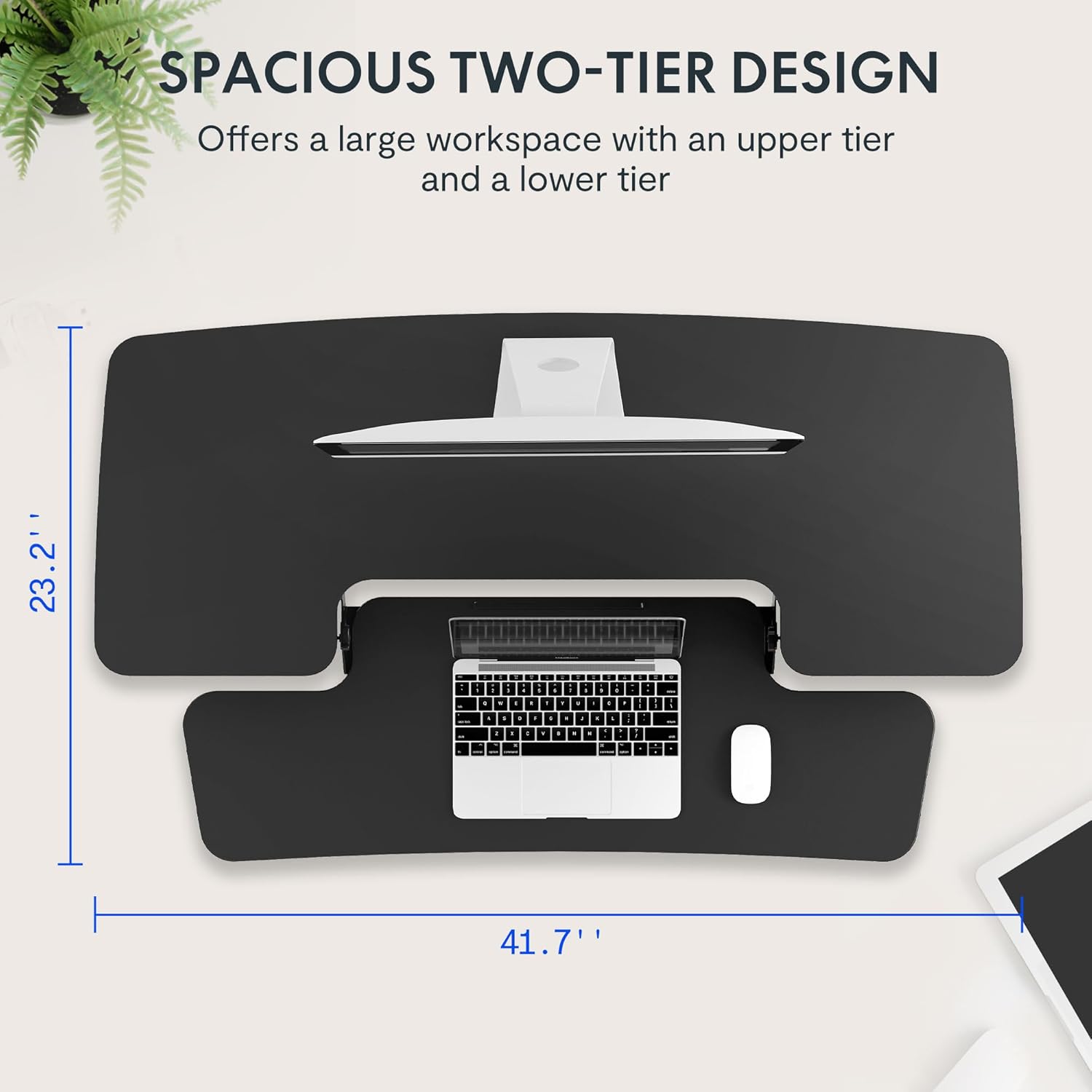
- Klavye tablasını takın: Align the removable keyboard tray with the designated slots on the underside of the main unit. Slide the tray into place until it clicks securely. Use a Phillips screwdriver (not included) to fasten any provided screws for additional stability.
- Kabloları Düzenleyin: Utilize the included cable management loops to organize your monitor, keyboard, and mouse cables. Ensure cables have enough slack to accommodate the full range of height adjustment.


5. Kullanım Talimatları
The desk riser features a spring-assisted lifting mechanism for smooth and effortless height adjustments.
- Yüksekliği Ayarlama: To raise or lower the desk, locate the lever on the right side of the main unit. Squeeze the lever firmly.
- Raising the Desk: While squeezing the lever, gently lift the desktop to your desired standing height. The spring-assisted mechanism will help elevate the unit. Release the lever to lock the desk in place.
- Lowering the Desk: While squeezing the lever, gently push down on the desktop to lower it to your desired sitting height. Release the lever to lock the desk in place.
- Dikey Hareket: The desk riser moves straight up and down within its own footprint, requiring no additional spatial accommodations. The height can be adjusted between 4.7 inches (minimum) and 19.7 inches (maximum).


6. Bakım
Regular maintenance ensures the longevity and optimal performance of your desk riser.
- Temizlik: Yüzeyleri yumuşak bir bezle silin.amp bez. Kaplamaya zarar verebilecek aşındırıcı temizleyicilerden veya sert kimyasallardan kaçının.
- Denetleme: Tüm vidaların ve bağlantıların sıkı kaldığından emin olmak için periyodik olarak kontrol edin. Gerekirse sıkın.
- Hareketli parçalar: The lifting mechanism is designed to be maintenance-free. Do not attempt to lubricate or disassemble it.
7. Sorun Giderme
If you encounter any issues with your desk riser, refer to the following common solutions:
- Desk is difficult to adjust: Ensure no objects are obstructing the lifting mechanism. Verify that the weight on the desktop does not exceed the maximum capacity.
- Masa dengesiz görünüyor: Check that the unit is placed on a flat, stable surface. Ensure all components, especially the keyboard tray, are securely attached. Redistribute weight evenly on the desktop.
- Keyboard tray is loose: Re-check the connection points of the keyboard tray and ensure any fastening screws are tightened.
If problems persist, please contact FLEXISPOT customer support for assistance.
8. Özellikler
| Özellik | Şartname |
|---|---|
| Marka | ESNEKLİK |
| Örnek | B0CDWSPYKQ |
| Ürün Boyutları (D x G x Y) | 24"D x 42"G x 19.7"Y |
| Renk | Siyah |
| Üst Malzeme Türü | Mühendislik Ahşap |
| Ürün Ağırlığı | 52 Pound |
| Minimum Yükseklik | 4.7 inç |
| Maksimum Yükseklik | 19.7 inç |
| Masaüstü Yük Kapasitesi | 33 kilo |
| Klavye Tepsisi Yük Kapasitesi | 4.4 kilo |
| Gerekli Montaj | Yes (Keyboard Tray) |
| Toplantı İçin Tavsiye Edilen Kişi Sayısı | 2 |

9. Garanti ve Destek
Your FLEXISPOT Sit-to-Stand Desk Riser comes with a limited warranty. For specific details regarding warranty coverage, please refer to the warranty documentation included with your purchase or visit the official FLEXISPOT webalan.
For technical support, troubleshooting assistance, or warranty claims, please contact FLEXISPOT customer service. You can typically find contact information on the manufacturer's websiteniz veya satın alma platformunuz aracılığıyla.
Çevrimiçi destek: Ziyaret edin FLEXISPOT Mağazası Amazon'da Ürün bilgisi ve destek kaynakları için.


