1. Ürün Bittiview
The Waveshare Modbus POE ETH Relay is an industrial-grade 8-channel relay module designed for control via an Ethernet port. It supports both Modbus RTU and Modbus TCP protocols, offering versatile communication options. This module also features Power over Ethernet (PoE) for simplified power supply and comes housed in a durable ABS rail-mount case for easy installation in industrial environments.

Şekil 1: Yukarıdan aşağıya view of the Waveshare Modbus POE ETH Relay Module, showing relay channels, Ethernet port, and power input.
2. Temel Özellikler
- 8-Channel Relay Control: Provides eight independent relay channels for controlling various devices.
- Modbus Protocol Support: Compatible with Modbus RTU and Modbus TCP protocols for industrial automation.
- PoE Güç Kaynağı: Supports IEEE 802.3af compliant Power over Ethernet, simplifying wiring.
- Geniş Hacimtage Giriş: Accepts DC 7V to 36V power input via screw terminal or DC 5.5*2.1 power port.
- Flash-on, Flash-off Function: Allows temporary relay activation with automatic deactivation after a specified duration.
- MQTT Protocol Support: Enables control through MQTT, with an Alibaba Cloud MQTT application demo available.
- Optocoupler Isolation: Onboard optocoupler isolation protects the relay from high-voltage circuit interference.
- Reverse-Proof Circuit: Integrated protection against accidental damage from incorrect power connection.
- High-Quality Relays: Contact rating of ≤10A 250VAC/30VDC, suitable for controlling home appliances or low-voltage DC cihazları.
- Rail-Mounted ABS Case: Durable and safe enclosure designed for easy installation on DIN rails.
- Durum Göstergeleri: Four LEDs (RUN, STA, TXD, RXD) and network indicators provide real-time status feedback.
3. Kurulum ve Kurulum
3.1 Güç Kaynağı Seçenekleri
The module offers flexible power input methods:
- PoE Bağlantı Noktası: Connect an IEEE 802.3af compliant PoE switch or injector to the Ethernet port.
- DC 5.5*2.1 Power Port: Use a DC 7V-36V power adapter.
- Vidalı terminal: Connect a DC 7V-36V power source to the designated screw terminals.
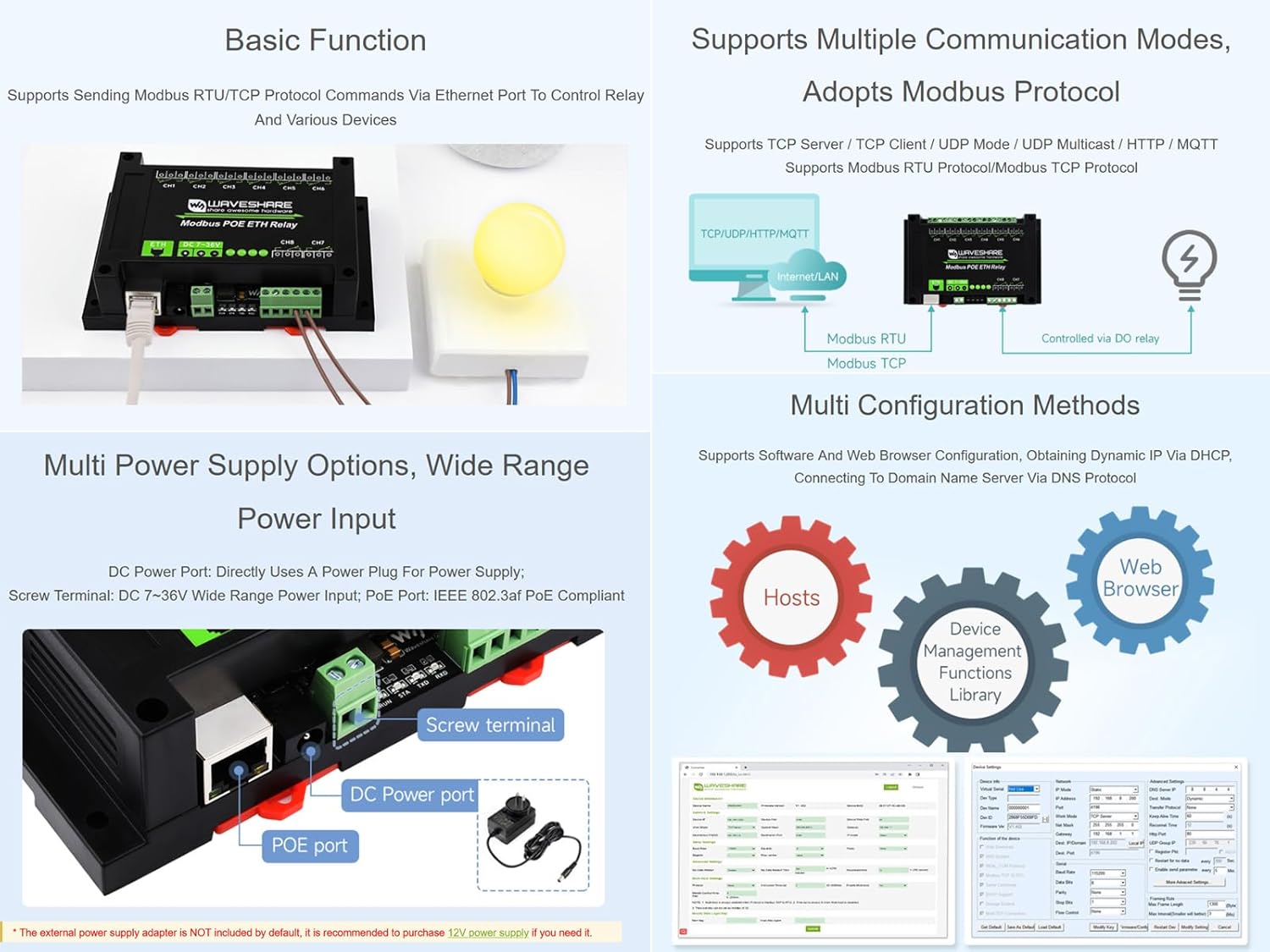
Figure 2: Illustration of multiple power supply options including PoE, DC power port, and screw terminals.
3.2 Ağ Bağlantısı
Connect the module to your network using a standard Ethernet cable. If using PoE, ensure your network equipment supports it. The module supports TCP Server, TCP Client, UDP Mode, UDP Multicast, HTTP, and MQTT communication modes.
3.3 Röle Bağlantısı
Each of the 8 relay channels provides 1 Normally Open (NO) and 1 Normally Closed (NC) contact. The common (COM) terminal is also available. Ensure that the connected load's voltage and current do not exceed the relay's contact rating of ≤10A 250VAC/30VDC.
- For AC 220V devices, connect the device in series with the COM and NO/NC terminals.
- For DC 30V devices, connect the device in series with the COM and NO/NC terminals, observing polarity if necessary for the device.

Figure 3: Wiring diagrams for connecting AC 220V and DC 30V devices to the relay contacts.
3.4 Rail-Mount Installation
The module is designed with an ABS protective enclosure for rail mounting. Simply clip the module onto a standard DIN rail in your control cabinet or enclosure.
4. Kullanım Talimatları
4.1 İletişim Protokolleri
The module primarily communicates using Modbus RTU and Modbus TCP protocols. Commands are sent via the Ethernet port to control the relays.
- ModbusRTU: Typically used over serial communication, but supported over Ethernet for compatibility.
- Modbus TCP'si: Standard protocol for Modbus communication over Ethernet networks.
Refer to the official Waveshare documentation or development resources for detailed Modbus register maps and command structures.
4.2 Flash-on, Flash-off Function
This feature allows you to momentarily activate a relay. By passing a specific argument with the control command, the relay will turn on for a set duration and then automatically turn off. Consult the programming guide for command syntax and timing parameters.
4.3 MQTT Control
The module supports control via MQTT protocol. This enables integration with IoT platforms and cloud services. An Alibaba Cloud MQTT application demo is available for reference, demonstrating how to publish commands and subscribe to status updates.
4.4 Durum Göstergeleri
Monitor the module's operational status using the onboard LEDs:
- RUN (Ethernet Port Indicator): Blinks in 2-second cycles when the Ethernet port is functioning normally.
- STA (MCU Indicator): Blinks when the Microcontroller Unit (MCU) is operating normally.
- TXD (Transmit Data Indicator): Lights up when the module is sending data.
- RXD (Receive Data Indicator): Lights up when the module is receiving data.
- Ethernet Port Green Indicator: Lights up when a network connection is established.
- Ethernet Port Yellow Indicator: Blinks to indicate data activity (transmitting/receiving).

Şekil 4: Ayrıntılı view of the module's interfaces and LED indicators.
5. Bakım
The Waveshare Modbus POE ETH Relay module is designed for industrial reliability and requires minimal maintenance. However, adhering to the following guidelines can ensure optimal performance and longevity:
- Çevresel Koşullar: Operate the module within its specified temperature and humidity ranges. Avoid exposure to excessive dust, moisture, or corrosive substances.
- Temizlik: If necessary, gently clean the exterior of the module with a soft, dry cloth. Do not use liquid cleaners or solvents. Ensure the device is powered off before cleaning.
- Donanım Yazılımı Güncellemeleri: Waveshare'in resmi sayfasını düzenli olarak kontrol edin. webMevcut ürün yazılımı güncellemeleri için siteyi ziyaret edin. Güncelleme işlemleri için verilen talimatları dikkatlice izleyin.
- Bağlantı Bütünlüğü: Regularly inspect all power and network connections to ensure they are secure and free from damage.
6. Sorun Giderme
This section provides solutions to common issues you might encounter with the Modbus POE ETH Relay module.
| Sorun | Olası Neden | Çözüm |
|---|---|---|
| Modül açılmıyor. | Yanlış güç kaynağı hacmitage or polarity; faulty power source; PoE not active or incompatible. | Verify power input (7-36V DC) and polarity. Ensure PoE source is active and compliant with IEEE 802.3af. Check power cables and connections. |
| No network connection (Ethernet Green LED off). | Faulty Ethernet cable; network switch/router issue; incorrect network settings. | Check Ethernet cable for damage and proper connection. Verify network switch/router status. Ensure module's network settings (IP address, subnet mask) are correct. |
| Relays not responding to commands. | Incorrect Modbus address or function code; communication protocol mismatch; software configuration error. | Confirm Modbus RTU/TCP settings and relay addresses. Verify the commands sent match the protocol specifications. Check software configuration for errors. Ensure the MCU (STA LED) is blinking normally. |
| Intermittent relay operation. | Yüksek hacimlitage interference; unstable power supply; loose connections. | Ensure proper grounding. Check for strong electromagnetic interference sources. Verify power supply stability. Secure all wiring connections. |
If you encounter issues not covered here, please refer to the official Waveshare online development resources or contact technical support.
7. Özellikler
| Parametre | Değer |
|---|---|
| Örnek | Modbus POE ETH Relay |
| Güç Kaynağı | PoE (IEEE 802.3af compliant), DC 5.5*2.1 port, or Screw terminal (7~36V DC) |
| İletişim Arayüzü | Ethernet (PoE port) |
| Röle Kanalları | 8 |
| İletişim Formu | 1NO 1NC per channel |
| İletişim Derecelendirmesi | ≤10A 250VAC / 30VDC |
| Modbus Protokolü | Modbus RTU Protocol, Modbus TCP Protocol |
| Çalışma Modu | Otomatik |
| Ürün Boyutları | 5.7 x 3.54 x 1.57 inç (145 x 90 x 40 mm) |
| Ağırlık | 8.82 ons (250 gr) |

Şekil 5: Modülün dış hat boyutları.
8. Garanti ve Destek
Waveshare products are designed for reliability and performance. For specific warranty information, please refer to the official Waveshare websiteyi ziyaret edin veya satın alma noktanızla iletişime geçin.
For technical assistance, online development resources, and further documentation, please visit the official Waveshare support portal. If you encounter any problems or require detailed guidance, do not hesitate to contact Waveshare technical support directly.
Note: Online Development Resources and Technical Support are provided.


