1. Giriş
Thank you for choosing the Acekool Portable Air Conditioner. This 3-in-1 unit provides powerful cooling, efficient dehumidification, and effective air circulation through its fan mode. Designed for convenience and portability, it is ideal for cooling rooms up to 35 square meters. Please read this manual thoroughly before operation to ensure proper use, maintenance, and safety.
2. Güvenlik Bilgileri
Klimanızı kullanırken yangın, elektrik çarpması veya yaralanma riskini azaltmak için aşağıdaki temel önlemleri izleyin:
- Cihazı daima topraklı 220V AC prize takın. Uzatma kablosu veya adaptör fişi kullanmayın.
- Üniteyi hasarlı bir kablo veya fişle çalıştırmayın.
- Do not block air inlets or outlets. Ensure adequate clearance around the unit for proper airflow.
- Üniteyi ısı kaynaklarından, doğrudan güneş ışığından ve yanıcı maddelerden uzak tutun.
- Hava giriş ve çıkışlarına parmaklarınızı veya yabancı cisimleri sokmayın.
- Herhangi bir temizlik veya bakım işlemi yapmadan önce cihazın fişini çekin.
- Bu cihaz, fiziksel, duyusal veya zihinsel yetenekleri kısıtlı olan veya deneyim ve bilgi eksikliği bulunan kişiler (çocuklar dahil) tarafından, güvenliklerinden sorumlu bir kişi tarafından cihazın kullanımıyla ilgili olarak gözetim veya talimat sağlanmadığı sürece kullanılmak üzere tasarlanmamıştır.
- Cihazın devrilmesini önlemek için düz ve sağlam bir yüzeye yerleştirildiğinden emin olun.
3. Ürün Özellikleri
- Güçlü ve Verimli: Delivers strong cooling power to quickly and effectively cool your room. Enjoy personal comfort at the touch of a button.
- Flexible and Mobile: Equipped with wheels for easy movement between rooms. Provides a pleasant climate in bedrooms, living rooms, or offices. Adjustable settings allow customization of cooling needs.
- Easy to Use and Control: Features an intuitive control panel and remote control for setting temperature, timer, and fan speed. The convenient timer function allows pre-programming for energy saving.
- Energy-efficient and Environmentally Friendly: Designed for low power consumption, helping to reduce energy costs. Uses R290 refrigerant, contributing to environmental protection.
- Şık ve Kompakt: Boasts a sleek and modern design that blends seamlessly into any room, making it an attractive addition to your home or office.

Image: The unit's compact size delivers high cooling performance, suitable for rooms up to 300 sq. ft. with 9000 BTU cooling capacity and 350m³/h airflow.

Image: The unit uses environmentally friendly R290 refrigerant, promoting energy efficiency and cost savings.

Image: The 3-in-1 operation system includes cooling (down to 16°C), dehumidifying (up to 42L/day), and fan (2 speeds) functions.
4. Ürün Özellikleri
| Şartname | Değer |
|---|---|
| Marka | Acekool |
| Model Numarası | CF9 |
| Ürün Boyutları (U x G x Y) | 45x89x44 cm |
| Ağırlık | 26 Kilogram |
| Enerji Verimliliği Derecelendirmesi | A |
| Soğutma Kapasitesi | 9000 BTU |
| Nem Alma Kapasitesi | 42 Litre/gün |
| Yıllık Güç Tüketimi | 1000 Watt |
| Gürültü Seviyesi | 55 dB |
| Kurulum Türü | Pencere |
| Özel Özellik | Nem giderici |
| Renk | Siyah |
| Cilttage | 220 Volt |
| Güç | 1000 Watt |
| Mevsimsel Enerji Verimliliği Oranı (SEER) | 2.6 |
5. Paket İçeriği
Lütfen tüm parçaların eksiksiz ve iyi durumda olduğundan emin olun:
- Acekool Portable Air Conditioner Unit
- Egzoz Hortumu
- Window Seal Kit (includes window slider kit and adapter)
- Uzaktan kumanda
- Drain Hose (for continuous drainage in dehumidifier mode)
- Kullanım Kılavuzu (bu belge)
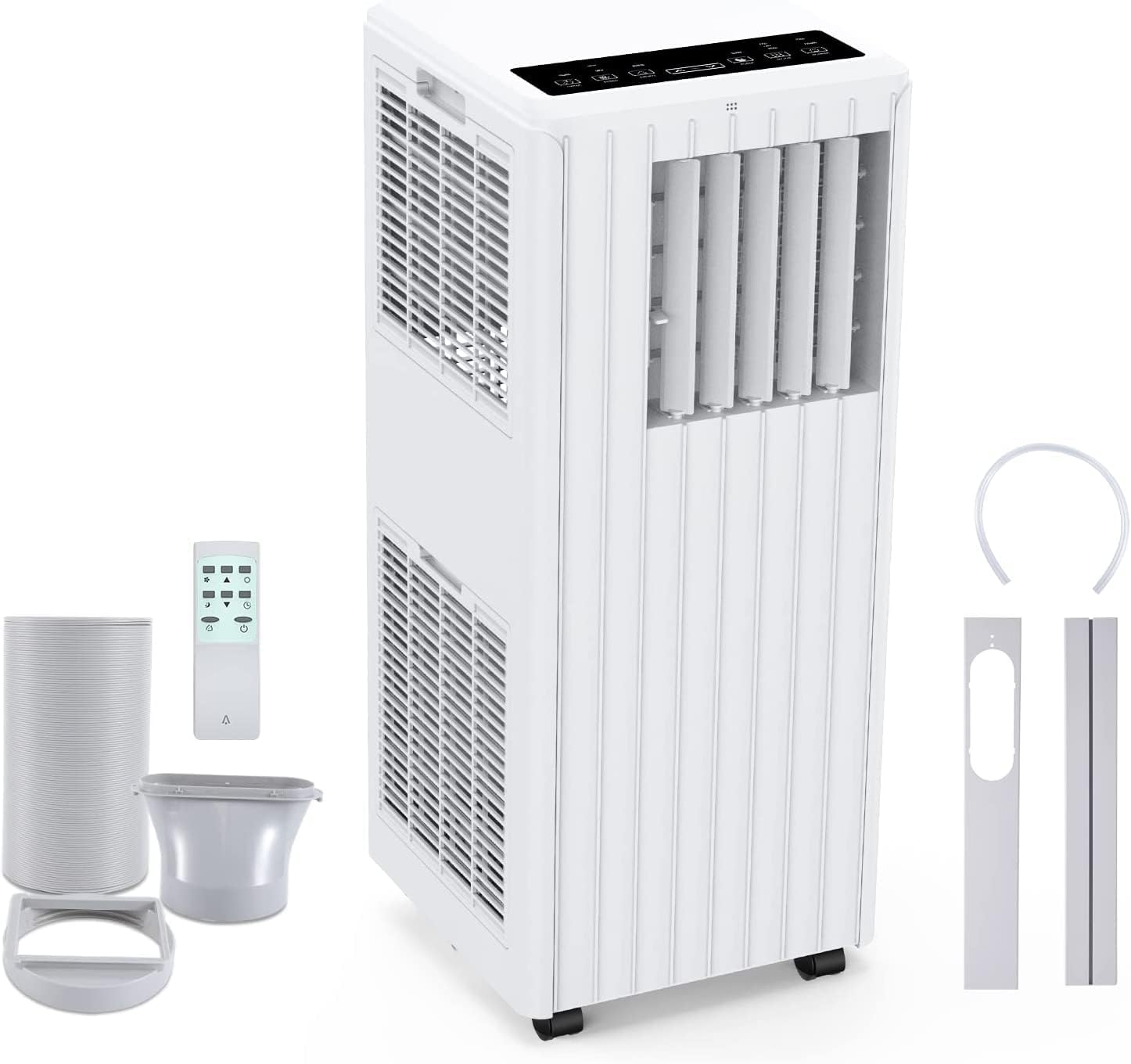
Image: All components included in the package: the main unit, exhaust hose, window sealing plate, remote control, and drain bucket.
6. Kurulum ve Kurulum
Taşınabilir klimanızı kurmak için şu adımları izleyin:
- Konumlandırma: Place the air conditioner on a flat, stable surface near a window and a grounded electrical outlet. Ensure there is at least 20 cm (8 inches) of space around the unit for proper airflow.
- Egzoz hortumunu takın: Screw one end of the exhaust hose into the air outlet on the back of the unit.
- Install Window Seal Kit: Pencere sürgüsü kitini pencere açıklığınıza uyacak şekilde ayarlayın. Yerine sabitleyin.
- Egzoz Hortumunu Pencere Kitine Bağlama: Attach the other end of the exhaust hose to the adapter on the window slider kit, ensuring a tight seal to prevent hot air from re-entering the room.
- Güç Bağlantısı: Güç kablosunu topraklı 220V AC prize takın.

Image: Visual guide for easy installation, showing how to connect the exhaust hose to the unit and the window sealing plate.
7. Kullanım Talimatları
Your Acekool Portable Air Conditioner can be operated using the control panel on the unit or the included remote control.
Kontrol Paneli ve Uzaktan Kumanda
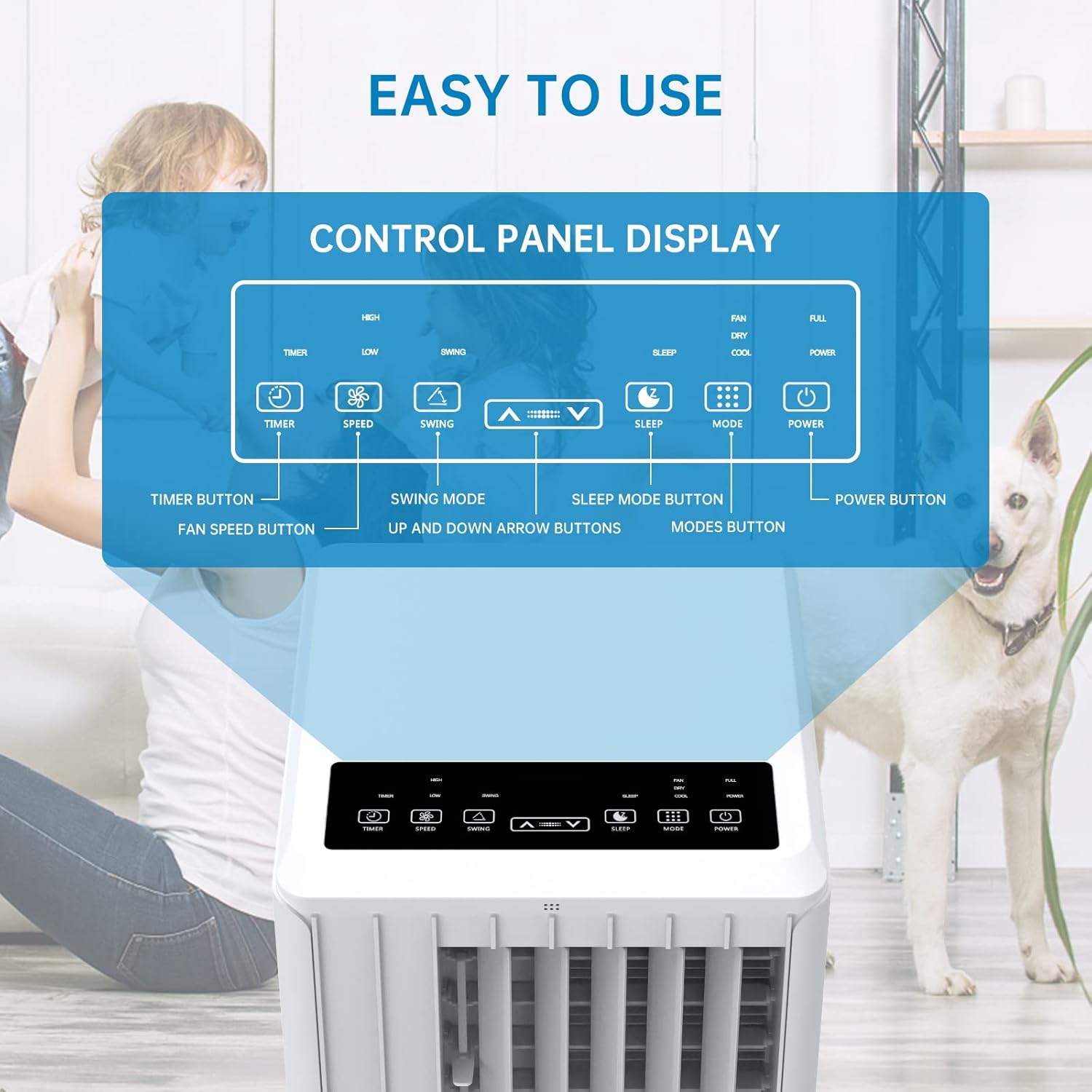
Resim: Ayrıntılı view of the control panel display, indicating buttons for Timer, Speed, Swing, Sleep, Mode, and Power.

Image: The unit can be conveniently controlled via the remote control, and features a swing mode for wider air distribution.
Çalışma Modları

Resim: Üzeriview of the main operating modes: Cool, Fan, Dry (Dehumidifying), and Sleep, along with smart timer functionality.
- Soğuk Mod: Press the "Mode" button until the snowflake icon appears. Use the Up/Down arrows to set your desired temperature (16°C - 30°C). The unit will cool the room to the set temperature.
- Fan Modu: Press the "Mode" button until the fan icon appears. In this mode, the unit circulates air without cooling. Use the "Speed" button to adjust fan speed (Low/High).
- Nem Alma Modu (Kuru): Press the "Mode" button until the water drop icon appears. The unit will remove excess moisture from the air. In this mode, the fan speed cannot be adjusted. Ensure the continuous drainage hose is connected for prolonged use.
- Uyku modu: Press the "Sleep" button. In this mode, the unit operates quietly and gradually increases the temperature by 1°C after the first hour and another 1°C after the second hour, maintaining this temperature for 6 hours before returning to normal operation. This mode is ideal for nighttime use.

Image: The sleep mode offers automatic shut-off, quiet operation (55dB), and a 24-hour smart timer for comfortable nighttime use.
Ek Fonksiyonlar
- Zamanlayıcı Fonksiyonu: Press the "Timer" button to set the desired operating time (1-24 hours) for automatic turn on/off.
- Fan Hızı: In Cool or Fan mode, press the "Speed" button to cycle through Low and High fan speeds.
- Salınım Fonksiyonu: Press the "Swing" button to activate or deactivate the automatic vertical oscillation of the air louvers, distributing air more evenly.
8. Bakım
Regular maintenance ensures optimal performance and extends the lifespan of your air conditioner. Always unplug the unit before cleaning.
Hava Filtresinin Temizlenmesi
Hava filtresinin kullanıma ve hava kalitesine bağlı olarak iki haftada bir veya daha sık temizlenmesi gerekir.
- Ünitenin arkasından hava filtresini çıkarın.
- Filtreyi ılık sabunlu suyla yıkayın. İyice durulayın.
- Filtreyi tekrar üniteye takmadan önce tamamen kurumasını bekleyin.
Suyu Boşaltma
The unit has an internal water tank that collects condensed water. When the tank is full, the unit will stop operating and display a "FULL" indicator. You will need to drain the water manually.
- Place a shallow pan or bucket under the drain port at the bottom rear of the unit.
- Suyun dışarı akmasını sağlamak için tahliye tapasını çıkarın.
- Boşaltıldıktan sonra tahliye tapasını güvenli bir şekilde yerine takın.
For continuous dehumidification, attach the provided drain hose to the continuous drain port.
Ünitenin Dış Yüzeyinin Temizlenmesi
Ünitenin dışını yumuşak bir bezle silin.amp bez. Sert kimyasallar veya aşındırıcı temizleyiciler kullanmayın.
Depolamak
Üniteyi uzun bir süre saklayacaksanız:
- Ünitedeki tüm suyu boşaltın.
- Hava filtresini temizleyin.
- Cihazı kuru, serin ve doğrudan güneş ışığından uzak bir yerde saklayın.
9. Sorun Giderme
Müşteri desteğiyle iletişime geçmeden önce, sık karşılaşılan sorunlar için lütfen aşağıdaki sorun giderme kılavuzuna bakın:
| Sorun | Olası Neden | Çözüm |
|---|---|---|
| Ünite açılmıyor | No power supply; Power cord unplugged; Circuit breaker tripped; Water tank full. | Check power outlet; Plug in power cord securely; Reset circuit breaker; Drain water tank. |
| Ünite etkili bir şekilde soğutmuyor | Air filter dirty; Exhaust hose not properly installed/sealed; Room too large; Doors/windows open; Air inlet/outlet blocked. | Clean air filter; Ensure exhaust hose is properly installed and sealed; Close doors/windows; Clear obstructions from air inlets/outlets. |
| Ünite gürültülü | Ünite düz bir yüzey üzerinde değil; Hava filtresi kirli; Dahili bileşenler titriyor. | Cihazı düz ve sabit bir yüzeye yerleştirin; Hava filtresini temizleyin; Gürültü devam ederse müşteri desteğiyle iletişime geçin. |
| Üniteden su sızıntısı var | Drain plug loose; Continuous drain hose not properly connected or blocked. | Ensure drain plug is secure; Check continuous drain hose for proper connection and clear any blockages. |
| Uzaktan kumanda çalışmıyor | Piller bitmiş veya yanlış takılmış; Kumanda ile ünite arasında engel var. | Replace batteries; Ensure line of sight between remote and unit. |
10. Garanti ve Destek
Garanti bilgileri ve müşteri desteği için lütfen ürününüzle birlikte verilen garanti kartına bakın veya resmi Acekool web sitesini ziyaret edin. website. Do not attempt to repair the unit yourself, as this may void the warranty and pose safety risks. For any issues not covered in this manual, please contact Acekool customer service.


