1. Giriş
Thank you for choosing the N-Gear Let's Go Party 5150 Portable Bluetooth Speaker. This manual provides essential information for the safe and efficient operation of your device. Please read it thoroughly before use and retain it for future reference.

Image 1.1: N-Gear Let's Go Party 5150 Portable Bluetooth Speaker with active LED lighting.
Temel Özellikler:
- Powerful 200 Watt output with dual 6-inch speakers.
- Bluetooth wireless connectivity for seamless audio streaming.
- Integrated LED disco lighting and light projection for enhanced ambiance.
- True Wireless Stereo (TWS) function to connect multiple speakers.
- Wireless microphone included for karaoke and announcements.
- MP3 playback via USB and MicroSD card.
- AUX audio input for wired connections.
- Built-in power bank function to charge external devices.
- Up to 5 hours of battery life (actual duration may vary).
- Rahat çalışma için uzaktan kumanda.
- Dış mekan kullanımı için su geçirmez tasarım.
2. Güvenlik Bilgileri
Cihazın hasar görmesini veya kendinizin yaralanmasını önlemek için lütfen aşağıdaki güvenlik önlemlerine uyun:
- Do not expose the speaker to extreme temperatures, direct sunlight, or excessive humidity.
- Ensure the charging port cover is securely closed when not charging, especially in wet environments, to maintain its waterproof rating.
- Cihazı kendiniz sökmeyin, tamir etmeyin veya üzerinde değişiklik yapmayın. Her türlü onarım için yetkili servis personeline başvurun.
- Hoparlörü güçlü manyetik alan kaynaklarından uzak tutun.
- Yalnızca belirtilen şarj kablosunu ve güç adaptörünü kullanın.
- İşitme hasarını önlemek için uzun süre aşırı yüksek sesle dinlemekten kaçının.
- Çocukların erişemeyeceği yerde saklayınız.
3. Paket İçeriği
Paketin içinde tüm öğelerin mevcut olduğundan emin olun:
- N-Gear Let's Go Party 5150 Portable Bluetooth Speaker
- Kablosuz Mikrofon
- Uzaktan kumanda
- AC Şarj Kablosu
- Kullanım Kılavuzu (bu belge)

Image 3.1: Included Remote Control and Wireless Microphone.
4. Kurulum
4.1 Hoparlörü Şarj Etme
- Locate the AC charging port on the back panel of the speaker.
- Connect the supplied AC charging cable to the speaker and then to a power outlet.
- Şarj gösterge ışığı yanacaktır. Tam şarj için yaklaşık 3-4 saat bekleyin.
- Once fully charged, disconnect the charging cable and ensure the port cover is sealed.
4.2 Açma/Kapatma
- To power on: Press and hold the Power button (usually located on the control panel) for a few seconds until you hear an audible prompt or see the display light up.
- Kapatmak için: Hoparlör kapanana kadar Güç düğmesine tekrar basılı tutun.
4.3 Bluetooth Eşleştirme
- Ensure the speaker is powered on and in Bluetooth mode. If not, press the 'MODE' button on the speaker or remote control until "Bluetooth" or "BT" is displayed.
- Mobil cihazınızda (akıllı telefon, tablet vb.) Bluetooth'u etkinleştirin ve kullanılabilir cihazları arayın.
- Select "N-Gear LGP 5150" from the list of devices.
- Once paired, the speaker will emit a confirmation sound, and the Bluetooth indicator will remain solid.
Not: Hoparlör açıldığında, en son eşleştirilen cihaza otomatik olarak yeniden bağlanmayı deneyecektir.
4.4 Connecting the Wireless Microphone
- Insert batteries into the wireless microphone (if not pre-installed).
- Power on the microphone using its dedicated power switch.
- The microphone should automatically connect to the speaker. Adjust the microphone volume using the dedicated knob on the speaker's control panel.
5. Kullanım Talimatları
5.1 Mod Seçimi
Press the 'MODE' button on the speaker or remote control to cycle through available input modes:
- Bluetooth (BT): For wireless audio streaming from your paired device.
- USB: For playing MP3 filebir USB flash sürücüden.
- MicroSD (TF Card): For playing MP3 fileMicroSD karttan.
- Yardımcı: For wired audio input using a 3.5mm audio cable.
5.2 Ses Oynatma
- Ses Kontrolü: Use the main volume knob on the speaker or the VOL+/- buttons on the remote control.
- Navigasyonu İzle: Use the Previous/Next buttons on the speaker or remote control to skip tracks in Bluetooth, USB, or MicroSD modes.
- Oynat/Duraklat: Press the Play/Pause button to start or pause playback.
5.3 LED Aydınlatma Kontrolü
The speaker features integrated LED disco lights and a top light projector.
- Press the dedicated 'LIGHT' or 'LED' button on the speaker or remote control to cycle through different light modes or turn them off.
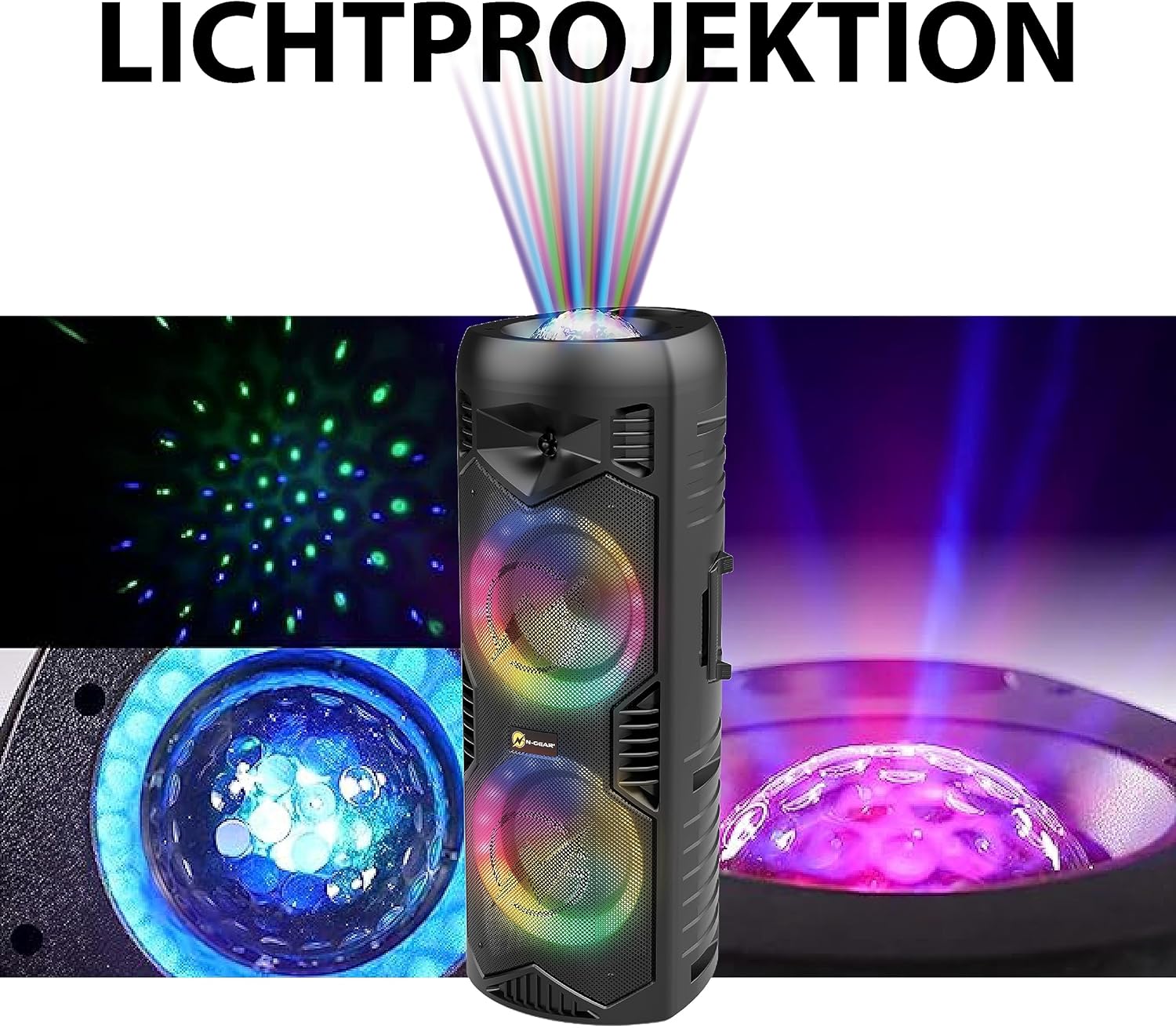
Image 5.1: Detail of the speaker's light projection and LED effects.
5.4 Gerçek Kablosuz Stereo (TWS) İşlevi
The TWS function allows you to pair two N-Gear Let's Go Party 5150 speakers together for a stereo sound experience.
- Her iki hoparlörün de açık ve Bluetooth modunda olduğundan, ancak herhangi bir cihaza bağlı olmadığından emin olun.
- On one speaker (this will be the primary speaker), press and hold the 'TWS' button (if available) or a combination of buttons as indicated in the quick start guide.
- Birincil hoparlör, ikincil hoparlörü arayacaktır. Bağlandıktan sonra bir onay sesi duyacaksınız.
- Now, connect your mobile device to the primary speaker via Bluetooth as described in section 4.3. Audio will play in stereo through both speakers.
5.5 Power Bank Fonksiyonu
The speaker can be used to charge external devices via its USB output port.
- Connect your device's USB charging cable to the USB output port on the speaker.
- Hoparlör cihazınızı şarj etmeye başlayacaktır.
6. Bakım
6.1 Temizlik
- Hoparlörün dış yüzeyini yumuşak bir bezle silin.amp bezle silin. Aşındırıcı temizleyiciler veya çözücüler kullanmayın.
- Ensure all ports are dry before use, especially after exposure to water.
6.2 Depolama
- Hoparlörü serin, kuru ve doğrudan güneş ışığından ve aşırı sıcaklıklardan uzak bir yerde saklayın.
- If storing for an extended period, charge the battery to approximately 50% every few months to prolong its lifespan.
7. Sorun Giderme
| Sorun | Olası Neden | Çözüm |
|---|---|---|
| Hoparlör açılmıyor. | Pil bitmiş. | Connect the speaker to a power source using the AC charging cable and allow it to charge. |
| Hoparlörden ses gelmiyor. | Volume is too low; incorrect mode selected; device not properly connected. | Increase the volume. Ensure the correct input mode (Bluetooth, USB, AUX) is selected. Re-pair Bluetooth device or check cable connections. |
| Bluetooth cihazı eşleştirilemiyor. | Hoparlör eşleştirme modunda değil; cihaz çok uzakta; parazit oluşuyor. | Ensure speaker is in Bluetooth mode and discoverable. Move device closer to speaker. Turn off other Bluetooth devices. |
| Mikrofon çalışmıyor. | Microphone is off; batteries are low/dead; microphone volume is low. | Ensure microphone is powered on. Replace microphone batteries. Increase microphone volume on the speaker. |
| LED ışıklar çalışmıyor. | Işıklar kapalı veya sabit modda. | Press the 'LIGHT' or 'LED' button to cycle through modes or turn them on. |
8. Özellikler
| Özellik | Detay |
|---|---|
| Model Numarası | LGP 5150 BK |
| Marka | N-Dişli |
| Çıkış Gücü | 200 Watt |
| Hoparlör Boyutu | Çift 6 inç hoparlör |
| Bağlantı | Bluetooth, USB, MicroSD, AUX (3.5 mm) |
| Kablosuz Teknoloji | Bluetooth |
| Pil Türü | Lityum iyon (dahil) |
| Pil Ömrü | 5 saate kadar (kullanıma göre değişir) |
| Boyutlar (U x G x Y) | 26.5 x 32 x 68.5 cm (10.4 x 12.6 x 26.9 inç) |
| Ağırlık | 5.5 Kilogram (12.1 lbs) |
| Su geçirmez | Evet |
| Dahil Bileşenler | Speaker, Wireless Microphone, Remote Control, AC Charging Cable, User Manual |

Image 8.1: Speaker Dimensions.
9. Garanti ve Destek
N-Gear products are designed and manufactured to the highest quality standards. For information regarding warranty coverage, please refer to the warranty card included with your purchase or visit the official N-Gear webalan.
For technical support, troubleshooting assistance, or service inquiries, please contact N-Gear customer support through their official channels. Contact information can typically be found on the product packaging or the N-Gear webalan.
Webalan: www.n-gear.eu


