giriiş
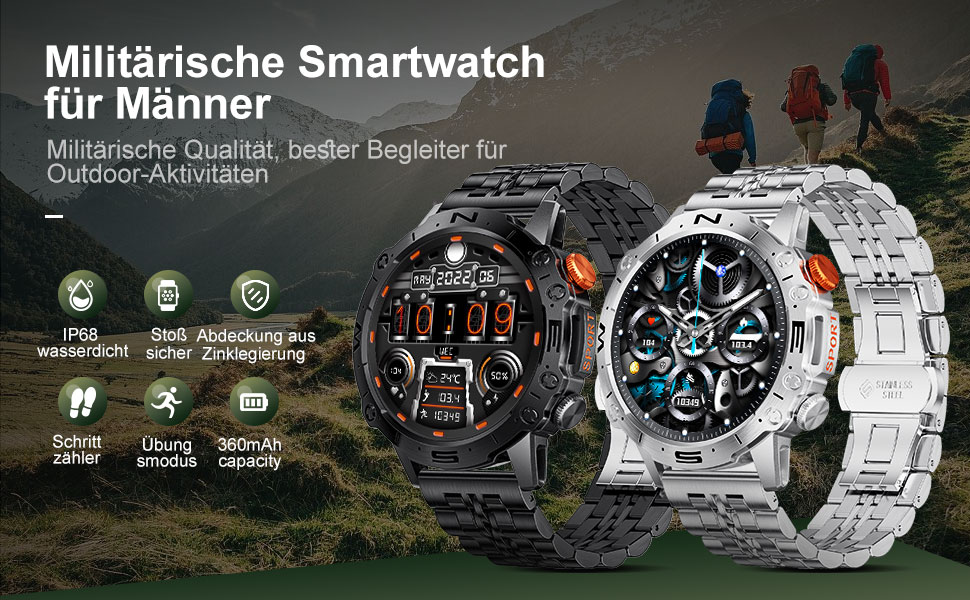
This manual provides detailed instructions for the setup, operation, and maintenance of your LIGE ST19-A Smartwatch. Designed for durability and functionality, this smartwatch features a 1.43-inch AMOLED touchscreen, Bluetooth calling, comprehensive health monitoring, and multiple sports modes. Please read this manual carefully to ensure proper use and to maximize your device's potential.
1. Kurulum
1.1 Akıllı Saati Şarj Etme
Before first use, fully charge your LIGE ST19-A Smartwatch. Use the provided magnetic charging cable.
- Connect the magnetic end of the charging cable to the charging contacts on the back of the smartwatch.
- Connect the USB end of the cable to a standard USB power adapter (5V/1A recommended) or a computer's USB port.
- Saatin ekranı şarj durumunu gösterecektir. Tam şarj genellikle 2-3 saat sürer.
- Once fully charged, the watch offers approximately 3-7 days of working time and up to 30 days of standby time.
1.2 Uygulama Kurulumu ve Cihaz Eşleştirme
Akıllı saatinizin tüm işlevlerini kullanabilmek için, akıllı telefonunuza yardımcı uygulamayı yüklemeniz ve cihazları eşleştirmeniz gerekir.
- Bluetooth'u etkinleştir: Akıllı telefonunuzda ayarlara gidin ve Bluetooth'un açık olduğundan emin olun.
- Uygulamayı indirin: Scan the QR code provided in the watch's packaging or search for "FitCloudPro" in your smartphone's app store (Google Play Store for Android, Apple App Store for iOS). Alternatively, you can visit bu bağlantı for download options.
- Kurun ve Açın: Install the "FitCloudPro" app and open it.
- Cihaz Ekle: In the app, navigate to the "Device" or "Add Device" section. The app will search for available devices. Select "ST19-A" from the list to initiate pairing.
- Eşleştirmeyi Onayla: Follow the on-screen prompts on both your phone and smartwatch to confirm the pairing request.
- Bildirimleri Etkinleştir: Grant the necessary permissions for the app to display notifications from your phone on the smartwatch.
- Bluetooth Çağrı İşlevi: After successful connection, you can enable or disable the call function on the watch. If the connection is successful, you can add/answer calls and play music.

2. Kullanım Talimatları
2.1 Temel Gezinme
- Dokunmatik ekran: Menüler ve özellikler arasında gezinmek için sola, sağa, yukarı veya aşağı kaydırın. Seçmek için dokunun.
- Yan Düğmeler: The smartwatch features physical buttons for quick access to functions or to return to the home screen. Refer to the watch's interface for specific button assignments.
2.2 Bluetooth Araması
Akıllı telefonunuzla eşleştirildikten sonra, doğrudan akıllı saatinizden arama yapabilir ve aramaları yanıtlayabilirsiniz.
- Arama Yapma: Access the dialer on your watch or select a contact from your synced phonebook.
- Çağrı Alma: When a call comes in, the watch will display the caller ID. You can answer or decline the call directly from your wrist.
- The watch includes a microphone and speaker for hands-free communication.

2.3 Akıllı Bildirimler
Receive instant notifications for incoming calls, text messages, and alerts from various social media applications directly on your wrist.
- Ensure notification permissions are granted in the "FitCloudPro" app for desired applications.
- Supported apps include Line, Messenger, Facebook, Twitter, Kakao Talk, Skype, and WhatsApp.

2.4 Sağlık Takibi
The smartwatch provides 24-hour real-time monitoring of various health metrics.
- Nabız İzleme: Tracks your heart rate continuously throughout the day.
- Kan Basıncı Ölçümü: Kan basıncı ölçümlerini sağlar.
- Kan Oksijen (SpO2) İzlemesi: Kanınızdaki oksijen satürasyon seviyelerini ölçer.
- Uyku İzleme: Derin uyku, hafif uyku ve uyanıklık saatleri dahil olmak üzere uyku düzeninizi analiz eder.
- Pedometre: Counts your daily steps, distance, and estimated calorie burn.
- Nefes Eğitimi: Stresi yönetmeye yardımcı olacak rehberli nefes egzersizleri.
Note: Health data provided by this device is for reference only and should not be used for medical diagnosis or treatment. Consult a medical professional for health concerns.

2.5 Spor Modu
The smartwatch supports over 100 sports modes to track your workout data accurately.
- Select your desired sport mode from the watch's menu to begin tracking.
- The watch records data such as duration, distance, calories burned, and heart rate during your activity.
- Examples of supported activities include walking, running, cycling, swimming, and various gym exercises.

2.6 Ek Özellikler
- Hava Durumu Ekranı: Get real-time weather updates directly on your watch face.
- Müzik Kontrolü: Control music playback on your smartphone (play, pause, skip tracks) from your wrist.
- Sürekli Açık Ekran (AOD): The 1.43-inch AMOLED screen supports an Always On Display feature, providing continuous time visibility.
- Yapay Zeka Sesli Asistan: Interact with your smartwatch using voice commands for various tasks.


3. Bakım
- Temizlik: Saat ekranını ve kayışını düzenli olarak yumuşak ve kuru bir bezle silin. Gerekirse, hafifçe kurulayın.amp Bir bezle silin ve ardından iyice kurulayın. Sert kimyasallardan veya aşındırıcı malzemelerden kaçının.
- Suya Dayanıklılık: The LIGE ST19-A Smartwatch is IP68 rated, meaning it is resistant to dust and can withstand immersion in water up to 1.5 meters for 30 minutes. It is suitable for daily use, hand washing, and rain exposure. However, it is not recommended for hot showers, saunas, or diving, as steam and hot water can compromise the seals.
- Pil Bakım: Pil ömrünü uzatmak için saati sık sık tamamen boşaltmaktan kaçının. Pil seviyesi düşük olduğunda şarj edin. Uzun süre kullanılmadığı zamanlarda saati serin ve kuru bir yerde saklayın.
- Aşırı Sıcaklıklardan Kaçının: Saati aşırı sıcak veya soğuk ortamlara maruz bırakmayın, çünkü bu durum bataryaya ve iç bileşenlere zarar verebilir.
4. Sorun Giderme
| Sorun | Olası Çözüm |
|---|---|
| Saat açılmıyor | Saatinizin tam şarjlı olduğundan emin olun. Saatinizi en az 30 dakika şarj cihazına takın. |
| Akıllı telefonla eşleştirilemiyor |
|
| Hiçbir bildirim alınmadı |
|
| Yanlış sağlık verileri |
|
| Kısa pil ömrü |
|
5. Özellikler
| Özellik | Detay |
|---|---|
| Model Adı | ST19-A |
| Marka | LİGE |
| Ekran Boyutu | 1.43 inç |
| Görüntü Türü | AMOLED Dokunmatik Ekran |
| Bağlantı Teknolojisi | Bluetooth |
| Pil Kapasitesi | 360 mAh (Lityum iyon) |
| Tipik Kullanım Süresi | 3-7 gün |
| Bekleme Süresi | Yaklaşık. 30 gün |
| Suya Dayanıklılık | IP68 (Dustproof, Water resistant up to 1.5m for 30 min) |
| Özel Özellikler | Voice Call, Music Player, Heart Rate Monitor, Activity Tracker, Blood Pressure Monitor, Blood Oxygen Monitor, Sleep Monitor, GPS (integrated) |
| Uyumluluk | Android, iOS |
| Ağırlık | 290 gr |
6. Garanti ve Destek
LIGE prioritizes customer satisfaction. Your LIGE ST19-A Smartwatch comes with the following support:
- 30 Günlük Para İade Garantisi: If any issues arise during use, you are eligible for a refund within 30 days of purchase.
- 2 Yıl Garantili Tamir Servisi: A 2-year repair service is provided after the sale for manufacturing defects.
- For any problems or inquiries, please contact LIGE customer support. Your satisfaction is important to us.


