1. Giriş
The iZEEKER iA200 is a high-performance 4K action camera designed to capture your adventures in stunning detail. Featuring 4K 30FPS video recording, 24MP photos, dual screens, 6-axis Electronic Image Stabilization (EIS), and a waterproof design, it is equipped for various environments and activities. This manual provides essential information for setting up, operating, and maintaining your iA200 camera.
2. Kutuda Neler Var?
Your iZEEKER iA200 Action Camera package includes the following items:
- iZEEKER iA200 Aksiyon Kamerası
- Waterproof Case (up to 40M/131ft)
- 2 x 1350mAh Şarj Edilebilir Pil
- External Noise-Canceling Microphone
- 2.4G Remote Control with Wrist Strap
- USB Type-C Şarj Kablosu
- Various Mounting Accessories (e.g., helmet mounts, bike mounts, tripod adapters, clips, straps)
- Kullanım Kılavuzu (bu belge)
- Hızlı Başlangıç Kılavuzu

Image: Contents of the iZEEKER iA200 Action Camera package, including the camera, waterproof case, batteries, remote, and various mounts.
3. Kurulum
3.1. Pilin Takılması ve Şarj Edilmesi
- Kameranın alt kısmındaki pil yuvası kapağını açın.
- Insert a 1350mAh battery, ensuring correct polarity.
- Pil bölmesi kapağını sıkıca kapatın.
- To charge, connect the camera to a USB power source using the provided Type-C cable. The charging indicator will illuminate.
- The camera comes with two rechargeable batteries for extended use.

Image: The iZEEKER iA200 Action Camera showing the battery compartment and two included 1350mAh batteries.
3.2. Mikro SD Kart Takma
- Locate the Micro SD card slot on the side of the camera (under a protective flap).
- Insert a Class 10 or higher Micro SD card (up to 128GB, 32GB included) with the contacts facing the front of the camera until it clicks into place.
- Çıkarmak için, kartı hafifçe itin, kendiliğinden dışarı fırlayacaktır.
3.3. Su Geçirmez Kılıf Kullanımı
The included waterproof case allows the iA200 to be submerged up to 40 meters (131 feet).
- Su geçirmez kılıfın içine yerleştirmeden önce kameranın tamamen kuru olduğundan emin olun.
- Close the case firmly, ensuring the latch is fully secured and the rubber seal is clean and free of debris.
- Before first use, test the empty waterproof case in water to ensure no leaks.

Image: The iZEEKER iA200 Action Camera securely enclosed within its transparent waterproof case.
4. Kameranın Çalıştırılması
4.1. Güç Açma/Kapatma
- To power on: Press and hold the Power/Mode button (usually on the front or top) for a few seconds.
- Kapatmak için: Ekran kapanana kadar Güç/Mod düğmesini tekrar basılı tutun.
4.2. Mod Seçimi
Press the Power/Mode button repeatedly to cycle through different modes:
- Video Modu: Video kaydedertage.
- Fotoğraf Modu: Hareketsiz görüntüler yakalar.
- Oynatma Modu: View kaydedilen videolar ve fotoğraflar.
- Ayarlar Modu: Kamera ayarlarına erişin.
The iA200 also supports specialized modes like Slow Motion, Loop Recording, Time-lapse Video, Auto Photo, Burst Photo, Timer Photo, and Car Mode.
4.3. Dual Screen Functionality
The iA200 features a 2-inch touch screen on the rear and a 1.3-inch front screen. The front screen is ideal for selfies and vlogging.
- To switch to the front screen: Long-press the UP/MODE button on the side of the camera.
- The 2-inch rear touch screen provides an intuitive user interface for easy operation and clear viewing of captured content.

Image: The iZEEKER iA200 Action Camera highlighting its dual screen feature, with both front and rear displays active.
4.4. Uzaktan Kumanda
The included 2.4G remote control allows you to start/stop recording videos or take photos from a distance. The remote control is not waterproof.
4.5. WiFi Connectivity and App (SupCam Pro)
Connect your iA200 to your smartphone via Wi-Fi using the SupCam Pro app (available on iOS and Android). This allows for real-time video synchronization, remote control of camera functions, and easy sharing of your content.

Image: The iZEEKER iA200 Action Camera displaying a live feed, mirrored on a smartphone via the SupCam Pro app.
Video: Demonstrates the user interface and features of an iZEEKER Action Camera (iA100 model shown), including mode selection and settings. This video is provided by the seller.
5. Özelliklerin Detaylı Açıklaması
5.1. High-Resolution Video and Photos
Capture native 4K video at 30 frames per second (FPS) and stunning 24MP still photos. The camera's advanced sensor ensures clear and vibrant imagery.
5.2. 6-Axis Electronic Image Stabilization (EIS)
The built-in 6-axis EIS technology provides smooth and stable video footage, even during intense action sports or bumpy rides. This feature minimizes camera shake for professional-looking results.
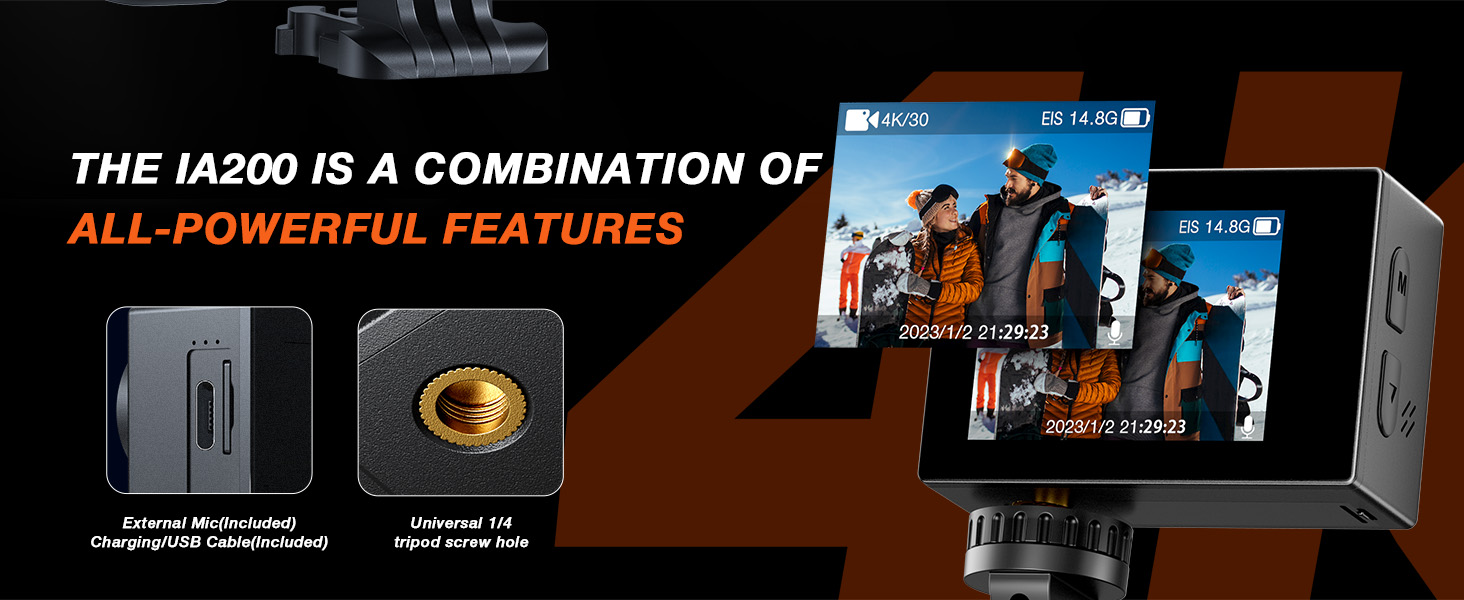
Image: The iZEEKER iA200 Action Camera showcasing its 6-axis EIS feature and a universal 1/4 tripod screw hole for versatile mounting.
5.3. 40M Waterproof Capability
With its upgraded waterproof case, the iA200 can be used underwater up to 40 meters (131 feet), making it perfect for diving, snorkeling, surfing, and other water sports.

Image: The iZEEKER iA200 Action Camera in its waterproof case, emphasizing its dustproof and anti-collision properties for rugged use.
5.4. Harici Mikrofon Desteği
An external noise-canceling microphone is included, allowing for clear audio recording even in noisy environments, enhancing the quality of your vlogs and action footage.
6. Montaj Seçenekleri
The iA200 comes with a wide range of accessories to mount your camera in various scenarios:
- Kask Bağlantı Aparatları: Securely attach the camera to your helmet for first-person perspective shots during skiing, cycling, or other activities.
- Bike Mounts: Attach to handlebars for capturing your rides.
- Tripod Adapters: Use with standard tripods or selfie sticks for stable shots.
- Clips and Straps: For attaching to various gear or body parts.

Image: The iZEEKER iA200 Action Camera mounted on a bicycle handlebar, demonstrating the difference between EIS on and off for smoother footage.

Image: The iZEEKER iA200 Action Camera mounted on a ski helmet, ready to capture winter sports footage.
Video: Bir yenidenview of a similar action camera (Hiicam Speed 20) demonstrating its dual screen and 4K video capabilities, including underwater use and various settings. This video is provided by the seller.
7. Bakım
- Temizlik: Use a soft, lint-free cloth to clean the camera lens and screens. For the waterproof case, rinse with fresh water after saltwater use and allow to air dry.
- Pil Bakım: Pilleri serin ve kuru bir yerde saklayın. Pillerin uzun süre tamamen boşalmasından kaçının.
- Depolamak: When not in use, store the camera and accessories in a protective case to prevent damage.
8. Sorun Giderme
- Kamera Açılmıyor: Pilinin şarjlı olduğundan ve doğru şekilde takıldığından emin olun.
- SD Kart Hatası: Use a Class 10 or higher Micro SD card. Format the SD card in the camera's settings menu.
- WiFi Bağlantı Sorunları: Ensure the SupCam Pro app is installed and the camera's WiFi is enabled. Try restarting both the camera and your smartphone.
- Kötü Ses Kalitesi: Ensure the external microphone is properly connected and positioned.
9. Özellikler
| Özellik | Detay |
|---|---|
| Model Numarası | iA200 |
| Video Çözünürlüğü | 4K 30FPS |
| Fotoğraf Çözünürlüğü | 24 MP |
| Suya Dayanıklı Derinlik | 40M (131ft) with case |
| Görüntü Sabitleme | 6 Eksenli EIS |
| Arka ekran | 2 inç Dokunmatik Ekran |
| Ön Ekran | 1.3 inç Ekran |
| Pil Kapasitesi | 2 x 1350mAh Lityum Polimer |
| Bağlantı | Wi-Fi, USB Type-C, Mini HDMI |
| Depolamak | Mikro SD (128 GB'a kadar) |
| Ürün Boyutları | 6.1x4.5x2.4 cm |
| Ağırlık | 710 gr |
| Menşei ülke | Çin |
10. Garanti ve Destek
iZEEKER products are designed for durability and performance. For any questions, technical support, or warranty claims, please refer to the contact information provided in your product packaging or visit the official iZEEKER webalan.


