1. Giriş ve Üzeriview
The Acer Aspire 3 A314-36P-35UU is a slim and lightweight laptop designed for everyday productivity and multitasking. Featuring a 14.0-inch Full HD IPS display, an Intel Core i3-N305 Processor, 8GB LPDDR5 memory, and a 128GB NVMe SSD, it offers reliable performance for various tasks. This manual provides essential information for setting up, operating, and maintaining your laptop.

The Acer Aspire 3 A314-36P-35UU laptop, open and ready for use.
Temel Özellikler:
- Amaçlı Tasarım: Kolay taşınabilirlik için ince ve hafif.
- Kullanıma Hazır Performans: Powered by an Intel Core i3-N305 Processor for efficient multitasking.
- Visually Stunning Display: 14.0" Full HD IPS screen with narrow bezels for clear visuals.
- İç Özellikler: 8GB LPDDR5 Onboard Memory and 128GB NVMe SSD for storage.
- Enhanced Communication: HD front-facing camera with Acer TNR and PurifiedVoice technology for clear video calls.
- Kablosuz bağlantı: Wi-Fi 6 (802.11ax) for strong and consistent wireless signals.
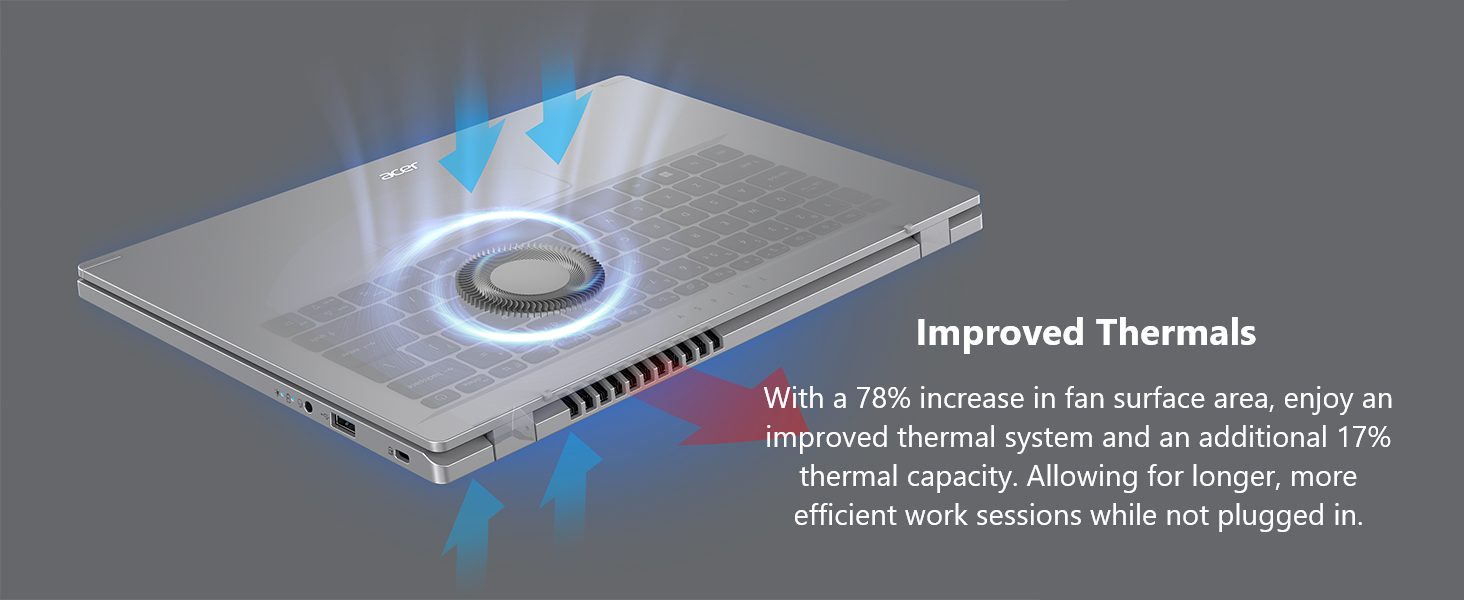
- Improved Thermals: Enhanced thermal system for efficient cooling during extended use.
- İşletim Sistemi: Windows 11 Home in S mode.
2. Kutuda Neler Var?
Upon unpacking your Acer Aspire 3 laptop, please ensure all the following items are present:
- Acer Aspire Dizüstü Bilgisayar
- AC Adaptörü
- Güç Kablosu
3. Kurulum
Follow these steps to set up your new Acer Aspire 3 laptop:
- Dizüstü Bilgisayarı Paketinden Çıkarın: Dizüstü bilgisayarınızı ve tüm aksesuarlarını dikkatlice ambalajından çıkarın.
- Gücü bağlayın: Plug the AC adapter into the laptop's DC-in jack and then into a power outlet. It is recommended to fully charge the battery before first use.
- İlk Önyükleme: Open the laptop lid and press the power button. The laptop will guide you through the initial Windows 11 setup process. Follow the on-screen instructions to configure your region, language, network, and user account.
- Çevre Birimlerini Bağlayın: Connect any external devices such as a mouse, external keyboard, or monitor to the available ports.

The laptop features multiple ports for connectivity, including USB Type-C, USB 3.2, and HDMI.
4. Dizüstü Bilgisayarınızı Çalıştırma
Güç Açma/Kapatma:
- To power on, press the power button located on the keyboard.
- To power off, click the Start button in Windows, then select Power > Shut down.
Dokunmatik Yüzeyi Kullanma:
The touchpad functions as a mouse. Use single-finger taps for left-clicks and two-finger taps for right-clicks. You can also use multi-touch gestures for scrolling and zooming.
Wi-Fi'ye bağlanma:
Your laptop supports Wi-Fi 6 for fast and stable wireless connections. To connect:
- Görev çubuğundaki Wi-Fi simgesine tıklayın.
- İstediğiniz ağı listeden seçin.
- Enter the network password if prompted and click Connect.
Enjoy fast and reliable internet with Wi-Fi 6 connectivity.
Windows 11 Home in S Mode:
Your laptop comes with Windows 11 Home in S mode, which is a version of Windows streamlined for security and performance. In S mode, you can only install apps from the Microsoft Store, and you must use Microsoft Edge for safe browsing. You can switch out of S mode at any time, but you cannot switch back.
This video demonstrates the powerful tools available with Microsoft 365, enhancing productivity on your Windows 11 device.
This video showcases Windows AI Photos, demonstrating how to easily enhance and manage your images.
This video illustrates the Windows 11 AI Snipping tool, allowing for easy text extraction and sensitive information protection.
This video demonstrates Windows AI Paint, highlighting its enhanced features for drawing and digital creation, including background removal.
This video introduces Microsoft Windows Copilot, your everyday AI companion for enhancing creativity and productivity.
5. Bakım
Düzenli bakım, dizüstü bilgisayarınızın uzun ömürlü olmasını ve en iyi performansı göstermesini sağlar:
- Temizlik: Ekranı ve dış yüzeyi temizlemek için yumuşak, tiftiksiz bir bez kullanın. İnatçı lekeler için,ampBezi su veya ekran temizleyicisiyle silin. Sert kimyasallardan kaçının.
- Pil Bakım: To maximize battery life, avoid fully discharging the battery frequently. Store the laptop in a cool, dry place when not in use for extended periods.
- Yazılım Güncellemeleri: Regularly update your Windows operating system and drivers to ensure security and performance.
- Isı Yönetimi: The Aspire 3 features improved thermals. Ensure the vents are not obstructed to allow for proper airflow and prevent overheating. Avoid using the laptop on soft surfaces like beds or couches that can block ventilation.

The laptop's improved thermal design helps maintain optimal operating temperatures.
6. Sorun Giderme
Dizüstü bilgisayarınızda sorun yaşıyorsanız, aşağıdaki temel sorun giderme adımlarını deneyin:
- Güç Yok: AC adaptörünün hem dizüstü bilgisayara hem de çalışan bir elektrik prizine güvenli bir şekilde bağlandığından emin olun. Elektrik prizinin çalışır durumda olup olmadığını kontrol edin.
- Sistem Yanıt Vermiyor: If the laptop freezes, press and hold the power button for 10-15 seconds to force a shutdown. Wait a few moments, then restart the laptop.
- Wi-Fi Bağlantı Sorunları: Restart your router and modem. On your laptop, turn Wi-Fi off and then on again. Ensure you are selecting the correct network and entering the correct password.
- Ekran Sorunları: If the screen is blank or flickering, try connecting an external monitor to the HDMI port to determine if the issue is with the laptop's display or graphics output.
- Yavaş Performans: Close unnecessary applications, check for malware, and ensure your operating system is up to date. Consider freeing up disk space if your storage is nearly full.
Daha karmaşık sorunlar için Acer destek ekibine başvurun website veya müşteri hizmetleriyle iletişime geçin.
7. Özellikler
Below are the detailed specifications for the Acer Aspire 3 A314-36P-35UU Slim Laptop:
| Özellik | Şartname |
|---|---|
| Model Adı | A314-36P-35UU |
| Ekran Boyutu | 14 inç |
| Ekran Çözünürlüğü | 1920 x 1080 piksel (Full HD IPS) |
| İşlemci | Intel Core i3-N305 (3.8 GHz) |
| Veri deposu | 8 GB LPDDR5 |
| Bellek Hızı | 2400 MHz |
| Sabit Sürücü | 128 GB NVMe SSD |
| Grafik Eş İşlemcisi | Intel UHD Grafikler (Entegre) |
| Kablosuz Tip | 802.11ax (Wi-Fi 6), Bluetooth |
| USB 3.0 Bağlantı Noktaları | 3 (1x USB Type-C 3.2 Gen 2, 2x USB 3.2 Gen 1) |
| HDMI Bağlantı Noktası | 1 (HDMI 2.1 with HDCP support) |
| İşletim Sistemi | S Modunda Windows 11 Home |
| Ürün Ağırlığı | 3.09 pound |
| Ürün Boyutları | 12.93 x 0.74 x 8.55 inç |
| Renk | Gümüş |
8. Garanti ve Destek
Ayrıntılı garanti bilgileri için lütfen ürününüzle birlikte verilen garanti kartına bakın veya resmi Acer destek sitesini ziyaret edin. webGaranti genellikle satın alma tarihinden itibaren belirli bir süre boyunca üretim hatalarını kapsar.
If you require technical assistance or have questions not covered in this manual, please contact Acer customer support through their official channels. Have your laptop's model number (A314-36P-35UU) and serial number ready when contacting support.


