giriiş
Thank you for choosing the AVMTON Wireless Gaming Mouse. This manual provides detailed instructions on how to set up, operate, and maintain your new mouse, ensuring optimal performance and an enhanced gaming and work experience. Designed for comfort and precision, this ergonomic wireless mouse features adjustable DPI, customizable buttons, and vibrant RGB lighting.
Ürün Bittiview
The AVMTON Wireless Gaming Mouse is engineered for both gaming and office use, offering a comfortable ergonomic design and responsive control. It features a honeycomb hollow design with RGB backlighting, providing both aesthetic appeal and lightweight performance.
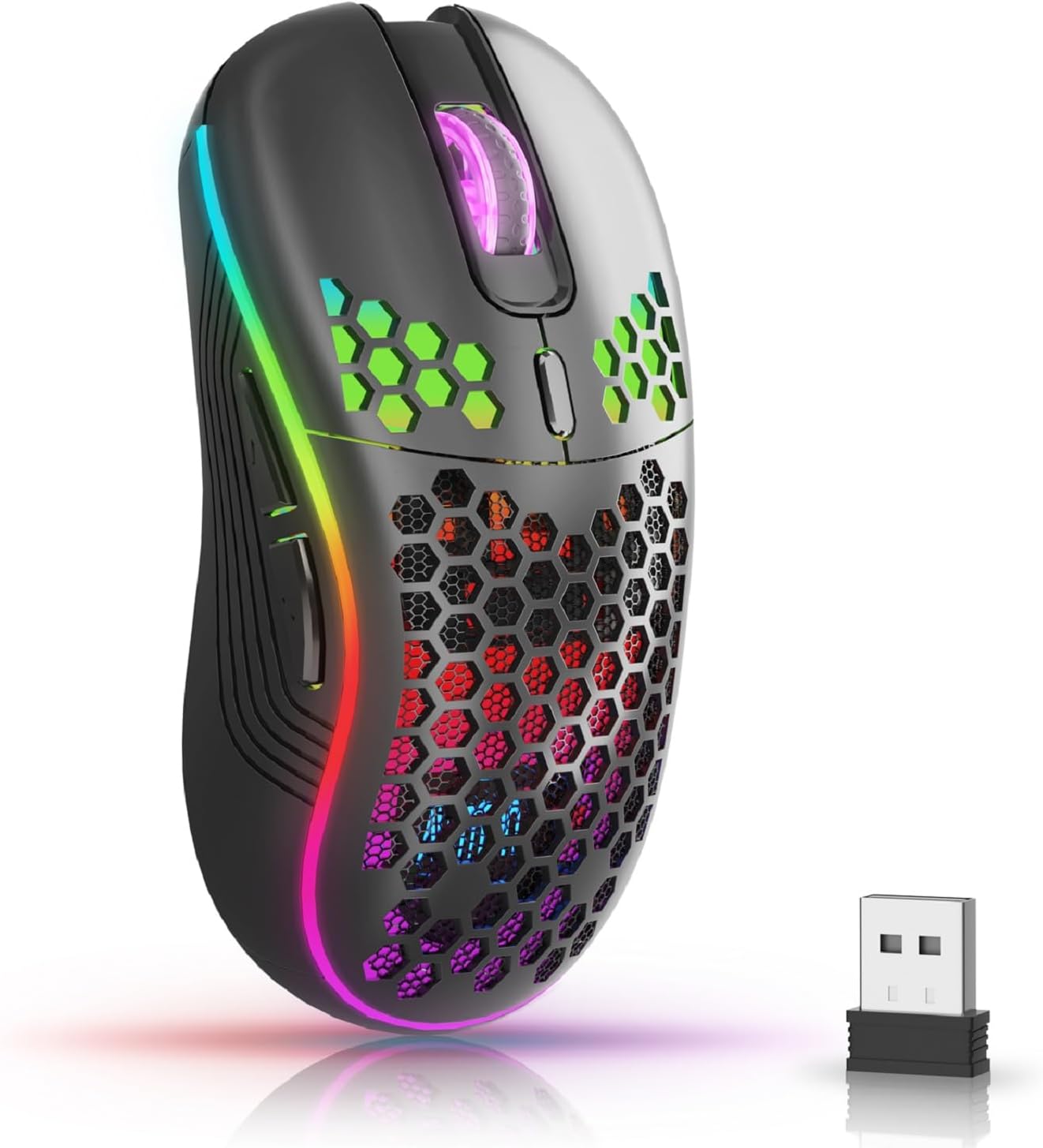
The AVMTON Wireless Gaming Mouse in black, featuring RGB lighting and a honeycomb design, shown alongside its compact USB receiver.

Illustration of the mouse's connectivity modes, including Type-C charging, 2.4G wireless receiver, and a 10m sensing range, suitable for home, gaming, and office environments.
Temel Özellikler:
- Ergonomik Tasarım: Shaped to fit the hand comfortably, reducing strain during extended use.
- Ayarlanabilir DPI: Easily switch between 800/1200/1600/2400/4800 DPI settings for precise control.
- 6 Programlanabilir Düğme: Includes forward/backward, left/right click, scroll wheel, and DPI adjustment button.
- Şarj Edilebilir Pil: Built-in lithium battery with USB-C charging, offering 15-20 days of use on a single charge.
- Sessiz Tıklama Tasarımı: Ideal for quiet environments like libraries or offices.
- Geniş Uyumluluk: Supports Windows 2000/ME/XP/7/8/10/Vista/98, Mac OS, Linux, and compatible with laptops, PCs, desktops, and Macbooks.
- Dayanıklı Yapı: Tested for over 5 million clicks, ensuring long-lasting performance.
Kurulum Kılavuzu
Follow these steps to set up your AVMTON Wireless Gaming Mouse:
- Fareyi Şarj Edin: Before first use, fully charge the mouse using the provided USB-C charging cable. Connect the cable to the mouse's Type-C port and a USB power source (e.g., computer USB port, USB wall adapter). The charging indicator will show the charging status.
- USB Alıcısını Bulun: The compact USB 2.4G wireless receiver is typically stored in a compartment on the underside of the mouse for safe keeping during transport.
- Alıcıyı bağlayın: Insert the USB receiver into an available USB port on your computer (laptop, PC, desktop, Macbook).
- Güç Açık: Fareyi, alt tarafında bulunan güç düğmesini kullanarak açın.
- Otomatik Bağlantı: The mouse should automatically connect to your computer. No additional drivers are usually required for basic functionality.
Kullanım Talimatları
Understanding the functions of your mouse buttons and settings will enhance your experience.
Düğme Fonksiyonları:
- Sol Tıklama Düğmesi: Standart birincil tıklama işlevi.
- Sağ Tıklama Butonu: Standart ikincil tıklama fonksiyonu.
- Kaydırma tekerleği: Belgeler arasında yukarı veya aşağı kaydırın ve web Sayfalar. Orta tıklama işlevi için de basılabilir.
- DPI Ayarlama Düğmesi: Located near the scroll wheel. Press this button to cycle through available DPI settings (800/1200/1600/2400/4800). Each press changes the cursor speed and sensitivity.
- İleri Düğmesi: Typically located on the side of the mouse. Used for navigating forward in web tarayıcılar veya file kaşifler.
- Geri Düğmesi: Typically located on the side of the mouse. Used for navigating backward in web tarayıcılar veya file kaşifler.
RGB Arka Aydınlatma Kontrolü:
The mouse features dynamic RGB backlighting. If you prefer to turn off the backlight, refer to the specific instructions provided with your mouse or check the manufacturer's website for software utilities, if available. Some models allow toggling RGB with a combination of buttons (e.g., DPI button + another button).
Bakım
Doğru bakım, farenizin uzun ömürlü olmasını ve performansını garanti eder.
- Şarj: Recharge the mouse when the battery indicator shows low power. A full charge provides approximately 15-20 days of use. It is recommended to fully charge the mouse before extensive use.
- Temizlik: Fare yüzeyini temizlemek için yumuşak, kuru bir bez kullanın. İnatçı kirler için, biraz daha kuru bir bez yeterli olacaktır.amp Bez kullanılabilir, ancak iç bileşenlere nem girmemesine dikkat edin. Sert kimyasallardan veya aşındırıcı malzemelerden kaçının.
- Depolamak: Uzun süre kullanılmayacaksa, pil ömrünü korumak için fareyi kapatın. Serin ve kuru bir yerde saklayın.
Sorun giderme
If you encounter issues with your AVMTON Wireless Gaming Mouse, try the following solutions:
- Fare Yanıt Vermiyor:
- Farenin açık olduğundan emin olun.
- USB alıcısının bilgisayarınızdaki çalışan bir USB bağlantı noktasına güvenli bir şekilde takılı olup olmadığını kontrol edin.
- Recharge the mouse. A low battery can cause unresponsiveness.
- USB alıcısını farklı bir USB bağlantı noktasına takmayı deneyin.
- Bilgisayarınızı yeniden başlatın.
- Gecikme veya Kesintili Bağlantı:
- Ensure the mouse is within the 10-meter sensing range of the USB receiver.
- Remove any large metallic objects or other wireless devices that might be causing interference between the mouse and the receiver.
- Try moving the USB receiver to a port closer to the mouse.
- DPI ayarı çalışmıyor:
- Ensure you are pressing the dedicated DPI adjustment button.
- If the issue persists, try restarting the mouse and your computer.
- RGB Işıkları Çalışmıyor:
- Check if the RGB backlight has been intentionally turned off (refer to "RGB Backlight Control" in Operating Instructions).
- Farenin pilinin yeterli şarjda olduğundan emin olun.
If these steps do not resolve the issue, please contact AVMTON customer support for further assistance.
Özellikler
| Özellik | Detay |
|---|---|
| Marka | AVMTON |
| Model Numarası | AV-DDMB-1 |
| Renk | Siyah |
| Bağlantı Teknolojisi | 2.4G Kablosuz (USB Alıcı) |
| DPI Ayarları | 800 / 1200 / 1600 / 2400 / 4800 |
| Düğme Sayısı | 6 |
| El Yönelimi | Sağ |
| Pil Ömrü | Approx. 15-20 days (on a single charge) |
| Şarj Portu | USB Tip-C |
| Uyumlu İşletim Sistemleri | Windows 2000/ME/XP/7/8/10/Vista/98, Mac OS, Linux |
| Uyumlu Cihazlar | Kişisel Bilgisayar, Dizüstü Bilgisayar |
| Özel Özellikler | Portable, Ergonomic, Rechargeable, RGB Backlight, Silent Click |
Garanti ve Destek
AVMTON offers a 12-month worry-free after-sales service for this product. If you encounter any problems with your wireless mouse, please do not hesitate to contact us. Our customer support team is ready to assist you.
For support, please visit the official AVMTON websitesine bakın veya satıcınızla iletişime geçin.


