1. Giriş
This manual provides detailed instructions for the setup, operation, and maintenance of your TECLAST N15 Mini PC. Please read this manual thoroughly before using the device to ensure proper functionality and to prevent damage.
The TECLAST N15 is a compact desktop computer featuring an Intel Celeron N5095 processor, 16GB DDR4 RAM, and a 512GB SSD. It supports triple 4K monitor output and comes with Windows 11 Pro pre-installed, making it suitable for various applications including office work, creative design, and multimedia entertainment.
2. Kutuda Neler Var?
Paketin içinde tüm öğelerin mevcut olduğundan emin olun:
- 1 x TECLAST N15 Mini PC
- 1 x Güç Adaptörü
- 1 x VESA Montajı
- 1 x HDMI Kablosu
- 1 x Kullanım Kılavuzu

Image: Contents of the TECLAST N15 Mini PC package.
3. Ürün Bittiview
3.1. Dimensions and Design
The TECLAST N15 Mini PC is designed for compactness and portability, measuring approximately 4.5 x 1.6 x 4.5 inches (115 x 43 x 115 mm) and weighing around 400g. Its aluminum body ensures a sturdy structure.
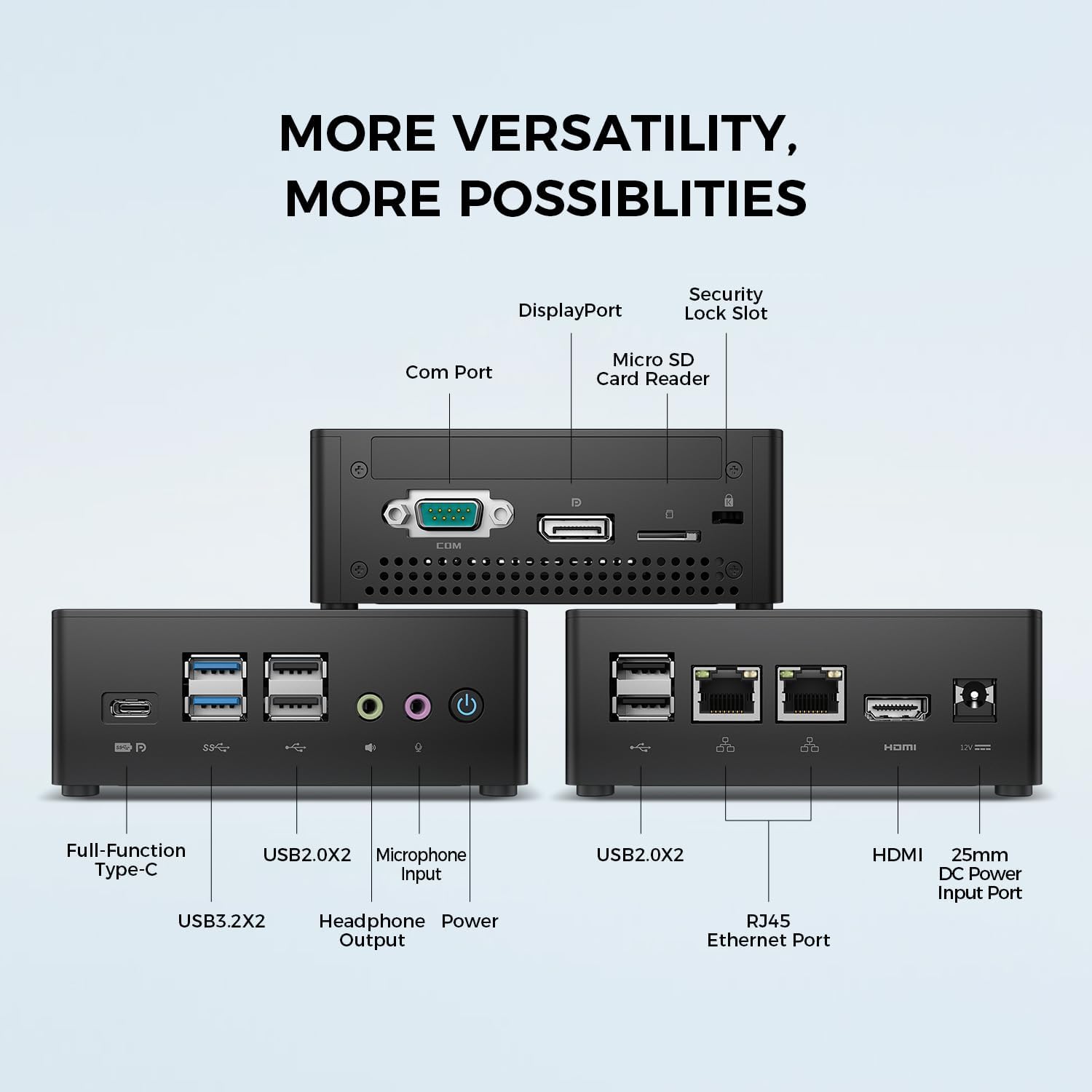
Image: TECLAST N15 Mini PC dimensions and compact design.
3.2. Bağlantı Noktaları ve Bağlantı
The N15 Mini PC offers extensive connectivity options to support various peripherals and displays.
- Ön Portlar: 1x Full-Function Type-C, 2x USB 3.0, 2x USB 2.0, 1x Headphone Output, 1x Microphone Input, Power Button.
- Yan Bağlantı Noktaları: 1x COM Port, 1x DisplayPort, 1x Micro SD Card Reader, 1x Security Lock Slot.
- Arka Portlar: 2x RJ45 Ethernet Ports (2.5Gbps), 2x USB 2.0, 1x HDMI Port, 1x DC Power Input.

Resim: Üzeriview of the TECLAST N15 Mini PC's various connectivity ports.

Image: Front panel ports of the TECLAST N15 Mini PC.

Image: Side panel ports of the TECLAST N15 Mini PC.

Image: Rear panel ports of the TECLAST N15 Mini PC.
3.3. İç Bileşenler
The N15 features an Intel Gen 11 N5095 processor, 16GB DDR4 RAM, and a 512GB PCIe 3.0 SSD. It also includes an M.2 E-slot for function expansion (pre-occupied by a wireless network card by default).

Image: Internal components of the TECLAST N15 Mini PC.
4. Kurulum Talimatları
4.1. Çevre Birimlerini Bağlama
- Ekranı Bağla: Use the HDMI, DisplayPort, or Full-Function Type-C port to connect your monitor(s). The N15 supports up to three 4K displays simultaneously.
- Klavye ve Fareyi Bağlayın: Plug your USB keyboard and mouse into the available USB ports.
- Ağa Bağlan: For a wired connection, connect an Ethernet cable to one of the two RJ45 ports. For wireless, ensure your Wi-Fi network is available during initial setup.
- Gücü bağlayın: Plug the power adapter into the DC power input port on the Mini PC, then connect the adapter to a power outlet.
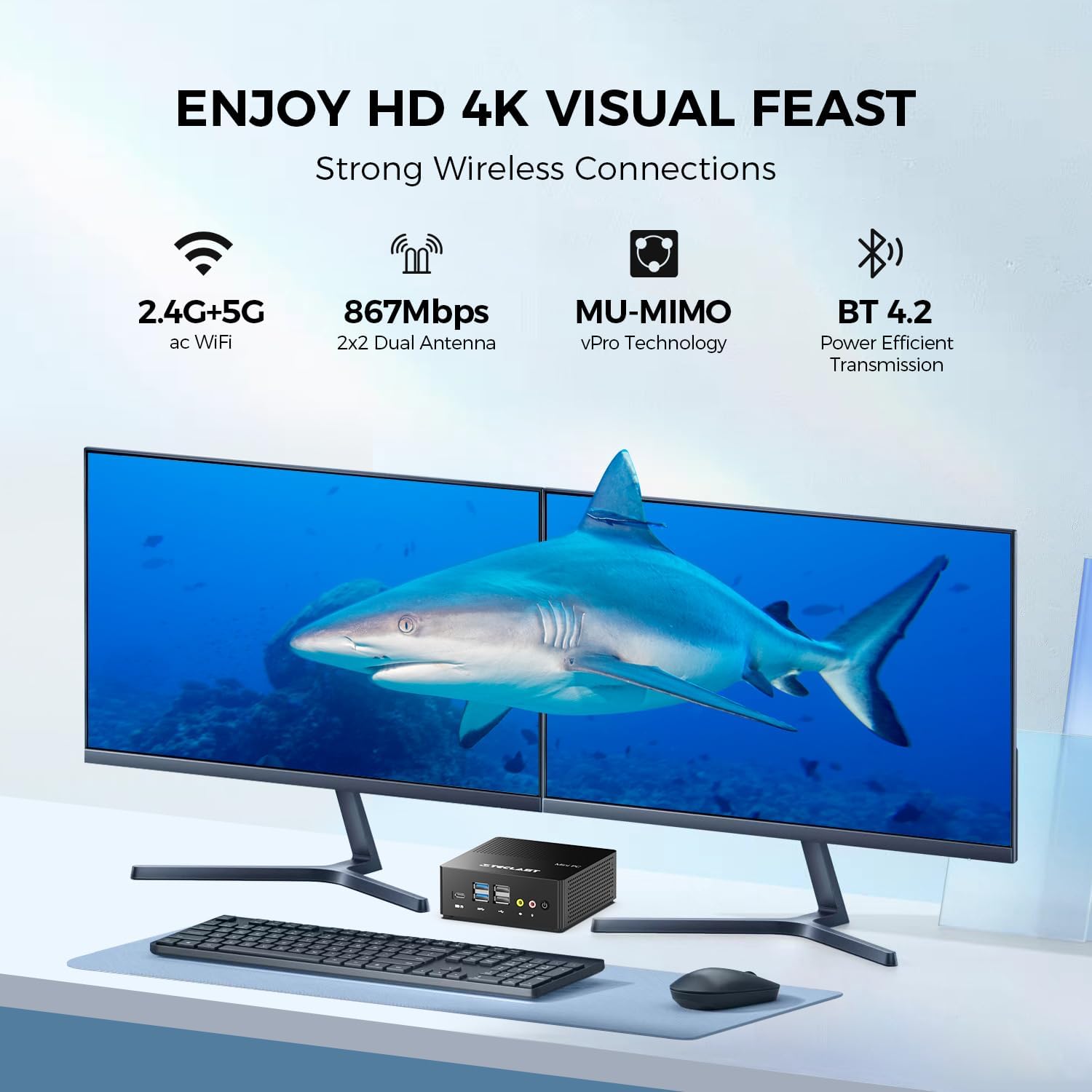
Resim: Eskiample setup with the TECLAST N15 Mini PC connected to multiple displays and peripherals.
4.2. İlk Güç Açma
Press the power button on the front of the Mini PC. The device will boot into Windows 11 Pro. Follow the on-screen instructions to complete the initial Windows setup, including language, region, network connection, and user account creation.
4.3. VESA Mount Installation (Optional)
The included VESA mount allows you to attach the Mini PC to the back of a compatible monitor or to a wall, saving desk space. Refer to the VESA mount instructions for detailed installation steps.

Image: TECLAST N15 Mini PC with VESA mount for space-saving installation.
5. Kullanım Talimatları
5.1. Windows 11 Pro
Your TECLAST N15 Mini PC comes with Windows 11 Pro pre-installed. This operating system provides a secure and versatile environment for various tasks, from productivity to entertainment. Ensure Windows updates are regularly installed to maintain system security and performance.

Image: Windows 11 Pro interface on the TECLAST N15 Mini PC.
5.2. Çoklu Monitör Kurulumu
The Mini PC supports connecting up to three displays simultaneously at 4096x2160@60Hz via HDMI, DisplayPort, and the Full-Function Type-C port. This allows for an extended workspace, enhancing productivity for tasks like creative design, data analysis, or multi-tasking.
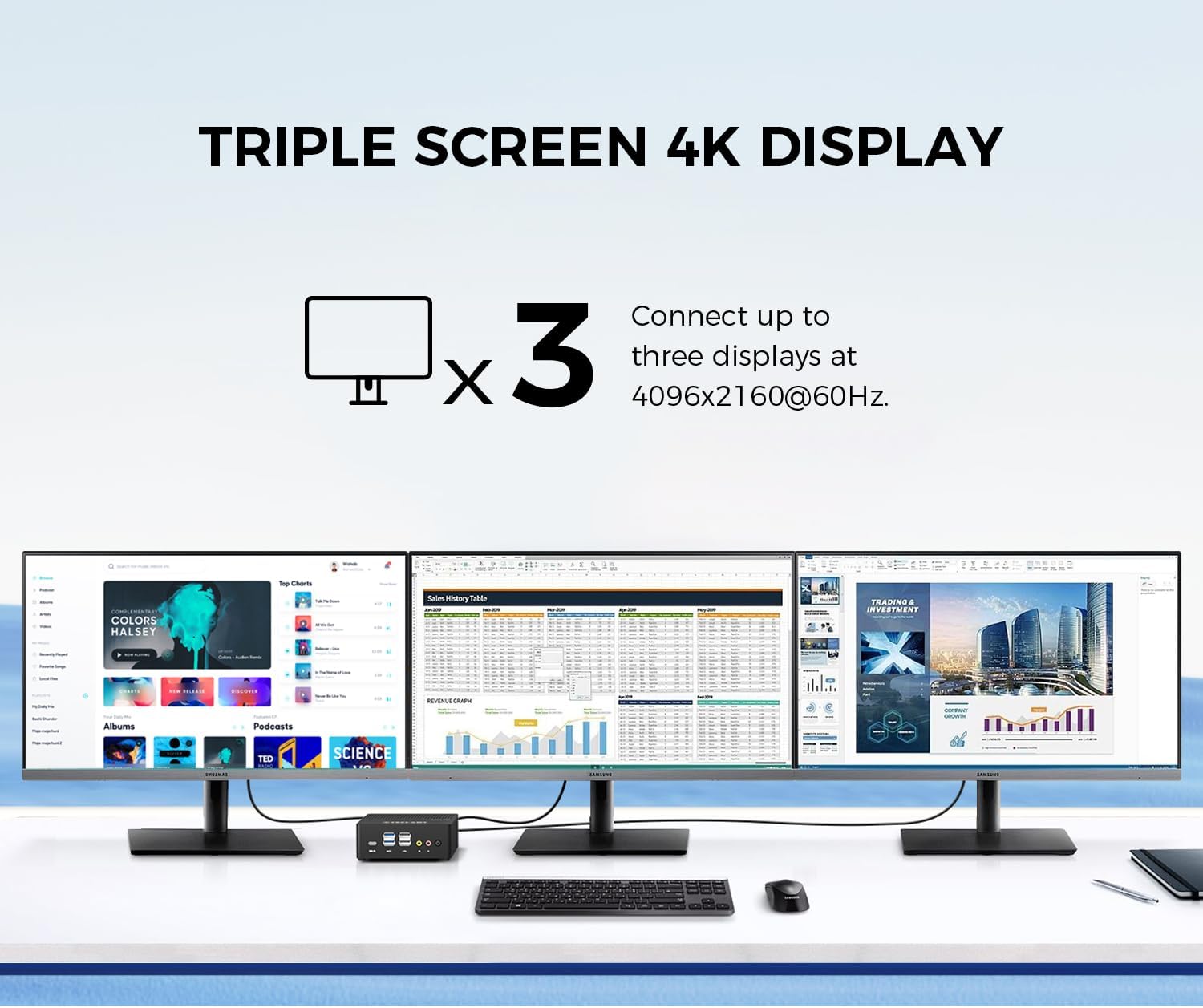
Image: Triple 4K monitor setup with the TECLAST N15 Mini PC.
5.3. Güç Yönetimi
- Kapat: Başlat düğmesine, ardından Güç > Kapat seçeneğine tıklayın.
- Tekrar başlat: Başlat düğmesine tıklayın, ardından Güç > Yeniden Başlat'ı seçin.
- Uyumak: Başlat düğmesine tıklayın, ardından Güç > Uyku seçeneğine gidin.
- Otomatik Güç Açma: The device supports Auto Power On, RTC Wake Settings, and Wake On LAN, which can be configured in the BIOS settings.
6. Performans ve Soğutma
The TECLAST N15 is equipped with an Intel Celeron N5095 processor, offering a turbo frequency of up to 2.9 GHz. It features Intel UHD Graphics with 16 Execution Units (EU) and Quick Sync Video technology for efficient hardware video encoding and decoding.

Image: Key performance specifications of the TECLAST N15 Mini PC.
6.1. Soğutma Sistemi
The Mini PC incorporates a built-in fan cooling system with a nickel-plated heat pipe and a large heat dissipation area (over 16000mm²). This design ensures efficient heat transfer and silent operation, preventing overheating during multitasking.

Image: Internal cooling system and noise level illustration.
7. Bakım
- Temizlik: Use a soft, dry cloth to clean the exterior of the Mini PC. For vents, use compressed air to remove dust buildup. Do not use liquid cleaners directly on the device.
- Yazılım Güncellemeleri: En iyi performansı ve güvenliği sağlamak için Windows güncelleştirmelerini ve sürücü güncelleştirmelerini düzenli olarak kontrol edin ve yükleyin.
- Depolama Yönetimi: Gereksiz olanları periyodik olarak temizleyin files and applications to free up storage space and improve system responsiveness.
- Çevresel Koşullar: Operate the Mini PC in a well-ventilated area, away from direct sunlight, excessive heat, and moisture.
8. Sorun Giderme
| Sorun | Olası Neden | Çözüm |
|---|---|---|
| Güç yok | Power adapter not connected, power outlet issue. | Güç adaptörünün mini bilgisayara ve çalışan bir elektrik prizine güvenli bir şekilde bağlı olduğundan emin olun. Farklı bir priz deneyin. |
| Ekran yok | Monitör bağlı değil, yanlış giriş kaynağı, arızalı kablo. | Check HDMI/DP/Type-C cable connections. Ensure monitor is on and set to the correct input source. Try a different cable or monitor if possible. |
| İnternet bağlantısı yok | Ethernet cable disconnected, Wi-Fi disabled, router issue. | For wired: Check Ethernet cable. For Wi-Fi: Ensure Wi-Fi is enabled in Windows settings and connected to your network. Restart your router/modem. |
| Peripherals not recognized | Loose connection, driver issue, incompatible device. | Reconnect the peripheral. Try a different USB port. Check Device Manager for driver issues. Ensure the peripheral is compatible with Windows 11. |
9. Özellikler
| Özellik | Detay |
|---|---|
| İşlemci | Intel Celeron N5095 (2.9 GHz Turbo Frequency) |
| Veri deposu | 16GB DDR4 |
| Depolamak | 512GB PCIe x4 SSD |
| Grafikler | Intel UHD Grafikler (Entegre) |
| İşletim Sistemi | Windows 11 Pro (Önceden yüklenmiş) |
| Video Çıkışı | HDMI, DisplayPort, Full-Function Type-C (Supports Triple 4K @ 60Hz) |
| USB Bağlantı Noktaları | 2x USB 3.0, 4x USB 2.0, 1x Full-Function Type-C |
| Ağ | 2x 2.5Gbps RJ45 Ethernet, 802.11ac Wi-Fi (Dual-band) |
| Bluetooth | Bluetooth 4.2 |
| Diğer Limanlar | COM Port, Micro SD Card Reader, Headphone Output, Microphone Input, Security Lock Slot |
| Boyutlar (UxGxY) | 4.5 x 1.6 x 4.5 inç (115 x 43 x 115 mm) |
| Ağırlık | 14.6 ons (yaklaşık 400g) |
| Soğutma | Built-in fan cooling with nickel-plated heat pipe |
10. Garanti ve Destek
The TECLAST N15 Mini PC comes with a 1-year product satisfaction warranty and lifetime technical support. For any questions or assistance, please contact TECLAST customer support.
You can find contact information and further resources on the official TECLAST websiteniz veya satın alma platformunuz aracılığıyla.
11. Ürün Videosu Tanıtımı
Ürünle ilgili daha fazla bilgi için resmi ürün videosunu izleyin.view of the TECLAST N15 Mini PC's features and capabilities.
Video: Official demonstration of the TECLAST N15 Mini PC, highlighting its design, ports, and usage scenarios.