PCsensor 3 Tuşlu Mini Klavye Kullanım Kılavuzu
Model: MK321U (2.4G Wireless Version)
giriiş
Thank you for choosing the PCsensor 3-Key Mini Keypad. This compact and versatile mechanical keyboard is designed for enhanced productivity and gaming, offering customizable hotkey functions, 2.4G wireless connectivity, and vibrant RGB LED lighting. This manual will guide you through the setup, operation, and maintenance of your new keypad to ensure optimal performance.
Ürün Bittiview
The PCsensor 3-Key Mini Keypad is a highly portable and programmable device. It features three mechanical keys, a durable ABS construction, and a long-lasting rechargeable battery. The keypad supports both 2.4G wireless and wired (USB Type-C) connections.

This image shows the compact design of the 3-key mini keypad, highlighting its three mechanical keys with vibrant RGB backlighting. The side features an ON/OFF switch, a USB Type-C port, and a 'connect' button for pairing.
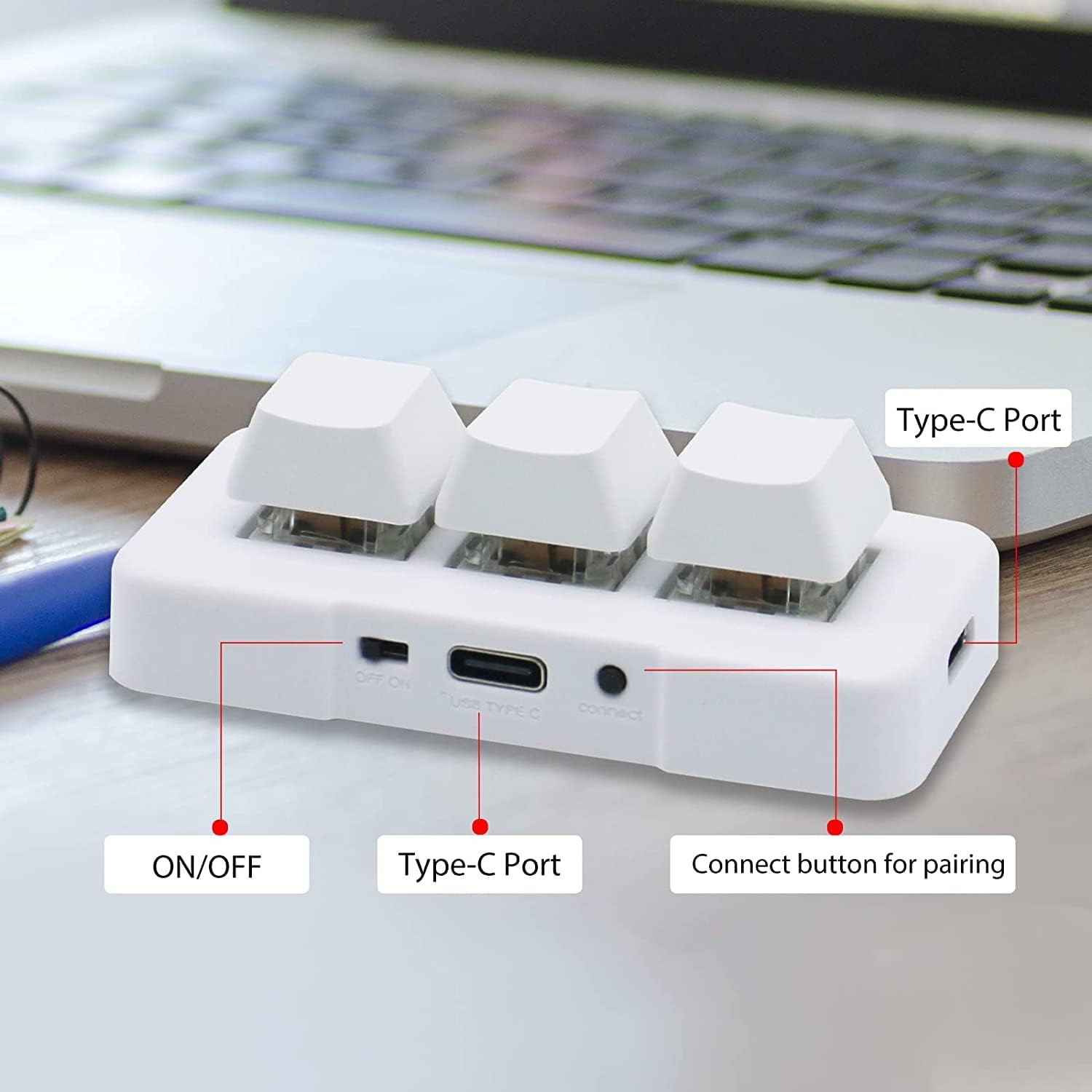
Ayrıntılı view of the keypad's connectivity options, including the ON/OFF switch, the USB Type-C port for charging and wired connection, and the dedicated 'connect' button for wireless pairing.

This diagram illustrates the compact dimensions of the keypad, making it suitable for various setups. It also shows the included USB cable for connection and charging.
Özellikler
| Özellik | Tanım |
|---|---|
| Marka | PC sensörü |
| Örnek | MK321U (2.4G Wireless) |
| Bağlantı Teknolojisi | 2.4G Wireless (Wi-Fi), USB Type-C (Wired) |
| Anahtar Sayısı | 3 |
| Anahtar Türü | Mekanik |
| Arka aydınlatma | RGB |
| Özel Özellikler | Backlit, Rechargeable, Customizable Display Keys |
| Uyumlu Cihazlar | Dizüstü Bilgisayar, PC, Tablet, Akıllı Telefon |
| Önerilen Kullanımlar | Office, Gaming (OSU), Customized Hotkeys |
| Pil Ömrü | Up to 3 months on a 2-hour full charge |
Kurulum Kılavuzu
Charging the Keypad
Before first use, fully charge the keypad using the provided USB Type-C cable. Connect the cable to the keypad's Type-C port and the other end to a USB power source (e.g., computer USB port, wall adapter). The LED indicator will show charging status. A full charge typically takes 2 hours and can provide up to 3 months of use. The LED light will flash every 3 seconds when the battery is low.
2.4G Kablosuz Bağlantı
- Ensure the keypad is charged.
- Locate the ON/OFF switch on the side of the keypad and slide it to the 'ON' position.
- 2.4G USB alıcısını bilgisayarınızdaki veya cihazınızdaki kullanılabilir bir USB bağlantı noktasına takın.
- Press the 'connect' button on the side of the keypad. The keypad should automatically pair with the receiver. A green light on the keypad indicates a successful 2.4G wireless connection.

This image demonstrates the 2.4G wireless connection, showing the keypad paired with its receiver. A green light indicates successful wireless mode activation.
Initial Configuration (Windows Recommended)
While the keypad is compatible with multiple operating systems, it is recommended to perform the initial key programming and customization on a Windows system. Once configured, the settings are saved to the keypad's internal memory and can be used freely on other compatible devices, including Linux, Mac OS, Android, and iOS.
Kullanım Talimatları
Key Programming and Customization
The primary feature of this keypad is its programmability. Each of the three keys can be assigned to perform various functions, including:
- Hotkeys/Shortcut Keys: Assign complex key combinations (e.g., Ctrl+C, Alt+F4).
- Multimedya Kontrolü: Play/pause, volume up/down, next/previous track.
- Gaming Macros: Execute a sequence of actions with a single press (e.g., for OSU! or other games).
- Dize Fonksiyonu: Input frequently used text strings.
- Fare Fonksiyonları: Simulate mouse clicks or movements.
- Özel Uygulamalar: Such as image collection for medical equipment.
Refer to the PCsensor official website or included software (if applicable) for detailed instructions on how to download and use the programming software to customize your keys.

This visual guide highlights the versatility of the keypad, showing its use for custom keyboard shortcuts, multimedia control, gaming macros, text input, mouse functions, and specialized applications like medical imaging.
Sistem Uyumluluğu
The PCsensor 3-Key Mini Keypad is broadly compatible with a range of operating systems:
- Pencereler
- macOS
- Android
- Linux
- iOS (after initial configuration on Windows/Mac)

This image confirms the broad compatibility of the keypad across various operating systems, including Windows, macOS, Android, and Linux. Configuration is recommended on Windows or Mac for full functionality.
Bakım
- Temizlik: Tuş takımını temizlemek için yumuşak, kuru bir bez kullanın. İnatçı kirler için, biraz daha yumuşak bir bez yeterli olacaktır.amp Cihazın içine sıvı girmemesine dikkat ederek, hafif sabunlu bir bez kullanılabilir. Sert kimyasallar veya aşındırıcı temizleyiciler kullanmayın.
- Depolamak: Tuş takımını serin, kuru ve doğrudan güneş ışığından ve aşırı sıcaklıklardan uzak bir yerde saklayın.
- Pil Bakım: To prolong battery life, avoid fully discharging the keypad frequently. Charge it regularly, especially if it will be stored for an extended period.
Sorun giderme
- Keypad not connecting wirelessly:
- Ensure the keypad is turned ON and fully charged.
- 2.4G USB alıcısının çalışan bir USB bağlantı noktasına güvenli bir şekilde takılı olduğundan emin olun.
- Press the 'connect' button on the keypad to re-initiate pairing.
- Cihazınızda farklı bir USB portu deneyin.
- Keys not responding or performing incorrect actions:
- Ensure the keypad is properly connected (wired or wireless).
- Check your key programming settings using the customization software. Re-program if necessary.
- Bilgisayarınızı/cihazınızı yeniden başlatın.
- LED light flashing every 3 seconds:
- This indicates low battery. Connect the keypad to a power source using the USB Type-C cable to charge it.
- Keypad not recognized by programming software:
- Ensure the keypad is connected via USB Type-C cable to your Windows or Mac computer. The software typically requires a wired connection for programming.
- Download the latest version of the programming software from the official PCsensor webalan.
Garanti ve Destek
PCsensor products are built for durability and performance. For warranty information, technical support, or further assistance, please refer to the warranty card included with your product or visit the official PCsensor website. You may also contact customer support through the platform where you purchased the product.


