giriiş
This manual provides instructions for the Alienware AW520H Wired Gaming Headset. It covers setup, operation, maintenance, and troubleshooting to ensure optimal performance and longevity of your device.
The Alienware AW520H headset is designed to deliver precision audio with Hi-Res certified drivers and Dolby Atmos spatial audio support, integrated into a comfortable and adjustable design.
Kutuda Neler Var?
Paketin tüm bileşenlerinin mevcut olduğunu doğrulayın:
- Alienware AW520H Wired Gaming Headset
- Belgeler (Kullanım Kılavuzu, Garanti Bilgileri)
Ürün Bittiview
Familiarize yourself with the key components and features of your Alienware AW520H headset.
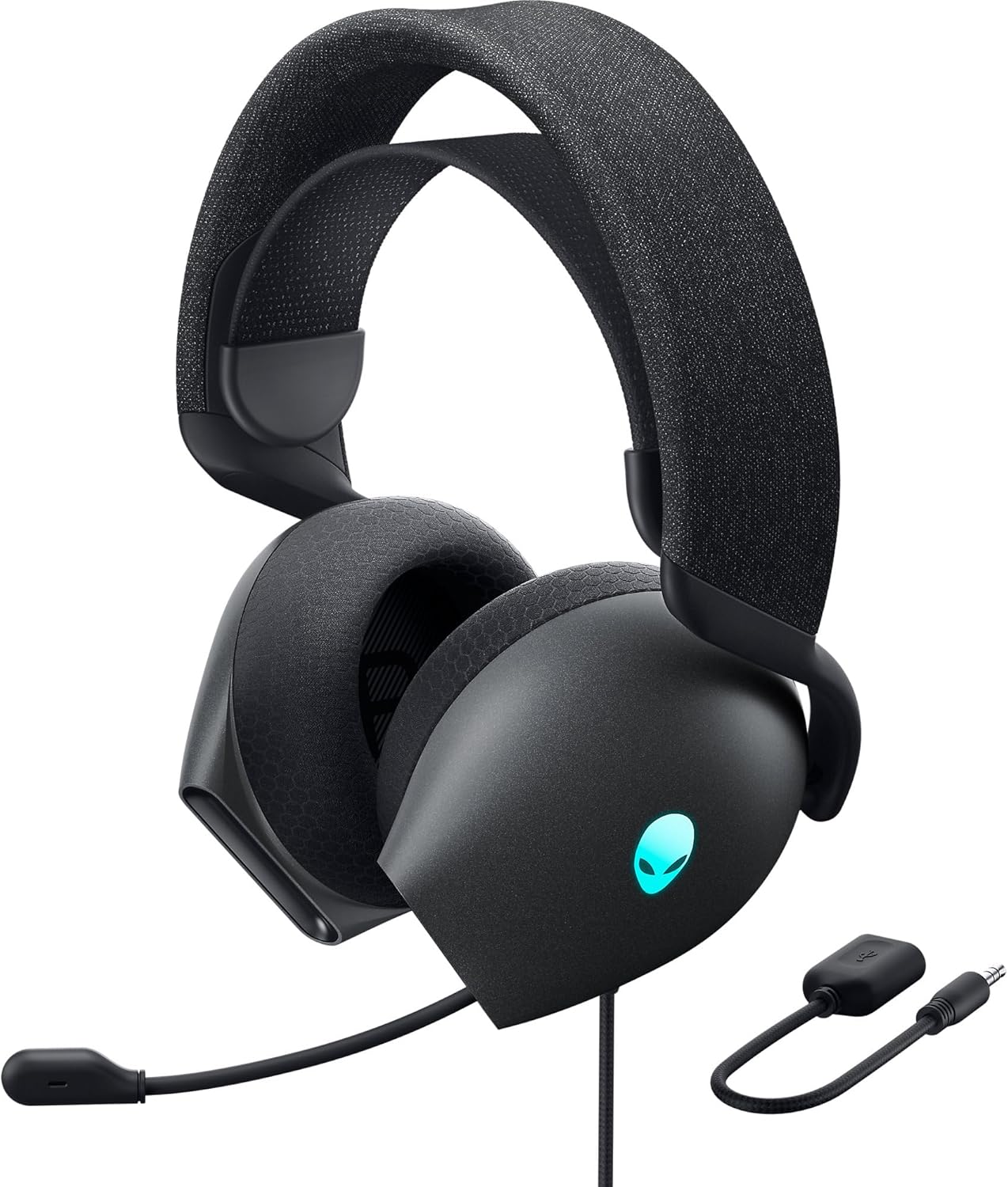

Temel Özellikler:
- Hi-Res Certified Drivers: Delivers clear and rich sound across a wide frequency range.
- Dolby Atmos Spatial Audio: Provides precise positional audio for an immersive experience.
- AI-Driven Noise Cancellation Microphone: Retractable boom mic focuses on your voice, reducing ambient noise.
- Rahat Tasarım: Features soft memory foam ear pads with breathable fabric and an adjustable suspension headband for extended wear.
- AlienFX RGB Aydınlatma: Customizable RGB lighting on the earcups, controllable via Alienware Command Center.
- Çok Yönlü Bağlantı: Supports both USB and 3.5mm connections for broad compatibility.
Kurmak
Follow these steps to set up your Alienware AW520H headset.
1. Kulaklığın Bağlanması
The AW520H offers flexible connectivity options:
- 3.5 mm Ses Jakı: Connect the 3.5mm cable directly to your PC, gaming console controller, or any other compatible device with a 3.5mm audio port. This provides basic audio and microphone functionality.
- USB Bağlantısı: For full functionality, including Dolby Atmos spatial audio and AlienFX RGB lighting customization, connect the headset via USB to your PC. This typically involves using a 3.5mm to USB adapter if your PC does not have a combined audio jack.


2. Software Installation (Optional, for full features)
To unlock the full potential of your headset, including Dolby Atmos and AlienFX RGB lighting customization, install the Alienware Command Center software on your PC. This software allows for personalized audio profileve ışık efektleri.
- Download the latest version of Alienware Command Center from the official Alienware support webalan.
- Kurulumu tamamlamak için ekrandaki talimatları izleyin.
- Connect your headset via USB to ensure it is recognized by the software.
Kullanım Talimatları
Ses Kontrolleri
The headset features integrated controls for convenient audio management:
- Hacim Tekerleği: Located on the earcup, rotate the wheel to increase or decrease the audio volume.
- Mikrofon Sessiz Düğmesi: Press the button on the earcup to mute or unmute the microphone.

Mikrofon Kullanımı
The AW520H features an AI-driven noise-canceling retractable boom microphone:
- Uzat/Geri Çek: Gently pull the microphone boom out from the earcup to extend it for use. Push it back into the earcup to retract it when not needed.
- Konumlandırma: En iyi ses netliği için mikrofonu ağzınızdan yaklaşık 1-2 cm uzaklığa yerleştirin.
- Gürültü Engelleme: The AI-driven noise cancellation automatically works to filter out ambient sounds, focusing on your voice.

Konfor İçin Ayarlama
The headset is designed for comfort during long gaming sessions:
- Suspension Headband: Slide the suspension headband up or down to find the ideal fit for your head size.
- Kulaklık Döndürme: The earcups can slightly pivot to conform to the shape of your ears.
- Hafızalı Köpük Kulak Yastıkları: The soft memory foam ear pads with breathable fabric provide cushioning and ventilation.

AlienFX RGB Lighting
Customize the RGB lighting on your headset using the Alienware Command Center software:
- Alienware Command Center'ı açın.
- Navigate to the lighting settings for your AW520H headset.
- Select desired colors, effects, and brightness levels.
- Ensure the headset is connected via USB for lighting customization.
Bakım
Doğru bakım, kulaklığınızın uzun ömürlü olmasını ve performansını garanti eder.
- Temizlik: Kulaklıkları ve kafa bandını silmek için yumuşak ve kuru bir bez kullanın. İnatçı kirler için, hafifçe kurulayın.amp bez kullanılabilir, ancak aşırı nemden kaçının. Sert kimyasallar veya aşındırıcı temizleyiciler kullanmayın.
- Depolamak: Store the headset in a clean, dry place away from extreme temperatures and direct sunlight. Retract the microphone when not in use to protect it.
- Kablo Bakımı: Avoid sharp bends or kinks in the audio cable. Do not pull on the cable to disconnect the headset.
- Kulak Pedleri: The ear pads are made of breathable fabric and memory foam. While durable, they are not designed for frequent removal. If replacement is needed, consult Alienware support.
Sorun giderme
If you encounter issues with your Alienware AW520H headset, refer to the following common solutions:
Ses yok veya ses seviyesi düşük.
- Bağlantıları Kontrol Edin: Ensure the 3.5mm cable or USB connection is securely plugged into both the headset and your device.
- Ses Seviyeleri: Verify that the volume wheel on the headset is turned up. Check the audio output settings on your PC or console to ensure the headset is selected as the default output device and volume is not muted.
- Yazılım/Sürücüler: If connected via USB, ensure Alienware Command Center is installed and updated. Check your operating system's sound settings for driver issues.
- Başka Bir Cihazda Test Edin: Connect the headset to a different device (e.g., smartphone, another PC) to determine if the issue is with the headset or the original device.
Mikrofon çalışmıyor
- Sessize Alma Düğmesini Kontrol Edin: Kulaklıktaki mikrofon sessizleştirme düğmesinin etkin olmadığından emin olun.
- Mikrofon Konumu: Verify the microphone boom is fully extended and positioned correctly.
- Giriş ayarları: Check your PC or console's sound input settings to ensure the headset microphone is selected as the default input device. Adjust microphone volume levels.
- Uygulama Ayarları: Some applications (e.g., Discord, Zoom) have their own microphone settings. Verify the correct microphone is selected within these applications.
- Yazılım/Sürücüler: If connected via USB, ensure Alienware Command Center is installed and updated.
AlienFX RGB Lighting Not Working
- USB Bağlantısı: Ensure the headset is connected via USB to your PC. RGB lighting functionality requires a USB connection.
- Alienware Komuta Merkezi: Verify that Alienware Command Center is installed and running. Check the lighting settings within the software for the headset.
- Yazılım Güncellemesi: Ensure Alienware Command Center and headset firmware are up to date.
Özellikler
| Özellik | Detay |
|---|---|
| Model Adı | AW520H |
| Bağlantı Teknolojisi | Wired (USB, 3.5 mm Jack) |
| Ses Sürücüsü Türü | Dinamik Sürücü |
| Frekans Tepkisi | 40 kHz (40,000 Hz) |
| Empedans | 32 Ohm |
| Gürültü Kontrolü | Active Noise Cancellation (AI-driven for mic) |
| Mikrofon | Retractable, Unidirectional |
| Kontroller | Volume Control, Microphone Mute (On-headset) |
| Kulak Yerleşimi | Kulak Üstü |
| Form Faktörü | Kulakta |
| Malzeme | Memory foam, breathable fabric |
| Renk | Dark Side of the Moon |
| Ürün Boyutları | 7.28 x 4.35 x 8.46 inç |
| Ürün Ağırlığı | 11.8 ons |
| Üretici | Dell |
| Uyumlu Cihazlar | Windows, wired devices |
Garanti ve Destek
For warranty information and technical support, please refer to the documentation included with your product or visit the official Alienware support webalan.
Üretici: Dell
Model Numarası: AW520H
İlk Mevcut Tarih: 30 Haziran 2023
For further assistance, please contact Alienware customer support through their official channels.


