1. Giriş
Welcome to the user manual for your Hoppstar Expert Digital Camera. This manual provides essential information on how to set up, operate, and maintain your camera, ensuring a fun and creative experience for young photographers. Please read this manual carefully before using the camera and keep it for future reference.
The Hoppstar Expert is designed specifically for children, offering a user-friendly interface, durable construction with interchangeable silicone covers, and a range of exciting features including a selfie camera, video recording, picture frames, photo filters, and face detection.
2. Güvenlik Bilgileri
- This product is intended for children aged 3 years and older. Adult supervision is recommended during use.
- Kamerayı suya veya aşırı neme maruz bırakmayın.
- Avoid dropping the camera or subjecting it to strong impacts, even with the protective silicone cover.
- Keep small parts, such as memory cards, out of reach of very young children to prevent choking hazards.
- Use only the charging cable provided or a compatible USB charger.
- Do not attempt to disassemble or repair the camera yourself. Contact customer support if issues arise.
3. Paket İçeriği
Lütfen aşağıdaki öğelerin kutucuğunu işaretleyin:
- Hoppstar Expert Digital Camera
- Kullanım Kılavuzu
- USB Şarj Kablosu
- Kordon/Kayış
- USB-C'den USB-A'ya Adaptör
- USB-C to Micro-USB Adapter
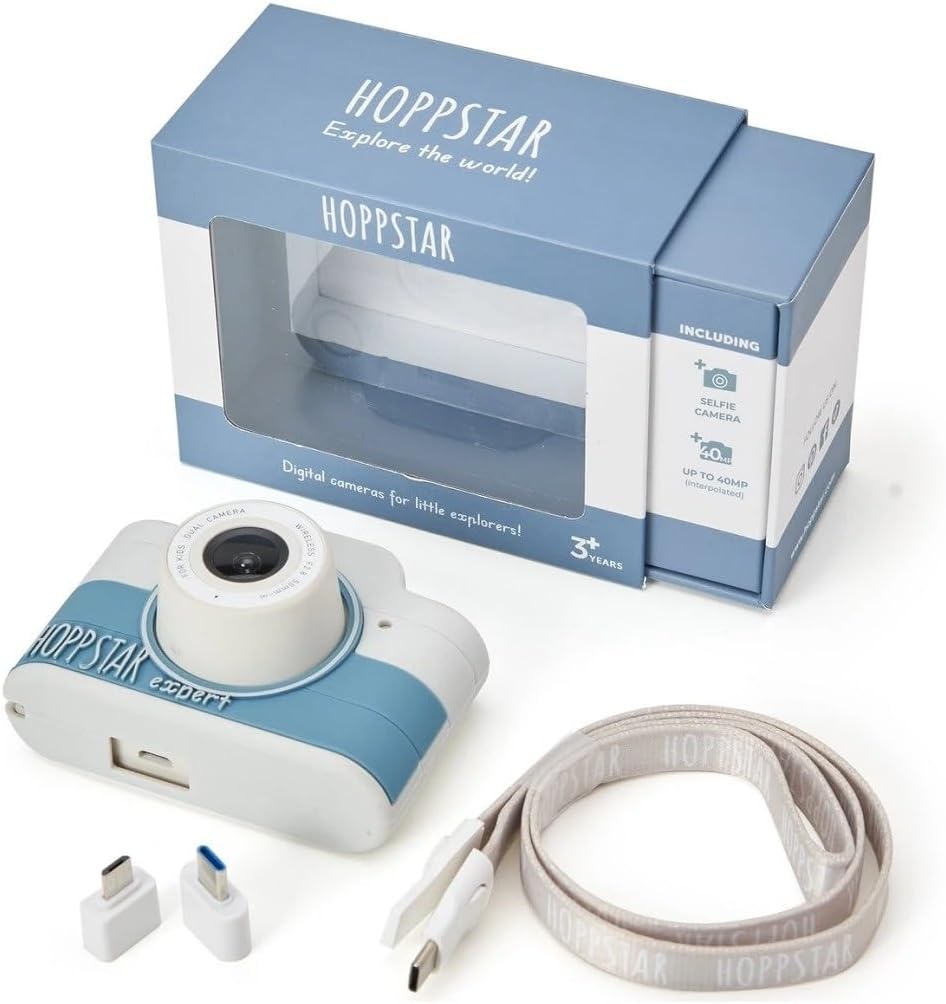
Image: Hoppstar Expert camera shown with its retail packaging, USB charging cable, lanyard, and two USB adapters.
4. Ürün Bittiview
Ön View

Image: The front of the Hoppstar Expert camera, featuring the main lens, flash, and the 'Hoppstar Expert' branding on the blue and white body.
- Ana Lens: For taking standard photos and videos.
- Flash/Light: Loş ışık koşullarında aydınlatma sağlar.
- Mikrofon: Video kaydı sırasında sesi yakalar.
Arka View

Image: The back of the Hoppstar Expert camera, displaying the LCD screen and the control buttons on either side.
- LCD Ekran: Displays menus, live view, and playback.
- Selfie Kamerası: Located above the screen for self-portraits.
- Kontrol Düğmeleri: Navigation, OK, Menu, and other function buttons.
5. Kurulum
5.1 Kamerayı Şarj Etme
Before first use, fully charge the camera's internal battery. Connect the provided USB charging cable to the camera's USB port and to a USB power source (e.g., computer, wall adapter). The charging indicator light will show the charging status and turn off when fully charged.
5.2 Bellek Kartının Takılması
The Hoppstar Expert comes with 16 GB of internal storage. If you wish to expand storage, locate the memory card slot (usually on the side or bottom) and insert a compatible microSD card (not included) until it clicks into place. Ensure the camera is powered off before inserting or removing the card.
5.3 Açma/Kapatma
Kamerayı açmak veya kapatmak için (genellikle üstte veya yanda bulunan) Güç düğmesine birkaç saniye basılı tutun.
6. Kullanım Talimatları
6.1 Temel Kontroller
- Tamam Düğmesi: Confirms selections in menus, takes photos, or starts/stops video recording.
- Yön tuşları: Used to move through menu options (Up, Down, Left, Right).
- Menü Düğmesi: Accesses the camera's settings and feature options.
- Mod Düğmesi: Fotoğraf, video ve oynatma modları arasında geçiş yapar.
6.2 Fotoğraf Çekme
In photo mode, frame your shot using the LCD screen. Press the OK button to capture a photo. The camera supports both front and selfie cameras. To switch between cameras, navigate to the camera settings in the menu or use a dedicated button if available.
6.3 Videoları Kaydetme
Switch to video mode. Press the OK button once to start recording and press it again to stop. Videos are saved to the internal memory or inserted memory card.
6.4 Using Creative Features
The Hoppstar Expert includes several creative features:
- Picture Frames: Apply fun borders to your photos. Access this feature through the camera's menu.
- Photo Filters: Change the look and feel of your photos with various color and effect filters.
- Yüz tanıma: The camera can automatically detect faces in the frame, assisting with focus.
Explore these options within the camera's menu settings to enhance your photos and videos.
7. Bakım
- Temizlik: Use a soft, dry cloth to clean the camera body and screen. For the lens, use a specialized lens cleaning cloth. Do not use liquid cleaners.
- Silikon Kapak: The interchangeable silicone cover can be removed and cleaned with mild soap and water if necessary. Ensure it is completely dry before reattaching.
- Pil Bakım: Pil ömrünü uzatmak için pili sık sık tamamen boşaltmaktan kaçının. Uzun süre kullanılmasa bile kamerayı düzenli olarak şarj edin.
- Depolamak: Kamerayı serin, kuru ve doğrudan güneş ışığından ve aşırı sıcaklıklardan uzak bir yerde saklayın.
8. Sorun Giderme
Kamera Açılmıyor
- Pilinin dolu olduğundan emin olun. Kamerayı bir güç kaynağına bağlayın ve tekrar deneyin.
- Press and hold the Power button for a longer duration (5-10 seconds).
Kötü Görüntü/Video Kalitesi
- Lensin temiz ve lekesiz, tozdan arındırılmış olduğundan emin olun.
- Check lighting conditions. Optimal results are achieved in well-lit environments.
- Ensure the camera is held steady during capture.
Camera Freezes/Unresponsive
- Try resetting the camera by pressing the reset button (if available, often a small pinhole) or by holding the Power button until it turns off and then restarting.
Cannot Save Photos/Videos
- Check if the internal memory or inserted memory card is full. Delete unnecessary fileveya yeni bir kart takın.
- Ensure the memory card is properly inserted and not corrupted.
If you encounter issues not listed here or if troubleshooting steps do not resolve the problem, please contact Hoppstar customer support.
9. Özellikler
| Özellik | Şartname |
|---|---|
| Marka Adı | Hoppstar |
| Model Adı | Hoppstar Expert Yale |
| Model Numarası | 76893 |
| Renk | Yale |
| Paket Boyutları | 14.3x8.7x5.1 cm |
| Sürekli Çekim Hızı | 30 kare/saniye |
| Dahili Bileşenler | Camera + Instruction Manual |
| Model Yılı | 2023 |
| Film Rengi | Renk |
| Pozlama Kontrol Türü | Otomatik |
| Kepenk Tipi | Elektronik |
10. Garanti ve Destek
The Hoppstar Expert Digital Camera comes with a standard manufacturer's warranty. Please refer to the warranty information provided with your purchase or visit the official Hoppstar webGaranti şartları ve koşullarıyla ilgili ayrıntılar için lütfen siteyi ziyaret edin.
For technical support, product inquiries, or warranty claims, please contact Hoppstar customer service through their official webSite veya satın alma belgelerinizde belirtilen iletişim bilgileri.


