1. Giriş
This manual provides comprehensive instructions for the installation, operation, maintenance, and troubleshooting of the Vivotek FE9391-EHV-V2 12MP Outdoor Fisheye IR Illumination Camera. Please read this manual thoroughly before using the product to ensure proper setup and functionality. Retain this manual for future reference.
2. Ürün Bittiview
2.1 Temel Özellikler
- 12 Megapixel Effective Still Resolution for high-quality imaging.
- Fisheye Lens with 1.2mm focal length for wide-area surveillance.
- Integrated IR Illumination for clear night vision up to 20 meters.
- WDR Pro technology for optimal image visibility in high contrast lighting.
- H.265/H.264/MJPEG compression for efficient video streaming.
- IP66-rated weather-resistant enclosure for outdoor use.
- Motion-only alert type for event detection.
- Wi-Fi Connectivity Protocol for flexible network integration.
2.2 Paket İçeriği
Paketin içinde tüm öğelerin mevcut olduğundan emin olun:
- Vivotek FE9391-EHV-V2 Camera Unit
- Mounting Kit (screws, anchors)
- Su Geçirmez Konnektör
- Hızlı Kurulum Kılavuzu
- Software CD (or download link information)
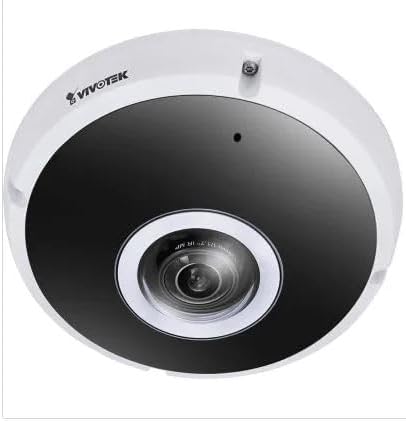
Şekil 2.1: Ön view of the Vivotek FE9391-EHV-V2 12MP Outdoor Fisheye IR Illumination Camera, showing the lens and IR illuminators.
3. Güvenlik Bilgileri
- Kurulum ve çalıştırmadan önce tüm talimatları dikkatlice okuyun.
- Ensure the power source matches the camera's requirements (Corded Electric).
- Kamerayı sökmeye veya üzerinde değişiklik yapmaya çalışmayın. Bu, garantiyi geçersiz kılacaktır.
- Kamerayı uzun süre doğrudan güçlü ışık kaynaklarına doğrultmaktan kaçının.
- Kurulum, yerel elektrik yönetmeliklerine uygun olarak yetkili personel tarafından yapılmalıdır.
- Protect cables from being walked on or pinched.
4. Kurulum ve Kurulum
4.1 Montaj Yeri
Select a suitable outdoor location for mounting. Consider the desired surveillance area, proximity to power, and network connectivity (Wi-Fi or wired Ethernet). The camera is IP66 rated for outdoor use.

Figure 4.1: Dimensional drawing of the Vivotek FE9391-EHV-V2 camera, showing a diameter of 150mm and height of 68.2mm.
4.2 Fiziksel Kurulum
- Montaj Yüzeyini Hazırlayın: (Varsa) Birlikte verilen montaj şablonunu kullanarak delik yerlerini işaretleyin.
- Matkap Delikleri: Gerekirse pilot delikler açın ve duvar dübellerini yerleştirin.
- Kamerayı Sabitleyin: Attach the camera base securely to the mounting surface using the provided screws.
- Kabloları Bağlayın:
- Güç: Güç kablosunu uygun bir güç kaynağına bağlayın.
- Ağ: Connect an Ethernet cable for wired network access, or ensure Wi-Fi signal strength is adequate for wireless connection. Use the waterproof connector for outdoor Ethernet connections.
- Kamera Açısını Ayarlayın: Loosen the adjustment screws (if applicable) to position the fisheye lens for optimal coverage. Tighten screws once adjusted.

Figure 4.2: An Ethernet cable with an RJ45 connector, used for wired network connectivity.
4.3 İlk Ağ Yapılandırması
After physical installation and power-up, the camera needs to be configured on your network.
- Fotoğraf Makinesini Keşfedin: Use the Vivotek IP Utility software (available on the manufacturer's website) to discover the camera on your network.
- IP Adresi Ata: Assign a static IP address or ensure it obtains an IP address via DHCP.
- Erişim Web Arayüz: Bir tane aç web Tarayıcınıza girin ve kameranın IP adresini girerek erişim sağlayın. web-tabanlı yapılandırma arayüzü.
- Giriş yapmak: Enter the default username and password (refer to the Quick Installation Guide for defaults). Change the default password immediately for security.
- Wi-Fi Setup (if applicable): Navigate to the network settings and configure the Wi-Fi connection if you are using wireless connectivity.
5. Kullanım Talimatları
5.1 Canlı View
Once configured, you can access the live video feed through the web interface or compatible Vivotek surveillance software.
- Web Tarayıcı: Kameranın hesabına giriş yapın. web interface and navigate to the "Live View" bölüm.
- Surveillance Software: Add the camera to your Vivotek NVR or VMS (Video Management Software) for centralized monitoring.
- Mobil Uygulama: Download the Vivotek mobile app and add your camera for remote viewIng.

Şekil 5.1: Ör.ample of surveillance footage from multiple cameras displayed on a tablet device, demonstrating remote monitoring capabilities.

Figure 5.2: A monitor displaying a split-screen view of four camera feeds, labeled CAM1 through CAM4, illustrating a typical surveillance setup.
5.2 Kayıt ve Depolama
Kamera çeşitli kayıt seçeneklerini desteklemektedir:
- Yerel Depolama: Insert a microSD card (not included) into the camera's slot for edge recording. Configure recording schedules and event triggers (e.g., motion detection).
- Ağ Video Kaydedici (NVR): Connect the camera to a compatible NVR for continuous or event-based recording.
- Bulut Depolama: Some Vivotek models or third-party services may offer cloud storage integration. Refer to the camera's web interface for specific options.
5.3 Hareket Algılama ve Uyarılar
Configure motion detection zones and sensitivity settings in the camera's web interface. When motion is detected, the camera can trigger actions such as:
- Recording video to local storage or NVR.
- Sending email notifications with snapshots.
- Uploading footage to an FTP server.
6. Bakım
- Lens Temizliği: Fotoğraf makinesinin objektifini yumuşak, temiz bir bezle nazikçe silin. İnatçı kirler için optik yüzeyler için tasarlanmış bir objektif temizleme solüsyonu kullanın. Aşındırıcı temizleyiciler kullanmayın.
- Konut Temizliği: Kamera muhafazasını reklamla temizleyinamp Kumaş kullanın. Güçlü deterjan veya çözücüler kullanmaktan kaçının.
- Donanım Yazılımı Güncellemeleri: Regularly check the Vivotek website for firmware updates. Updating firmware can improve performance, add features, and enhance security.
- Kablo Denetimi: Özellikle dış mekan kurulumlarında, tüm kabloları periyodik olarak aşınma veya hasar belirtileri açısından kontrol edin.
- Çevre Kontrolü: Kameranın çalışma ortamının belirtilen sıcaklık ve nem aralıklarında kalmasını sağlayın.
7. Sorun Giderme
7.1 Görüntü Akışı Yok
- Gücü Kontrol Edin: Ensure the camera is receiving power. Verify power adapter and cable connections.
- Ağ bağlantısı: Confirm the Ethernet cable is securely connected or that the Wi-Fi signal is strong and the camera is connected to the correct network.
- IP Adresi: Verify the camera's IP address and ensure it is not conflicting with another device on the network.
- Güvenlik Duvarı: Check if any firewall settings on your network or computer are blocking access to the camera.
7.2 Düşük Görüntü Kalitesi
- Lensi Temizle: Kamera lensinin temiz ve toz veya lekelerden arınmış olduğundan emin olun.
- Aydınlatma Koşulları: Adjust camera settings for optimal exposure in varying light conditions. Ensure IR illuminators are functioning at night.
- Çözünürlük Ayarları: Verify that the video resolution and quality settings are configured appropriately in the camera's web arayüz.
- Ağ Bant Genişliği: Yetersiz ağ bant genişliği, kesintili veya düşük kaliteli videoya yol açabilir. Ağ yükünü kontrol edin.
7.3 Hareket Algılama Çalışmıyor
- Hareket Algılamayı Etkinleştir: Ensure motion detection is enabled in the camera's settings.
- Sensitivity and Zones: Adjust motion detection sensitivity and define detection zones correctly.
- Kayıt Programı: Verify that the recording schedule is active for motion-triggered events.
8. Özellikler
| Özellik | Detay |
|---|---|
| Model Numarası | FE9391-EHV-V2 |
| Etkili Hareketsiz Çözünürlük | 12 MP |
| Mercek | 1.2mm Fisheye Lens |
| IR Aydınlatma Aralığı | 20m |
| WDR Teknolojisi | WDR Profesyonel |
| Video Sıkıştırma | H.265 / H.264 / MJPEG |
| Bağlantı Protokolü | Wifi |
| Uluslararası Koruma Derecelendirmesi | IP66 |
| Güç Kaynağı | Kablolu Elektrik |
| Ürün Boyutları (U x G x Y) | 5.9 x 5.9 x 2.68 inç (150 x 150 x 68.2 mm) |
| Üretici | Vivotek A.Ş. |
| Önerilen Kullanımlar | Açık Hava Güvenliği |
9. Garanti ve Destek
For warranty information, technical support, and additional resources, please visit the official Vivotek websitesine bakın veya müşteri hizmetleri departmanıyla iletişime geçin.
- Üretici: Vivotek A.Ş.
- Webalan: www.vivotek.com (Örnamp(bağlantı, gerçek bağlantı değişiklik gösterebilir)
- Temas etmek: Şuna bakın: website for regional support contact information.
Please have your model number (FE9391-EHV-V2) and purchase date available when contacting support.


