1. Giriş
This manual provides essential information for the safe and effective operation of your VOLTCRAFT DSO-2202H + AFG Handheld Oscilloscope. This versatile device combines the functions of an oscilloscope, a multimeter, and an arbitrary function generator (AFG) into a single portable unit. Please read this manual thoroughly before using the device to ensure proper handling and to prevent damage or injury.
2. Güvenlik Bilgileri
Always observe the following safety precautions to avoid personal injury and prevent damage to the instrument or other equipment.
- Tüm talimatları okuyunuz: Cihazı çalıştırmadan önce tüm güvenlik ve kullanım talimatlarını okuyun ve anlayın.
- Use proper probes: Use only probes and accessories rated for the voltage and current of the measurement.
- Islak koşullardan kaçının: Cihazı ıslak veya nemli ortamlarda çalıştırmayın.amp ortamlar.
- Topraklama: Ensure proper grounding when connecting to mains power or high-voltage devreler.
- C'yi açmayınasing: Refer all servicing to qualified service personnel. Opening the casing sizi tehlikeli volaja maruz bırakabilirtagee.
- Observe all ratings: Cihazın maksimum giriş değerlerini aşmayın.
3. Ürün Bittiview
The VOLTCRAFT DSO-2202H + AFG is a compact, multi-functional test instrument designed for various electrical measurement tasks. It features a clear color LCD display and intuitive controls.
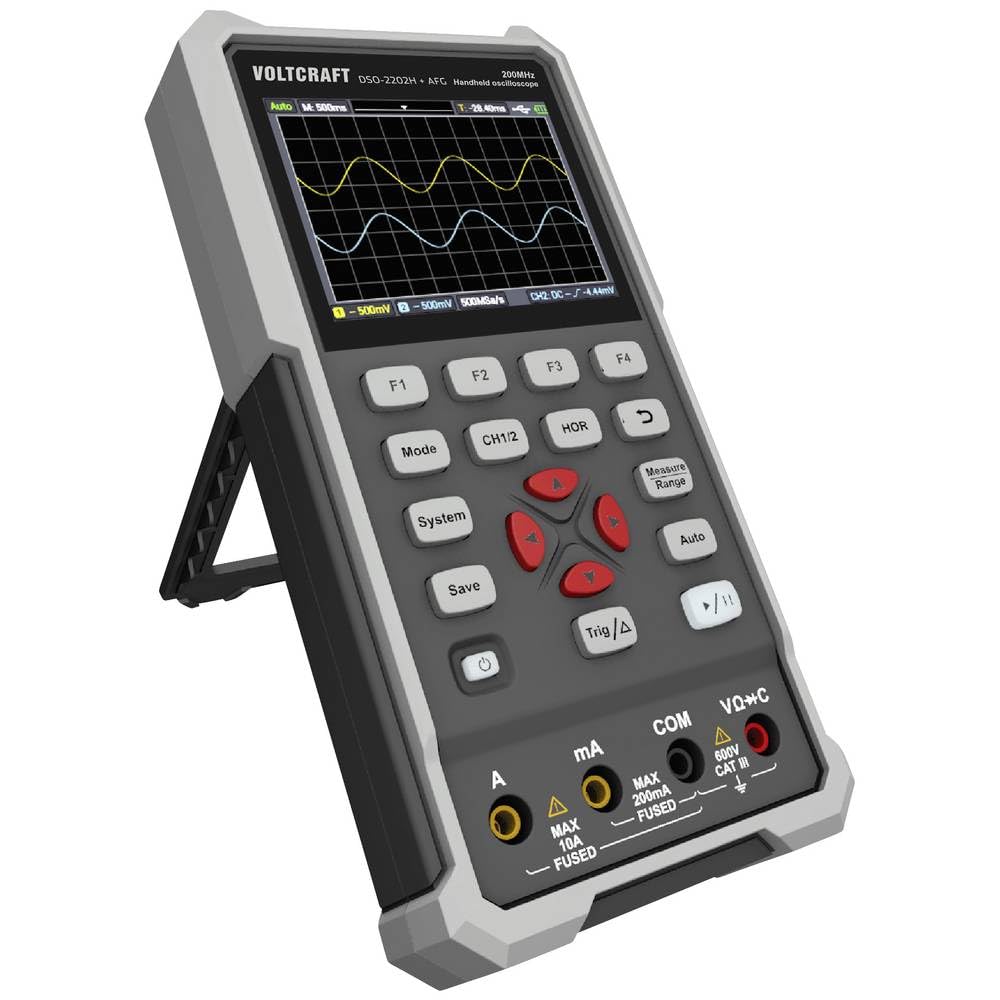
Şekil 1: Ön view of the VOLTCRAFT DSO-2202H + AFG Handheld Oscilloscope with connected test probes. The display shows a voltage reading, and the control panel with function buttons and navigation keys is visible below.
Temel Özellikler:
- 3-in-1 Oscilloscope, Multimeter, and Waveform Generator
- 3.5-inch (8.89 cm) Color LCD Screen (320 x 240 pixels)
- USB Type-C Interface for connectivity and data storage
- Dayanıklı ve sağlam tasarım
4. Kurulum
Follow these steps for initial setup of your device.
4.1 Açma/Kapatma
- Cihazı açmak için, tuşuna basın ve basılı tutun Güç button located on the side/top panel.
- The color LCD screen will illuminate, displaying the startup sequence.
- Kapatmak için tuşunu basılı tutun. Güç Cihaz kapanana kadar düğmeye tekrar basın.
4.2 Probların Bağlanması
For oscilloscope functions, connect the oscilloscope probes to the BNC connectors. For multimeter functions, connect the test leads to the appropriate input jacks (VΩ+C, mA, A, COM) at the bottom of the device.
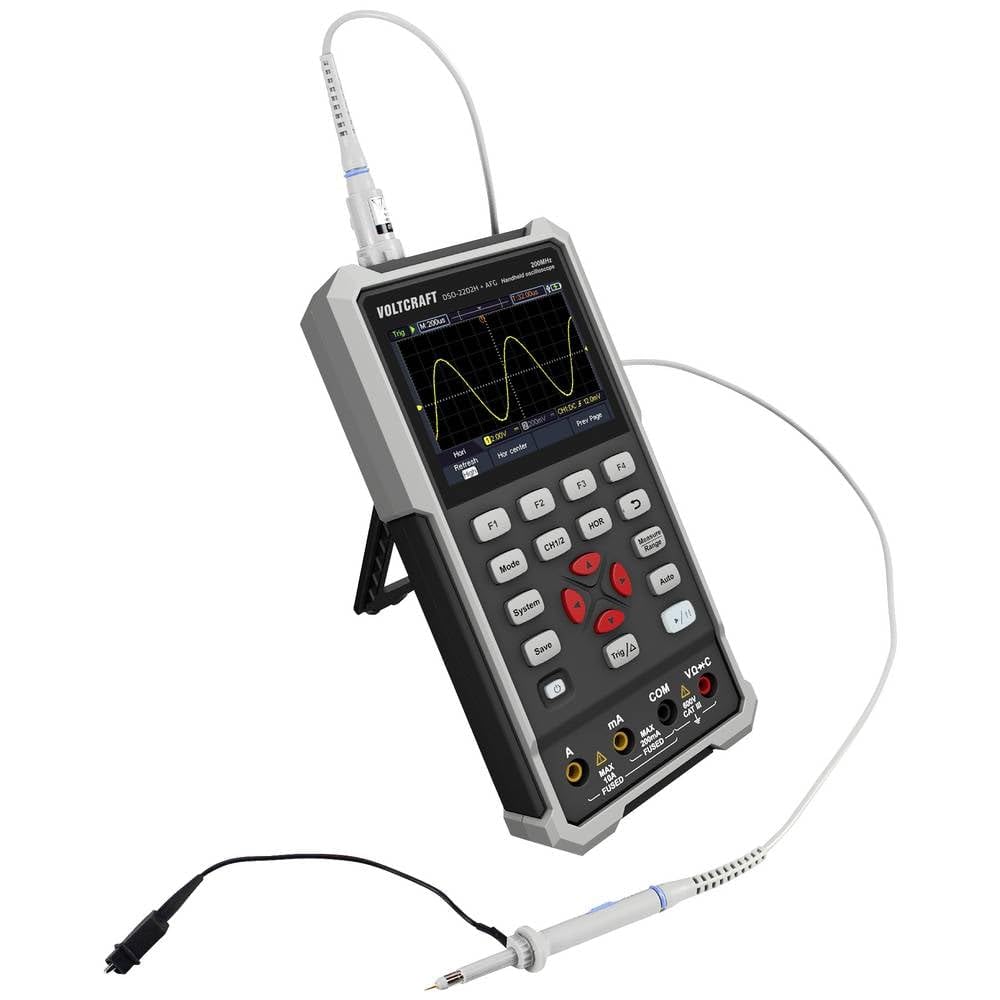
Şekil 2: Yan view of the device showing the kickstand extended for desktop use and an oscilloscope probe connected to the BNC input. The multimeter input jacks are visible at the bottom.
5. Kullanım Talimatları
The DSO-2202H + AFG offers three primary modes of operation: Oscilloscope, Multimeter, and Arbitrary Function Generator.
5.1 Osiloskop Modu
This mode allows you to visualize and analyze electrical signals. The device features 2 channels and a 200MHz bandwidth.
- Basın Mod button to select Oscilloscope mode.
- Connect the oscilloscope probe(s) to the circuit under test.
- Kullanın BÖLÜM 1/2 button to switch between channels or view ikisi birden.
- Adjust the vertical sensitivity (V/div) and horizontal time base (s/div) using the navigation buttons.
- Kullanın Trig/Δ button to set trigger conditions for stable waveform display.
- The Otomatik button can automatically adjust settings for a stable waveform.

Figure 3: The device displaying a waveform in oscilloscope mode. The screen shows voltage and time divisions, indicating a signal measurement.
5.2 Multimetre Modu
The multimeter function allows for precise measurements of voltage, current, resistance, capacitance, and continuity.
- Basın Mod button to select Multimeter mode.
- Connect the test leads to the appropriate input jacks (e.g., VΩ+C for voltage/resistance/capacitance, A or mA for current, COM for common).
- Select the desired measurement function (e.g., DC Voltage, AC Hacmitage, Resistance) using the function buttons (F1-F4) or navigation keys.
- Ekrandaki ölçüm değerini okuyun.
5.3 Arbitrary Function Generator (AFG) Mode
The AFG allows you to generate various waveforms for testing circuits.
- Basın Mod button to select AFG mode.
- Connect the output of the AFG to the circuit requiring a signal input.
- Use the function buttons (F1-F4) and navigation keys to select waveform type (sine, square, triangle, etc.), frequency, ampBüyüklük ve uzaklık.
- Adjust parameters as needed for your application.
5.4 Veri Depolama
The USB Type-C port can be used for data storage. Connect the device to a computer using a USB Type-C cable to transfer saved waveforms or measurement data.
6. Bakım
Doğru bakım, cihazınızın uzun ömürlü ve doğru çalışmasını sağlar.
- Temizlik: Clean the device regularly with a soft, dry cloth. Do not use abrasive cleaners or solvents.
- Depolamak: Cihazı serin, kuru ve doğrudan güneş ışığından ve aşırı sıcaklıklardan uzak bir yerde saklayın.
- Pil Bakım: If the device has an internal rechargeable battery, ensure it is charged periodically if stored for long periods to maintain battery health.
- Prob Bakımı: Inspect probes and test leads for damage before each use. Replace any damaged accessories immediately.
7. Sorun Giderme
Cihazınızla ilgili sorunlarla karşılaşırsanız, aşağıdaki yaygın sorun giderme adımlarına bakın.
- Cihaz açılmıyor: Ensure the device is charged or connected to a power source. Check the power button for proper engagement.
- Görüntü yok: If the device powers on but the screen is blank, try adjusting the display brightness (if available) or restarting the device.
- Yanlış okumalar: Verify that probes and test leads are correctly connected and not damaged. Ensure the correct measurement mode and range are selected. Calibrate the device if necessary (refer to advanced settings or contact support).
- Unstable waveform: In oscilloscope mode, adjust the trigger level, trigger source, and time base settings. Use the Auto button for initial setup.
For persistent issues, contact VOLTCRAFT customer support or your retailer.
8. Özellikler
| Şartname | Değer |
|---|---|
| Üretici | VOLTCRAFT |
| Model Numarası | VC-13438620 (DSO-2202H + AFG) |
| Ürün Boyutları (U x G x Y) | 17x12x40 cm |
| Ağırlık | 600 gram |
| Malzeme | Plastik |
| Osiloskop Bant Genişliği | 200 MHz |
| Kanallar | 2-Kanal |
| Sample Oranı | 1 GSa/s |
| Bellek Derinliği | 8 kpts |
| Çözünürlük | 8 Bit |
| Görüntülemek | 3.5-inch (8.89 cm) Color LCD (320 x 240 pixels) |
| Arayüz | USB Tip-C |
| Ölçüm Sistemi | Metrik |
| Piller Dahil | HAYIR |
| Piller Gerekli | HAYIR |
9. Garanti ve Destek
For warranty information, please refer to the documentation provided with your purchase or contact your retailer. For technical support, visit the official VOLTCRAFT websitesine bakın veya müşteri hizmetleri departmanıyla iletişime geçin.