1. Giriş
Satın aldığınız için teşekkür ederizasing the CANYON BSP-8 Bluetooth Speaker. This manual provides essential information for the safe and efficient use of your device. Please read it thoroughly before operation and retain it for future reference.
Temel Özellikler:
- 10W Ses Çıkışı: Net ve güçlü ses sunar.
- Bluetooth 5.2: For stable and energy-efficient wireless connection up to 10 meters.
- RGB Arka Aydınlatma: Integrated lighting for enhanced ambiance.
- Gerçek Kablosuz Stereo (TWS): Connect two BSP-8 speakers for a full stereo sound experience.
- Çoklu Oynatma Seçenekleri: Supports Bluetooth, AUX, USB, and MicroSD card inputs.
- Taşınabilir Tasarım: Compact size with a convenient hanger for easy transport.
- Uzun Pil Ömrü: Tek bir şarjla 3 saate kadar oynatma süresi.
2. Güvenlik Bilgileri
- Hoparlörü aşırı sıcaklıklara, doğrudan güneş ışığına veya yüksek neme maruz bırakmayın.
- Hoparlörü düşürmekten veya sert darbelere maruz bırakmaktan kaçının.
- Hoparlörü kendiniz sökmeyin veya tamir etmeye çalışmayın. Yetkili servis personeliyle iletişime geçin.
- Hoparlörü su ve diğer sıvılardan uzak tutun. Su geçirmez değildir.
- Şarj için yalnızca verilen şarj kablosunu veya sertifikalı bir Type-C kablosunu kullanın.
- Pili ve hoparlörü yerel yönetmeliklere uygun şekilde imha edin.
3. Paket İçeriği
- CANYON BSP-8 Bluetooth Speaker
- USB Type-C Şarj Kablosu
- Kullanıcı Kılavuzu
4. Ürün Bittiview
Hoparlörün bileşenlerini ve kontrollerini tanıyın.
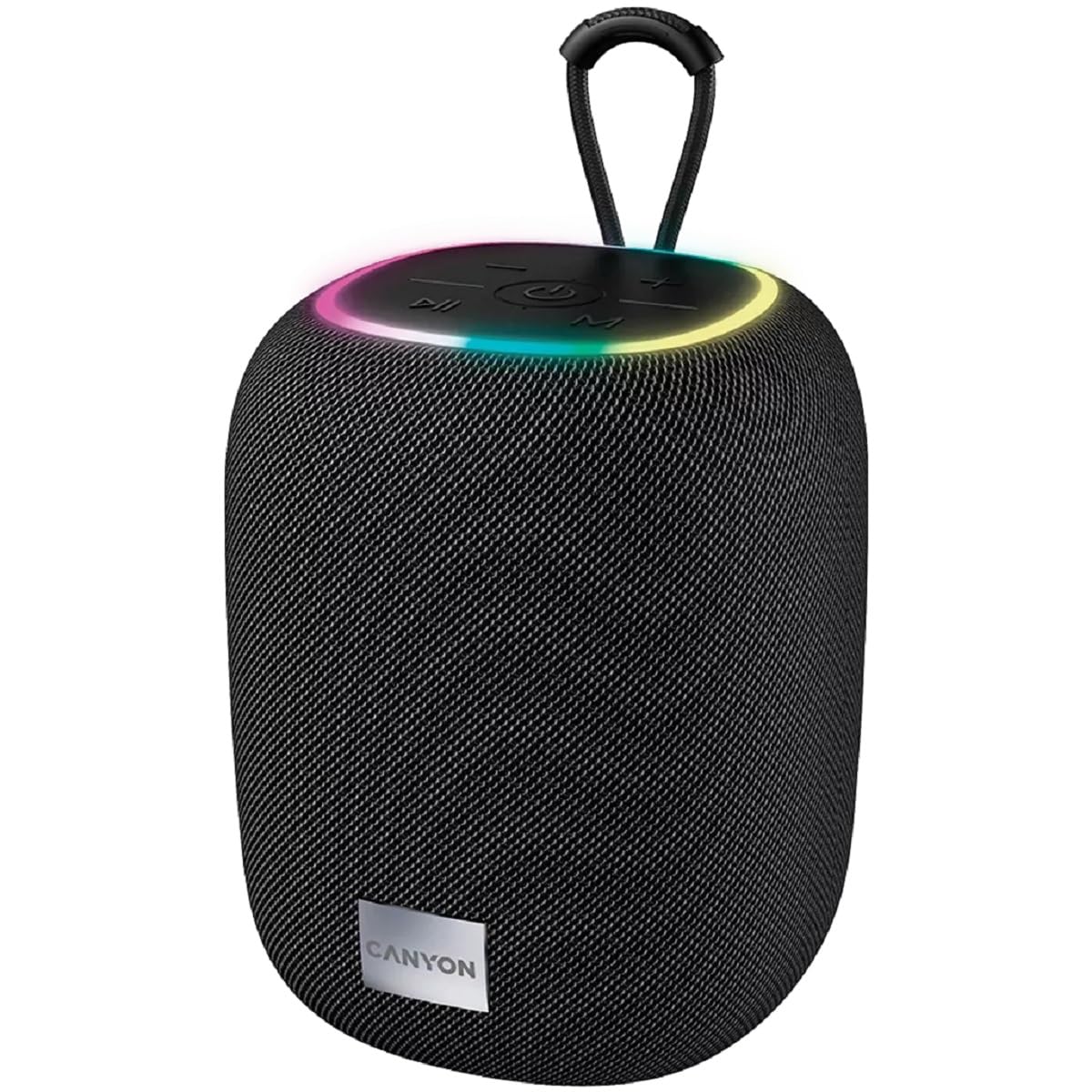
Resim 1: Üst view of the CANYON BSP-8 speaker, showing the control buttons, RGB backlight, and integrated hanger.
Kontrol Düğmeleri (Üst Panel):
- Güç Düğmesi: Açmak/kapatmak için basılı tutun. Oynatmak/durdurmak için kısa süre basın.
- Sesi Azaltma / Önceki Parça Düğmesi: Sesi kısmak için kısa basın. Önceki parçaya geçmek için uzun basın.
- Sesi Aç / Sonraki Parça Düğmesi: Sesi artırmak için kısa basın. Sonraki parçaya geçmek için uzun basın.
- Mod Düğmesi (M): Short press to switch between Bluetooth, AUX, USB, and MicroSD modes.

Resim 2: Arka view of the CANYON BSP-8 speaker, illustrating the various input ports including AUX, USB, TF (MicroSD) card slot, and DC5V Type-C charging port.
Input Ports (Rear Panel):
- AUX Bağlantı Noktası: Harici ses cihazlarını 3.5 mm ses kablosuyla bağlamak için.
- USB Bağlantı Noktası: USB flash bellekten ses çalmak için.
- TF Card Slot (MicroSD): MicroSD karttan ses dosyaları oynatmak için.
- DC5V (Type-C) Bağlantı Noktası: Hoparlörü şarj etmek için.
5. Kurulum
5.1 Hoparlörü Şarj Etme
- Connect the provided USB Type-C cable to the DC5V port on the speaker.
- Kablo ucunu bir USB güç adaptörüne (5V/1A önerilir) veya bilgisayarın USB portuna bağlayın.
- Şarj gösterge ışığı yanacaktır. Tamamen şarj olduğunda sönecek veya rengi değişecektir.
Not: En iyi pil ömrü için, hoparlörü ilk kullanımdan önce tamamen şarj edin.

Image 3: Illustration showing the 1800 mAh battery capacity and up to 3 hours of playtime for the CANYON BSP-8 speaker.
5.2 Açma/Kapatma
- Açmak İçin: Press and hold the Power button for approximately 3 seconds. You will hear an audible prompt.
- Kapatmak İçin: Press and hold the Power button for approximately 3 seconds. You will hear an audible prompt.
5.3 Bluetooth Eşleştirme
- Hoparlörü açın. Otomatik olarak Bluetooth eşleştirme moduna geçecektir; bu durum yanıp sönen bir LED ışıkla belirtilir.
- Mobil cihazınızda (akıllı telefon, tablet, bilgisayar) Bluetooth'u etkinleştirin.
- Arama available Bluetooth devices and select "CANYON BSP-8" from the list.
- Once paired, the LED light will stop flashing, and you will hear a confirmation sound.
Note: The speaker will automatically reconnect to the last paired device if it is within range and Bluetooth is enabled.

Image 4: Illustration highlighting the stable and energy-efficient Bluetooth 5.2 connection with an operating range of up to 10 meters.
5.4 Gerçek Kablosuz Stereo (TWS) Eşleştirme
To connect two CANYON BSP-8 speakers for a stereo sound experience:
- Ensure both BSP-8 speakers are powered on and not connected to any Bluetooth device.
- Hoparlörlerden birinde (bu birincil hoparlör olacaktır), Güç düğmesine iki kez basın. Bu işlem TWS eşleştirme moduna girecektir.
- İki hoparlör otomatik olarak birbirini arayacak ve birbirine bağlanacaktır. Bağlantı kurulduğunda bir onay sesi duyacaksınız.
- Once TWS is established, connect your mobile device to the primary speaker via Bluetooth as described in section 5.3.
Note: TWS mode only works with two identical CANYON BSP-8 speakers.
6. Kullanım Talimatları
6.1 Ses Çalma
- Bluetooth Modu: Eşleştirme başarılı olduktan sonra, bağlı cihazınızdan gelen ses hoparlörden çalınacaktır.
- AUX Modu: Connect a 3.5mm audio cable from your external audio device to the AUX port on the speaker. Press the 'M' button to switch to AUX mode.
- USB Modu: USB flash sürücüyü USB bağlantı noktasına takın. Hoparlör otomatik olarak USB moduna geçecek ve ses çalmaya başlayacaktır. files. If not, press the 'M' button.
- MicroSD Kart Modu: Insert a MicroSD card into the TF card slot. The speaker will automatically switch to MicroSD mode and begin playing audio files. If not, press the 'M' button.
6.2 Oynatma Kontrolü
- Oynat/Duraklat: Güç düğmesine kısa basın.
- Sesi aç: Sesi Açma (+) tuşuna kısa basın.
- Sesi kıs: Sesi Azaltma (-) tuşuna kısa basın.
- Sonraki Parça: Sesi Açma (+) tuşuna uzun basın.
- Önceki parça: Sesi Azaltma (-) tuşuna uzun basın.
6.3 RGB Arka Aydınlatma
The speaker features an integrated RGB backlight on the top panel. The backlight activates automatically when the speaker is powered on. There are no specific controls for changing the RGB pattern or turning it off/on independently of the speaker's power state.


