1. Giriş
Satın aldığınız için teşekkür ederizasing the NEDIS SmartLife Wi-Fi Smart Plug with Power Meter. This device allows you to control connected appliances remotely via the SmartLife app on your smartphone or through voice commands with compatible smart home assistants like Google Home and Amazon Alexa. It also features a power meter to monitor energy consumption.
Please read this manual carefully before use to ensure proper operation and to prevent damage.
2. Güvenlik Bilgileri
- Akıllı prizin belirtilen voltaj aralığında kullanıldığından emin olun.tage ve akım değerleri (240V, 16A, 3680W).
- Cihazı sökmeyin veya üzerinde değişiklik yapmayın.
- Cihazı suya, neme veya aşırı sıcaklıklara maruz bırakmaktan kaçının.
- Çocukların erişemeyeceği yerde saklayınız.
- Do not connect appliances that exceed the maximum load capacity.
- Sadece iç mekanda kullanıma uygundur.
3. Paket İçeriği
- NEDIS SmartLife Wi-Fi Smart Plug (WIFIP121FWT3)
- Kullanım Kılavuzu
Note: The product is typically sold in packs of 3. This manual covers the operation of a single unit.
4. Kurulum
4.1. Download the SmartLife App
- Arama "SmartLife" in the Apple App Store (for iOS devices) or Google Play Store (for Android devices).
- Uygulamayı indirin ve kurun.
- Yeni bir hesap oluşturun veya zaten bir hesabınız varsa giriş yapın.
4.2. Akıllı Fişi Bağlayın
- Plug the NEDIS SmartLife Wi-Fi Smart Plug into a standard wall outlet.
- Ensure your smartphone is connected to a 2.4 GHz Wi-Fi network. The smart plug does not support 5 GHz Wi-Fi.
- Open the SmartLife app.
- Bir cihaz eklemek için sağ üst köşedeki "+" simgesine dokunun.
- Cihaz listesinden "Elektrik Prizi" veya "Akıllı Priz"i seçin.
- Follow the on-screen instructions to put the smart plug into pairing mode. This usually involves pressing and holding the power button on the plug until the indicator light flashes rapidly.
- Uygulamada gösterge ışığının hızlı bir şekilde yanıp söndüğünü doğrulayın.
- Wi-Fi ağ şifrenizi girin.
- Wait for the app to connect to the smart plug. Once connected, you can rename the device for easier identification.
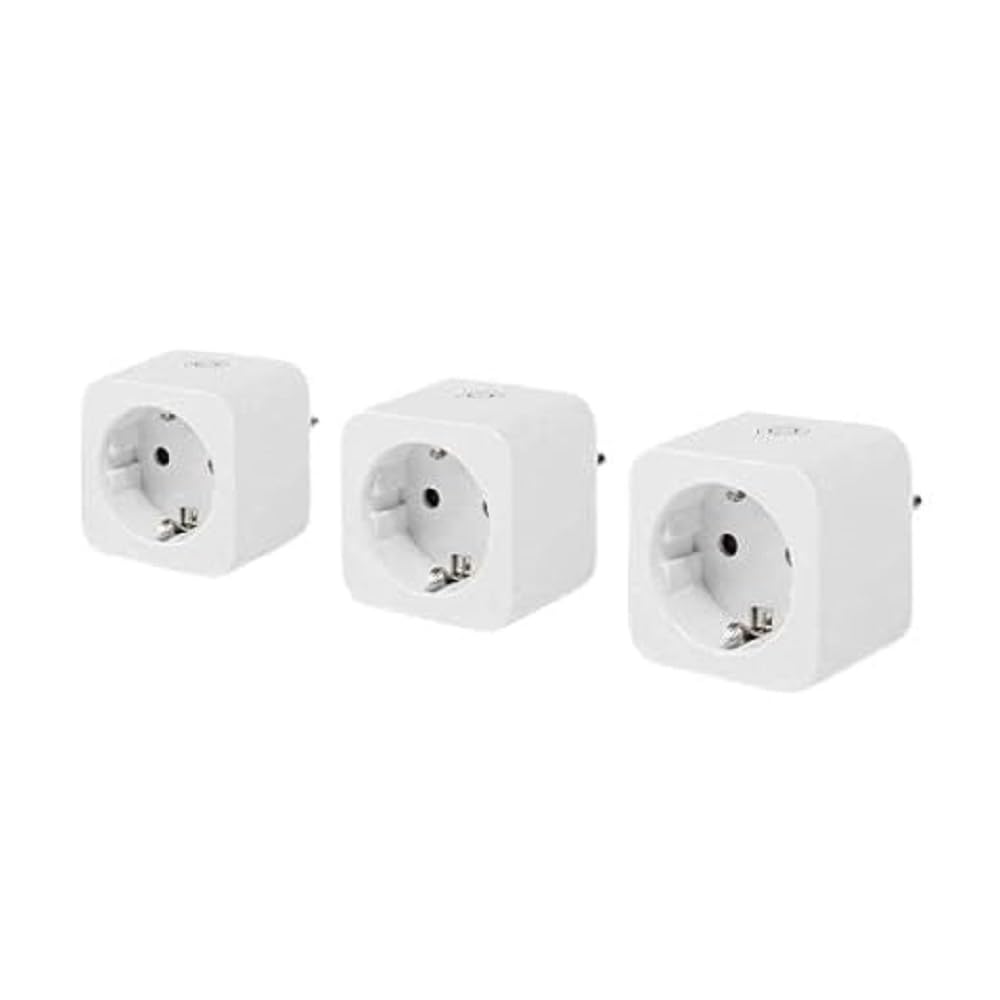
Image: The NEDIS SmartLife Wi-Fi Smart Plug. This image shows the compact design of the smart plug, which connects directly to a wall outlet.
5. Kullanım Talimatları
5.1. Temel Açma/Kapama Kontrolü
- Manuel kontrol: Press the physical button on the smart plug to turn the connected appliance on or off.
- Uygulama Kontrolü: Open the SmartLife app, select your smart plug, and tap the power icon to toggle its state.
5.2. Planlama ve Zamanlayıcılar
The SmartLife app allows you to set schedules and timers for your smart plug:
- Takvim: Set specific times for the plug to turn on or off daily or on selected days of the week.
- Zamanlayıcı: Set a countdown timer for the plug to turn off after a certain duration.
- Dolaşım: Configure the plug to cycle on and off at regular intervals.
5.3. Güç İzleme
The integrated power meter allows you to monitor the energy consumption of the connected appliance. In the SmartLife app, navigate to the smart plug's details page to view real-time power usage, current, voltage, and historical consumption data.
5.4. Ses Kontrolü Entegrasyonu
To enable voice control with Google Home or Amazon Alexa:
- Ensure your smart plug is successfully added to the SmartLife app.
- Google Home veya Amazon Alexa uygulamasını açın.
- Go to the "Skills & Games" (Alexa) or "Works with Google" (Google Home) section.
- Arama and enable the "SmartLife" skill/service.
- Link your SmartLife account when prompted.
- Discover devices. Your smart plug should now appear and be controllable via voice commands (e.g., "Alexa, turn on Living Room Plug" or "Hey Google, turn off Fan").
6. Bakım
- Clean the smart plug with a dry, soft cloth. Do not use liquid cleaners or aerosols.
- Temizlemeden önce cihazın fişinin çekili olduğundan emin olun.
- Regularly check for firmware updates in the SmartLife app to ensure optimal performance and security.
7. Sorun Giderme
| Sorun | Olası Neden | Çözüm |
|---|---|---|
| Akıllı priz Wi-Fi'ye bağlanmıyor. | Incorrect Wi-Fi password, 5 GHz Wi-Fi network, plug too far from router, incorrect pairing mode. |
|
| Cihaz uygulama komutlarına yanıt vermiyor. | No internet connection, smart plug offline, app glitch. |
|
| Ses kontrolü çalışmıyor. | SmartLife skill not enabled, account not linked, device not discovered. |
|
8. Özellikler
| Özellik | Detay |
|---|---|
| Marka | NEDIS |
| Model Numarası | WIFIP121FWT3 |
| Ürün Boyutları (U x G x Y) | 8x6x5.5 cm |
| Ağırlık | 320 gram |
| Malzeme | Plastik |
| Maksimum Güç Yükü | 3680 Watt |
| Güncel Derecelendirme | 16A |
| Çalışma Hacmitage | 240 Volt |
| Electrical Outlet Type | Type F (CEE 7/7), Wall Mount |
| Kablosuz Bağlantı | Kablosuz 2.4 GHz |
| Çalışma Sıcaklığı | 0-55 °C |
| Uyumluluk | Android™, iOS, Google Home, Amazon Alexa |
| Sertifikalar | CE |
| Menşei ülke | Çin |
9. Garanti ve Destek
Specific warranty information for the NEDIS SmartLife Wi-Fi Smart Plug (WIFIP121FWT3) is not available in the provided product data. Please refer to the warranty card included with your purchase or contact NEDIS customer support directly for detailed warranty terms and conditions.
For technical support or further assistance, please visit the official NEDIS website or contact their customer service department. Contact details are typically found on the product packaging or on the manufacturer's webalan.


