1. Giriş
Thank you for choosing the Maxcom FW36 Aurum SE Smartwatch. This manual provides detailed instructions to help you set up, operate, and maintain your device, ensuring optimal performance and longevity. Please read this manual carefully before using your smartwatch.

Şekil 1: Ön view of the Maxcom FW36 Aurum SE Smartwatch, displaying time and health metrics.
2. Kurulum
2.1 Kutudan Çıkarma ve İlk İnceleme
Upon opening the package, verify that all components are present: Maxcom FW36 Aurum SE Smartwatch, charging cable, and this user manual. Inspect the device for any visible damage.
2.2 Akıllı Saati Şarj Etme
Before first use, fully charge your smartwatch. Connect the charging cable to the charging port on the back of the watch and to a standard USB power adapter (not included). The battery icon on the screen will indicate charging status. A full charge typically takes approximately 2 hours.
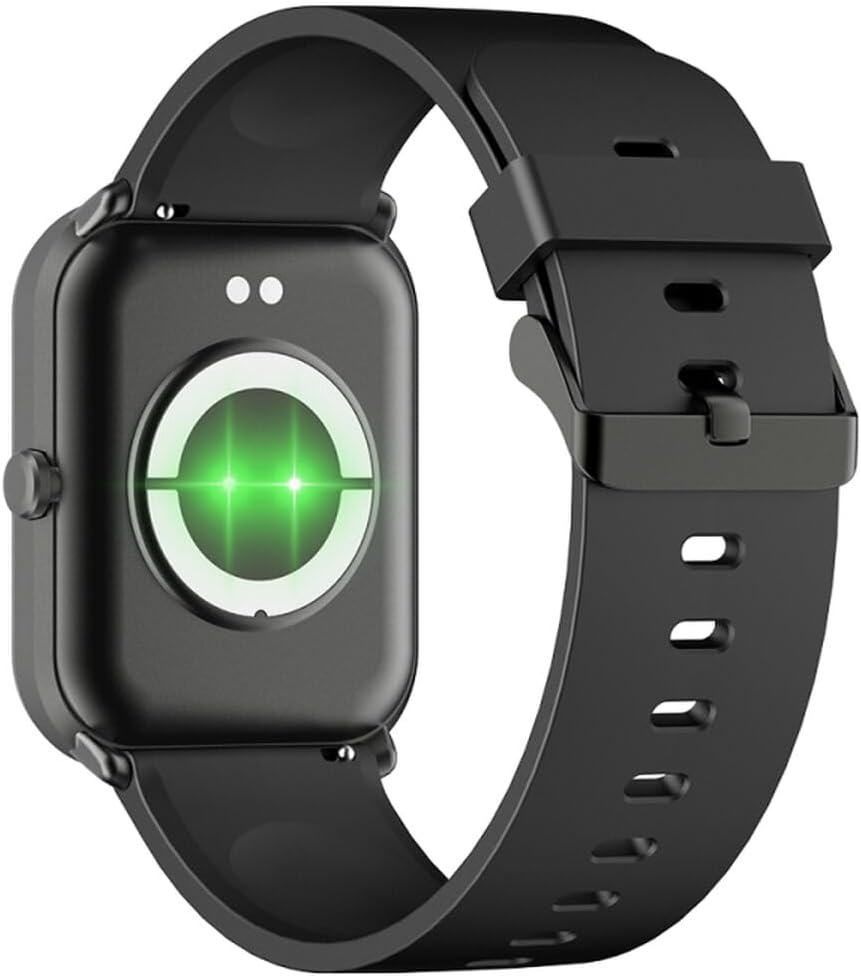
Şekil 2: Arka view of the smartwatch, highlighting the charging contacts and health sensors.
2.3 Güç Açma/Kapatma
- Güç Açık: Ekran ışığı yanana kadar yan düğmeyi birkaç saniye basılı tutun.
- Kapat: Saat kadranından aşağı kaydırarak hızlı ayarlara erişin, ardından güç simgesine dokunun veya "Ayarlar" > "Sistem" > "Kapat" yolunu izleyin. Seçiminizi onaylayın.
2.4 Uygulama Kurulumu ve Eşleştirme
- Uygulamayı indirin: Scan the QR code in the manual (if provided) or search for "GLORY FIT" in your smartphone's app store (Google Play Store for Android, Apple App Store for iOS).
- Kayıt Ol/Giriş Yap: Open the GLORY FIT app and follow the on-screen instructions to create an account or log in.
- Eşleştirme:
- Akıllı telefonunuzda Bluetooth'un etkinleştirildiğinden emin olun.
- Open the GLORY FIT app, go to "Device" or "My Device", and tap "Add Device".
- The app will search for nearby devices. Select "FW36 Aurum SE" from the list.
- Eşleştirme isteğini hem akıllı telefonunuzdan hem de akıllı saatinizden onaylayın.
Once paired, the smartwatch will synchronize data with your phone, including time and date settings.
3. Kullanım Talimatları
3.1 Temel Gezinme
- Dokunmatik ekran: Swipe left/right to navigate between main functions (e.g., activity, heart rate). Swipe up to view Bildirimler. Hızlı ayarlara erişmek için aşağı kaydırın.
- Yan Düğme: Press once to return to the watch face or wake the screen. Press and hold for power options.

Şekil 3: Yan view of the smartwatch, illustrating the physical button and strap design.
3.2 Sağlık İzleme
The Maxcom FW36 Aurum SE Smartwatch features several health monitoring functions:
- Kalp Atış Hızı Monitörü: Swipe to the heart rate interface and wait for the measurement to complete. Ensure the watch is snug on your wrist.
- Kan Oksijen Sensörü: Similar to heart rate, navigate to the SpO2 interface for measurement.
- Tansiyon Aleti: Access this function from the main menu or by swiping to its dedicated screen.
- Uyku Kalitesi İzleme: Bu saat, uyku sırasında takıldığında uyku düzeninizi otomatik olarak takip eder. View detailed reports in the GLORY FIT app.
- Pedometre: Tracks your daily steps, distance, and calories burned automatically.
Önemli: The health data provided by this device is for reference only and should not be used for medical diagnosis or treatment.
3.3 Çoklu Spor Modu
Access the multi-sport mode from the main menu to select various activities such as running, walking, cycling, etc. The watch will track specific metrics relevant to your chosen activity.
3.4 Bildirimler
Once paired with your smartphone and notification permissions are granted in the GLORY FIT app, your smartwatch will display incoming calls, messages, and app notifications. Swipe up from the watch face to view bildirim geçmişiniz.
4. Bakım
4.1 Temizlik
Regularly clean your smartwatch and strap with a soft, dry cloth. For stubborn dirt, use a slightly damp Önce bir bezle silin ve ardından iyice kurulayın. Sert kimyasallar veya aşındırıcı malzemeler kullanmaktan kaçının.
4.2 Su ve Toz Direnci
The Maxcom FW36 Aurum SE Smartwatch is designed to be dust resistant and water resistant. This means it can withstand splashes, rain, and brief immersion in shallow water. However, it is not suitable for hot showers, saunas, diving, or high-speed water sports. Avoid pressing buttons underwater.
4.3 Pil Bakımı
Pil ömrünü uzatmak için, pili sık sık tamamen boşaltmaktan kaçının. Cihazı, uzun süre kullanılmasa bile düzenli olarak şarj edin. Cihazı serin ve kuru bir yerde saklayın.
5. Sorun Giderme
- Akıllı saat açılmıyor: Ensure the device is fully charged. Press and hold the side button for an extended period (10-15 seconds).
- Akıllı telefonla eşleştirilemiyor:
- Ensure Bluetooth is enabled on your phone and the smartwatch is within range.
- Hem akıllı telefonunuzu hem de akıllı saatinizi yeniden başlatın.
- Check if the GLORY FIT app has necessary permissions.
- Daha önce eşleştirilmişse, cihazın eşleştirmesini kaldırıp yeniden eşleştirmeyi deneyin.
- Yanlış sağlık ölçümleri: Ensure the watch is worn snugly on your wrist, not too tight or too loose. Clean the sensors on the back of the watch. Avoid excessive movement during measurement.
- Alınmayan bildirimler: Verify that notification permissions are enabled for the GLORY FIT app in your phone's settings. Ensure the app is running in the background.
6. Özellikler
| Örnek | FW36 Aurum SE |
| Marka | Maxcom |
| İşletim Sistemi | Android |
| Görüntülemek | 1.69" (4.29 cm) Color Touchscreen, 240 x 280 pixels, Digital, Rounded Corners |
| Pil Kapasitesi | 220 mAh lityum-iyon |
| Bağlantı | Bluetooth |
| Sensörler | Heart Rate Monitor, Blood Oxygen Sensor, Blood Pressure Monitor, Pedometer |
| Koruma | Dust Resistant, Water Resistant |
| Uyumlu Uygulama | GLORY FIT |
| Dimensions (W x T x D) | 44.6 mm x 1.04 cm x 35 mm |
| GPS İşlevselliği | Müsait değil |
7. Garanti ve Destek
The Maxcom FW36 Aurum SE Smartwatch comes with a iki yıllık garanti Fabrika hatalarına karşı garantilidir. Garanti talepleri için lütfen satın alma belgenizi saklayın.
For technical support, troubleshooting assistance, or warranty inquiries, please contact Maxcom customer service through their official websatın alma belgelerinizle birlikte verilen site veya iletişim bilgileri.


