giriiş
This manual provides essential information for the setup, operation, and maintenance of your Focusrite Scarlett 4i4 4th Gen USB Audio Interface. Designed for musicians, songwriters, guitarists, and content creators, the Scarlett 4i4 offers high-fidelity, studio-quality recording capabilities. Please read this manual thoroughly to ensure optimal performance and longevity of your device.

Resim: Ön view of the Focusrite Scarlett 4i4 4th Gen USB Audio Interface, showcasing its inputs and controls.
Kurmak
To begin using your Scarlett 4i4 4th Gen, follow these steps:
- Kutudan Çıkarma: Carefully remove the Scarlett 4i4, USB C-C cable, USB C-A adaptor, and USB-C 5V 3A power supply from the packaging.
- Yazılım Kurulumu: Focusrite'ı ziyaret edin website and follow the 'Easy Start' guide to download and install the necessary drivers and included software bundle. This process typically involves registering your device.
- Bilgisayara Bağlan: Connect the Scarlett 4i4 to your computer using the provided USB C-C cable. If your computer only has USB-A ports, use the included USB C-A adaptor.
- Güç Bağlantısı: Connect the USB-C 5V 3A power supply to the Scarlett 4i4 and a power outlet. While the device can draw power from USB, the dedicated power supply ensures stable operation, especially when using phantom power or multiple inputs.
- Ses Bağlantıları: Connect your microphones, instruments, or line-level devices to the appropriate inputs on the Scarlett 4i4. Connect your headphones to the headphone output and studio monitors to the line outputs.

Image: A user connecting cables to the rear of the Scarlett 4i4, which is placed on a desk next to a laptop.
Operating Your Scarlett 4i4
The Scarlett 4i4 features intuitive controls for managing your audio inputs and outputs.
Giriş Kontrolleri
- Kazanç Düğmeleri (1 ve 2): Adjust the input level for microphones or instruments connected to inputs 1 and 2. The gain halos around the knobs indicate signal level (green for good, amber for approaching clip, red for clipping).
- 48V (Hayalet Güç): Activates +48V phantom power for condenser microphones connected to inputs 1 and 2. Ensure your microphone requires phantom power before enabling.
- Inst (Instrument Mode): Engages high-impedance mode for direct connection of guitars or basses to inputs 1 and 2.
- Hava Modu: Enhances vocals and guitars by adding a musical presence and rich harmonic drive, emulating classic Focusrite transformer-based preamps.
- Otomatik Kazanç: Automatically sets the optimal input level for your microphone or instrument, preventing clipping and ensuring a clean recording.
- Klipsli Kasa: A safety feature that automatically reduces gain if the input signal approaches clipping, preserving your take.
Çıktı Kontrolleri
- Monitor Output Knob: Controls the overall volume of your main studio monitor outputs (outputs 1-2).
- Headphone Output Knob: Adjusts the volume for the dedicated headphone output.
MIDI I / O
The Scarlett 4i4 includes MIDI In and Out ports, allowing you to connect MIDI keyboards, controllers, and other MIDI-compatible devices for sequencing and control within your digital audio workstation (DAW).
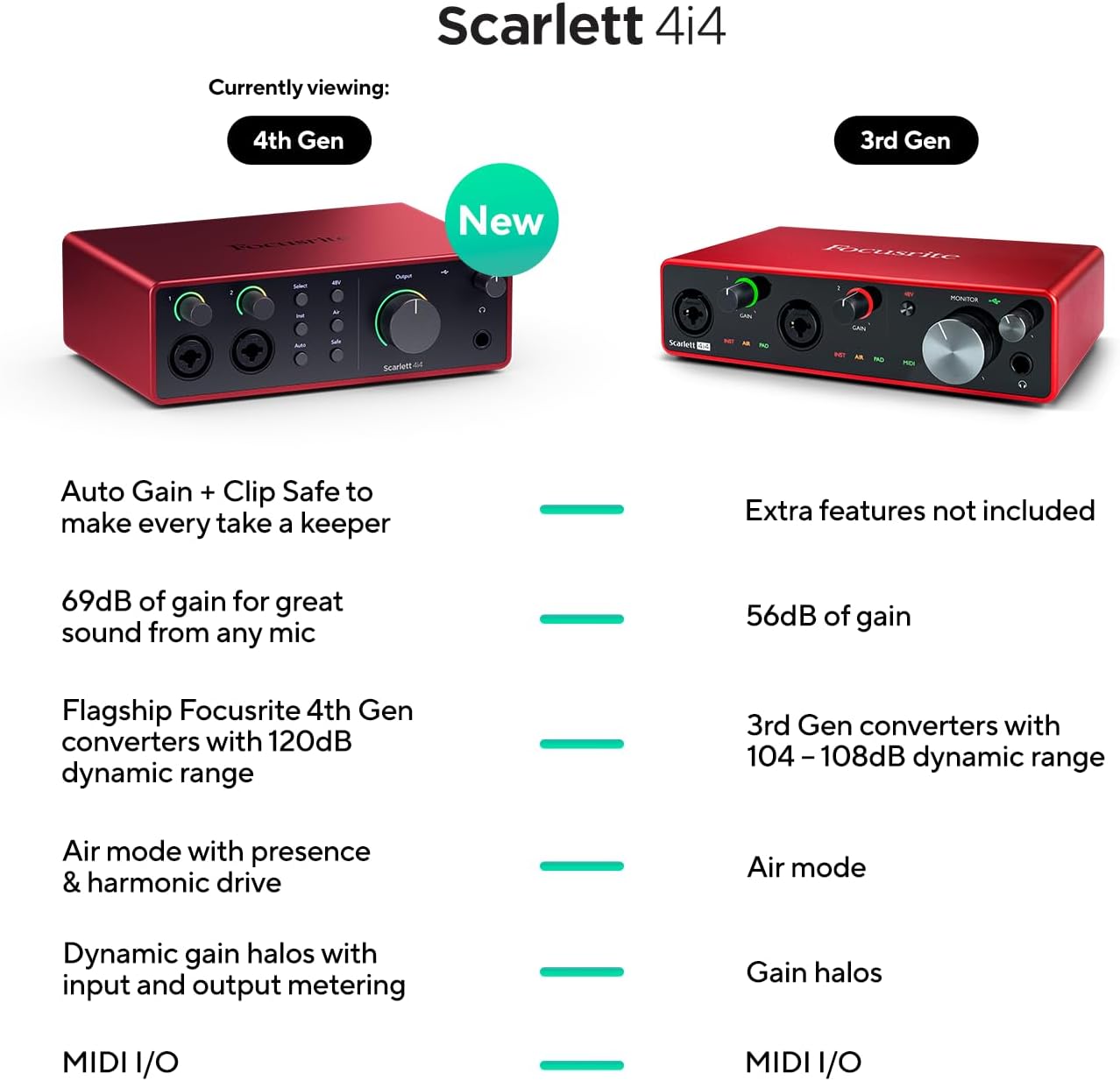
Image: A visual comparison highlighting new features of the Scarlett 4i4 4th Gen, including Auto Gain, Clip Safe, increased gain, improved converters, enhanced Air mode, and dynamic gain halos.
Bakım
Proper care ensures the longevity and performance of your Scarlett 4i4:
- Temizlik: Dış yüzeyi temizlemek için yumuşak ve kuru bir bez kullanın. Aşındırıcı temizleyiciler veya çözücülerden kaçının.
- Depolamak: Cihazı serin, kuru ve doğrudan güneş ışığından ve aşırı sıcaklıklardan uzak bir yerde saklayın.
- İşleme: Cihazı düşürmekten veya şiddetli darbelere maruz bırakmaktan kaçının.
- Havalandırma: Aşırı ısınmayı önlemek için ünitenin etrafında yeterli hava akışı olduğundan emin olun.
Sorun giderme
If you encounter issues with your Scarlett 4i4, consider the following common solutions:
- Ses Yok: Check all cable connections (USB, power, audio inputs/outputs). Verify that the correct audio device is selected in your computer's sound settings and your DAW. Ensure gain levels are appropriately set and not muted.
- Distorted Audio/Clipping: Reduce the input gain using the gain knobs. Utilize the Auto Gain and Clip Safe features to prevent clipping. Check for proper impedance matching for instruments (Inst mode).
- Sürücü Sorunları: Reinstall the latest drivers from the Focusrite webSiteyi ziyaret edin. İşletim sisteminizin güncel olduğundan emin olun.
- MIDI Not Working: Verify MIDI connections and ensure MIDI devices are properly configured in your DAW.
- Aralıklı Bağlantı: Try a different USB port or cable. Ensure the dedicated power supply is connected and functioning.
For further assistance, refer to the Focusrite support websitesine gidin veya müşteri hizmetleriyle iletişime geçin.
Özellikler
| Özellik | Detay |
|---|---|
| Ürün Ağırlığı | 2.23 pound |
| Ürün Boyutları | 7.09 x 5.08 x 2.32 inç |
| Ürün Model Numarası | AMS-SCARLETT-4I4-4G |
| Gövde Malzemesi | Alüminyum |
| Renk Adı | Kırmızı |
| Uyumlu Cihazlar | Microphone, Instrument, Personal Computer, Headphones, Studio Monitors |
| Bağlayıcı Türü | USB-C |
| Donanım Arayüzü | USB 2.0 |
| Desteklenen Yazılımlar | Tüm ses kayıt yazılımları |
| Donanım Platformu | Ses arayüzü |
| İşletim Sistemi | Mac OS, Windows İşletim Sistemi |
| Bağlantı Teknolojisi | USB |
| Kanal Sayısı | 4 |
| Dinamik Aralık | 120dB |
Kutuda Neler Var?
Your Focusrite Scarlett 4i4 4th Gen package includes:
- Scarlett 4i4 4. Nesil Ses Arayüzü
- USB CC Kablosu
- USB C-A Adaptor
- USB-C 5V 3A Power Supply
Garanti ve Destek
Focusrite provides a three-year warranty for the Scarlett 4i4 4th Gen, ensuring peace of mind regarding your investment. Additionally, 24/7/365 support is available to assist you with any questions or issues you may encounter.
For detailed warranty information and to access support resources, please visit the official Focusrite webalan: focusrite.com/destek


