1. Giriş
This manual provides comprehensive instructions for the setup, operation, and maintenance of your TVIP S-Box v.710 4K UHD IP-Receiver. Please read this manual thoroughly before using the device to ensure proper functionality and to prevent damage.
2. Paket İçeriği
Aşağıda listelenen tüm öğelerin paketinizde bulunduğunu doğrulayın:
- 1x TVIP S-Box v.710 4K UHD Android 11 IP-Receiver (Black)
- 1x Uzaktan Kumanda
- 1x HDMI Kablosu
- 1x Güç Adaptörü
- 2x AAA Pil
- 1x Kullanım Kılavuzu (bu belge)
3. Ürün Bittiview
The TVIP S-Box v.710 is a compact 4K UHD IP-Receiver designed for high-quality media streaming. It operates on Android 11 and supports various media formats and protocols.
3.1 Cihaz Özellikleri
- Android 11.0 İşletim Sistemi
- 4K Ultra HD Resolution support
- HDR (Yüksek Dinamik Aralık) desteği
- 1GB RAM & 8GB Flash Storage
- MicroSD-Slot for expandable storage
- HDMI 2.1 çıkışı
- Ethernet (10/100 Mbit/s) connectivity
- USB 2.0 portu
3.2 Aygıt Yerleşimi ve Bağlantı Noktaları
Familiarize yourself with the physical layout and connection ports of your TVIP S-Box v.710.

Şekil 1: Ön taraf view of the TVIP S-Box v.710. This image shows the compact black receiver with the 'TVIP' logo on the front.

Şekil 2: Taraf view of the TVIP S-Box v.710, highlighting the USB 2.0 port, MicroSD card slot, IR receiver port, and AV output port.

Şekil 3: Tepe view of the TVIP S-Box v.710, showing its sleek, minimalist design.
3.3 Uzaktan Kumanda
The included remote control allows for easy navigation and control of your TVIP S-Box v.710.
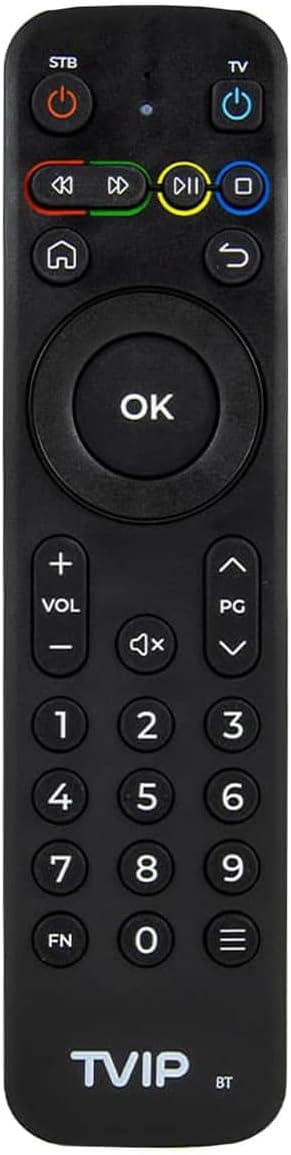
Şekil 4: The TVIP S-Box v.710 remote control, featuring power buttons for STB and TV, navigation keys, number pad, volume controls, and media playback buttons.
4. Kurulum
Follow these steps to set up your TVIP S-Box v.710.
4.1 Televizyonunuza Bağlanma
- Connect one end of the provided HDMI cable to the HDMI 2.1 port on the TVIP S-Box v.710.
- HDMI kablosunun diğer ucunu televizyonunuzdaki kullanılabilir bir HDMI giriş portuna bağlayın. HDMI giriş numarasını not edin (örneğin, HDMI 1, HDMI 2).
4.2 Ağa Bağlanma
- For a stable connection, use an Ethernet cable. Connect one end of an Ethernet cable to the Ethernet (LAN) port on the TVIP S-Box v.710.
- Ethernet kablosunun diğer ucunu yönlendiricinizdeki veya ağ anahtarınızdaki kullanılabilir bir LAN bağlantı noktasına bağlayın.
4.3 Güç Bağlantısı
- Insert the small end of the power adapter into the DC port on the TVIP S-Box v.710.
- Plug the power adapter into a wall outlet. The device should power on automatically or enter standby mode.
4.4 İlk Kurulum Sihirbazı
- Televizyonunuzu açın ve TV kumandanızı kullanarak doğru HDMI giriş kaynağını seçin.
- The TVIP S-Box v.710 will display a boot screen, followed by an initial setup wizard.
- Follow the on-screen prompts to configure language, display settings, and network settings.
5. Kullanım Talimatları
This section covers basic operation of your TVIP S-Box v.710.
5.1 Arayüzde Gezinme
Use the included remote control to navigate the Android 11 interface:
- Kullanın directional arrow keys to move between menu items.
- Basın OK Bir öğeyi seçmek veya bir işlemi onaylamak için kullanılan düğme.
- Basın Geri button (curved arrow) to return to the previous screen.
- Basın Ev button (house icon) to return to the main home screen.
5.2 Medya Oynatma
The TVIP S-Box v.710 supports various media applications and services. To play 4K or HDR content, ensure you have compatible media files and a 4K/HDR compatible television.
5.3 Using USB and MicroSD Storage
You can connect external storage devices to your TVIP S-Box v.710:
- USB sürücüsü: Insert a USB flash drive or external hard drive into the USB 2.0 port. The device will typically detect it automatically, and you can access its contents via a file Yönetici uygulaması.
- MicroSD Kart: Insert a MicroSD card into the MicroSD slot. Ensure it is inserted correctly. Access its contents using a file Yönetici uygulaması.
6. Bakım
Doğru bakım, cihazınızın uzun ömürlü olmasını ve optimum performans göstermesini sağlar.
6.1 Temizlik
- Temizlemeden önce cihazı güç kaynağından ayırın.
- Cihazın dışını silmek için yumuşak ve kuru bir bez kullanın.
- Do not use liquid cleaners, aerosols, or abrasive materials, as these can damage the finish or internal components.
6.2 Yazılım Güncellemeleri
Periodically check for software updates to ensure your device has the latest features and security enhancements. Updates are typically managed through the device's settings menu under 'About device' or 'System updates'.
7. Sorun Giderme
If you encounter issues with your TVIP S-Box v.710, refer to the following common problems and solutions.
7.1 Güç Yok
- Güç adaptörünün hem cihaza hem de çalışan bir elektrik prizine güvenli bir şekilde bağlandığından emin olun.
- Adaptörü başka bir prize takmayı deneyin.
7.2 Televizyonda Görüntü Yok
- Verify that the HDMI cable is securely connected to both the TVIP S-Box v.710 and your television.
- Ensure your television is set to the correct HDMI input source.
- Televizyonunuzda farklı bir HDMI kablosu veya HDMI portu deneyin.
7.3 Uzaktan Kumanda Yanıt Vermiyor
- Ensure the AAA batteries in the remote control are correctly inserted and not depleted. Replace them if necessary.
- Point the remote directly at the front of the TVIP S-Box v.710, ensuring no obstructions.
7.4 Ağ Bağlantısı Sorunları
- Check that the Ethernet cable is securely connected to both the device and your router.
- Restart your router and the TVIP S-Box v.710.
- Verify your network settings in the device's system settings.
7.5 4K/HDR Playback Problems
- Ensure your television supports 4K UHD and HDR content.
- Verify that the media content you are trying to play is indeed 4K or HDR.
- Check your TV's settings to ensure HDR or enhanced HDMI input is enabled for the connected port.
8. Özellikler
Detailed technical specifications for the TVIP S-Box v.710.
| Çözünürlük | 4K HDR (3840x2160) |
| İşlemci | Amlogic S905W2 (Quad Core 1.8 GHz) |
| İşletim Sistemi | Android 11 |
| Veri deposu | 1GB DDR |
| Flaş Bellek | 8GB eMMC |
| Ethernet | 10/100M RJ45 Network Port |
| Video Kod Çözücüleri | AV1, H.265(10bit), VP9, H.264, MPEG4 ASP, Xvid, MPEG2, MJPEG 2160p 60fps |
| Ses Kod Çözücüleri | MPEG/MP3/MPA, AAC, WMA, OGG, WAV, FLAC, APE |
| Desteklenen Protokoller | UDP, RTP, HTTP, HLS, MPEG-DASH, RTSP, SMB, NFS, DLNA |
| Altyazılar | DVBSUB, VOBSUB, Teletext, SSA/ASS, SubRip, MOV_TEXT, WebVTT |
| Bağlantı | 1x HDMI 2.1, 1x USB 2.0, 1x MicroSD-Slot, 1x Ethernet (10/100 Mbit/s), 1x AV-Port, 1x DC-Port, 1x IR-Port |
| Boyutlar (GxYxD) | 67x67x15 mm |
| Ağırlık | 70 gr |
| Çalışma Sıcaklığı | 1°C - 40°C |
| Nem | %5 - %93 |
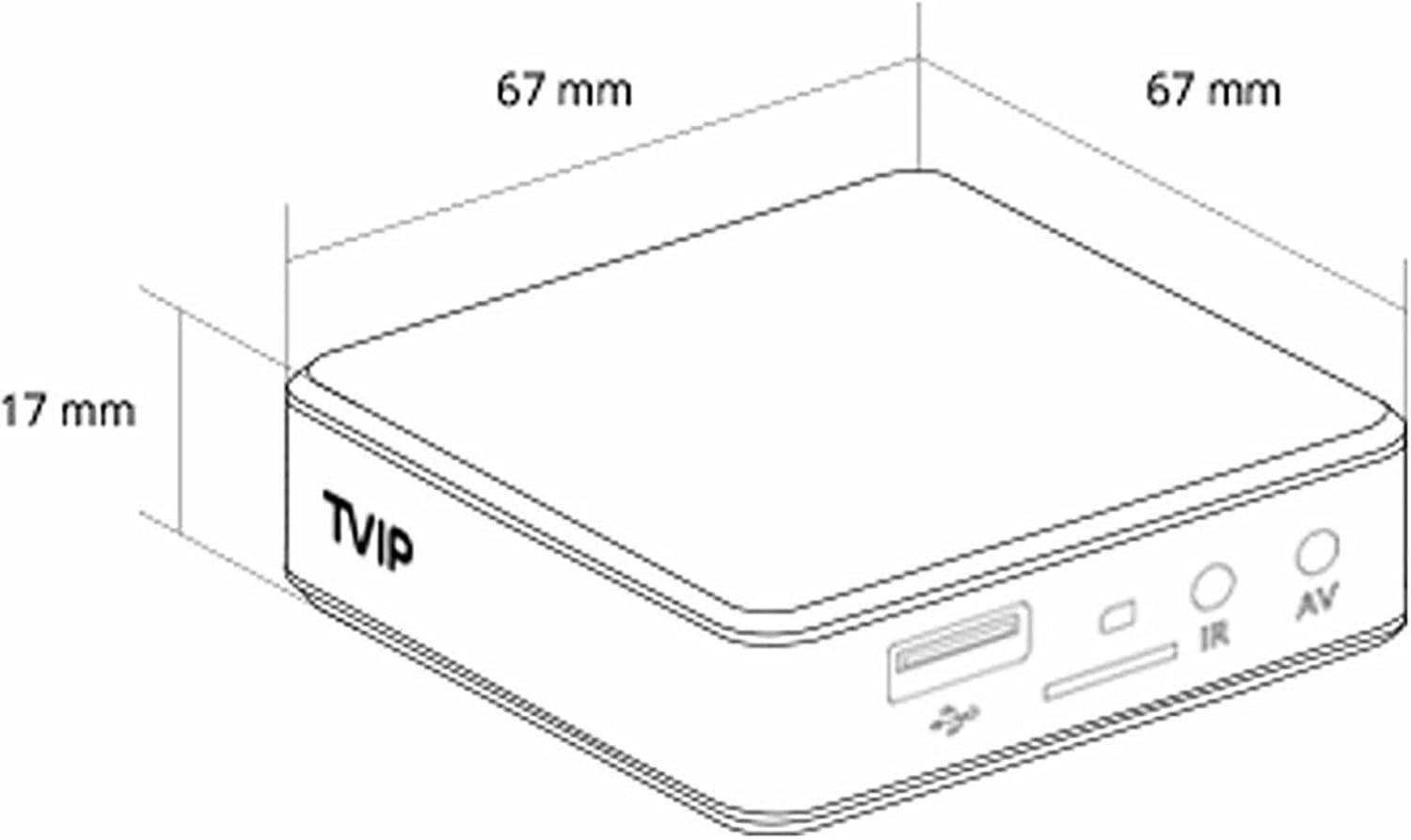
Şekil 5: Diagram illustrating the dimensions of the TVIP S-Box v.710 (67mm x 67mm x 17mm).
9. Güvenlik Bilgileri
Lütfen aşağıdaki güvenlik önlemlerine uyun:
- Cihazı suya veya neme maruz bırakmayın.
- Cihazı ısı kaynaklarının yakınına veya doğrudan güneş ışığına maruz bırakmaktan kaçının.
- Cihazı kendiniz açmaya veya onarmaya çalışmayın. Tüm servis işlemlerini yetkili personele yaptırın.
- Yalnızca verilen güç adaptörünü kullanın.
- Cihazı ve aksesuarlarını çocukların erişemeyeceği bir yerde saklayın.
10. Garanti ve Destek
Your TVIP S-Box v.710 comes with a standard manufacturer's warranty. For warranty claims or technical support, please contact your retailer or the official TVIP support channels. Keep your proof of purchase for warranty purposes.


